
iOS---UICollectionView自定义流布局实现瀑布流效果
自定义布局,实现瀑布流效果
自定义流水布局,继承UICollectionViewLayout
实现一下方法
// 每次布局之前的准备

- (void)prepareLayout;

// 返回所有的尺寸

- (CGSize)collectionViewContentSize;

// 返回indexPath这个位置Item的布局属性

- (UICollectionViewLayoutAttributes *)layoutAttributesForItemAtIndexPath:(NSIndexPath *)indexPath

// 返回rect范围内的布局属性

- (NSArray *)layoutAttributesForElementsInRect:(CGRect)rect;
思路:默认有三列,添加图片时,往三列中最大长度最小的那一列添加,
- 主要工作就在计算最大Y值,然后布局图片
- 用一个字典用来存储每一列最大的Y值(每一列的高度)
遍历字典找出最短的那一列
 // 找出最短的那一列

    [self.maxYDict enumerateKeysAndObjectsUsingBlock:^(NSString *column, NSNumber *maxY, BOOL *stop) {

        if ([maxY floatValue] < [self.maxYDict[minColumn] floatValue]) {

            minColumn = column;

        }

    }];
服务端返回的数据,必须包含图片的高度和宽度,以此可以根据宽高比布局,根据宽度可以通过代理计算高度。
示例代码
YLCollectionLayout.h
//

//  YLCollectionLayout.h

//  Created by 邵银岭.

//

#import <UIKit/UIKit.h>

@class YLCollectionLayout;

@protocol YLCollectionLayoutDelegate <NSObject>

- (CGFloat)flowLayout:(YLCollectionLayout *)flowLayout heightForWidth:(CGFloat)width atIndexPath:(NSIndexPath *)indexPath;

@end

@interface YLCollectionLayout : UICollectionViewLayout

/** 列间距 */

@property(nonatomic,assign)CGFloat columnMargin;

/** 行间距 */

@property(nonatomic,assign)CGFloat rowMargin;

/** 列数 */

@property(nonatomic,assign)int columnsCount;

/** 外边距 */

@property (nonatomic, assign) UIEdgeInsets sectionInset;

@property (nonatomic, weak) id<YLCollectionLayoutDelegate> delegate;

@end
YLCollectionLayout.m
//

//  YLCollectionLayout.m

//  Created by 邵银岭

//

#import "YLCollectionLayout.h"

@interface YLCollectionLayout()

/** 这个字典用来存储每一列最大的Y值(每一列的高度) */

@property (nonatomic, strong) NSMutableDictionary *maxYDict;

/** 存放所有的布局属性 */

@property(nonatomic,strong)NSMutableArray *attributeArray;

@end

@implementation YLCollectionLayout

- (NSMutableDictionary *)maxYDict

{

    if (!_maxYDict) {

        self.maxYDict = [[NSMutableDictionary alloc] init];

    }

    return _maxYDict;

}

- (NSMutableArray *)attributeArray

{

    if (!_attributeArray) {

        self.attributeArray = [[NSMutableArray alloc] init];

    }

    return _attributeArray;

}

#pragma mark -初始化默认值

- (instancetype)init

{

    if (self = [super init]) {

        self.columnMargin = 15;

        self.rowMargin = 10;

        self.columnsCount = 3;

        self.sectionInset = UIEdgeInsetsMake(10, 10, 10, 10);

    }

    return self;

}

- (BOOL)shouldInvalidateLayoutForBoundsChange:(CGRect)newBounds

{

    return YES;

}

// 布局每一个indexPath的位置

- (UICollectionViewLayoutAttributes *)layoutAttributesForItemAtIndexPath:(NSIndexPath *)indexPath

{

    // 1.计算尺寸

    CGFloat width = (self.collectionView.frame.size.width - self.sectionInset.left - self.sectionInset.right - (self.columnsCount - 1) * self.columnMargin) / self.columnsCount;

    // 代理计算传入高的值

    CGFloat height = [self.delegate flowLayout:self heightForWidth:width atIndexPath:indexPath];

    // 2.0假设最短的那一列的第0列

    __block NSString *minColumn = @"0";

    // 遍历字典找出最短的那一列

    [self.maxYDict enumerateKeysAndObjectsUsingBlock:^(NSString *column, NSNumber *maxY, BOOL *stop) {

        if ([maxY floatValue] < [self.maxYDict[minColumn] floatValue]) {

            minColumn = column;

        }

    }];

    // 2.1计算位置

    CGFloat x = self.sectionInset.left + (self.columnMargin + width) * [minColumn intValue];

    CGFloat y = [self.maxYDict[minColumn] floatValue]+ _rowMargin;

    self.maxYDict[minColumn] = @(y + height);

    // 3.创建属性

    UICollectionViewLayoutAttributes *attrs = [UICollectionViewLayoutAttributes layoutAttributesForCellWithIndexPath:indexPath];

    attrs.frame = CGRectMake(x, y, width, height);

    return attrs;

}

- (void)prepareLayout

{

    [super prepareLayout];

    // 1.清空最大的Y值

    for (int i = 0; i<self.columnsCount; i++) {

        NSString *column = [NSString stringWithFormat:@"%d", i];

        self.maxYDict[column] = @(self.sectionInset.top);

    }

    [self.attributeArray removeAllObjects];

    // 总 item 数

    NSInteger count = [self.collectionView numberOfItemsInSection:0];

    for (int i = 0; i <count; i++) {

        UICollectionViewLayoutAttributes *attris = [self layoutAttributesForItemAtIndexPath:[NSIndexPath indexPathForRow:i inSection:0]];

        [self.attributeArray addObject:attris];

    }

}

- (NSArray *)layoutAttributesForElementsInRect:(CGRect)rect

{

    return self.attributeArray;

}

// 计算ContentSize

- (CGSize)collectionViewContentSize

{

    // 默认最大Y值在第0列

    __block NSString *maxColumn = @"0";

    [self.maxYDict enumerateKeysAndObjectsUsingBlock:^(NSString *column, NSNumber *maxY, BOOL *stop) {

        if ([maxY floatValue] > [self.maxYDict[maxColumn] floatValue]) {

            maxColumn = column;

        }

    }];

    return CGSizeMake(0, [self.maxYDict[maxColumn] floatValue] + self.sectionInset.bottom);

}

@end
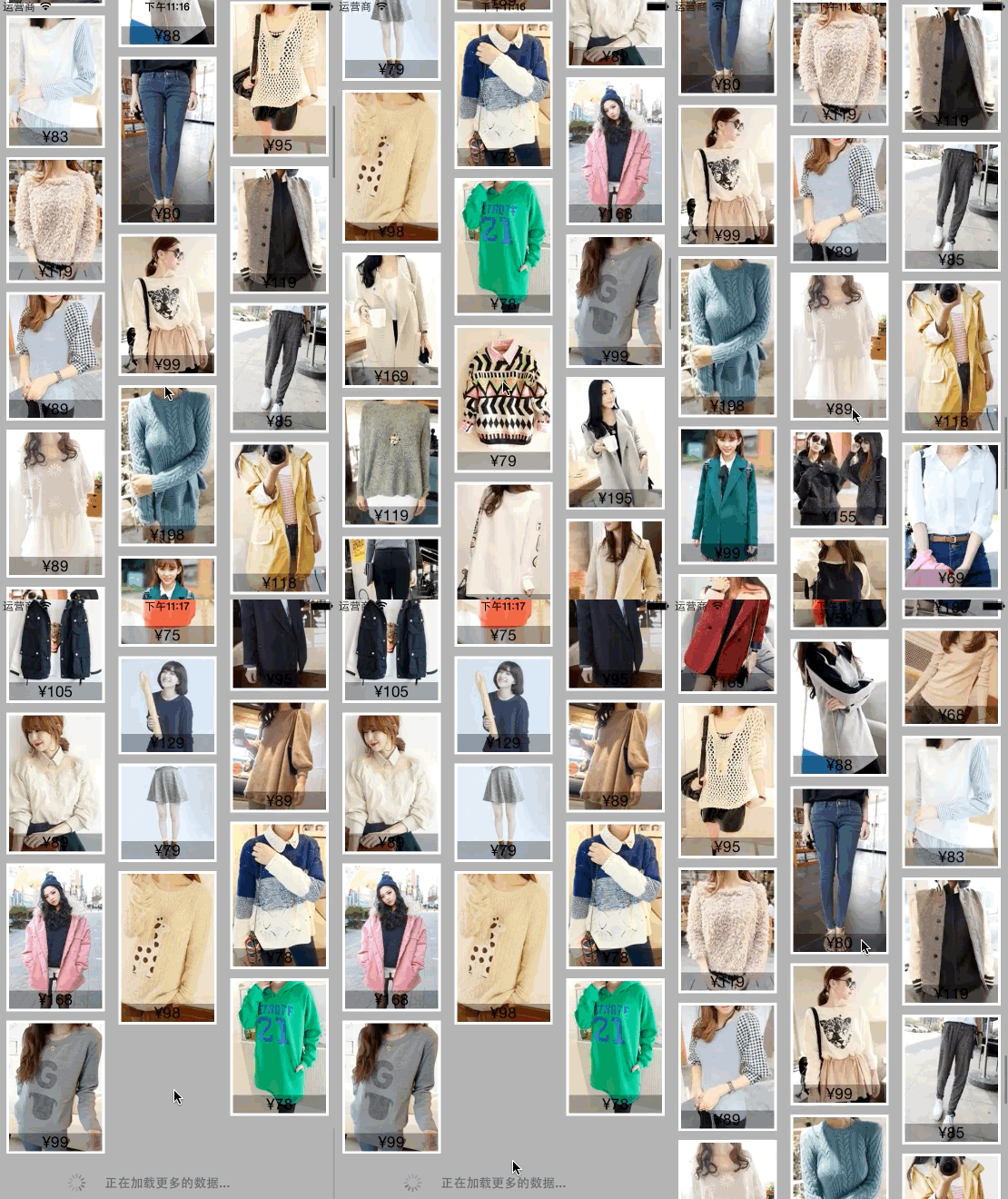
效果
iOS---UICollectionView自定义流布局实现瀑布流效果的更多相关文章
- iOS自定义UICollectionViewLayout之瀑布流
目标效果 因为系统给我们提供的 UICollectionViewFlowLayout 布局类不能实现瀑布流的效果,如果我们想实现 瀑布流 的效果,需要自定义一个 UICollectionViewLay ...
- css基础之 图片瀑布流布局:用CSS+DIV等宽格子堆砌瀑布流效果 (一)
<!doctype html> <html> <head> <meta charset="UTF-8"/> <title> ...
- 自定义UICollectionViewLayout之瀑布流
目标效果 因为系统给我们提供的 UICollectionViewFlowLayout 布局类不能实现瀑布流的效果,如果我们想实现 瀑布流 的效果,需要自定义一个 UICollectionViewLay ...
- RecyclerView实现瀑布流效果(图文详解+源码奉送)
最近有时间研究了一下RecyclerView,果然功能强大啊,能实现的效果还是比较多的,那么今天给大家介绍一个用RecyclerView实现的瀑布流效果. 先来一张效果图: 看看怎么实现吧: 整体工程 ...
- javascript瀑布流效果
javascript瀑布流效果 其实javascript瀑布流 前几年都已经很流行了(特别是美丽说,蘑菇街),最近看到网上有人问这个瀑布流效果,所以自己有空的时候就研究了下,其实也是研究别人的代码,研 ...
- wpf 客户端【JDAgent桌面助手】开发详解(三) 瀑布流效果实现与UI虚拟化优化大数据显示
目录区域: 业余开发的wpf 客户端终于完工了..晒晒截图 wpf 客户端[JDAgent桌面助手]开发详解-开篇 wpf 客户端[JDAgent桌面助手]详解(一)主窗口 圆形菜单... wpf 客 ...
- RecylerView完美实现瀑布流效果
RecylerView包含三种布局管理器,分别是LinearLayoutManager,GridLayoutManager,StaggeredGridLayoutManager,对应实现单行列表,多行 ...
- 使用JS实现图片展示瀑布流效果
不知大家有没有发现,一般的图片展示网站都会使用瀑布流效果,所谓的瀑布流 就是网站内的图片不会一下子全缓存出来,而是等你滚动到一定的距离的时候, 下面的图片才会继续缓存,并且图片也是随机出现的,只是宽度 ...
- WPF下制作的简单瀑布流效果
最近又在搞点小东西,美化界面的时候发现瀑布流效果比较不错.顺便就搬到了WPF,下面是界面 我对WEB前端不熟,JS和CSS怎么实现的,我没去研究过,这里就说下WPF的实现思路,相当简单. 1.最重要的 ...
随机推荐
- R.layout引用不了布局文件
删除import android.R 引用包所在的R文件..
- Latex 2: 解决WinEdt和TexWorks用久之后忽然不能正反向搜索
说明:下面说的WinEdt版本是10.1,TexWorks是texlive2016中自带的texworks,如果情况不一样请自行测试,原理一样 1.不能正向搜索: 解决:① 确定路径名是英文名(实际上 ...
- html页面内锚点定位及跳转方法总结
1.最简单的方法是锚点用<a>标签,在href属性中写入DIV的id.如下: <!DOCTYPE html><html><head><style& ...
- mongodb07---用户权限
用户管理: 注意: 添加用户后,我们再次退出并登陆,发现依然可以直接读数据库? 原因: mongodb服务器启动时, 默认不是需要认证的. 要让用户生效, 需要启动服务器时,就指定 --auth 选项 ...
- Oracle - 查询语句 - 多表关联查询
/* SQL语句的历史版本 SQL89 比较多 SQL92 SQL99 多表关联查询 笛卡尔积 等值关联查询 非等值关联查询 左外连接 右外连接 全外连接 自连接 */ --------------- ...
- bzoj4594: [Shoi2015]零件组装机
论静态查错的重要性...乱搞题真难调 首先这题看起来就是要分治检验了. 考虑对于区间[l,r],分成[l,p-1]和[p,r]使得这两个区间合并可以得到[l,r],并且要保证后面一个区间较大 设前一个 ...
- 逆向分析一个完整的C++程序包含寄存器与参数传递详解
最近在分析C++ dump 文件的时候觉得有必要将一些必要的反汇编东西总结一下以备别人参考,自己有时间的时候也可以进行更多的改进.下面通过一个简单的C++代码转成汇编代码后的详细解释说明一下C++和汇 ...
- Pimple研究及PHP框架搭建
此文参考PHP容器--Pimple运行流程浅析 和 利用 Composer 一步一步构建自己的 PHP 框架,如有不清楚的,请参考原文. Pimple貌似在PHP社区里非常流行,听闻是个非常轻量化并且 ...
- lua 与 c 的相互调用
Lua是一个嵌入式的语言,意味着Lua不仅可以是一个独立运行的程序包也可以是一个用来嵌入其他应用的程序库. Lua可以作为程序库用来扩展应用的功能,也就是Lua可以作为扩展性语言的原因所在.同时,Lu ...
- cmd登入mysql的命令不要写分号
下面是正确的: 下面这个就是错误的 mysqldump同理