
【Spring Boot&&Spring Cloud系列】使用Intellij构建Spring Boot和Mybatis项目
一、创建项目
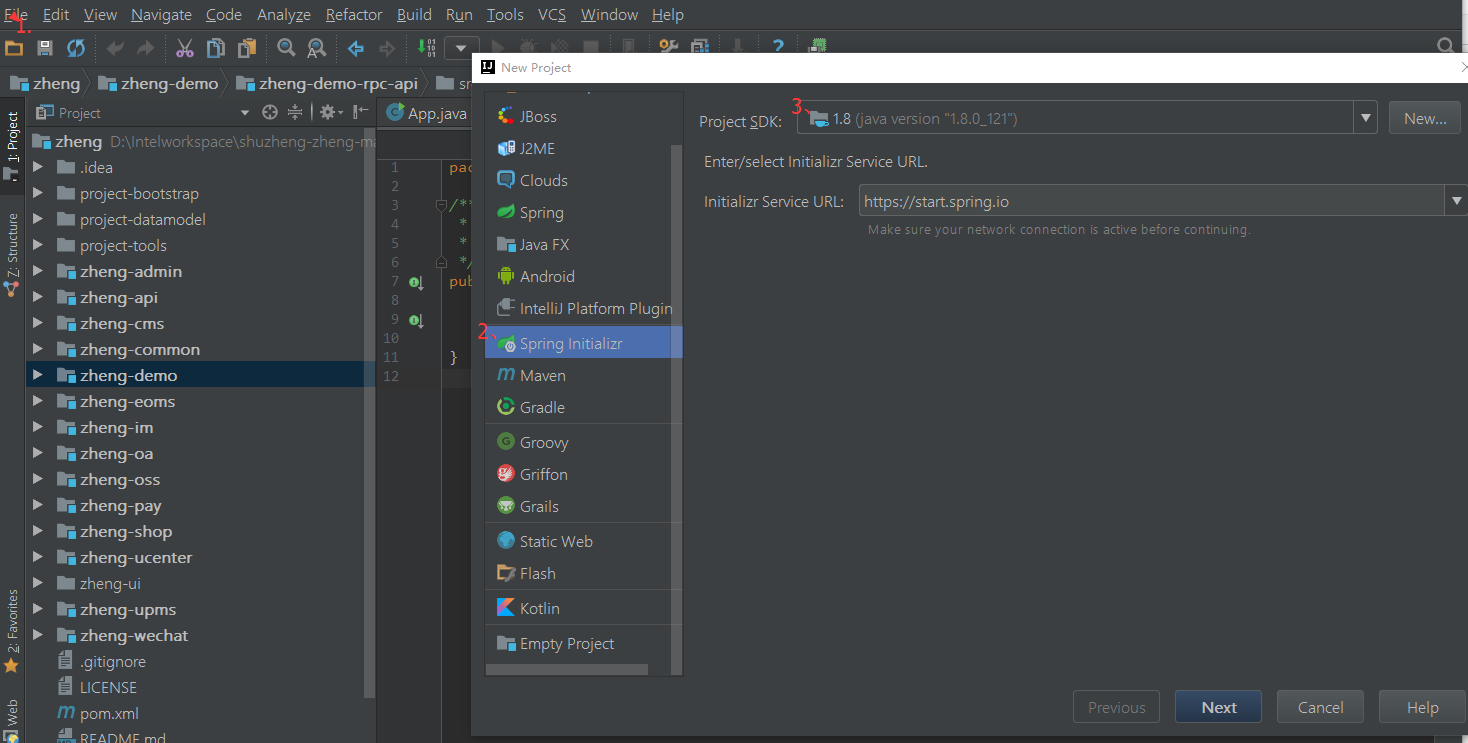
1、File->New->Project->spring initializer
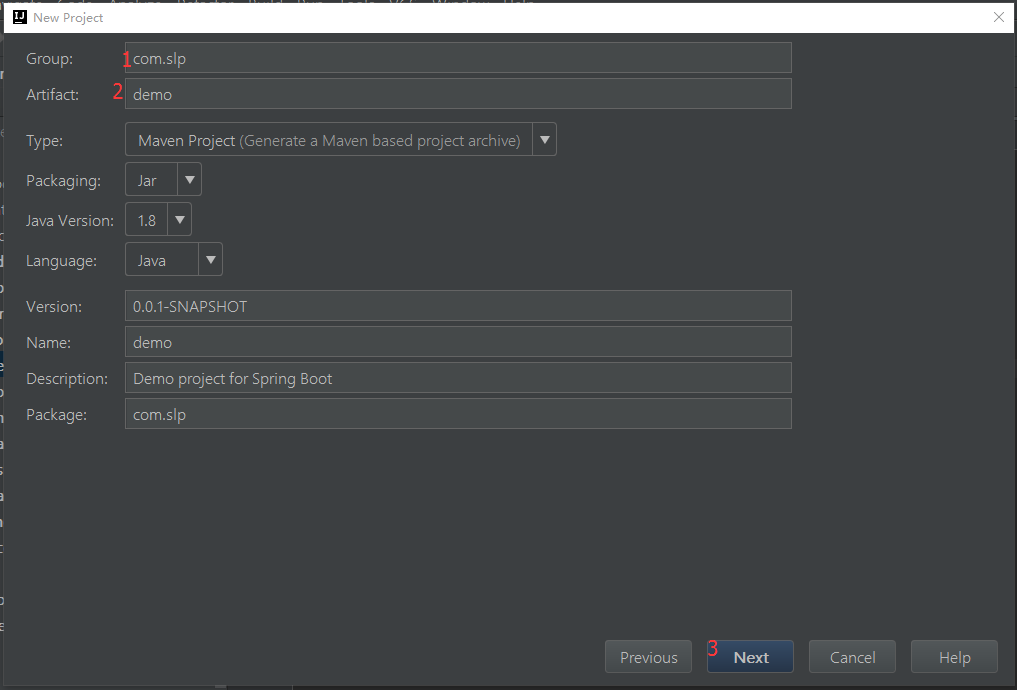
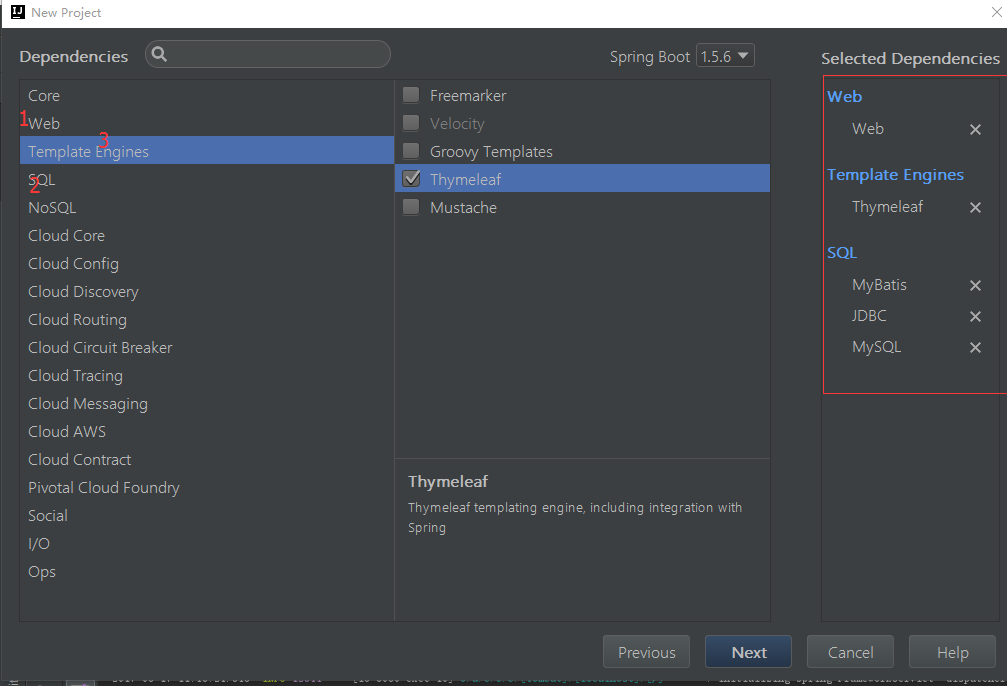
2、勾选Web SQL Template Engines
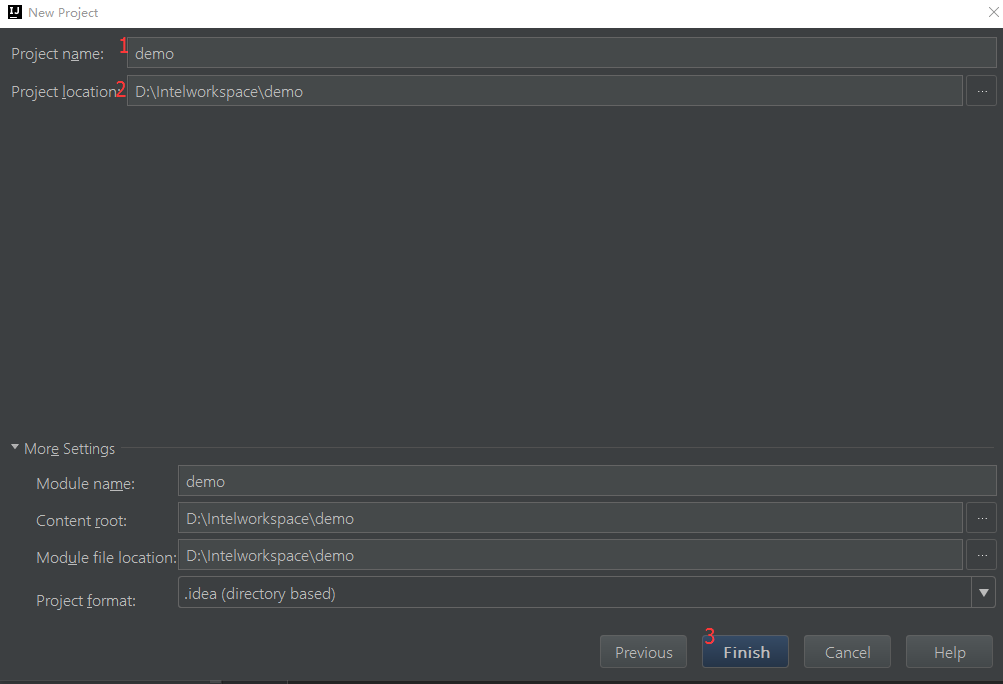
3、项目生成之后,点击add as maven project 这时候会自动下载jar包
4、项目生成的目录结构
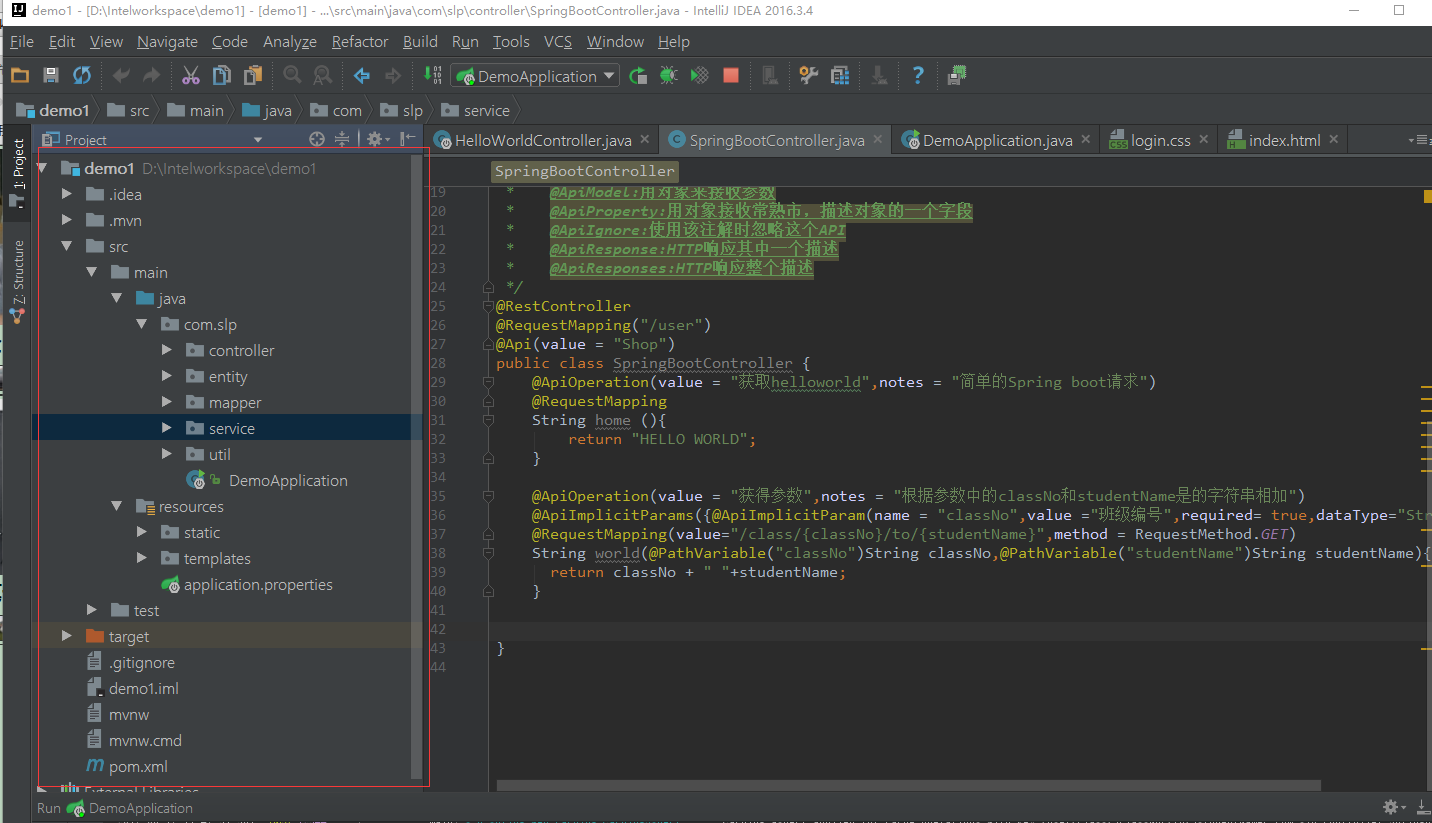
其中DemoApplication.java是项目主入口,编辑run/debug configuration即可运行
5、在生成的项目中新建自己需要的包
controller
entity
mapper
service
util
resources下的static文件夹下新建
css
fonts
img
js
resources下templates下新建需要的html文件
6、修改application.properties
spring.datasource.url=jdbc:mysql://localhost:3306/dev

spring.datasource.username=root

spring.datasource.password=

spring.datasource.driver-class-name=com.mysql.jdbc.Driver

#页面热加载

spring.thymeleaf.cache=false
二、代码编写
HelloWorld.controller.java
 package com.slp.controller;

 import com.slp.entity.User;

 import com.slp.service.IRegService;

 import com.slp.util.GenerateKeyUtil;

 import org.springframework.beans.factory.annotation.Autowired;

 import org.springframework.boot.autoconfigure.EnableAutoConfiguration;

 import org.springframework.stereotype.Controller;

 import org.springframework.util.StringUtils;

 import org.springframework.web.bind.annotation.RequestMapping;

 import org.springframework.web.bind.annotation.RequestParam;

 import org.springframework.web.bind.annotation.ResponseBody;

 import java.math.BigInteger;

 import java.security.MessageDigest;

 import java.security.NoSuchAlgorithmException;

 /**

  * Created by sangliping on 2017/8/15.

  * @Controller注解返回指定页面,也就是template文件夹下的页面

  * @RestController相当于@Controller和@ResponseBody

  * springboot默认会缓存templates下的文件,如果html页面修改后,看不到修改后的效果则修改热部署为false

  */

 @Controller

 @EnableAutoConfiguration

 public class HelloWorldController {

     @Autowired

     private IRegService regService;

     @RequestMapping("/")

     String home(){

         return "index";

     }

     @RequestMapping("/reg")

     @ResponseBody

     Boolean reg(@RequestParam("loginPwd")String loginNum,@RequestParam("userId")String userId){

         System.out.println("进入注册页面");

         User user = regService.findUserById(userId);//根据用户id查询用户

         if(StringUtils.isEmpty(user)){//如果用户不存在则进行注册

             String pwd =  this.createMD5(loginNum);

             System.out.println(userId+"==="+loginNum);

             String id = GenerateKeyUtil.getCharAndNumr(20);

             regService.regUser(userId,pwd,id);

         }

      return true;

     }

     private String createMD5(String loginNum){

         MessageDigest md = null;

         try {

             md = MessageDigest.getInstance("MD5");

             md.update(loginNum.getBytes());

         }catch (NoSuchAlgorithmException e){

             e.printStackTrace();

         }

         return new BigInteger(1,md.digest()).toString();

     }

     @RequestMapping("/register")

     private String register(){

         System.out.println("进入注册页面");

         return "login";

     }

 }
User.java
 package com.slp.entity;

 /**

  * Created by sangliping on 2017/8/15.

  */

 public class User {

     private String id;

     private String userId;

     private String pwd;

     public String getId() {

         return id;

     }

     public void setId(String id) {

         this.id = id;

     }

     public String getUserId() {

         return userId;

     }

     public void setUserId(String userId) {

         this.userId = userId;

     }

     public String getPwd() {

         return pwd;

     }

     public void setPwd(String pwd) {

         this.pwd = pwd;

     }

     @Override

     public String toString() {

         return "User{" +

                 "id='" + id + '\'' +

                 ", userId='" + userId + '\'' +

                 ", pwd='" + pwd + '\'' +

                 '}';

     }

 }
UserMapper.java
 package com.slp.mapper;

 import com.slp.entity.User;

 import org.apache.ibatis.annotations.Insert;

 import org.apache.ibatis.annotations.Mapper;

 import org.apache.ibatis.annotations.Param;

 import org.apache.ibatis.annotations.Select;

 /**

  * Created by sangliping on 2017/8/15.

  */

 @Mapper

 public interface UserMapper {

     @Select("select * from users where userId = #{userId}")

     User findUserByUserId(@Param("userId") String userId);

     @Insert("insert into users(id,userId,pwd) values(#{id},#{userId},#{pwd})")

     boolean insertUsers (@Param("userId")String userId,@Param("pwd")String pwd,@Param("id")String id);

 }
IRegService.java
 package com.slp.service;

 import com.slp.entity.User;

 /**

  * Created by sangliping on 2017/8/15.

  */

 public interface IRegService {

     boolean regUser(String userId,String pwd,String id);

     User findUserById(String userId);

 }
RegService.java
 package com.slp.service;

 import com.slp.entity.User;

 import com.slp.mapper.UserMapper;

 import org.springframework.beans.factory.annotation.Autowired;

 import org.springframework.stereotype.Service;

 /**

  * Created by sangliping on 2017/8/15.

  */

 @Service()

 public class RegService implements IRegService{

     @Autowired

     private UserMapper userMapper;

     @Override

     public boolean regUser(String userId, String pwd,String id) {

         boolean  flag = userMapper.insertUsers(userId,pwd,id);

         return flag;

     }

     @Override

     public User findUserById(String userId) {

         User user = userMapper.findUserByUserId(userId);

         return user;

     }

 }
GenerateKeyUtil.java
 package com.slp.util;

 import java.util.Random;

 /**

  * Created by sangliping on 2017/8/15.

  */

 public class GenerateKeyUtil {

     public static String getCharAndNumr(int length) {

         String val = "";

         Random random = new Random();

         for (int i = 0; i < length; i++) {

             // 输出字母还是数字

             String charOrNum = random.nextInt(2) % 2 == 0 ? "char" : "num";

             // 字符串

             if ("char".equalsIgnoreCase(charOrNum)) {

                 // 取得大写字母还是小写字母

                 int choice = random.nextInt(2) % 2 == 0 ? 65 : 97;

                 val += (char) (choice + random.nextInt(26));

             } else if ("num".equalsIgnoreCase(charOrNum)) { // 数字

                 val += String.valueOf(random.nextInt(10));

             }

         }

         return val;

     }

 }
页面index.html
 <!DOCTYPE html>

 <html xmlns="http://www.thymeleaf.org">

 <head>

     <meta charset="utf-8"/>

     <meta http-equiv="X-UA-Compatible" content="IE=edge"/>

     <meta name="viewport" content="width=device-width, initial-scale=1"/>

     <title>登陆页面</title>

     <!-- CSS -->

     <link rel="stylesheet" href="http://fonts.googleapis.com/css?family=Roboto:400,100,300,500"/>

     <link rel="stylesheet" href="/css/bootstrap.min.css"/>

     <link rel="stylesheet" href="/css/font-awesome.min.css"/>

     <link rel="stylesheet" href="/css/form-elements.css"/>

     <link rel="stylesheet" href="/css/style.css"/>

     <!-- HTML5 Shim and Respond.js IE8 support of HTML5 elements and media queries -->

     <!-- WARNING: Respond.js doesn't work if you view the page via file:// -->

     <!--[if lt IE 9]>

     <script src="https://oss.maxcdn.com/libs/html5shiv/3.7.0/html5shiv.js"></script>

     <script src="https://oss.maxcdn.com/libs/respond.js/1.4.2/respond.min.js"></script>

     <![endif]-->

     <!-- Favicon and touch icons -->

     <link rel="shortcut icon" href="/img/favicon.png"/>

     <link rel="apple-touch-icon-precomposed" sizes="144x144" href="/img/apple-touch-icon-144-precomposed.png"/>

     <link rel="apple-touch-icon-precomposed" sizes="114x114" href="/img/apple-touch-icon-114-precomposed.png"/>

     <link rel="apple-touch-icon-precomposed" sizes="72x72" href="/img/apple-touch-icon-72-precomposed.png"/>

     <link rel="apple-touch-icon-precomposed" href="/img/apple-touch-icon-57-precomposed.png"/>

 </head>

 <body>

 <!-- Top content -->

 <div class="top-content">

     <div class="inner-bg">

         <div class="container">

             <div class="row">

                 <div class="col-sm-8 col-sm-offset-2 text">

                     <h3>没有账户请先<a href="http://localhost:8080/register">注册</a> </h3>

                     <div class="description">

                         <p>

                         </p>

                     </div>

                 </div>

             </div>

             <div class="row">

                 <div class="col-sm-6 col-sm-offset-3 form-box">

                     <div class="form-top">

                         <div class="form-top-left">

                             <h3>登 陆</h3>

                             <p>输入用户名和密码:</p>

                         </div>

                         <div class="form-top-right">

                             <i class="fa fa-key"></i>

                         </div>

                     </div>

                     <div class="form-bottom">

                         <form role="form" action="" method="post" class="login-form">

                             <div class="form-group">

                                 <label class="sr-only" for="form-username">用户名</label>

                                 <input type="text" name="form-username" placeholder="请输入用户名" class="form-username form-control" id="form-username"/>

                             </div>

                             <div class="form-group">

                                 <label class="sr-only" for="form-password">密  码</label>

                                 <input type="password" name="form-password" placeholder="请输入密码" class="form-password form-control" id="form-password"/>

                             </div>

                             <button type="submit" class="btn">登 陆!</button>

                         </form>

                     </div>

                 </div>

             </div>

             <div class="row">

                 <div class="col-sm-6 col-sm-offset-3 social-login">

                     <h3>或者使用第三方账户登陆:</h3>

                     <div class="social-login-buttons">

                         <a class="btn btn-link-1 btn-link-1-facebook" href="#">

                             <i class="fa fa-facebook"></i> Facebook

                         </a>

                         <a class="btn btn-link-1 btn-link-1-twitter" href="#">

                             <i class="fa fa-twitter"></i> Twitter

                         </a>

                         <a class="btn btn-link-1 btn-link-1-google-plus" href="#">

                             <i class="fa fa-google-plus"></i> Google Plus

                         </a>

                     </div>

                 </div>

             </div>

         </div>

     </div>

 </div>

 <!-- Javascript -->

 <script src="/js/jquery-1.11.1.min.js"></script>

 <script src="/js/bootstrap.min.js"></script>

 <script src="/js/jquery.backstretch.min.js"></script>

 <script src="/js/scripts.js"></script>

 <!--[if lt IE 10]>

 <script src="/js/placeholder.js"></script>

 <![endif]-->

 </body>

 </html>
启动预览
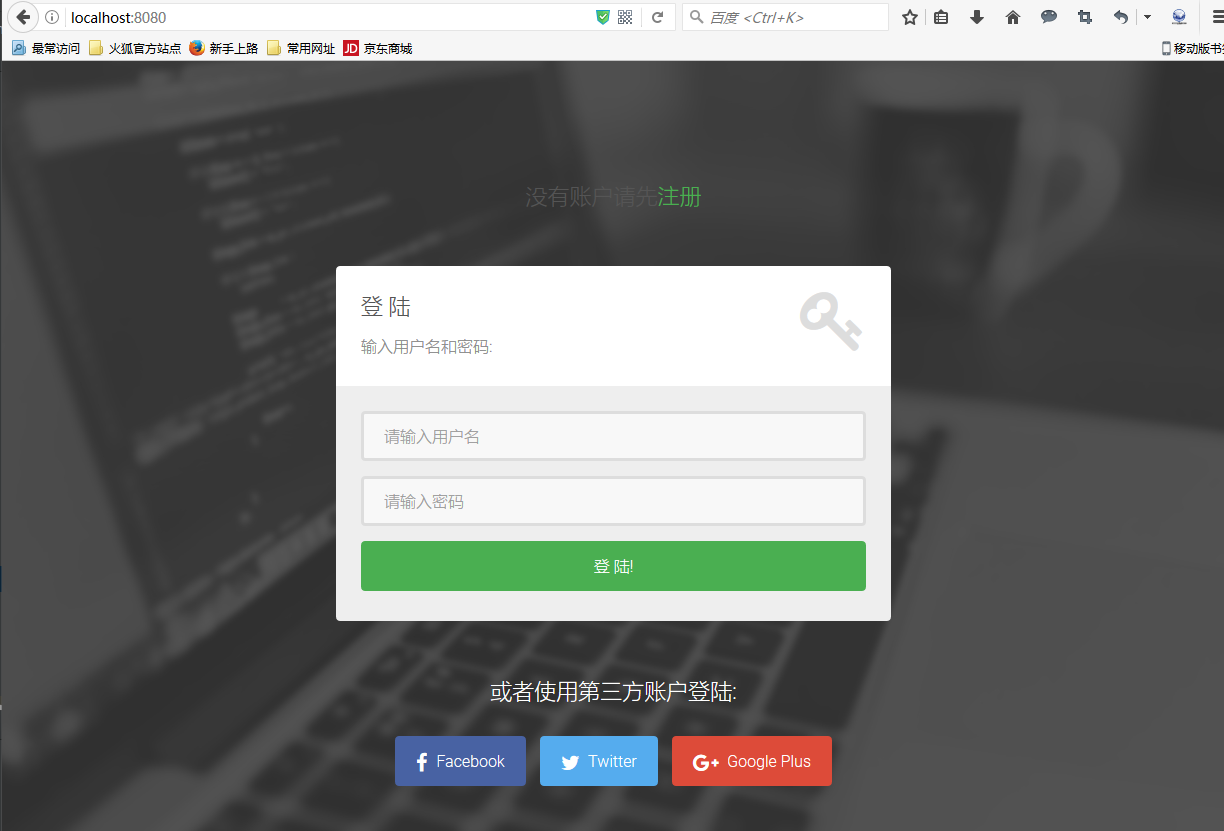
到此为止使用Intellij创建Spring boot+mybatis的简单的项目就完成了
表结构:

【Spring Boot&&Spring Cloud系列】使用Intellij构建Spring Boot和Mybatis项目的更多相关文章
- Spring Boot 2.0系列文章(五):Spring Boot 2.0 项目源码结构预览
关注我 转载请务必注明原创地址为:http://www.54tianzhisheng.cn/2018/04/15/springboot2_code/ 项目结构 结构分析: Spring-boot-pr ...
- Spring实战第五章学习笔记————构建Spring Web应用程序
Spring实战第五章学习笔记----构建Spring Web应用程序 Spring MVC基于模型-视图-控制器(Model-View-Controller)模式实现,它能够构建像Spring框架那 ...
- spring boot系列01--快速构建spring boot项目
最近的项目用spring boot 框架 借此学习了一下 这里做一下总结记录 非常便利的一个框架 它的优缺点我就不在这背书了 想了解的可以自行度娘谷歌 说一下要写什么吧 其实还真不是很清楚,只是想记录 ...
- 通过IntelliJ IDEA创建maven+springmvc+mybatis项目
第一个springmvc+mybatis项目,通过学习极客学院视频(视频案例通过eclipse搭建,网址为http://www.jikexueyuan.com/course/1430.html),发现 ...
- 【Spring Cloud 系列】 二、Spring Cloud Eureka 的第一印象
Eureka : 翻译翻译,找到了!(惊讶语气) Spring CLoud 中的 Spring Cloud Eureka,用于 分布式项目中的服务治理.是对Netflix 套件中的Eureka 的二次 ...
- Spring Boot 2.0系列文章(七):SpringApplication 深入探索
关注我 转载请务必注明原创地址为:http://www.54tianzhisheng.cn/2018/04/30/springboot_SpringApplication/ 前言 在 Spring B ...
- SpringCloud核心教程 | 第一篇: 使用Intellij中的Spring Initializr来快速构建Spring Cloud工程
spring cloud简介 spring cloud 为开发人员提供了快速构建分布式系统的一些工具,包括配置管理.服务发现.断路器.路由.微代理.事件总线.全局锁.决策竞选.分布式会话等等.它运行环 ...
- SpringCloud核心教程 | 第二篇: 使用Intellij中的maven来快速构建Spring Cloud工程
spring cloud简介 spring cloud 为开发人员提供了快速构建分布式系统的一些工具,包括配置管理.服务发现.断路器.路由.微代理.事件总线.全局锁.决策竞选.分布式会话等等.它运行环 ...
- spring boot / cloud (三) 集成springfox-swagger2构建在线API文档
spring boot / cloud (三) 集成springfox-swagger2构建在线API文档 前言 不能同步更新API文档会有什么问题? 理想情况下,为所开发的服务编写接口文档,能提高与 ...
随机推荐
- JsonObject和Gson详解
参考文件:http://www.cnblogs.com/xwdreamer/archive/2011/12/16/2296904.html一.JsonObject 1.JAR包简介 要使程序可以运行必 ...
- Js正则校验身份证号码
原文链接:http://gongwen.sinaapp.com/article-126-cmd 这个其实不难,在网上多找一下总会有意外收获的.但是工欲善其事,必先利其器.我们需要了解一下身份证号的规则 ...
- iOS: crush when save Core Data
如果一个页面拥有一个 NSFetchedResultsController 的引用,那么在这个界面将要结束时,一定要 remove 它的 observer - (void)dealloc { //.. ...
- 决策树-Cart算法二
本文结构: CART算法有两步 回归树的生成 分类树的生成 剪枝 CART - Classification and Regression Trees 分类与回归树,是二叉树,可以用于分类,也可以用于 ...
- Java编程思想学习笔记——初始化与清理(二)
成员初始化 Java尽力保证:所有变量在使用前都能得到适当的初始化. 方法的局部变量:未初始化,编译错误. void f(){ int i; // System.out.println(i);//编译 ...
- 在 ubuntu 【6.06、6.10】 上安装 oracle 10.2.0.1,并打补丁 10.2.0.5
特点: ubuntu 6.06.6.10 算是很古老的ubuntu了,其应该是基于 debian 4 的 tesing/unstable 分支.所以,毛病较多. 如何安装oracle10g? 几个技术 ...
- Unity判断网络是否连接以及判断是否连接WiFi
由于项目中的核心模块需要用到网络连接,所以需要首先检测用户是否有网络百度了下,有人说通过连接自己的服务器进行测试的,也有人说通过延迟来判断的最后发现原来Unity是提供了网络判断的方法的.Networ ...
- mysql数据库2
命令行客户端软件MySQL Command Line Client, 打开该程序,输入数据库密码,登陆到MySQL软件, 如果想通过该命令行工具来操作MySQL软件,只需要在"mysql&g ...
- zabbix-agents客户端安装
Windows下zabbix客户端的安装 记得关windows上的防火墙 1.首先需要下载zabbix_agents.rar文件 点击这里进行下载 当然也可以在www.zabbix.com进行下载 2 ...
- Nginx服务器之负载均衡策略
http://www.cnblogs.com/1214804270hacker/p/9325150.html