
简单原始的ASP.NET WEBFORM中多文件上传【参考其他资料修改】
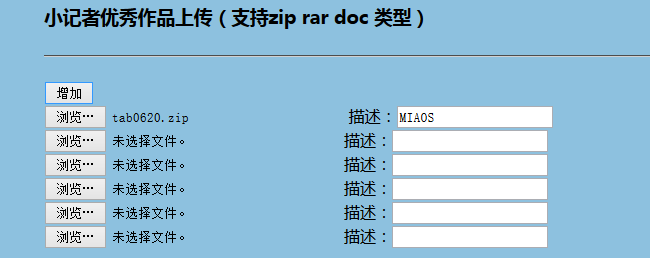
首先是ASPX页面中添加file标签
<input onclick="addFile()" type="button" value="增加" /><br />
<input id="viewfile" type="file" name="File" runat="server" style="width: 300px" accept="application/pdf,application/msword,application/x-zip-compressed" />
描述:<input name="text" type="text" style="width: 150px" maxlength="20" />
还有按钮
<asp:Button CssClass="inputbutton" ID="BtnAdd" runat="server" Text="提交" OnClick="btnSave_Click" />
添加addFile()js事件
    <script type="text/javascript">

    var i = 1

    function addFile() {

        if (i < 8) {

            var str = '<BR> <input type="file" name="File" runat="server" style="width: 300px"  accept="application/pdf,application/msword,application/x-zip-compressed"/>描述:<input name="text" type="text" style="width: 150px" maxlength="20" />'

            document.getElementById('MyFile').insertAdjacentHTML("beforeEnd", str)

        }

        else {

            alert("您一次最多只能上传8个附件!")

        }

        i++

    }

    </script>
后台处理事件
       /// <summary>

        /// 保存事件

        /// </summary>

        /// <param name="sender"></param>

        /// <param name="e"></param>

        protected void btnSave_Click(object sender, EventArgs e)

        {

            try

            {

                lblMessage.Text = "";

                lblMessage.Visible = false;

                System.Web.HttpFileCollection files = System.Web.HttpContext.Current.Request.Files;

                System.Text.StringBuilder strmsg = new System.Text.StringBuilder("");

                string[] rd = Request.Form[].Split(',');//获得图片描述的文本框字符串数组,为对应的图片的描述

                int ifile;

                for (ifile = ; ifile < files.Count; ifile++)

                {

                    if (files[ifile].FileName.Length > )

                    {

                        System.Web.HttpPostedFile postedfile = files[ifile];

                        if (postedfile.ContentLength /  > )//单个文件不能大于10240k

                        {

                            strmsg.Append(Path.GetFileName(postedfile.FileName) + "---不能大于10240k<br>");

                            break;

                        }

                        string fex = Path.GetExtension(postedfile.FileName).ToLower();

                        if (fex != ".doc" && fex != ".docx" && fex != ".zip" && fex != ".rar")

                        {

                            strmsg.Append(Path.GetFileName(postedfile.FileName) + "---格式不对,只能是doc、docx、zip、rar");

                            break;

                        }

                    }

                }

                if (strmsg.Length <= )//说明图片大小和格式都没问题

                {

                    //以下为创建图库目录

                    string dirname = "excellent";

                    string dirpath = Server.MapPath("/appendix");

                    dirpath = dirpath + "\\" + dirname;

                    if (Directory.Exists(dirpath) == false)

                    {

                        Directory.CreateDirectory(dirpath);

                    }

                    Random ro = new Random();

                    int name = ;

                    int id = ;

                    Model.ExcellentWorksModel excellentWorksModel = null;

                    for (int i = ; i < files.Count; i++)

                    {

                        System.Web.HttpPostedFile myFile = files[i];

                        string FileName = "";

                        string FileExtention = "";

                        string PicPath = "";

                        FileName = System.IO.Path.GetFileName(myFile.FileName);

                        string stro = ro.Next(, ).ToString() + name.ToString();//产生一个随机数用于新命名的图片

                        string NewName = ConvertDateTimeInt(DateTime.Now) + stro;

                        if (FileName.Length > )//有文件才执行上传操作再保存到数据库

                        {

                            FileExtention = System.IO.Path.GetExtension(myFile.FileName);

                            string ppath = dirpath + "\\" + NewName + FileExtention;

                            myFile.SaveAs(ppath);

                            string FJname = FileName;

                            PicPath = ppath;

                        }

                        //保存图片详细

                        excellentWorksModel = new ExcellentWorksModel();

                        excellentWorksModel.AddTime = DateTime.Now;

                        excellentWorksModel.Path = PicPath;

                        excellentWorksModel.Title = FileName;

                        excellentWorksModel.Description = rd[i];

                        excellentWorksModel.Status = ;

                        bool res = BusinessLogic.ExcellentWorksBll.Add(excellentWorksModel);

                        name = name + ;//用来重命名规则的变量

                    }

                }

                else

                {

                    lblMessage.Text = strmsg.ToString();

                    lblMessage.Visible = true;

                }

                ResponseRedirect("/Reporter/UpLoadExcellentWorks.aspx");

            }

            catch (Exception ex)

            {

                WriteErrMsg("出现异常:"+ex.Message);

            }

        }

        /// <summary>

        /// DateTime时间格式转换为Unix时间戳格式

        /// </summary>

        /// <param name=”time”></param>

        /// <returns></returns>

        public int ConvertDateTimeInt(System.DateTime time)

        {

            System.DateTime startTime = TimeZone.CurrentTimeZone.ToLocalTime(new System.DateTime(, , ));

            return (int)(time - startTime).TotalSeconds;

        }
附件信息保存表
/*==============================================================*/

/* Table: ExcellentWorks                                   */

/*==============================================================*/

create table ExcellentWorks (

   ID                   int                  not null,

   Title                nvarchar(200)        null,

   Description          nvarchar(200)        null,

   Path                 nvarchar(200)        null,

   AddTime              datetime             null,

   Status               int                  null,

   constraint PK_EXCELLENTWORKS primary key (ID)

)

go

declare @CurrentUser sysname

select @CurrentUser = user_name()

execute sp_addextendedproperty 'MS_Description',

   '小记者优秀作品',

   'user', @CurrentUser, 'table', 'ExcellentWorks'

go

declare @CurrentUser sysname

select @CurrentUser = user_name()

execute sp_addextendedproperty 'MS_Description',

   '表ID',

   'user', @CurrentUser, 'table', 'ExcellentWorks', 'column', 'ID'

go

declare @CurrentUser sysname

select @CurrentUser = user_name()

execute sp_addextendedproperty 'MS_Description',

   '附件文件名',

   'user', @CurrentUser, 'table', 'ExcellentWorks', 'column', 'Title'

go

declare @CurrentUser sysname

select @CurrentUser = user_name()

execute sp_addextendedproperty 'MS_Description',

   '描述',

   'user', @CurrentUser, 'table', 'ExcellentWorks', 'column', 'Description'

go

declare @CurrentUser sysname

select @CurrentUser = user_name()

execute sp_addextendedproperty 'MS_Description',

   '路径',

   'user', @CurrentUser, 'table', 'ExcellentWorks', 'column', 'Path'

go

declare @CurrentUser sysname

select @CurrentUser = user_name()

execute sp_addextendedproperty 'MS_Description',

   '添加时间',

   'user', @CurrentUser, 'table', 'ExcellentWorks', 'column', 'AddTime'

go

declare @CurrentUser sysname

select @CurrentUser = user_name()

execute sp_addextendedproperty 'MS_Description',

   '状态',

   'user', @CurrentUser, 'table', 'ExcellentWorks', 'column', 'Status'

go
简单原始的ASP.NET WEBFORM中多文件上传【参考其他资料修改】的更多相关文章
- ASP.NET Core 中的文件上传
ASP.NET Core上传文件 ASP.NET Core使用IFormFile来读取上传的文件内容,然后将数据写入到磁盘或其它存储空间. 添加FileUpload模型,用来接收上传的文件内容. pu ...
- ASP.NET中的文件上传大小限制的问题
一.文件大小限制的问题 首先我们来说一下如何解决ASP.NET中的文件上传大小限制的问题,我们知道在默认情况下ASP.NET的文件上传大小限制为2M,一般情况下,我们可以采用更改WEB.Config文 ...
- Asp.Net实现无刷新文件上传并显示进度条(非服务器控件实现)(转)
Asp.Net实现无刷新文件上传并显示进度条(非服务器控件实现) 相信通过Asp.Net的服务器控件上传文件在简单不过了,通过AjaxToolkit控件实现上传进度也不是什么难事,为什么还要自己辛辛苦 ...
- [代码示例]用Fine Uploader+ASP.NET MVC实现ajax文件上传
原文 [代码示例]用Fine Uploader+ASP.NET MVC实现ajax文件上传 Fine Uploader(http://fineuploader.com/)是一个实现 ajax 上传文件 ...
- javaWeb中,文件上传和下载
在Web应用系统开发中,文件上传和下载功能是非常常用的功能,今天来讲一下JavaWeb中的文件上传和下载功能的实现. 对于文件上传,浏览器在上传的过程中是将文件以流的形式提交到服务器端的,如果直接使用 ...
- Silverlight 2中实现文件上传和电子邮件发送
Silverlight 2中实现文件上传和电子邮件发送 [收藏此页] [打印] 作者:IT168 TerryLee 2008-05-30 内容导航: 使用Web Service上传文件 [I ...
- JavaWeb中的文件上传和下载功能的实现
导入相关支持jar包:commons-fileupload.jar,commons-io.jar 对于文件上传,浏览器在上传的过程中是将文件以流的形式提交到服务器端的,如果直接使用Servlet获取上 ...
- ASP.NET MVC下使用文件上传
这里我通过使用uploadify组件来实现异步无刷新多文件上传功能. 1.首先下载组件包uploadify,我这里使用的版本是3.1 2.下载后解压,将组件包拷贝到MVC项目中 3. 根目录下添加新 ...
- 在WebBrowser中通过模拟键盘鼠标操控网页中的文件上传控件(转)
引言 这两天沉迷了Google SketchUp,刚刚玩够,一时兴起,研究了一下WebBrowser. 我在<WebBrowser控件使用技巧分享>一文中曾谈到过“我现在可以通过WebBr ...
随机推荐
- go语言之进阶篇定时器重置
1.定时器重置 示例: package main import ( "fmt" "time" ) func main() { timer := time.New ...
- the network bridge on device vmnet0 is not running解决方法
最近电脑装上win8,在安装vm 7.1.4 安装后发现网络连接中的网桥模式不能使用. 原来在本地连接里少了:VMware Bridge Protocol 最后的解决方案如下: 打开物理网卡本地连接- ...
- [leetcode]Spiral Matrix @ Python
原题地址:https://oj.leetcode.com/problems/spiral-matrix/ 题意: Given a matrix of m x n elements (m rows, n ...
- iOS开发-音乐播放(AVAudioPlayer)
现在的手机的基本上没有人不停音乐的,我们无法想象在一个没有声音的世界里我们会过的怎么样,国内现在的主流的主流网易云音乐,QQ音乐,酷狗,虾米,天天基本上霸占了所有的用户群体,不过并没有妨碍大家对音乐的 ...
- 不能从const char *转换为LPCWSTR --VS经常碰到
不能从const char *转换为LPCWSTR 在VC 6.0中编译成功的项目在VS2005 vs2005.vs2008.vs2010中常会出现类型错误. 经常出现的错误是:不能从const ch ...
- Web项目MySQL配置文件运维
root@mysqltest:/etc/mysql/mysql.conf.d# cat mysqld.cnf # # The MySQL database server configuration f ...
- [React] Validate React Forms with Formik and Yup
Validating forms in React can take several lines of code to build. However, Formik's ErrorMessage co ...
- [Algorithm] Powerset Problem
By given an array [1,2,3]: Return all possible combinations. for example: [[], [1], [2], [3], [1, 2] ...
- linux下更改主机名方法hostname
一.永久修改修改/etc/sysconfig/network,在里面指定主机名称HOSTNAME=然后执行命令hostname 主机名这个时候可以注销一下系统,再重登录之后就行了. 或者修改/etc/ ...
- iOS开发点滴 - 关闭键盘
有时候系统显示的键盘会挡住视图中某些重要的控件,这个时候当用户按下换行键,就应该取消UITextField对象的第一响应(First Responder)状态而关闭键盘. 1. 首先,视图控制器必须遵 ...