
因默认包扫描问题导致的SpringBoot项目无法启动问题
启动SpringBoot项目的时候,提示如下信息:
-- ::22.255  INFO  --- [           main] s.c.a.AnnotationConfigApplicationContext :
Refreshing org.springframework.context.annotation.AnnotationConfigApplicationContext@4e3958e7:
startup date [Mon Aug  :: CST ]; root of context hierarchy

-- ::22.817  INFO  --- [           main] f.a.AutowiredAnnotationBeanPostProcessor :
JSR- 'javax.inject.Inject' annotation found and supported for autowiring

-- ::22.864  INFO  --- [           main] trationDelegate$BeanPostProcessorChecker :
Bean 'configurationPropertiesRebinderAutoConfiguration' of type
[class org.springframework.cloud.autoconfigure.ConfigurationPropertiesRebinderAutoConfiguration$$EnhancerBySpringCGLIB$$105a6ef0]
is not eligible for getting processed by all BeanPostProcessors (for example: not eligible for auto-proxying)

  .   ____          _            __ _ _

 /\\ / ___'_ __ _ _(_)_ __  __ _ \ \ \ \

( ( )\___ | '_ | '_| | '_ \/ _` | \ \ \ \

 \\/  ___)| |_)| | | | | || (_| |  ) ) ) )

  '  |____| .__|_| |_|_| |_\__, | / / / /

 =========|_|==============|___/=/_/_/_/

 :: Spring Boot ::        (v1.4.2.RELEASE)

-- ::23.551  INFO  --- [           main] EurekaServerMasterApplication            :
No active profile set, falling back to default profiles: default

-- ::23.567  INFO  --- [           main] ationConfigEmbeddedWebApplicationContext :
Refreshing org.springframework.boot.context.embedded.AnnotationConfigEmbeddedWebApplicationContext@12c7a01b:
startup date [Mon Aug  :: CST ];
parent: org.springframework.context.annotation.AnnotationConfigApplicationContext@4e3958e7

-- ::23.582  WARN  --- [           main] ionWarningsApplicationContextInitializer :

** WARNING ** : Your ApplicationContext is unlikely to start due to a @ComponentScan of the default package.
解决办法:
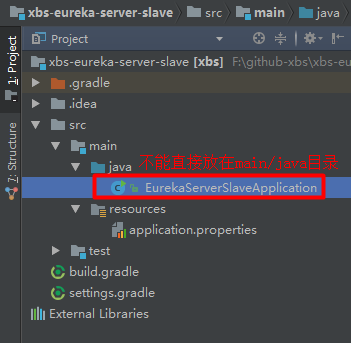
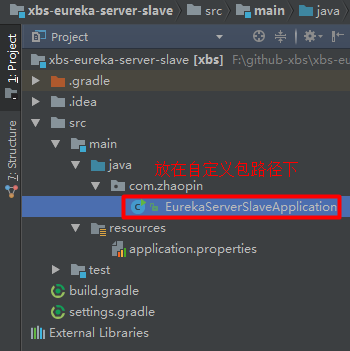
把main方法所在的类放到一个自定义的包路径下,而不能直接放在mian/java路径下。
下面是错误的位置:
下面是正确的位置:
如果本文对您有所帮助,请扫描下方微信二维码打赏,您的鼓励是我前进最大的鼓励!

因默认包扫描问题导致的SpringBoot项目无法启动问题的更多相关文章
- SpringBoot项目快速启动停止脚本
SpringBoot项目快速启动停止脚本 1.在jar包同级目录下,创建 app.sh #!/bin/bash appName=`ls|grep .jar$` if [ -z $appName ] t ...
- springboot项目突然启动缓慢
在项目快到最后的时候,有一次在本地启动项目的时候,突然发现项目启动起来特别的慢. 刚开始也不知道哪里出了问题,只能慢慢的查原因. springboot项目在debug模式下本来运行的挺快,后来某一天突 ...
- SpringBoot项目jar启动端口设置
SpringBoot项目打包后,在target下生成的jar文件可以使用 Java - jar 直接启动,指定端口号配置 java -jar epjs-eureka.jar --server.port ...
- SpringBoot -- 项目结构+启动流程
一.简述: 项目结构 二.简述:启动流程 说springboot的启动流程,当然少不了springboot启动入口类 @SpringBootApplication public class Sprin ...
- eclipse中创建的spring-boot项目在启动时指定加载那一个配置文件的设置
步骤如下:鼠标点击项目右键—>Run As—>Run Configurations—>Java Application (如下图) 鼠标右键点击Java Application——— ...
- springboot项目简单启动脚本
#!/bin/bash function log_info () { DATE=`date "+%Y-%m-%d %H:%M:%S"` USER=$(whoami) echo &q ...
- IDEA导入springboot项目不能启动
由于工具没有识别到项目的pom.xml文件,所以需要在右侧的Maven栏目中点击 + 号,选中项目的pom.xml文件,则导入成功.
- 【排错】springboot项目,启动报An attempt was made to call the method com.google.gson.GsonBuilder.setLenient()Lcom/google/gson/GsonBuilder; but it does not exist.
pom文件新引入: <dependency> <groupId>com.google.code.gson</groupId> ...
- SpringBoot包扫描之多模块多包名扫描和同类名扫描冲突解决
前言 我们在开发springboot项目时候,创建好SpringBoot项目就可以通过启动类直间启动,运行一个web项目,非常方便简单,不像我们之前通过Spring+SpringMvc要运行启动一个w ...
随机推荐
- Storage System and File System Courses
I researched a lot about storage system classes given at good universities this year. This had two r ...
- 可扩展的Web系统和分布式系统(Scalable Web Architecture and Distributed Systems)
Open source software has become a fundamental building block for some of the biggest websites. And a ...
- iOS UILabel设置行间距和字间距
实现UILabel的文字,设置行间距和字间距. 效果图: 代码: let lblTitle = UILabel(frame: CGRect(x: , y: , width: KScreenWidth- ...
- Swift3 substring几种常用用法
举例: " let length = str.characters.count //截取前四位 )) //截取后2位(两种方法) )) )) //截取中间4位,从第2位开始(二种方法) le ...
- JavaScript调用App原生代码(iOS、Android)通用解决方案
实际场景 场景:现在有一个H5活动页面,上面有一个登陆按钮,要求点击登陆按钮以后,唤出App内部的登录界面,当登录成功以后将用户的手机号返回给H5页面,显示出来.这个场景应该算是比较完整的一次H5中的 ...
- linux 的时区设置函数tzset() 【转】
linux 的时区设置函数tzset() 本文转载于: http://blog.csdn.net/epicyong333/article/details/5258152 tzset #incude & ...
- linux sshd ssh 服务的启动和使用
这里使用sshd服务登录到linux系统的方法,不少同学走了弯路,包括我,我一直使用vmware虚拟linux学习使用的,后来windows病毒的原因转入到linux系统中使用 1,sshd服务安装 ...
- Redis 学习之路 (009) - Redis-cli命令最新总结
资料来源: http://redisdoc.com/ http://redis.io/commands 连接操作相关的命令 默认直接连接 远程连接-h 192.168.1.20 -p 6379 pi ...
- magento注册
1. 地址保存 $_custom_address = array ( 'firstname' => 'Branko', 'lastname' => 'Ajzele', 'street' = ...
- WARNING: The host 'r6' could not be looked up with /usr/local/mysql/bin/resolveip.
初始化MySQL数据库提示以下信息: # /usr/local/mysql/scripts/mysql_install_db \ > --defaults-file=/etc/my.cnf \ ...