
让旧版本的 Flash IDE 支持更新的 Flash Player/AIR 功能
转载:https://blog.zengrong.net/post/1568.html
让旧版本的 Flash IDE 支持更新的 Flash Player/AIR 功能
今天在论坛上看到一篇文章:H264VideoStreamSettings无法在cs4里面使用吗?,并做了回复。记录在这里,希望对更多的人有帮助。
H264VideoStreamSettings是Flash Player 11才开始支持的功能,但目前Aodbe发布的最新版的Flash CS5.5,都不支持将Flash Player 11作为目标播放器版本发布。这个问题很容易解决,但涉及到的东西却比较多,我在这里将一一讲解。
首先来个Setp by Step,这里以Flash Player CS5.5为例,但Flash CS4也没有问题(Flash CS3我就不确定了):
第一步 首先下载最新的 playerglobal.swc(基于Flash Player11):
第二步 将其复制到 FlashCS5.5\CommonConfiguration\ActionScript 3.0\FP11.1 ,没有这个文件夹请自行建立;
第三步 复制 FlashCS5.5\CommonConfiguration\Players\FlashPlayer10_1.xml 为 `FlashPlayer11_1.xml;
第四步 用 NotePad++/EditPlus/UltraEdit (但不要用windows Notepad,避免换行符问题)之类的软件打开 `FlashPlayer11_1.xml ,修改以下内容:
第3行修改为:
1 |
<player id="FlashPlayer11.1" version="14" asversion="3"> |
第4行修改为:
1 |
<name>Flash Player 11.1</name> |
第8行修改为:
1 |
<playerDefinitionPath as2="$(UserConfig)/Classes/FP10;$(UserConfig)/Classes/FP9;$(UserConfig)/Classes/FP8;$(UserConfig)/Classes/FP7" as3="$(AppConfig)/ActionScript 3.0/FP11_1/playerglobal.swc" /> |
这是我修改好的,可以直接用:
1 |
<?xml version="1.0" encoding="UTF-8"?> |
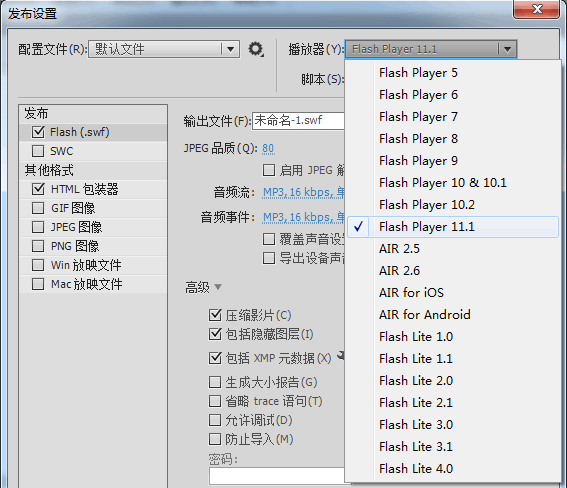
第五步 重新启动Flash CS5.5, 就可以看到新的发布设置生效了,在新建Fla文件的时候选择这个发布设置,就可以支持Flash Player 11.1新增的功能。如下图:
**第六步 为了能够播放和调试新生成的Flash Player 11文件,还需要更新DebugFlashPlayer,在 这里 下载。注意必须下载Debug版本:Windows Flash Player 11.1 Projector content debugger。如果不知道这些版本之间的区别,可以看看我写的这篇文章:有史以来关于Flash Player的最详细说明 。
第七步 下载了上面的文件后,将其复制到 FlashCS5.5\Adobe Flash CS5.5\Players\Debug,替换原来的FlashPlayerDebugger.exe。
下面是原理讲解(Flash IDE代指Flash CS4/CS5/CS5.5):
在Flash 8时代,编译器和Flash Player是完全同步的。因为那时,只有Flash IDE可以生成swf文件。而Flex问世,以及MacroMedia被Adobe收购以后,Flash的发展就变得多样了,FlashIDE和Flex都可以生成swf文件,Flash Player的发展也更加独立。现在的情况,Flash CS,Flash Builder,Flex SDK,Flash Player的发布已经完全不同步了。尤其是当Adobe将Flex SDK交给Apache发展后,SDK的更新速度估计会更快。Adobe自己又会紧紧将Flash Player攥在手里,保持自己的步调来更新。
Flex SDK/Flash IDE可以和不同版本的Flash Player相配。即使是使用Flex SDK 3.6/Flash CS4,同样也可以开发出Flash Player 11.1支持的swf程序。通过使用不同版本Flash Player提供的playerglobal.swc文件,就可以让旧的Flex SDK/Flash IDE兼容新的Flash Player提供的功能,方法就是修改编译属性中的-swf-version和 -target-player编译属性。当然,也可以让新的Flex SDK兼容旧的Flash Player功能。
以上这段来自我写的这篇文章:Flex编译器参数中-swf-version与-target-player之关系,有修改。
2015-04-03 更新
Flash IDE 整合了 AIR SDK 之后,我们也经常需要将最新的 AIR SDK 更新到 Flash IDE 中。
在 Flash Professional CS6 中,参考这个官方帮助页面即可: Flash Professional Help / Overlay AIR 。
在 Flash CC 中,则已经在 Help 菜单中提供了 Manage Adobe AIR SDK… 命令可供配置。
让旧版本的 Flash IDE 支持更新的 Flash Player/AIR 功能的更多相关文章
- Bootstrap 4/3 页面基础模板 与 兼容旧版本浏览器
Bootstrap 3 与 4 差别很大,目录文件结构.所引入的内容也不同,这里说说一下 Bootstrap 引入的文件.网页模板和兼容性问题.本网站刚刚搭建好,正好发一下文章原来测试网站. Boot ...
- 长期支持版本(即不自动更新版本) - Flash Player 18.0.0.268
无意中发现,适合不喜欢折腾的朋友. 下载链接:(官方:http://www.adobe.com/cn/products/flashplayer/distribution3.html) (分流:http ...
- 企业IT管理员IE11升级指南【2】—— Internet Explorer 11 对Adobe Flash的支持
企业IT管理员IE11升级指南 系列: [1]—— Internet Explorer 11增强保护模式 (EPM) 介绍 [2]—— Internet Explorer 11 对Adobe Flas ...
- Linux下安装Firefox以及更新Adobe flash
一直无法舍弃Firefox浏览器,老是提示更新,但包管理器中的版本又不是最新版,只能自己手动安装了(一下是在Ubuntu14.04环境中进行的). 1.去官网下载最新版本 2.进入下载目录,解压文件 ...
- ActiveReports 6:如何升级旧版本的项目
如果现在的项目使用的是ActiveReports for .NET 3.0,那么有两种升级方式: 一是使用ActiveReports 6.0附带的转换工具(参见下面"升级ActiveRepo ...
- 印象笔记 MAC安装使用旧版本
印象笔记终于支持markdown了,赞! 第一个beta版用起来非常不错.提示更新安装新版本后保存markdown一直提示 "Note content is invalid.",无 ...
- [转帖]InfluxDB 1.2.0安装及新旧版本的注意事项
InfluxDB 1.2.0安装及新旧版本的注意事项 http://haibing.org/245?zwlqby=npztq3 挺好的文章 很好的解决了 上一个文档里面 关于 web admin 的问 ...
- Flash 终将谢幕:微软将于年底( 2020 年 )停止对 Flash 的支持
近日,微软宣布将于今年 12 月终止对 Adobe Flash Player 的支持,届时,微软旗下所有浏览器都将无法使用 Flash,Adobe 也不会在今年 12 月后发布安全更新.早在 2017 ...
- Flash 终将谢幕:微软将于年底停止对 Flash 的支持
近日,微软宣布将于今年 12 月终止对 Adobe Flash Player 的支持,届时,微软旗下所有浏览器都将无法使用 Flash,Adobe 也不会在今年 12 月后发布安全更新.早在 2017 ...
随机推荐
- 使用php的curl根据关键词爬取百度搜索结果页
http://bbs.csdn.net/wap/topics/390938327 正则表达式匹配Html标签 查找所有的TD区域(最短):<td\s*.*>\s*.*<\/td& ...
- Centos安装git2.2.1
由于Centos6.5使用yum -y install git 安装的git版本是 git --versiongit version 1.7.1 想要升级到2.2.1: ># yum remov ...
- 【Bitmap Index】B-Tree索引与Bitmap位图索引的锁代价比较研究
通过以下实验,来验证Bitmap位图索引较之普通的B-Tree索引锁的“高昂代价”.位图索引会带来“位图段级锁”,实际使用过程一定要充分了解不同索引带来的锁代价情况. 1.为比较区别,创建两种索引类型 ...
- Hadoop 和 Spark 的关系
Hadoop实质上是一个分布式数据基础设施: 它将巨大的数据集分派到一个由普通计算机组成的集群中的多个节点进行存储,意味着您不需要购买和维护昂贵的服务器硬件. 同时,Hadoop还会索引和跟踪这些数据 ...
- IPv6调用java后端接口报错:java.net.SocketException: Protocol family unavailable
目前需求是java后端的接口需要支持IPv6.先确认linux机器已经绑定了IPv6: CMREAD-SV43 apache-tomcat/bin> ifconfig eth0 Link enc ...
- 获取post发送过来的xml包
if (Request.HttpMethod.ToLower() == "post") { byte[] ar; ar = new byte[this.Request.Input ...
- 设计模式初学者笔记:Builder模式
[作者:byeyear Email:byeyear@hotmail.com 首发:cnblogs 转载请注明] 在本文的开头,先森森的鄙视下自己……将Builder模式反反复复读了七 ...
- BASIC-13_蓝桥杯_数列排序
示例代码: #include <stdio.h>#include <stdlib.h> int main(void){ int n = 0 ; int i = 0 , j = ...
- maven学习(3)-Maven 核心技术
第一节:Maven 仓库概念 Maven 远程仓库配置文件: $M2_HOME/lib/maven-model-builder-3.3.3.jar 文件:org\apache\maven\model\ ...
- springMVC学习(2)
一.使用注解的处理器映射器和适配器 1) 在这个下面的/org/springframework/web/servlet/DispatcherServlet.properties文件,从这个文件中加载处 ...