
关于LayoutInflater的错误用法(警告提示:Avoid passing null as the view root)
项目中用LayoutInflater加载xml布局一直飘黄警告,上网搜了搜发现没有解释明白的,到是找到了一篇外国的博文,但是竟然是英文。。。幸好以前上学时候的英语不是很差加上谷歌的辅助,简单翻一下!
原文地址:http://www.cnblogs.com/kobe8/p/3859708.html
参考博客:http://blog.csdn.net/ccfcccfc/article/details/40984971
错误用法:
inflater.inflate(R.layout.my_layout, null);
加载xml布局常用的有这两个方法:
inflate(int resource, ViewGroup root)
resource:将要加载的xml布局
root:指定“将要加载的xml布局”的“根布局”
inflate(int resource, ViewGroup root, boolean attachToRoot)
attachToRoot:是否将解析xml生成的view加载到“根布局”中
注意:这里的参数root的设置很关键,会影响到xml解析生成的view;如果设置成null即没有指定“根布局”的话,xml的最外层根布局设置的Android:layout_xxx等属性不会生效,因为android:layout_xxx等属性是在根布局中获得的;
第三个参数如果设置为:true,表示xml布局会被解析并加载到“根布局”中,如果为false,则会生成一个view并且不会加载到根布局中,但是这个view的类型取决于第二个参数根布局的类型,所以如果xml布局中如果设置了一些根布局类型中不存在的属性则不会有效果。下边是一个例子:
布局代码:
<LinearLayout xmlns:android="http://schemas.android.com/apk/res/android"android:layout_width="fill_parent"android:layout_height="50dp"android:layout_margin="50dp"android:gravity="center"android:orientation="horizontal" ><TextViewandroid:id="@+id/textView1"android:layout_width="wrap_content"android:layout_height="wrap_content"android:text="TextView1" /><TextViewandroid:id="@+id/textView2"android:layout_width="wrap_content"android:layout_height="wrap_content"android:text="TextView2" /></LinearLayout>
- 1
- 2
- 3
- 4
- 5
- 6
- 7
- 8
- 9
- 10
- 11
- 12
- 13
- 14
- 15
- 16
- 17
- 18
- 19
- 20
- 1
- 2
- 3
- 4
- 5
- 6
- 7
- 8
- 9
- 10
- 11
- 12
- 13
- 14
- 15
- 16
- 17
- 18
- 19
- 20
如果你的adapter中加载布局写成这样即不指定“根布局”:
LayoutInflater.from(context).inflate(R.layout.list_item, null);
运行效果 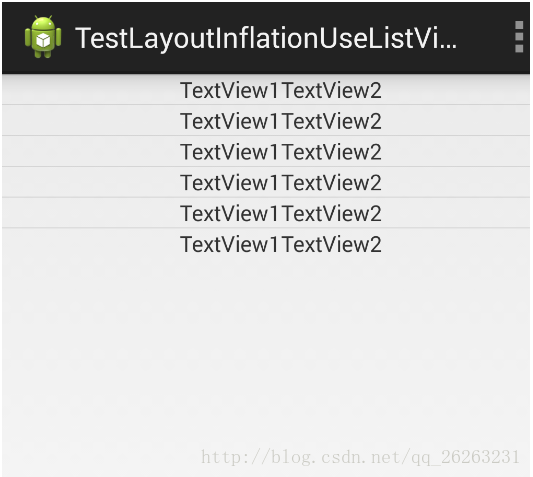
发现
android:layout_height=”50dp”
android:layout_margin=”50dp”
这两句代码没有效果,这是因为没有指定根布局,所以根布局里设置的android:layout_xxx等属性并没有起作用;
如果将adapter中加载布局代码改为:
@Override

public View getView(int position, View convertView, ViewGroup parent) {

    if (convertView == null) {

        convertView = LayoutInflater.from(context).inflate(

                R.layout.list_item, parent, false);

    }

    return convertView;

}
- 1
- 2
- 3
- 4
- 5
- 6
- 7
- 8
- 9
- 1
- 2
- 3
- 4
- 5
- 6
- 7
- 8
- 9
运行效果: 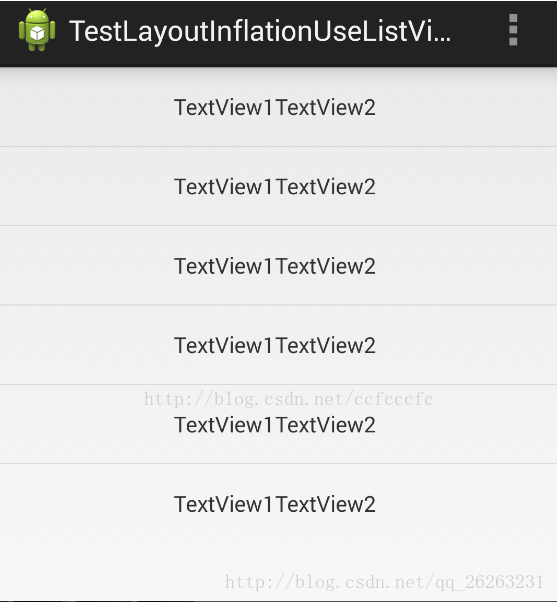
我们发现android:layout_height=”50dp” 已经有效果了
但是layout_margin没有起作用,这是因为我们上边设置的“根布局”是ViewGroup,他不能识别layout_margin属性,在线性布局里才会有这个属性。
如果将adapter中改为:
layout=(LinearLayout)findViewById(R.id.layout1);

View view=LayoutInflater.from(this).inflate(R.layout.list_item,layout , false);

        layout.addView(view);
- 1
- 2
- 3
- 1
- 2
- 3
最终运行效果会发现
android:layout_height, android:layout_margin都已经有效果了。
关于LayoutInflater的错误用法(警告提示:Avoid passing null as the view root)的更多相关文章
- Android: Avoid passing null as the view root
在做一个应用时把Android SDK从4.4换成6.0,使用LayoutInflater的inflate方法时出现以下情 LayoutInflater.inflate(int resource, V ...
- ABBYY FineReader出现错误和警告提示的解决办法
识别结果的质量取决于多种因素,这些因素包括原始文档的质量.结构布局和文档导出参数等.在使用ABBYY FineReader Pro for Mac OCR文字识别软件处理文档的各个阶段,应用程序均可能 ...
- 关于LayoutInflater的错误用法
转自:http://www.doubleencore.com/2013/05/layout-inflation-as-intended/ Layout inflation is the term us ...
- GCC 警告提示的用法
转自GCC 警告提示的用法 本节主要讲解GCC的警告提示功能.GCC包含完整的出错检查和警告提示功能,它们可以帮助Linux程序员写出更加专业和优美的代码.我们千万不能小瞧这些警告信息,在很多情况下, ...
- odoo开发笔记 -- 异常、错误、警告、提示、确认信息显示
1.检查业务逻辑中的错误,终止代码执行,显示错误或警告信息: raise osv.except_osv(_('Error!'), _('Error Message.')) 示例代码: #删除当前销售单 ...
- openerp学习笔记 错误、警告、提示、确认信息显示
1.检查业务逻辑中的错误,终止代码执行,显示错误或警告信息: raise osv.except_osv(_('Error!'), _('Error Message.')) 示例代码: #删除当前销售单 ...
- C51-keil编译常见错误和警告处理53
keil错误:C51编译器识别错类型有三种:1.致命错误:伪指令控制行有错,访问不存在的原文:2.语法及语义错误:语法和语义错误都发生在原文件:3.警告:警告出现并不影响目标文件的产生,但执行:C_5 ...
- 《Visual C++ 2010入门教程》系列四:VC2010中初学者常见错误、警告和问题
<Visual C++ 2010入门教程>系列四:VC2010中初学者常见错误.警告和问题 这一章将帮助大家解释一些常见的错误.警告和问题,帮助大家去理解和解决一些常见问题,并了解它的 ...
- 如何快速复制Windows警告提示消息对话框内容
凡是使用过计算机的朋友,都遇到过系统发出的警告提示消息对话框,如图所示. 哇!好长的一串英文错误警告,这要手写到什么时候呢?不!现在不用这么麻烦了. 你只要鼠标选中这个提示框Ctrl+C,然后打开你的 ...
随机推荐
- Virtualenv教程
虚拟环境简介 VirtualEnv用于在一台机器上创建多个独立的Python虚拟运行环境,多个Python环境相互独立,互不影响,它能够: 在没有权限的情况下安装新套件 不同应用可以使用不同的套件版本 ...
- javascript:Array.prototype.slice.call(arguments)
我们知道,Array.prototype.slice.call(arguments)能将具有length属性的对象转成数组,除了IE下的节点集合(因为ie下的dom对象是以com对象的形式实现的,js ...
- IOS开发之——objective-c与javascript交互
原文:http://blog.csdn.net/pjk1129/article/details/6936545 在写 JavaScript 的时候,可以使用一个叫做 window 的对象,像是我们想要 ...
- 解决警告 warning: directory not found for option
解决方法: 选择项目名称----->Targets----->Build Settings----->Search Paths----->Library Search Path ...
- git push.default设置
转自:http://blog.csdn.net/daijingxin/article/details/51326715 在进行一次空仓库的提交时,我遇到了这个警告 警告如下: warning: pus ...
- centOS7下实践查询版本/CPU/内存/硬盘容量等硬件信息
1.系统 1.1版本 uname -a 能确认是64位还是32位,其它的信息不多 [root@localhost ~]# uname -a Linux localhost.localdomain 3. ...
- 【凯子哥带你学Framework】Activity界面显示全解析(下)
咱们接着上篇继续讲,上篇没看的请戳:[凯子哥带你学Framework]Activity界面显示全解析(上) 如何验证上一个问题 首先,说明一下运行条件: //主题 name="AppThem ...
- python三大web框架Django,Flask,Flask,Python几种主流框架,13个Python web框架比较,2018年Python web五大主流框架
Python几种主流框架 从GitHub中整理出的15个最受欢迎的Python开源框架.这些框架包括事件I/O,OLAP,Web开发,高性能网络通信,测试,爬虫等. Django: Python We ...
- executing external native build for cmake
进一步调试的方法: 在Android studio下方打开terminal,然后: gradlew build --stacktrace
- 单因素方差分析(One Way ANOVA)
Analysis of variance (ANOVA) is a collection of statistical models and their associated estimation p ...