
『Sklearn』数据划分方法
原理介绍
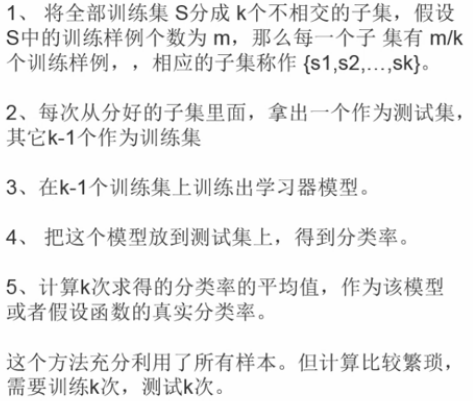
K折交叉验证:
KFold,GroupKFold,StratifiedKFold,
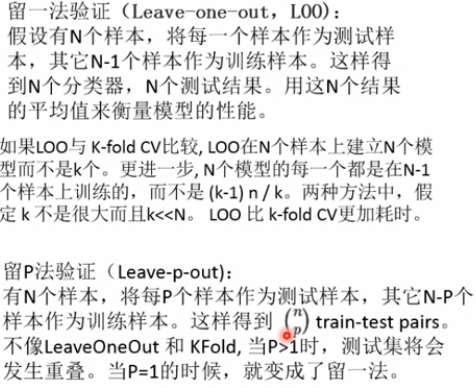
留一法:
LeaveOneGroupOut,LeavePGroupsOut,LeaveOneOut,LeavePOut,
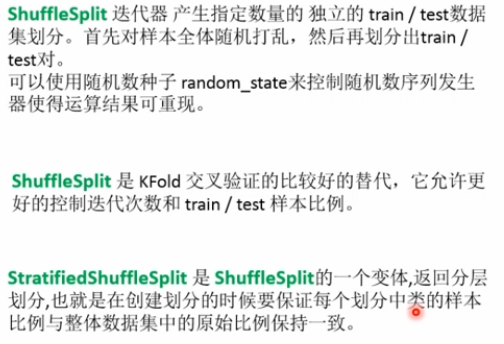
随机划分法:
ShuffleSplit,GroupShuffleSplit,StratifiedShuffleSplit,
代码实现
流程:
实例化分类器 -> 迭代器迭代组[.split()]
KFold(n_splits=2)
#KFold

import numpy as np

from sklearn.model_selection import KFold

X=np.array([[1,2],[3,4],[5,6],[7,8],[9,10],[11,12]])

y=np.array([1,2,3,4,5,6])

kf=KFold(n_splits=2)    # 定义分成几个组

# kf.get_n_splits(X)    # 查询分成几个组

print(kf)

for train_index,test_index in kf.split(X):

    print("Train Index:",train_index,",Test Index:",test_index)

    X_train,X_test=X[train_index],X[test_index]

    y_train,y_test=y[train_index],y[test_index]

    #print(X_train,X_test,y_train,y_test)
GroupKFold(n_splits=2)
# GroupKFold,不是很懂这个划分方法

import numpy as np

from sklearn.model_selection import GroupKFold

X=np.array([[1,2],[3,4],[5,6],[7,8],[9,10],[11,12]])

y=np.array([1,2,3,4,5,6])

groups=np.array([1,2,3,4,5,6])

group_kfold=GroupKFold(n_splits=2)

group_kfold.get_n_splits(X,y,groups)

print(group_kfold)

for train_index,test_index in group_kfold.split(X,y,groups):

    print("Train Index:",train_index,",Test Index:",test_index)

    X_train,X_test=X[train_index],X[test_index]

    y_train,y_test=y[train_index],y[test_index]

    #print(X_train,X_test,y_train,y_test)

#GroupKFold(n_splits=2)

#Train Index: [0 2 4] ,Test Index: [1 3 5]

#Train Index: [1 3 5] ,Test Index: [0 2 4]
StratifiedKFold(n_splits=3)
# stratifiedKFold:保证训练集中每一类的比例是相同的(尽量)

import numpy as np

from sklearn.model_selection import StratifiedKFold

X=np.array([[1,2],[3,4],[5,6],[7,8],[9,10],[11,12]])

y=np.array([1,1,1,2,2,2])

skf=StratifiedKFold(n_splits=3)

skf.get_n_splits(X,y)

print(skf)

for train_index,test_index in skf.split(X,y):

    print("Train Index:",train_index,",Test Index:",test_index)

    X_train,X_test=X[train_index],X[test_index]

    y_train,y_test=y[train_index],y[test_index]

    #print(X_train,X_test,y_train,y_test)

#StratifiedKFold(n_splits=3, random_state=None, shuffle=False)

#Train Index: [1 2 4 5] ,Test Index: [0 3]

#Train Index: [0 2 3 5] ,Test Index: [1 4]
LeaveOneOut()
# leaveOneOut:测试集就留下一个

import numpy as np

from sklearn.model_selection import LeaveOneOut

X=np.array([[1,2],[3,4],[5,6],[7,8],[9,10],[11,12]])

y=np.array([1,2,3,4,5,6])

loo=LeaveOneOut()

loo.get_n_splits(X)

print(loo)

for train_index,test_index in loo.split(X,y):

    print("Train Index:",train_index,",Test Index:",test_index)

    X_train,X_test=X[train_index],X[test_index]

    y_train,y_test=y[train_index],y[test_index]

    #print(X_train,X_test,y_train,y_test)

#LeaveOneOut()

#Train Index: [1 2 3 4 5] ,Test Index: [0]

#Train Index: [0 2 3 4 5] ,Test Index: [1]

#Train Index: [0 1 3 4 5] ,Test Index: [2]

#Train Index: [0 1 2 4 5] ,Test Index: [3]

#Train Index: [0 1 2 3 5] ,Test Index: [4]

#Train Index: [0 1 2 3 4] ,Test Index: [5]
LeavePOut(p=3)
LeavePOut:测试集留下P个

import numpy as np

from sklearn.model_selection import LeavePOut

X=np.array([[1,2],[3,4],[5,6],[7,8],[9,10],[11,12]])

y=np.array([1,2,3,4,5,6])

lpo=LeavePOut(p=3)

lpo.get_n_splits(X)

print(lpo)

for train_index,test_index in lpo.split(X,y):

    print("Train Index:",train_index,",Test Index:",test_index)

    X_train,X_test=X[train_index],X[test_index]

    y_train,y_test=y[train_index],y[test_index]

    #print(X_train,X_test,y_train,y_test)

#LeavePOut(p=3)

#Train Index: [3 4 5] ,Test Index: [0 1 2]

#Train Index: [2 4 5] ,Test Index: [0 1 3]

#Train Index: [2 3 5] ,Test Index: [0 1 4]

#Train Index: [2 3 4] ,Test Index: [0 1 5]

#Train Index: [1 4 5] ,Test Index: [0 2 3]

#Train Index: [1 3 5] ,Test Index: [0 2 4]

#Train Index: [1 3 4] ,Test Index: [0 2 5]

#Train Index: [1 2 5] ,Test Index: [0 3 4]

#Train Index: [1 2 4] ,Test Index: [0 3 5]

#Train Index: [1 2 3] ,Test Index: [0 4 5]

#Train Index: [0 4 5] ,Test Index: [1 2 3]

#Train Index: [0 3 5] ,Test Index: [1 2 4]

#Train Index: [0 3 4] ,Test Index: [1 2 5]

#Train Index: [0 2 5] ,Test Index: [1 3 4]

#Train Index: [0 2 4] ,Test Index: [1 3 5]

#Train Index: [0 2 3] ,Test Index: [1 4 5]

#Train Index: [0 1 5] ,Test Index: [2 3 4]

#Train Index: [0 1 4] ,Test Index: [2 3 5]

#Train Index: [0 1 3] ,Test Index: [2 4 5]

#Train Index: [0 1 2] ,Test Index: [3 4 5]
ShuffleSplit(n_splits=3,test_size=.25,random_state=0)
# ShuffleSplit 把数据集打乱顺序,然后划分测试集和训练集,训练集额和测试集的比例随机选定,

# 训练集和测试集的比例的和可以小于1

import numpy as np

from sklearn.model_selection import ShuffleSplit

X=np.array([[1,2],[3,4],[5,6],[7,8],[9,10],[11,12]])

y=np.array([1,2,3,4,5,6])

rs=ShuffleSplit(n_splits=3,test_size=.25,random_state=0)

rs.get_n_splits(X)

print(rs)

for train_index,test_index in rs.split(X,y):

    print("Train Index:",train_index,",Test Index:",test_index)

    X_train,X_test=X[train_index],X[test_index]

    y_train,y_test=y[train_index],y[test_index]

    #print(X_train,X_test,y_train,y_test)

print("==============================")

rs=ShuffleSplit(n_splits=3,train_size=.5,test_size=.25,random_state=0)

rs.get_n_splits(X)

print(rs)

for train_index,test_index in rs.split(X,y):

    print("Train Index:",train_index,",Test Index:",test_index)

#ShuffleSplit(n_splits=3, random_state=0, test_size=0.25, train_size=None)

#Train Index: [1 3 0 4] ,Test Index: [5 2]

#Train Index: [4 0 2 5] ,Test Index: [1 3]

#Train Index: [1 2 4 0] ,Test Index: [3 5]

#==============================

#ShuffleSplit(n_splits=3, random_state=0, test_size=0.25, train_size=0.5)

#Train Index: [1 3 0] ,Test Index: [5 2]

#Train Index: [4 0 2] ,Test Index: [1 3]

#Train Index: [1 2 4] ,Test Index: [3 5]
StratifiedShuffleSplit(n_splits=3,test_size=.5,random_state=0)
# StratifiedShuffleSplitShuffleSplit 把数据集打乱顺序,然后划分测试集和训练集,

# 训练集额和测试集的比例随机选定,训练集和测试集的比例的和可以小于1,但是还要保证训练集中各类所占的比例是一样的

import numpy as np

from sklearn.model_selection import StratifiedShuffleSplit

X=np.array([[1,2],[3,4],[5,6],[7,8],[9,10],[11,12]])

y=np.array([1,2,1,2,1,2])

sss=StratifiedShuffleSplit(n_splits=3,test_size=.5,random_state=0)

sss.get_n_splits(X,y)

print(sss)

for train_index,test_index in sss.split(X,y):

    print("Train Index:",train_index,",Test Index:",test_index)

    X_train,X_test=X[train_index],X[test_index]

    y_train,y_test=y[train_index],y[test_index]

    #print(X_train,X_test,y_train,y_test)

#StratifiedShuffleSplit(n_splits=3, random_state=0, test_size=0.5,train_size=None)

#Train Index: [5 4 1] ,Test Index: [3 2 0]

#Train Index: [5 2 3] ,Test Index: [0 4 1]

#Train Index: [5 0 4] ,Test Index: [3 1 2]
『Sklearn』数据划分方法的更多相关文章
- 『Sklearn』特征向量化处理
『Kaggle』分类任务_决策树&集成模型&DataFrame向量化操作 1 2 3 4 5 6 7 8 9 '''特征提取器''' from sklearn.feature_extr ...
- 『Sklearn』框架自带数据集接口
自带数据集类型如下: # 自带小型数据集# sklearn.datasets.load_<name># 在线下载数据集# sklearn.datasets.fetch_<name&g ...
- JS 中通过对象关联实现『继承』
JS 中继承其实是种委托,而不是传统面向对象中的复制父类到子类,只是通过原型链将要做的事委托给父类. 下面介绍通过对象关联来实现『继承』的方法: Foo = { // 需要提供一个 init 方法来初 ...
- 『Python』__getattr__()特殊方法
self的认识 & __getattr__()特殊方法 将字典调用方式改为通过属性查询的一个小class, class Dict(dict): def __init__(self, **kw) ...
- 『TensorFlow』模型保存和载入方法汇总
『TensorFlow』第七弹_保存&载入会话_霸王回马 一.TensorFlow常规模型加载方法 保存模型 tf.train.Saver()类,.save(sess, ckpt文件目录)方法 ...
- 『转载』hadoop2.x常用端口、定义方法及默认端口
『转载』hadoop2.x常用端口.定义方法及默认端口 1.问题导读 DataNode的http服务的端口.ipc服务的端口分别是哪个? NameNode的http服务的端口.ipc服务的端口分别是哪 ...
- 『计算机视觉』Mask-RCNN_推断网络终篇:使用detect方法进行推断
一.detect和build 前面多节中我们花了大量笔墨介绍build方法的inference分支,这节我们看看它是如何被调用的. 在dimo.ipynb中,涉及model的操作我们简单进行一下汇总, ...
- 『TensorFlow』读书笔记_降噪自编码器
『TensorFlow』降噪自编码器设计 之前学习过的代码,又敲了一遍,新的收获也还是有的,因为这次注释写的比较详尽,所以再次记录一下,具体的相关知识查阅之前写的文章即可(见上面链接). # Aut ...
- 『AngularJS』$location 服务
项目中关于 $location的用法 简介 $location服务解析在浏览器地址栏中的URL(基于window.location)并且让URL在你的应用中可用.改变在地址栏中的URL会作用到$loc ...
随机推荐
- 20145316许心远《网络对抗》EXP7网络欺诈技术防范
20145316许心远<网络对抗>EXP7网络欺诈技术防范 实验后回答问题 通常在什么场景下容易受到DNS spoof攻击 公共共享网络里,同一网段可以ping通的网络非常容易被攻击 在日 ...
- 有趣的js匿名函数写法(function嵌套)
例子没有什么实际意义,只能做为思路参考 <!DOCTYPE html> <html> <head> <meta charset="UTF-8&quo ...
- switch to hexo !
用 hexo 搭了个博客 但是由于本博客内容过多,所以对于少数内容搬迁,而且本博客和那个博客相关联,但是这个博客不再更新. 新站地址 再见!
- android 实践项目 总结 (修改)
Android手机定位与地图实现 在一个不熟悉的环境中,获得自己的位置,选择合适的就餐地点,住宿和公交路线成为一项难题.本次的实践项目就是为了解决上述难题的,通过调用百度地图的接口实现定位.查询公交路 ...
- Linux查看网卡带宽的两个命令
1.ethtool ethtool 网络接口名 #ethtool em4 Settings for em4: Supported ports: [ TP ] Supported link modes: ...
- dp暑假专题 训练记录
A 回文串的最小划分 题意:给出长度不超过1000的字符串,把它分割成若干个回文字串,求能分成的最少字串数. #include <iostream> #include <cstdio ...
- 基于nodejs环境,用npm简单搭建一个本地服务器Live-server的使用
用npm 或者cnpm进行全局安装 cnpm install -g live-server 运行后就可以直接给你虚拟一个本地服务器,而且还可以热同步 运行 live-server
- Kylin介绍
转:http://blog.csdn.net/yu616568/article/details/48103415 Kylin是ebay开发的一套OLAP系统,与Mondrian不同的是,它是一个MOL ...
- Ubuntu 14.04 删除软件附加依赖
参考:FlowVisor的学习笔记 eg.mininet $ sudo apt-get remove mininet $ sudo apt-get remove --auto-remove minin ...
- 前端验证用户登陆状态(vue.js)
首先用户需要进行登陆(请求登陆接口),接口请求成功之后后台会返回对应的用户信息(可以把用户信息存放在浏览器缓存中),并且后台会设置浏览器的cookie值(可以在network->header-& ...