
移动端 Retina屏 各大主流网站1px的解决方案
Retina屏的移动设备如何实现真正1px的线?
在retina屏下面,如果你写了这样的meta <meta name="viewport" content="initial-scale=1, maximum-scale=1, minimum-scale=1, user-scalable=no">
你将永远无法写出1px宽度的东西,除此之外,inline的SVG等元素,也会按照逻辑像素来渲染,整个页面的清晰度会打折;
先看看 “诸子百家 ” 是如何实现的;
先看看百度糯米的
@media only screen and (-webkit-min-device-pixel-ratio:2),only screen and (min-device-pixel-ratio:2) {

.normal-goods .good-content {

border: none;

background-image: -webkit-linear-gradient(90deg,#e0e0e0,#e0e0e0 50%,transparent 50%);

background-image: -moz-linear-gradient(90deg,#e0e0e0,#e0e0e0 50%,transparent 50%);

background-image: -o-linear-gradient(90deg,#e0e0e0,#e0e0e0 50%,transparent 50%);

background-image: linear-gradient(0,#e0e0e0,#e0e0e0 50%,transparent 50%);

background-size: 100% 1px;

background-repeat: no-repeat;

background-position: bottom

}

}

再看看 大众点评的
.index-rec .home-tuan-list .cnt {

    padding: 7px 10px 10px 0;

    display: box;

    display: -webkit-box;

    display: -ms-flexbox;

    height: 78px;

    background-image: url(//www.dpfile.com/mod/app-m-style/1.7.2/css/img/repeat-x.png);

    background-repeat: repeat-x;

    background-position: 0 bottom;

    background-size: auto 1px

}

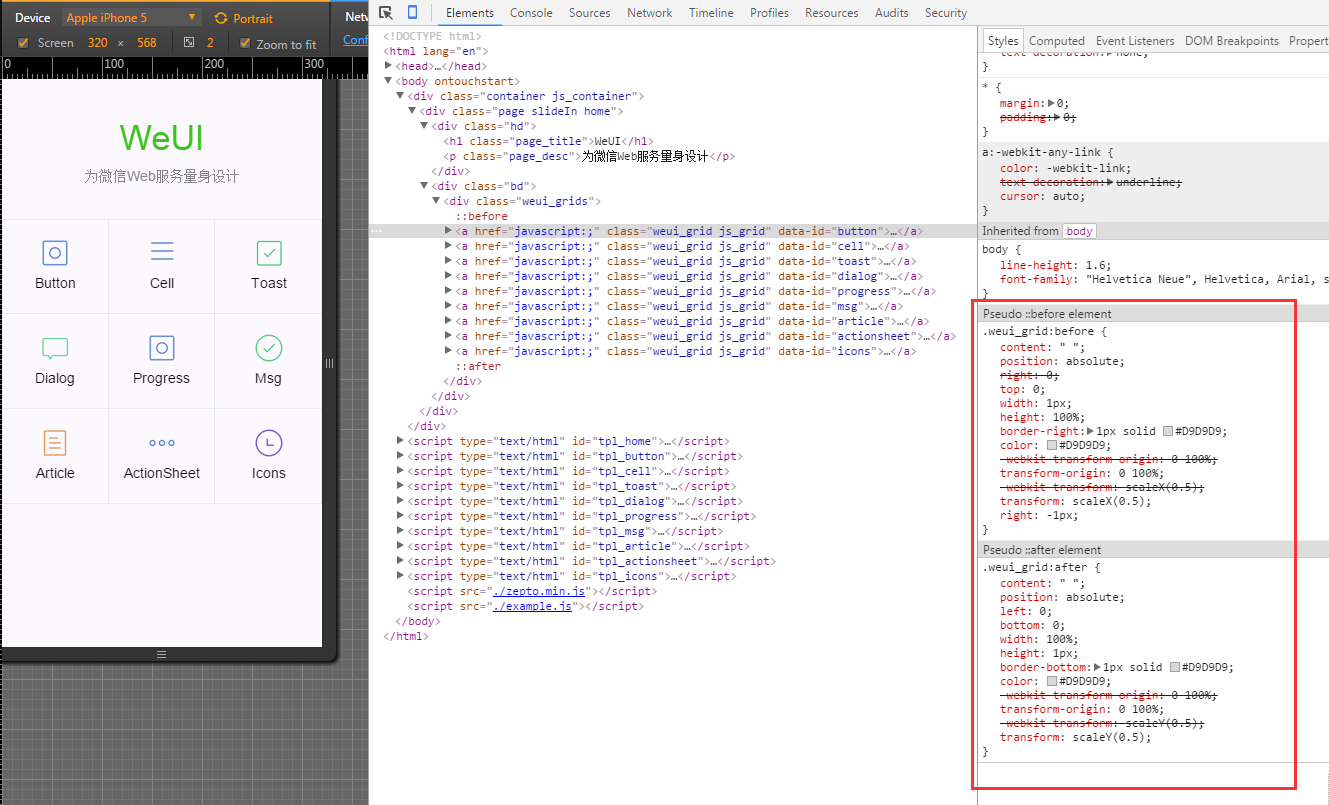
微信WeUI的
.weui_grid:before {

    content: " ";

    position: absolute;

    right: 0;

    top: 0;

    width: 1px;

    height: 100%;

    border-right: 1px solid #D9D9D9;

    color: #D9D9D9;

    -webkit-transform-origin: 0 100%;

    transform-origin: 0 100%;

    -webkit-transform: scaleX(0.5);

    transform: scaleX(0.5);

    right: -1px;

}

.weui_grid:after {

    content: " ";

    position: absolute;

    left: 0;

    bottom: 0;

    width: 100%;

    height: 1px;

    border-bottom: 1px solid #D9D9D9;

    color: #D9D9D9;

    -webkit-transform-origin: 0 100%;

    transform-origin: 0 100%;

    -webkit-transform: scaleY(0.5);

    transform: scaleY(0.5);

}
再看再看看 阿里去啊 ,利用.5px 其中 hairlines挂到 <html class='hairlines'上> ios8以上支持 .5px
<script>

	if (/iP(hone|od|ad)/.test(navigator.userAgent)) {  //  就是放到html根节点上的   ios8现在普及率高了,可以省略

		var v = (navigator.appVersion).match(/OS (\d+)_(\d+)_?(\d+)?/), version = parseInt(

				v[1], 10);

		if (version >= 8) {

			document.documentElement.classList.add('hairlines')

		}

	};

</script>
.r1bt {

    border-top: 1px solid rgba(32,35,37,.15)

}

.r1bb {

    border-bottom: 1px solid rgba(32,35,37,.15)

}

.r1bl {

    border-left: 1px solid rgba(32,35,37,.15)

}

.r1br {

    border-right: 1px solid rgba(32,35,37,.15)

}

.r1b {

    border: 1px solid rgba(32,35,37,.15)

}

.hairlines .r1bt,.hairlines .r1bb,.hairlines .r1bl,.hairlines .r1br,.hairlines .r1b {

    border-width: .5px!important

}
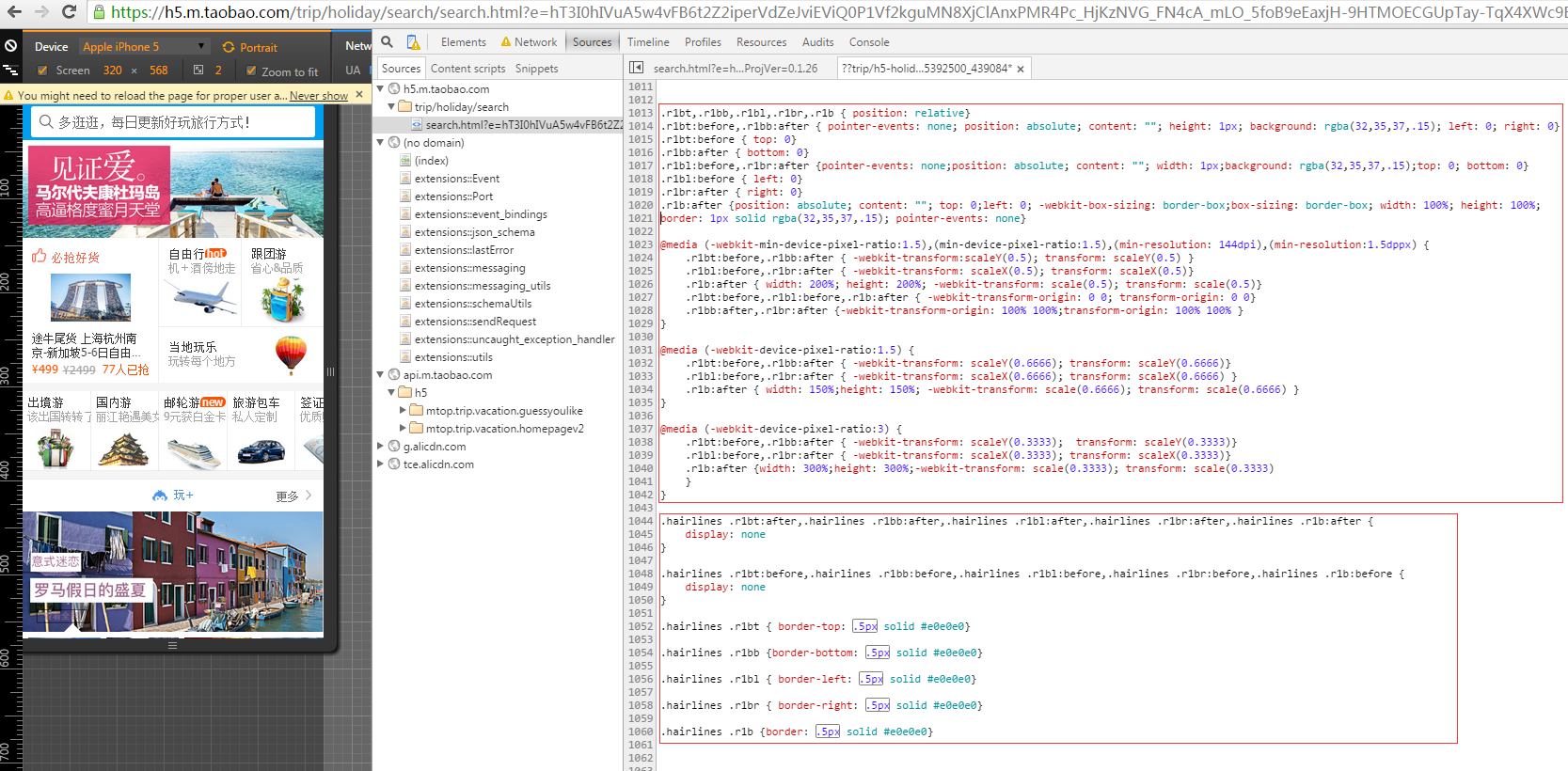
阿里去啊 另一种 transform: scale(x) 缩放 ,兼容性适用性非常好 推荐使用
/*Retian 1px border start */

.retinabt,.retinabb,.retinabl,.retinabr,.retinab{position:relative;}

.retinabt:before,.retinabb:after{pointer-events:none;position:absolute;content:"";height:1px;background:rgba(32,35,37,.14);left:0;right:0;z-index:26;}

.retinabt:before{top:0;z-index:26;}

.retinabb:after{bottom:0;z-index:26;}

.retinabl:before,.retinabr:after{pointer-events:none;position:absolute;content:"";width:1px;background:rgba(32,35,37,.14);top:0;bottom:0}

.retinabl:before{left:0;z-index:26;}

.retinabr:after{right:0;z-index:26;}

.retinab:after{position:absolute;content:"";top:0;left:0;-webkit-box-sizing:border-box;box-sizing:border-box;width:100%;height:100%;border:1px solid rgba(32,35,37,.14);pointer-events:none;z-index:26;}

@media (-webkit-min-device-pixel-ratio:1.5),(min-device-pixel-ratio:1.5),(min-resolution:144dpi),(min-resolution:1.5dppx){

.retinabt:before,.retinabb:after{-webkit-transform:scaleY(.5);transform:scaleY(.5) }

.retinabl:before,.retinabr:after{-webkit-transform:scaleX(.5);transform:scaleX(.5) }

.retinab:after{width:200%;height:200%;-webkit-transform:scale(.5);transform:scale(.5) }

.retinabt:before,.retinabl:before,.retinab:after{-webkit-transform-origin:0 0;transform-origin:0 0}

.retinabb:after,.retinabr:after{-webkit-transform-origin:100% 100%;transform-origin:100% 100%}

}

@media (-webkit-device-pixel-ratio:1.5){

.retinabt:before,.retinabb:after{-webkit-transform:scaleY(.6666);transform:scaleY(.6666) }

.retinabl:before,.retinabr:after{-webkit-transform:scaleX(.6666);transform:scaleX(.6666)}

.retinab:after{width:150%;height:150%;-webkit-transform:scale(.6666);transform:scale(.6666) }

}

@media (-webkit-device-pixel-ratio:3){

.retinabt:before,.retinabb:after{-webkit-transform:scaleY(.3333);transform:scaleY(.3333)}

.retinabl:before,.retinabr:after{-webkit-transform:scaleX(.3333);transform:scaleX(.3333)}

.retinab:after{width:300%;height:300%;-webkit-transform:scale(.3333);transform:scale(.3333)}

}

@media (-webkit-min-device-pixel-ratio:4),(min-device-pixel-ratio:4){

.retinabt:before,.retinabb:after{-webkit-transform:scaleY(.25);transform:scaleY(.25)}

.retinabl:before,.retinabr:after{-webkit-transform:scaleX(.25);transform:scaleX(.25)}

.retinab:after{width:400%;height:400%;-webkit-transform:scale(.25);transform:scale(.25)}

}

/*Retina 1px border end */
然后 再看看rem的解决方案
美团的 (使用rem,但是不随屏幕大小而计算根节点html的font-size,适合列表较多)
<script type="text/javascript">

        //根据屏幕大小及dpi调整缩放和大小

        (function() {

            var scale = 1.0;

            var ratio = 1;

            if (window.devicePixelRatio >= 2) {

                scale *= 0.5;

                ratio *= 2;

            }

            var text = '<meta name="viewport" content="initial-scale=' + scale + ', maximum-scale=' + scale +', minimum-scale=' + scale + ', width=device-width, user-scalable=no" />';

            document.write(text);

            document.documentElement.style.fontSize = 50*ratio + "px";

        })();

    </script>
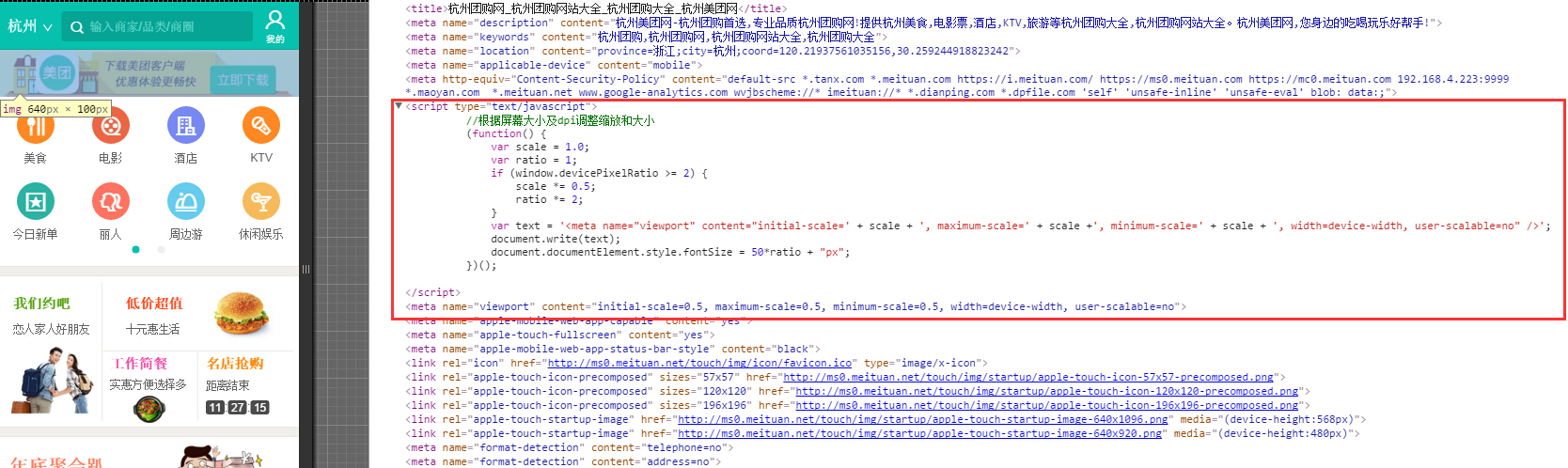
我们把美团的 拷贝过来使用,发现 安卓自带的浏览器(app内嵌h5不得不考虑)有的 不兼容 开始整体字体放大,应该是没有正确获取设备的实际宽度,(手头没有那么多安卓测试手机,主要是自带浏览器出现问题),不知到美团怎么处理的,我想到的用这个 target-densittydpi=device-dpi hack下;是可以的 或者加个 计时器 延迟 50毫秒 获取设备的正确实际宽度;
 <meta name="viewport" content="target-densitydpi=device-dpi">  <!--安卓自带的 device-width 先不加 否则iphone 随进线条出现问题 -->

<script>

+function(win,doc,undefined) {//根据屏幕大小及dpi调整缩放和大小

	var scale = 1.0,ratio = 1,dc=doc,viewporttexts='';

	if (win.devicePixelRatio && devicePixelRatio >= 1.5) {

		ratio = devicePixelRatio;

		scale = scale/(devicePixelRatio);

	}

	//var texts = '<meta  name="viewport" content="initial-scale=' + scale + ', maximum-scale=' + scale +', minimum-scale=' + scale + ', width=device-width, user-scalable=no" />';

	// dc.write(texts);

	  viewporttexts = ' width=device-width, initial-scale=' + scale + ', maximum-scale=' + scale +', minimum-scale=' + scale + ',user-scalable=no';

      doc.querySelector('meta[name="viewport"]').setAttribute("content",viewporttexts);

	   console.log('111');

      dc.documentElement.style.fontSize =doc.getElementsByTagName("html")[0].style.fontSize=Math.ceil(50*ratio) + "px";

}(window,document);

 </script>
最后淘宝的 等等(大部分rem都是 随屏幕大小而计算 根节点大小 ) 这段代码有点旧了 https://github.com/amfe/lib-flexible
;(function(win, lib) {

    var doc = win.document;

    var docEl = doc.documentElement;

    var metaEl = doc.querySelector('meta[name="viewport"]');

    var flexibleEl = doc.querySelector('meta[name="flexible"]');

    var dpr = 0;

    var scale = 0;

    var tid;

    var flexible = lib.flexible || (lib.flexible = {});

    if (metaEl) {

        console.warn('将根据已有的meta标签来设置缩放比例');

        var match = metaEl.getAttribute('content').match(/initial\-scale=([\d\.]+)/);

        if (match) {

            scale = parseFloat(match[1]);

            dpr = parseInt(1 / scale);

        }

    } else if (flexibleEl) {

        var content = flexibleEl.getAttribute('content');

        if (content) {

            var initialDpr = content.match(/initial\-dpr=([\d\.]+)/);

            var maximumDpr = content.match(/maximum\-dpr=([\d\.]+)/);

            if (initialDpr) {

                dpr = parseFloat(initialDpr[1]);

                scale = parseFloat((1 / dpr).toFixed(2));

            }

            if (maximumDpr) {

                dpr = parseFloat(maximumDpr[1]);

                scale = parseFloat((1 / dpr).toFixed(2));

            }

        }

    }

    if (!dpr && !scale) {

        var isAndroid = win.navigator.appVersion.match(/android/gi);

        var isIPhone = win.navigator.appVersion.match(/iphone/gi);

        var devicePixelRatio = win.devicePixelRatio;

        if (isIPhone) {

            // iOS下,对于2和3的屏,用2倍的方案,其余的用1倍方案

            if (devicePixelRatio >= 3 && (!dpr || dpr >= 3)) {

                dpr = 3;

            } else if (devicePixelRatio >= 2 && (!dpr || dpr >= 2)){

                dpr = 2;

            } else {

                dpr = 1;

            }

        } else {

            // 其他设备下,仍旧使用1倍的方案

            dpr = 1;

        }

        scale = 1 / dpr;

    }

    docEl.setAttribute('data-dpr', dpr);

    if (!metaEl) {

        metaEl = doc.createElement('meta');

        metaEl.setAttribute('name', 'viewport');

        metaEl.setAttribute('content', 'initial-scale=' + scale + ', maximum-scale=' + scale + ', minimum-scale=' + scale + ', user-scalable=no');

        if (docEl.firstElementChild) {

            docEl.firstElementChild.appendChild(metaEl);

        } else {

            var wrap = doc.createElement('div');

            wrap.appendChild(metaEl);

            doc.write(wrap.innerHTML);

        }

    }

    function refreshRem(){

        var width = docEl.getBoundingClientRect().width;

        if (width / dpr > 540) {

            width = 540 * dpr;

        }

        var rem = width / 10;

        docEl.style.fontSize = rem + 'px';

        flexible.rem = win.rem = rem;

    }

    win.addEventListener('resize', function() {

        clearTimeout(tid);

        tid = setTimeout(refreshRem, 300);

    }, false);

    win.addEventListener('pageshow', function(e) {

        if (e.persisted) {

            clearTimeout(tid);

            tid = setTimeout(refreshRem, 300);

        }

    }, false);

    if (doc.readyState === 'complete') {

        doc.body.style.fontSize = 12 * dpr + 'px';

    } else {

        doc.addEventListener('DOMContentLoaded', function(e) {

            doc.body.style.fontSize = 12 * dpr + 'px';

        }, false);

    }

    refreshRem();

    flexible.dpr = win.dpr = dpr;

    flexible.refreshRem = refreshRem;

    flexible.rem2px = function(d) {

        var val = parseFloat(d) * this.rem;

        if (typeof d === 'string' && d.match(/rem$/)) {

            val += 'px';

        }

        return val;

    }

    flexible.px2rem = function(d) {

        var val = parseFloat(d) / this.rem;

        if (typeof d === 'string' && d.match(/px$/)) {

            val += 'rem';

        }

        return val;

    }

})(window, window['lib'] || (window['lib'] = {}));
用rem写1px 维护行方便;图片高度可以用rem固定高度,防止加载时出现高度自动网速加载慢导致的明显塌陷;
缺点: 动态控制 viewport retina下,无论美团还是淘宝用 rem始终还有许多细小的问题;在ios上浏览器打开仔细看还是看的出的,安卓上没看出来;
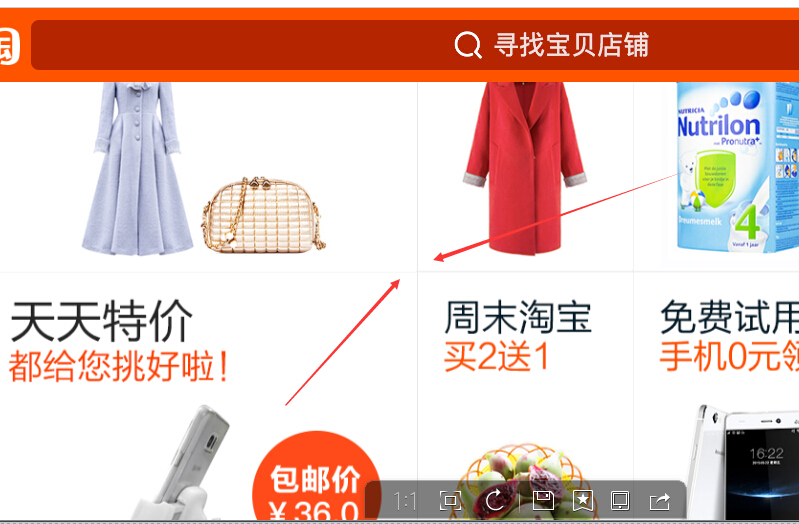
有时候retina下, viewport 缩放动态控制字体大小;<meta name="viewport" content="initial-scale=0.5, maximum-scale=0.5, minimum-scale=0.5, user-scalable=no"> 竖线或者奇数偶数行横线 或者动态添加显示的元素 之后的1px线条,有的1.1px 或者1.2px等等...拿手机仔细看下,观察iphone5 以及iphone6 safari以及其他浏览器对比下就知道,以下是截图出来问题的(只是示范一下 红色箭头的 border 线条 ),同样都是像素比 ratio=2 真机上细看还是明显的;
先看看iphone6 的截图 文字 ktv右侧的1px border正常;

再看看 下面 iphone5s的截图 刷选左侧的1px正常; ip6第一条正常;ip5s最后一条正常;


上面iphone5s 截图 美团KTV 全城 默认排序 刷选的 分割线 ;iphone5s 刷选的那条是正常的鹅;前面3条1px多了点;ip6上则不是;
有的 竖线始终 感觉 宽度是 不是1px;宽了一点点;首页美食类目进去;每个店铺边框 偶尔几条线条是1px多了一点点;
下面是iphone6 plus 的截图 100状态下 ; iphone6 plus 的截图还是看的出来 ;比较明显 奇数偶数行线条 不一致的 问题;;

淘宝网 iophone5s 横向 屏幕截图
喜欢那种就用那种好了;
顺便附个H5 Canvas Retina屏幕处理的1px的函数
/**

 * HiDPI Canvas Polyfill (1.0.9)

 *

 * Author: Jonathan D. Johnson (http://jondavidjohn.com)

 * Homepage: https://github.com/jondavidjohn/hidpi-canvas-polyfill

 * Issue Tracker: https://github.com/jondavidjohn/hidpi-canvas-polyfill/issues

 * License: Apache 2.0

*/

;(function(prototype) {

	var pixelRatio = (function(context) {

			var backingStore = context.backingStorePixelRatio ||

						context.webkitBackingStorePixelRatio ||

						context.mozBackingStorePixelRatio ||

						context.msBackingStorePixelRatio ||

						context.oBackingStorePixelRatio ||

						context.backingStorePixelRatio || 1;

			return (window.devicePixelRatio || 1) / backingStore;

		})(prototype),

		forEach = function(obj, func) {

			for (var p in obj) {

				if (obj.hasOwnProperty(p)) {

					func(obj[p], p);

				}

			}

		},

		ratioArgs = {

			'fillRect': 'all',

			'clearRect': 'all',

			'strokeRect': 'all',

			'moveTo': 'all',

			'lineTo': 'all',

			'arc': [0,1,2],

			'arcTo': 'all',

			'bezierCurveTo': 'all',

			'isPointinPath': 'all',

			'isPointinStroke': 'all',

			'quadraticCurveTo': 'all',

			'rect': 'all',

			'translate': 'all',

			'createRadialGradient': 'all',

			'createLinearGradient': 'all'

		};

	if (pixelRatio === 1) return;

	forEach(ratioArgs, function(value, key) {

		prototype[key] = (function(_super) {

			return function() {

				var i, len,

					args = Array.prototype.slice.call(arguments);

				if (value === 'all') {

					args = args.map(function(a) {

						return a * pixelRatio;

					});

				}

				else if (Array.isArray(value)) {

					for (i = 0, len = value.length; i < len; i++) {

						args[value[i]] *= pixelRatio;

					}

				}

				return _super.apply(this, args);

			};

		})(prototype[key]);

	});

	 // Stroke lineWidth adjustment

	prototype.stroke = (function(_super) {

		return function() {

			this.lineWidth *= pixelRatio;

			_super.apply(this, arguments);

			this.lineWidth /= pixelRatio;

		};

	})(prototype.stroke);

	// Text

	//

	prototype.fillText = (function(_super) {

		return function() {

			var args = Array.prototype.slice.call(arguments);

			args[1] *= pixelRatio; // x

			args[2] *= pixelRatio; // y

			this.font = this.font.replace(

				/(\d+)(px|em|rem|pt)/g,

				function(w, m, u) {

					return (m * pixelRatio) + u;

				}

			);

			_super.apply(this, args);

			this.font = this.font.replace(

				/(\d+)(px|em|rem|pt)/g,

				function(w, m, u) {

					return (m / pixelRatio) + u;

				}

			);

		};

	})(prototype.fillText);

	prototype.strokeText = (function(_super) {

		return function() {

			var args = Array.prototype.slice.call(arguments);

			args[1] *= pixelRatio; // x

			args[2] *= pixelRatio; // y

			this.font = this.font.replace(

				/(\d+)(px|em|rem|pt)/g,

				function(w, m, u) {

					return (m * pixelRatio) + u;

				}

			);

			_super.apply(this, args);

			this.font = this.font.replace(

				/(\d+)(px|em|rem|pt)/g,

				function(w, m, u) {

					return (m / pixelRatio) + u;

				}

			);

		};

	})(prototype.strokeText);

})(CanvasRenderingContext2D.prototype);

;(function(prototype) {

	prototype.getContext = (function(_super) {

		return function(type) {

			var backingStore, ratio,

				context = _super.call(this, type);

			if (type === '2d') {

				backingStore = context.backingStorePixelRatio ||

							context.webkitBackingStorePixelRatio ||

							context.mozBackingStorePixelRatio ||

							context.msBackingStorePixelRatio ||

							context.oBackingStorePixelRatio ||

							context.backingStorePixelRatio || 1;

				ratio = (window.devicePixelRatio || 1) / backingStore;

				if (ratio > 1) {

					this.style.height = this.height + 'px';

					this.style.width = this.width + 'px';

					this.width *= ratio;

					this.height *= ratio;

				}

			}

			return context;

		};

	})(prototype.getContext);

})(HTMLCanvasElement.prototype);
本文地址 http://www.cnblogs.com/surfaces/p/4324044.html
移动端 Retina屏 各大主流网站1px的解决方案的更多相关文章
- 移动端Retina屏边框线1px 显示为2px或3px问题解决方法
我们在开发移动端web项目时经常遇到设置border:1px,但是显示的边框却为2px或是3px粗细,这是因为设备像素比devicePixelRatio为2或3引起的. 1.何为“设备像素比dev ...
- 移动端Retina屏boder 1px显示为2px或3px的解决方法
我们在开发移动端web项目时经常遇到设置border:1px,但是显示的边框却为2px或是3px粗细,这是因为设备像素比devicePixelRatio为2或3引起的. 何为“设备像素比deviceP ...
- 移动端 Retina屏border实现0.5px
首先来看一下造成Retina边框变粗的原因 其实这个原因很简单,因为css中的1px并不等于移动设备的1px,这些由于不同的手机有不同的像素密度.在window对象中有一个devicePixelRat ...
- 移动端,多屏幕尺寸高清屏retina屏适配的解决方案
移动端高清.多屏适配方案 背景 开发移动端H5页面 面对不同分辨率的手机 面对不同屏幕尺寸的手机 视觉稿 在前端开发之前,视觉MM会给我们一个psd文件,称之为视觉稿. 对于移动端开发而言,为了做到页 ...
- python下载各大主流视频网站电影
You-Get 是一个命令行工具, 用来下载各大视频网站的视频, 是我目前知道的命令行下载工具中最好的一个, 之前使用过 youtube-dl, 但是 youtube-dl 吧, 下载好的视频是分段的 ...
- 7种方法解决移动端Retina屏幕1px边框问题
在Reina(视网膜)屏幕的手机上,使用CSS设置的1px的边框实际会比视觉稿粗很多.在之前的项目中,UI告诉我说我们移动项目中的边框全部都变粗了,UI把他的设计稿跟我的屏幕截图跟我看,居然真的不一样 ...
- 7种方法实现移动端Retina屏幕1px边框效果
在Reina(视网膜)屏幕的手机上,使用CSS设置的1px的边框实际会比视觉稿粗很多.在之前的项目中,UI告诉我说我们移动项目中的边框全部都变粗了,UI把他的设计稿跟我的屏幕截图跟我看,居然真的不一样 ...
- 6 大主流 Web 框架优缺点对比:15篇前端热文回看
摘自:http://blog.csdn.net/VhWfR2u02Q/article/details/78993079 注:以下文章,点击标题即可阅读 <6 大主流 Web 框架优缺点对比> ...
- retina屏 适配问题
物理像素(physical pixel) 一个物理像素是显示器(手机屏幕)上最小的物理显示单元,在操作系统的调度下,每一个设备像素都有自己的颜色值和亮度值. 设备独立像素(density-indepe ...
随机推荐
- Unity3D发布WebPlayer时Failed to download data file解决方案
今天发布WebPlayer时, 发现直接打开html是可以正常运行的, 但是通过iis访问的话就会报错: Failed to download data file. 一开始以为是防火墙, 后来发现不是 ...
- 准备踏入IT编程的学子们,你们第一门编程语言选谁? Are You Ready? Go!
Are You Ready? Go! ——第一门编程语言选谁? 金旭亮 说明: 这篇文章是专门针对大学低年级学生(和其他软件开发初学者)写的,如果你己经是研究生或本科高年级学生,请将这篇文章转发给你的 ...
- linux下Oracle11g RAC搭建(九)
linux下Oracle11g RAC搭建(九) 八.创建ASM仓储 相同在图形化界面操作 [root@node1 ~]# su - grid [grid@node1 ~]$ asmca //创 ...
- crashRpt用法
从官网上下载crashRpt的源代码,按说明编译出对应的lib和dll 1 在编译crashRpt的时候,在环境变量中设置 crashrptDir=D:\work\AIW\WebMicaps\Web ...
- ListView IllegalStateException
贴出源代码: android.widget.ListView ... if(mItemCount == 0){ resetList(); invokeOnItemScrollListener(); r ...
- ORA-00020的思考
今天,历史的图书馆例行检查DB,发现alert.log有一"ORA-00020: maximum number of processes (150) exceeded",这是一个常 ...
- Java乔晓松-android的四大组件之一Service(服务的绑定)
android的四大组件之一Service(服务的绑定) 怎么绑定服务,又怎么解除服务,代码如下: MainActivity.java源码: package com.example.lesson14_ ...
- C语言程序代写(Linux下线程)
联系QQ:928900200 CSCI 3120 Operating Systems Summer 2014 Handout 3Assignment 2Date Due: June 5, 2014 b ...
- Google Maps Android API v2 (4)- 地图类型
地图类型 地图内的谷歌地图的Android API的种类有很多.地图的类型管辖地图的整体代表性.例如,地图集通常包含政治地图,专注于显示边界和道路地图,显示了一个城市或地区的所有道路. Android ...
- WPF中对三维模型的控制
原文:WPF中对三维模型的控制 (以下选自南开大学出版社出版的<WPF和Silverlight教程>) 3Dmax中的建模模型可以导出为obj文件格式,将此文件导入WPF项目中,由WPF完 ...