
WebAPI客户端
封装WebAPI客户端,附赠Nuget打包上传VS拓展工具
一、前言
上篇《 WebAPI使用多个xml文件生成帮助文档 》有提到为什么会出现基于多个xml文件生成帮助文档的解决方案,因为定义的模型可能的用处有:
1:单元测试
2:其他项目引用(可能以Nuget包的形式)
3:WebAPI客户端(封装的HttpClient及WebAPI接口调用,其实包含在第2点内..)
要源码的可以直接拉到最下面,源码一如既往的还在那。
二、为什么要封装WebAPI客户端
1:让WebAPI对于调用者来说“透明”,直接以引用程序集的方式。
2:统一项目内调用入口(当然了,非要绕过直接去请求接口肯定也是可以得,但是这是团队管理的问题)。
3:组合接口调用
4:版本化(通过Nuget,不论是自建还是Nuget.org)
三、封装的WebAPI客户端都包含些什么
这里继续使用 WebAPI2PostMan 项目来演示。
首先,因为将WebAPI的接口以HttpClient来进行封装,那至少需要定义出接口的请求路由,此处仅定义出了两处。
我们在解决方案新建一个类库项目,并将其命名为 WebAPI2PostMan.Client ,接着添加一个名为 WebApi2PostManStatic 的类
- using System.Configuration;
- namespace WebAPI2PostMan.Client
- {
- /// <summary>
- /// WebApi2PostMan静态资源类
- /// </summary>
- public class WebApi2PostManStatic
- {
- /// <summary>
- /// 服务地址
- /// </summary>
- public static string ServiceUrl = ConfigurationManager.AppSettings["WebAPI2PostManServiceUrl"];
- /// <summary>
- /// 获取所有产品
- /// </summary>
- public static string RouteProductGetAll = "api/Product/All";
- /// <summary>
- /// 添加产品
- /// </summary>
- public static string RouteProductAdd = "api/Product/Add";
- }
- }
接口请求无非就是Http的那几个方法,但此处仅认为我们的接口只包含Get和Post两种Http请求方法。
基于此,我们定义出一个WebApiHelper类。
- /// <summary>
- /// WebAPI帮助类
- /// </summary>
- public class WebApiHelper
- {
- public static T1 CallPostWebApi<T1, T2>(string url, T2 request, string serviceUrl, int? timeOut = 10)
- public static T1 CallGetWebApi<T1>(string url, string serviceUrl, int? timeOut = 10)
- public static List<TResponse> CallWebApiBatch<TRequest, TResponse>(HttpMethod method, string endpoint, List<TRequest> batchRequestModels, string url, string serviceUrl, int? timeOut = 10)
- public static async Task<T1> CallPostWebApiAsync<T1, T2>(string url, T2 request, string serviceUrl, int? timeOut = 10)
- public static async Task<T1> CallGetWebApiAsync<T1>(string url, string serviceUrl, int? timeOut = 10)
- public static async Task<List<TResponse>> CallWebApiBatchAsync<TRequest, TResponse>(HttpMethod method,string endpoint,List<TRequest> batchRequestModels,string url,string serviceUrl,int? timeOut=10)
- }
为了节省篇幅和便于观看,将实现都删去了,可以看到定义了6个方法,分为同步和异步一共三类,Get , Post ,Batch(批量接口,有感兴趣的就下篇讲讲)。
然后,再添加一个用于封装的类 WebApi2PostManClient。
- using System.Collections.Generic;
- using WebAPI2PostMan.WebModel;
- namespace WebAPI2PostMan.Client
- {
- /// <summary>
- /// WebApi2PostMan 客户端
- /// </summary>
- public class WebApi2PostManClient
- {
- /// <summary>
- /// 获取所有产品
- /// </summary>
- /// <param name="timeout">超时时间</param>
- /// <returns>产品列表</returns>
- public static IEnumerable<Product> GetAllProduct(int? timeout = 10)
- {
- return WebApiHelper.CallGetWebApi<IEnumerable<Product>>(WebApi2PostManStatic.RouteProductGetAll,WebApi2PostManStatic.ServiceUrl,timeout);
- }
- /// <summary>
- /// 添加产品
- /// </summary>
- /// <param name="request">添加的产品</param>
- /// <param name="timeout">超时时间</param>
- /// <returns>添加结果</returns>
- public static string AddProduct(Product request,int? timeout = 10)
- {
- return WebApiHelper.CallPostWebApi<string, Product>(WebApi2PostManStatic.RouteProductAdd, request,WebApi2PostManStatic.ServiceUrl, timeout);
- }
- }
- }
四、使用Nuget包管理器来发布WebAPI2PostMan.Client
怎么搭建NugetServer就不赘述了,新建一个空的web项目接着程序包控制台输入
- PM> Install-Package NuGet.Server
然后该有的都会有了,直接发布到IIS即可。
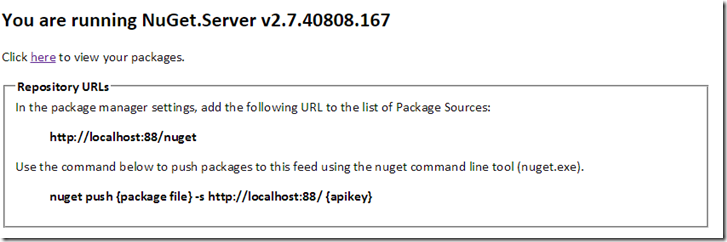
此时,本地已经有一个NugetServer了,浏览如下。
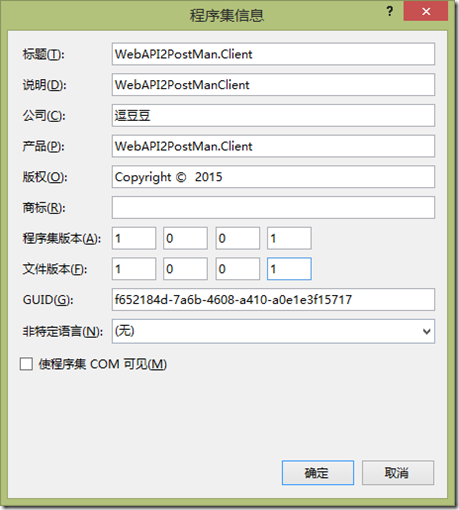
右键项目 WebAPI2PostMan.Client => 属性 => 应用程序 => 程序集信息,补全一些信息。
运行命令行并定位到当前项目目录,执行
- nuget pack WebAPI2PostMan.Client.csproj -s http://localhost:88 123
此处的nuget是配的环境变量,也可以替换成( 路径/NuGet.exe ),若启用了 NuGet 程序包还原的话,解决方案目录下的文件夹.nuget内会有NuGet.exe及其配置。
http://localhost:88 即为server地址,此处切不可加/nuget,否则会报403. 后面是密码,默认没设置的话会有警告并提示使用nuget setApiKey 设置。
那么其实一直以来都是做一个批处理脚本来打包并上传我们的包。
或者是dudu很久以前发的《用Nuget管理好自家的包包i》以及 http://www.cnblogs.com/lzrabbit/tag/NuGet/ 讲的都很详细。
还有《将nuget与VS直接集成,实现一键上传等功能》,只不过是需要手动设置的。
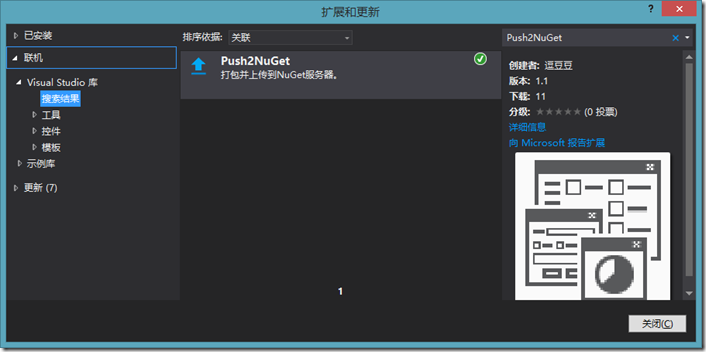
为了不想这么麻烦,顺手写了一个VS的拓展工具 Push2NuGet 来简化这些操作。
首先在 工具=》拓展和更新=》联机=》Visual Studio库 =》输入 Push2NuGet 安装,重启解决方案。
因为是一口气写出来的,没想好 一些服务参数放哪,就暂时扔到.nuget文件夹下,因此,需要在.nuget文件夹下 新建一个NuGet.xml的文件并完善信息。
- <?xml version="1.0" encoding="utf-8"?>
- <SelfServer>
- <Url>http://localhost:88</Url>
- <ApiKey>123</ApiKey>
- </SelfServer>
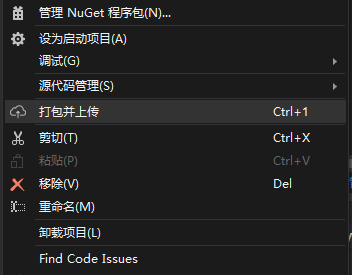
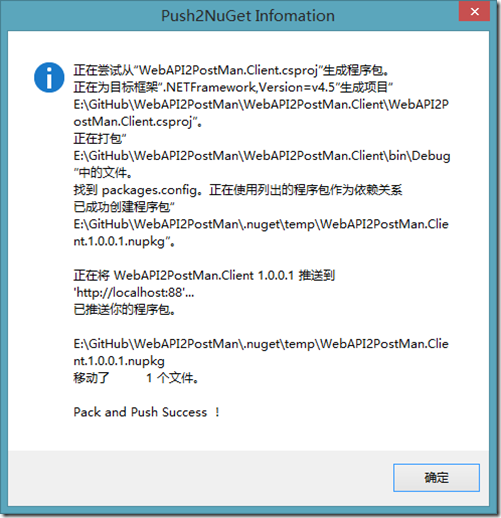
然后右键项目点击【打包并上传】即可。
成功后显示。
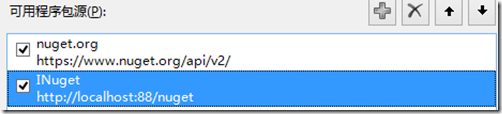
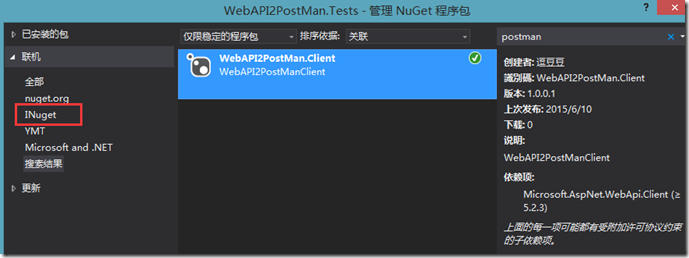
新建一个 单元测试项目 WebAPI2PostMan.Tests 并在Nuget里设置Nuget源。
安装刚才上传的 WebAPI2PostMan.Client
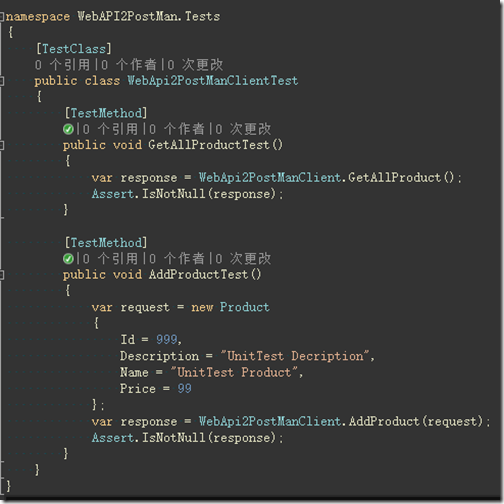
添加两个单元测试方法
五、源码
示例源码:https://github.com/yanghongjie/WebAPI2PostMan
拓展工具:https://github.com/yanghongjie/Push2NugetServer
既然都看到这了,顺手评价再赏个推荐呗!
WebAPI客户端的更多相关文章
- 封装WebAPI客户端,附赠Nuget打包上传VS拓展工具
一.前言 上篇< WebAPI使用多个xml文件生成帮助文档 >有提到为什么会出现基于多个xml文件生成帮助文档的解决方案,因为定义的模型可能的用处有: 1:单元测试 2:其他项目引用(可 ...
- 一种类似Retrofit声明接口即可实现调用的WebApi客户端框架
为.Net出力 java有okhttp,还在okhttp这上搞了一个retrofit,.net有HttpClient,但目前我没有发现有类似的retrofit框架.最近在搞mqtt的webApi封装, ...
- (3)WebApi客户端调用
1.创建一个应用台控制程序,可以把Model的引用,用下面的方法拖拽上来(解决方案里没有这个文件,只是这个文件的引用) 2.Program.cs using System; using System ...
- WebApi用JilFormatter处理客户端序列化的字符串加密,之后在服务端解析。
本文有改动,参考原文:https://www.cnblogs.com/liek/p/4888201.html https://www.cnblogs.com/tonykan/p/3963875.htm ...
- WebAPI使用多个xml文件生成帮助文档
一.前言 上篇有提到在WebAPI项目内,通过在Nuget里安装(Microsoft.AspNet.WebApi.HelpPage)可以根据注释生成帮助文档,查看代码实现会发现是基于解析项目生成的xm ...
- WebAPI使用多个xml文件生成帮助文档(转)
http://www.cnblogs.com/idoudou/p/xmldocumentation-for-web-api-include-documentation-from-beyond-the- ...
- 【转】WebAPI使用多个xml文件生成帮助文档
来自:http://www.it165.net/pro/html/201505/42504.html 一.前言 上篇有提到在WebAPI项目内,通过在Nuget里安装(Microsoft.AspNet ...
- webapi跨域实现(CROS、JSONP)
CROS: /// <summary> /// 支持WebAPI服务器端跨域 /// </summary> public class ServerCrossDomainAttr ...
- 我的“第一次”,就这样没了:DDD(领域驱动设计)理论结合实践
写在前面 插一句:本人超爱落网-<平凡的世界>这一期,分享给大家. 阅读目录: 关于DDD 前期分析 框架搭建 代码实现 开源-发布 后记 第一次听你,清风吹送,田野短笛:第一次看你,半弯 ...
随机推荐
- Android研究之手PullToRefresh(ListView GridView 下拉刷新)使用具体解释
群里一哥们今天聊天偶然提到这个git hub上的控件:pull-to-refresh ,有兴趣的看下,样例中的功能极其强大,支持非常多控件.本篇博客具体给大家介绍下ListView和GridVi ...
- DDDLite的权限管理
领域驱动设计实战—基于DDDLite的权限管理 在园子里面,搜索一下“权限管理”至少能得到上千条的有效记录.记得刚开始工作的时候,写个通用的权限系统一直是自己的一个梦想.中间因为工作忙(其实就是懒 ...
- IOS基金会_ UICollectionView简单易用
和表格视图类似 UICollectionView的使用有两种方法 一种是继承UICollectionViewController,这个Controller会自带一个UICollectionView. ...
- Chapter 1 Securing Your Server and Network(9):使用Kerberos用于身份验证
原文:Chapter 1 Securing Your Server and Network(9):使用Kerberos用于身份验证 原文出处:http://blog.csdn.net/dba_huan ...
- 在SSMS里查看TDS数据包内容
原文:在SSMS里查看TDS数据包内容 在SSMS里查看TDS数据包内容 摘抄自<SQLSERVER2012实施与管理实战指南> 要具体查看TDS数据库的内容,我们可以: 用NETWORK ...
- 5、Cocos2dx 3.0小游戏开发的例子寻找测试三个简单的介绍和总结
繁重的劳动开发商,当转载请注明出处:http://blog.csdn.net/haomengzhu/article/details/27186557 測试例子简单介绍 Cocos2d-x 为我们提供了 ...
- MongoDB日常保养
它引入了程序来进行维护管理工具 MongoDB的日常维护包含使用配置文件,设置訪问控制.Shell交互,系统监控和管理,数据库日常备份和恢复 启动和停止MongoDB 启动后能够通过数据库的IP加po ...
- C该结构变化 struct typedef
这几天看代码,看到若干类型的结构,例如下列结构声明: struct book{ string name; int price; int num; }; 此种结构定义结构变量的格式例如以下: ...
- RH253读书笔记(3)-Lab 3 Securing Networking
Lab 3 Securing Networking Goal: To build skills with the Netfilter packet filter Sequence 1: Applyin ...
- 【LeetCode】3Sum 解决报告
这个问题是我目前的知识回答,不来,只有良好的网上搜索解决方案,发现 K Sum 它是一类问题,但是,互联网是没有更简洁的代码,我想对于谁刚开始学习的人.您可能仍然想看看这个问题该怎么解决,然后看看他们 ...