
22、整合mybatis
搭建环境:
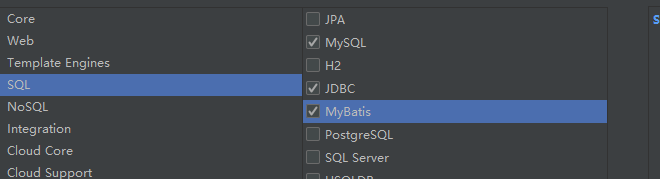
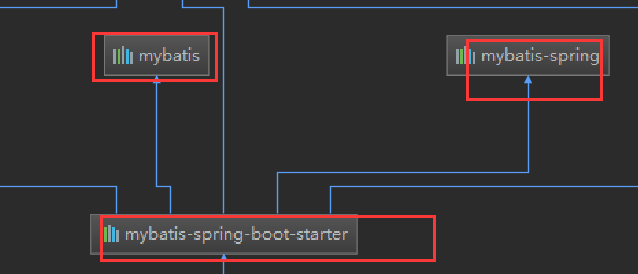
1)、创建工程需要的maven坐标

<dependency>

    <groupId>com.alibaba</groupId>

    <artifactId>druid</artifactId>

    <version>1.1.</version>

</dependency>
spring.datasource.url=jdbc:mysql://127.0.0.1:3306/users?serverTimezone=GMT

spring.datasource.username=root

spring.datasource.password=

spring.datasource.driver-class-name=com.mysql.cj.jdbc.Driver

spring.datasource.type=com.alibaba.druid.pool.DruidDataSource

#其他配置

# 下面为连接池的补充设置,应用到上面所有数据源中

spring.datasource.initialSize=

spring.datasource.minIdle=

spring.datasource.maxActive=

# 配置获取连接等待超时的时间

spring.datasource.maxWait=

# 配置间隔多久才进行一次检测,检测需要关闭的空闲连接,单位是毫秒

spring.datasource.timeBetweenEvictionRunsMillis=

# 配置一个连接在池中最小生存的时间,单位是毫秒

spring.datasource.minEvictableIdleTimeMillis=

spring.datasource.validationQuery=SELECT  FROM DUAL

spring.datasource.testWhileIdle=true

spring.datasource.testOnBorrow=false

spring.datasource.testOnReturn=false

# 配置监控统计拦截的filters,去掉后监控界面sql无法统计,'wall'用于防火墙

spring.datasource.filters=stat,wall

spring.datasource.logSlowSql=true
4)、Druid的后台监控.......
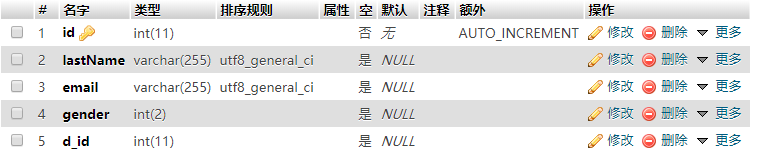
public class Employee {

    private Integer id;

    private String lastName;

    private Integer gender;

    private String email;

    private Integer dId;

...

}
public class Department {

    private Integer id;

    private String departmentName;

....

}

使用MyBatis
@Repository

//指定这是一个操作数据库的mapper

@Mapper

public interface DepartMapper {

    @Select("select * from department where id=#{id}")

    public Department getDeptById(Integer id);

    @Delete("delete from department where id=#{id}")

    public int deleteDeptById(Integer id);

    @Insert("insert into department(departmentName) values(#{departmentName})")

    public int insertDept(Department department);

    @Update("update department set department_name=#{departmentName} where id=#{id}")

    public int updateDept(Department department);

}
注解版本的都是用注解来进行标注,没有配置文件,所有的sql语句都在标签里面
controller类的实现方法:
@ResponseBody

@Controller

public class DeptController {

    @Autowired

    DepartMapper departMapper;

    //模拟查询

    @RequestMapping("/dept/{id}")

    public Department getDept(@PathVariable("id")Integer id){

        Department dept = departMapper.getDeptById(id);

        return dept;

    }

    //模拟插入

    @RequestMapping("/dept")

    public Department insertDept(Department department){

        departMapper.insertDept(department);

        return department;

    }

}
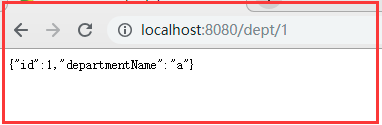
测试模拟插入:
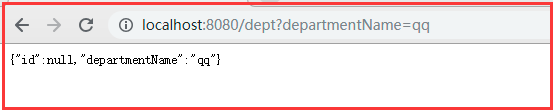
测试查询:
//使用自动生成的组件

@Options(useGeneratedKeys = true,keyProperty = "id")

@Insert("insert into department(departmentName) values(#{departmentName})")

public int insertDept(Department department);

问题:

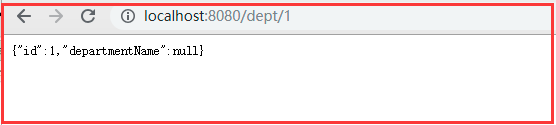
此时的数据表列值发生改变
@Select("select * from department where id=#{id}")

public Department getDeptById(Integer id);
此时执行查询department_name是封装不到对象中的

@Bean

@ConditionalOnMissingBean

public SqlSessionFactory sqlSessionFactory(DataSource dataSource) throws Exception {

    SqlSessionFactoryBean factory = new SqlSessionFactoryBean();

    factory.setDataSource(dataSource);

    factory.setVfs(SpringBootVFS.class);

    if (StringUtils.hasText(this.properties.getConfigLocation())) {

        factory.setConfigLocation(this.resourceLoader.getResource(this.properties.getConfigLocation()));

    }

    org.apache.ibatis.session.Configuration configuration = this.properties.getConfiguration();

    if (configuration == null && !StringUtils.hasText(this.properties.getConfigLocation())) {

        configuration = new org.apache.ibatis.session.Configuration();

    }

    if (configuration != null && !CollectionUtils.isEmpty(this.configurationCustomizers)) {

        Iterator var4 = this.configurationCustomizers.iterator();

        while(var4.hasNext()) {

            ConfigurationCustomizer customizer = (ConfigurationCustomizer)var4.next();

            customizer.customize(configuration);

        }

    }

......

}
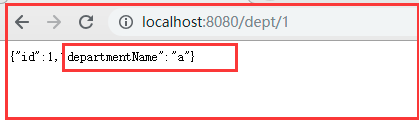
开启驼峰命名
自定义MyBatis的配置规则
@Configuration

public class MyBatisConfig {

    @Bean

    public ConfigurationCustomizer configurationCustomizer(){

        return new ConfigurationCustomizer() {

            @Override

            public void customize(org.apache.ibatis.session.Configuration configuration) {

                //开启驼峰命名发

                configuration.setMapUnderscoreToCamelCase(true);

            }

        };

    }

}
此时可以封装到对象
@MapperScan(value = "com.cr.mybatis.mapper")

@SpringBootApplication

public class MybatisApplication {

    public static void main(String[] args) {

        SpringApplication.run(MybatisApplication.class, args);

    }

}
2)、配置文件的方式
@Repository

public interface EmployeeMapper {

    public Employee getById(Integer id);

    public void insertEmp(Employee employee);

}
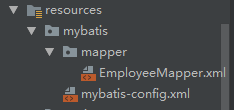
mybatis配置文件:
mybatis-config.xml
<?xml version="1.0" encoding="UTF-8" ?>

<!DOCTYPE configuration

        PUBLIC "-//mybatis.org//DTD Config 3.0//EN"

        "http://mybatis.org/dtd/mybatis-3-config.dtd">

<configuration>

    <settings>

        <setting name="mapUnderscoreToCamelCase" value="true"/>

    </settings>

</configuration>
EmployeeMapper.xml
<?xml version="1.0" encoding="UTF-8" ?>

<!DOCTYPE mapper

        PUBLIC "-//mybatis.org//DTD Mapper 3.0//EN"

        "http://mybatis.org/dtd/mybatis-3-mapper.dtd">

<mapper namespace="com.cr.mybatis.mapper.EmployeeMapper">

    <select id="getById"

            resultType="com.cr.mybatis.pojo.Employee">

        SELECT * FROM employee WHERE id=#{id}

    </select>

    <insert id="insertEmp">

        INSERT INTO employee(lastName,email,gender,d_id)

        VALUES (#{lastName},#{email},#{gender},#{dId})

    </insert>

</mapper>
#配置mybatis

#mybatis的配置文件

mybatis.config-location=classpath:mybatis/mybatis-config.xml

#mapper的配置文件

mybatis.mapper-locations=classpath:mybatis/mapper/*.xml
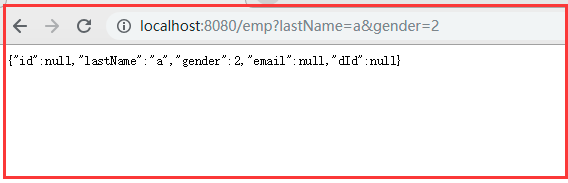
测试的controller类:
@ResponseBody

@Controller

public class EmpTest {

    @Autowired

    EmployeeMapper employeeMapper;

    //查询

    @RequestMapping("/emp/{id}")

    public Employee getEmp(@PathVariable("id") Integer id){

        Employee emp = employeeMapper.getById(id);

        return emp;

    }

    @RequestMapping("/emp")

    public Employee insert(Employee employee){

        employeeMapper.insertEmp(employee);

        return employee;

    }

}
测试:

22、整合mybatis的更多相关文章
- Spring学习总结(六)——Spring整合MyBatis完整示例
为了梳理前面学习的内容<Spring整合MyBatis(Maven+MySQL)一>与<Spring整合MyBatis(Maven+MySQL)二>,做一个完整的示例完成一个简 ...
- 分析下为什么spring 整合mybatis后为啥用不上session缓存
因为一直用spring整合了mybatis,所以很少用到mybatis的session缓存. 习惯是本地缓存自己用map写或者引入第三方的本地缓存框架ehcache,Guava 所以提出来纠结下 实验 ...
- 2017年2月16日 分析下为什么spring 整合mybatis后为啥用不上session缓存
因为一直用spring整合了mybatis,所以很少用到mybatis的session缓存. 习惯是本地缓存自己用map写或者引入第三方的本地缓存框架ehcache,Guava 所以提出来纠结下 实验 ...
- SpringBoot整合Mybatis,多数据源,事务,支持java -jar 启动.
用了一段时间SpringBoot,之前配置MYBATIS ,在打包WAR 放到tomcat下正常,但是WAR已经过时了,现在流行直接打包JAR 丢到DOCKER 里,无奈JAR 启动的时候MAPPER ...
- Spring Boot 整合 Mybatis Annotation 注解的完整 Web 案例
摘要: 原创出处 www.bysocket.com 「泥瓦匠BYSocket 」欢迎转载,保留摘要,谢谢! 『 公司需要人.产品.业务和方向,方向又要人.产品.业务和方向,方向… 循环』 本文提纲一. ...
- 简单探讨spring整合mybatis时sqlSession不需要释放关闭的问题
https://blog.csdn.net/RicardoDing/article/details/79899686 近期,在使用spring和mybatis框架编写代码时,sqlSession不需要 ...
- SpringBoot整合mybatis、shiro、redis实现基于数据库的细粒度动态权限管理系统实例
1.前言 本文主要介绍使用SpringBoot与shiro实现基于数据库的细粒度动态权限管理系统实例. 使用技术:SpringBoot.mybatis.shiro.thymeleaf.pagehelp ...
- SpringBoot31 整合SpringJDBC、整合MyBatis、利用AOP实现多数据源
一.整合SpringJDBC 1 JDBC JDBC(Java Data Base Connectivity,Java 数据库连接)是一种用于执行 SQL 语句的 Java API,可以为多种关系数 ...
- SpringBoot进阶教程 | 第四篇:整合Mybatis实现多数据源
这篇文章主要介绍,通过Spring Boot整合Mybatis后如何实现在一个工程中实现多数据源.同时可实现读写分离. 准备工作 环境: windows jdk 8 maven 3.0 IDEA 创建 ...
- springboot整合mybatis(注解)
springboot整合mybatis(注解) 1.pom.xml: <?xml version="1.0" encoding="UTF-8"?> ...
随机推荐
- [转]微信小程序联盟 跳坑《一百八十一》设置API:wx.openSetting使用说明
本文转自:http://www.wxapp-union.com/forum.php?mod=viewthread&tid=4066 这个API解决了过去一个长久以来无法解决的问题,如何让用户重 ...
- 禅道和JIRA大对比
转自:https://blog.csdn.net/qq_40543535/article/details/78182636?locationNum=9&fps=1 禅道和JIRA大对比 置顶 ...
- Silverlight & Blend动画设计系列二:旋转动画(RotateTransform)
Silverlight的基础动画包括偏移.旋转.缩放.倾斜和翻转动画,这些基础动画毫无疑问是在Silverlight中使用得最多的动画效果,其使用也是非常简单的.相信看过上一篇<偏移动画(Tra ...
- 修改django 后台admin用户的密码
python manage.py shellfrom django.contrib.auth.models import User from django.contrib.auth.models im ...
- shiro,基于springboot,基于前后端分离,从登录认证到鉴权,从入门到放弃
这个demo是基于springboot项目的. 名词介绍: ShiroShiro 主要分为 安全认证 和 接口授权 两个部分,其中的核心组件为 Subject. SecurityManager. Re ...
- Hibernate 性能优化一对一关联映射
概述: hibernate提供了两种映射一对一关联的方式:按照外键映射和按照主键映射. 下面以员工账号和员工档案为例 ,介绍两种映射方式,并使用这两种映射方式分别完成以下持久化操作: (1)保存员工档 ...
- Android 保存和恢复activity的状态数据
一般来说, 调用onPause()和onStop()方法后的activity实例仍然存在于内存中, activity的所有信息和状态数据不会消失, 当activity重新回到前台之后, 所有的改变都会 ...
- 在Ubuntu14.10中部署Hadoop2.6.0单节点伪分布集群
1. 环境信息如下: ubuntu:14.10 jdk:openjdk-1.7.0 hadoop:2.6.0 2. 下载hadoop2.6.0, http://apache.fayea.com/had ...
- Android学习——ListView的缓存机制
在使用ListView的时候,需要加载适配器和数据源,这篇文章主要介绍一下ListView的使用以及利用ListView的缓存机制来减少系统的初始化时间. ListView的使用 ListView和V ...
- 自动下载和安装 MNIST 到 TensorFlow 的 python 源码 (转)
# Copyright 2015 Google Inc. All Rights Reserved. # # Licensed under the Apache License, Version 2.0 ...