
Installing TensorFlow on Ubuntu
1、安装方法有4种,官方推荐是第一种.
virtualenv(官方推荐)
"native" pip
Docker
Anaconda
2、基于virtualenv的安装方法:
1)、Install pip and virtualenv by issuing one of the following commands:
$ sudo apt-get install python-pip python-dev python-virtualenv # for Python 2.7

$ sudo apt-get install python3-pip python3-dev python-virtualenv # for Python 3.n
2)、把virtualenv安装到目录下: 其中targetDirectory 是你要安装的目录名称,假设我们使用目录名称为tensorfolw
$ virtualenv --system-site-packages targetDirectory # for Python 2.7

$ virtualenv --system-site-packages -p python3 targetDirectory # for Python 3.n
3)、进入virtualenv环境下(假设上一步建立的目录名称为tensorfolw)
$ source ~/tensorflow/bin/activate # bash, sh, ksh, or zsh

 $ source ~/tensorflow/bin/activate.csh  # csh or tcsh
执行命令后,出现这个画面:
(tensorflow)$
4)、安装tensorflow:建议先安装只CPU的版本
 (tensorflow)$ pip install --upgrade tensorflow      # for Python 2.7

 (tensorflow)$ pip3 install --upgrade tensorflow     # for Python 3.n

 (tensorflow)$ pip install --upgrade tensorflow-gpu  # for Python 2.7 and GPU

 (tensorflow)$ pip3 install --upgrade tensorflow-gpu # for Python 3.n and GPU
如果这一步命令出现错误,说明pip version lower than 8.1
则执行下面的命令:
(tensorflow)$ pip install --upgrade https://storage.googleapis.com/tensorflow/linux/cpu/tensorflow-1.2.1-cp27-none-linux_x86_64.whl #python2.7 cpu only
5)、安装完成后,执行以下命令退出
(tensorflow)$ deactivate
6)、测试tensorflow是否安装成功
# Python

import tensorflow as tf

hello = tf.constant('Hello, TensorFlow!')

sess = tf.Session()

print(sess.run(hello))
实际操作环境截图:
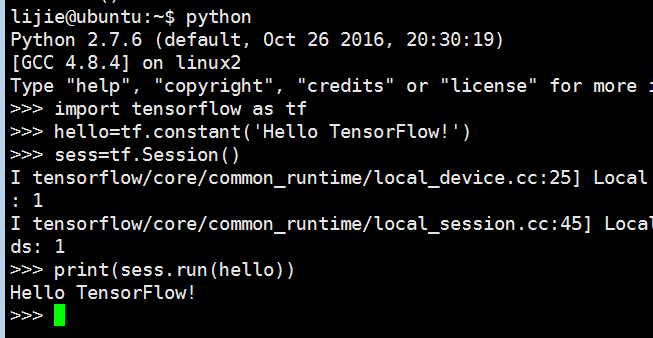
如果成功print了Hello TensorFlow的字符,说明安装成功
Installing TensorFlow on Ubuntu的更多相关文章
- Installing TensorFlow on Ubuntu or Windows
Installing TensorFlow on Ubuntu 显卡驱动:http://developer2.download.nvidia.com/compute/cuda/8.0/secure/P ...
- Installing Moses on Ubuntu 16.04
Installing Moses on Ubuntu 16.04 The process of installation To install requirements sudo apt-get in ...
- TensorFlow安装-ubuntu
windows下某些tensorflow例子跑不成功,比如https://www.tensorflow.org/tutorials/wide 中的例子报下面的错误:' 'NoneType' objec ...
- Installing python-ldap in Ubuntu
These are the steps to be followed to install python-ldap in Ubuntu. At first, sudo apt-get install ...
- 【Tensorflow】Ubuntu 安装 Tensorflow gpu
安装环境:Ubuntu 16.04lts 64位,gcc5.4 1.安装Cuda 1. 下载cuda toolkit. 下载cuda8.0 地址:https://developer.nvidia.co ...
- Compiling Xen-4.4 From Source And Installing It On Ubuntu Server (Amd-64)
First of all, you should install a clean Ubuntu Server (Amd-64) on your server. (Version 14.04 is st ...
- Installing PHP5 on Ubuntu Server
When installing PHP 5 from source I ran into the following problems and solutions: Problem:configure ...
- How to install tensorflow on ubuntu 18.04 64bit
Ans:pip install tensorflow (note: version number of pip and python must be consistent)
- Installing Redis on Ubuntu
wget http://download.redis.io/redis-stable.tar.gz tar xvzf redis-stable.tar.gz cd redis-stable sudo ...
随机推荐
- laravel5.8的使用
首先,确定电脑已经安装了composer.最好是全局安装 然后打开phpstorm的控制台: composer create-project --prefer-dist laravel/laravel ...
- Mathematica多元隐函数作图
例: ContourPlot3D[ 1/x + 1/y + 1/z == 1/10, {x, 最小值, 最大值}, {y, 最小值, 最大值}, {z, 最小值, 最大值}]
- Unity中利用委托与监听解耦合的思路
这篇随笔是一篇记录性的随笔,记录了从http://www.sikiedu.com/my/course/304,这门课程中学到的内容,附带了一些自己的思考. 一.单例模式的应用 首先假想一种情况,现在需 ...
- APP开发的三种技术对比
目前来说主流的App开发方式有三种:Native App .Web App.Hybird App.下面我们来分析一下这三种App开发方式的优劣对比: 一 :Native App 即 原生App开发 优 ...
- golang mcall
// func mcall(fn func(*g)) // Switch to m->g0's stack, call fn(g). // Fn must never return. It sh ...
- ubuntu16.04 安装python3.6
https://www.cnblogs.com/yjlch1016/p/8641910.html
- Request.QueryString 的用法
比如常见的URL网页地址都有 xxx.asp?type=reLogin ?号后面的就是querystring querystring是asp中获取数据的一个方法. 那么就可以用request.qu ...
- Javascript面向对象编程(转)
http://blog.csdn.net/lmj623565791/article/details/29210679 其实,从这个面向对象编程的例子来看,思路还是很清晰的. 第一步: 构造函数,用于初 ...
- JVM的内存分配和回收策略
对象的Class加载 虚拟机遇到一条new指令时,首先将去检查这个指令的参数是否能在常量池中定位到一个类的符号引用,并且检查这个符号引用代表的类是否已被加载.解析和初始化过.如果没有,那必须先执行相应 ...
- Linux常用命令语法+示例
原文出自:https://blog.csdn.net/seesun2012 Linux常用命令:Linux查看日志命令总结:Tomcat相关:Linux配置网卡,连接外网:Linux下安装JDK:Li ...