
Installing TensorFlow on Ubuntu
1、安装方法有4种,官方推荐是第一种.
virtualenv(官方推荐)
"native" pip
Docker
Anaconda
2、基于virtualenv的安装方法:
1)、Install pip and virtualenv by issuing one of the following commands:
$ sudo apt-get install python-pip python-dev python-virtualenv # for Python 2.7

$ sudo apt-get install python3-pip python3-dev python-virtualenv # for Python 3.n
2)、把virtualenv安装到目录下: 其中targetDirectory 是你要安装的目录名称,假设我们使用目录名称为tensorfolw
$ virtualenv --system-site-packages targetDirectory # for Python 2.7

$ virtualenv --system-site-packages -p python3 targetDirectory # for Python 3.n
3)、进入virtualenv环境下(假设上一步建立的目录名称为tensorfolw)
$ source ~/tensorflow/bin/activate # bash, sh, ksh, or zsh

 $ source ~/tensorflow/bin/activate.csh  # csh or tcsh
执行命令后,出现这个画面:
(tensorflow)$
4)、安装tensorflow:建议先安装只CPU的版本
 (tensorflow)$ pip install --upgrade tensorflow      # for Python 2.7

 (tensorflow)$ pip3 install --upgrade tensorflow     # for Python 3.n

 (tensorflow)$ pip install --upgrade tensorflow-gpu  # for Python 2.7 and GPU

 (tensorflow)$ pip3 install --upgrade tensorflow-gpu # for Python 3.n and GPU
如果这一步命令出现错误,说明pip version lower than 8.1
则执行下面的命令:
(tensorflow)$ pip install --upgrade https://storage.googleapis.com/tensorflow/linux/cpu/tensorflow-1.2.1-cp27-none-linux_x86_64.whl #python2.7 cpu only
5)、安装完成后,执行以下命令退出
(tensorflow)$ deactivate
6)、测试tensorflow是否安装成功
# Python

import tensorflow as tf

hello = tf.constant('Hello, TensorFlow!')

sess = tf.Session()

print(sess.run(hello))
实际操作环境截图:
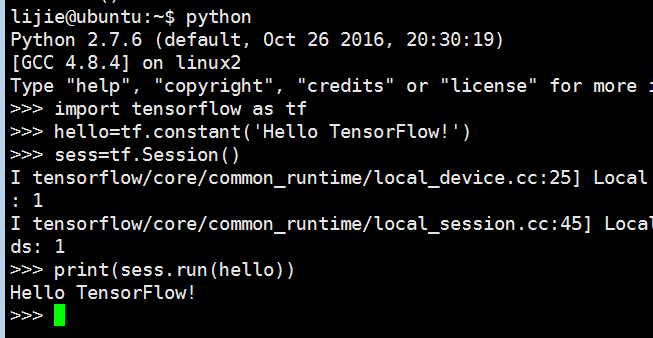
如果成功print了Hello TensorFlow的字符,说明安装成功
Installing TensorFlow on Ubuntu的更多相关文章
- Installing TensorFlow on Ubuntu or Windows
Installing TensorFlow on Ubuntu 显卡驱动:http://developer2.download.nvidia.com/compute/cuda/8.0/secure/P ...
- Installing Moses on Ubuntu 16.04
Installing Moses on Ubuntu 16.04 The process of installation To install requirements sudo apt-get in ...
- TensorFlow安装-ubuntu
windows下某些tensorflow例子跑不成功,比如https://www.tensorflow.org/tutorials/wide 中的例子报下面的错误:' 'NoneType' objec ...
- Installing python-ldap in Ubuntu
These are the steps to be followed to install python-ldap in Ubuntu. At first, sudo apt-get install ...
- 【Tensorflow】Ubuntu 安装 Tensorflow gpu
安装环境:Ubuntu 16.04lts 64位,gcc5.4 1.安装Cuda 1. 下载cuda toolkit. 下载cuda8.0 地址:https://developer.nvidia.co ...
- Compiling Xen-4.4 From Source And Installing It On Ubuntu Server (Amd-64)
First of all, you should install a clean Ubuntu Server (Amd-64) on your server. (Version 14.04 is st ...
- Installing PHP5 on Ubuntu Server
When installing PHP 5 from source I ran into the following problems and solutions: Problem:configure ...
- How to install tensorflow on ubuntu 18.04 64bit
Ans:pip install tensorflow (note: version number of pip and python must be consistent)
- Installing Redis on Ubuntu
wget http://download.redis.io/redis-stable.tar.gz tar xvzf redis-stable.tar.gz cd redis-stable sudo ...
随机推荐
- Linux I2C驱动程序设计
1. Linux I2C子系统架构 (1)I2C核心(I2C-Core):I2C 总线和I2C 设备驱动的中间枢纽,它提供了I2C 总线驱动和设备驱动的注册.注销方法等 (2)I2C控制器驱动(ada ...
- 移动端滑动时页面惯性滑动overflow-scrolling: touch
-webkit-overflow-scrolling:auto | touch; auto: 普通滚动,当手指从触摸屏上移开,滚动立即停止 touch:滚动回弹效果,当手指从触摸屏上移开,内容会保持一 ...
- 整理的最全 python常见面试题
整理的最全 python常见面试题(基本必考)① ②③④⑤⑥⑦⑧⑨⑩ 1.大数据的文件读取: ① 利用生成器generator: ②迭代器进行迭代遍历:for line in file; 2.迭代 ...
- SVM面经
原始问题与对偶问题的关系 1,目标函数对原始问题是极大化,对对偶问题则是极小化 2,原始问题目标函数中的收益系数(优化函数中变量前面的系数)是对偶问题约束不等式中的右端常数,而原始问题约束不等式中的右 ...
- 怎么高效查找和正确改变谷歌浏览器编码格式(新版和旧版Google Chrome)(图文详解)
前言 今天,无意中在解决一个乱码问题,后台是有过判断解决兼容性问题,但是有个别电脑还是有乱码问题,就去想改变下前台的编码格式,突然发现一向好用的谷歌,居然找不到编码格式了! 上网百度了半天,查阅各种网 ...
- 配置vim插件遇到youcompleteme插件问题解决方案
今天在Opensuse下配置vim 遇到两个问题 配置插件找到一个很好的博客.学到一些有用技巧 http://hahaya.github.io/2013/07/26/use-vundle.html 但 ...
- MySQL优化--创建索引,以及怎样索引才会生效 (03)
1. 创建索引 (看这里) 2.索引在什么情况下才会起作用(重点)
- HDU 5695 ——Gym Class——————【贪心思想,拓扑排序】
Gym Class Time Limit: 6000/1000 MS (Java/Others) Memory Limit: 65536/65536 K (Java/Others)Total S ...
- bzoj 2167: 公交车站
Description Z市交通不发达,所有公交路线覆盖的边竟然一个环也不包含,甚至该市的公交路线有可能会分为几个互不连通的块,这可真是不可思议.有一天,你突然听到一条消息,说你的M个同学被困在了Z市 ...
- linux 查看服务器系统资源和负载,以及性能监控
1.查看磁盘 df -h 2.查看内存大小 free [-m|g]#按MB,GB显示内存 3.查看每个进程的情况 cat /proc/5346/status PID 4.查看负载 uptime 5.查 ...