
【Hbase三】Java,python操作Hbase
Java,python操作Hbase
python操作Hbase
由于Hbase是java开发的,所有如需要用python进行对Hbase的操作就需要借助Thrift等工具让语言透明化
安装Thrift之前所需准备
wget http://archive.apache.org/dist/thrift/0.8.0/thrift-0.8.0.tar.gz
tar xzf thrift-0.8.0.tar.gz
yum install automake libtool flex bison pkgconfig gcc-c++ boost-devel libeventdevel zlib-devel python-devel ruby-devel openssl-devel
yum install boost-devel.x86_64
yum install libevent-devel.x86_64
安装Thrift
进入Thrift解压目录
运行:
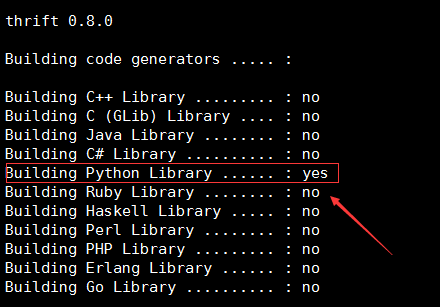
./configure --with-cpp=no --with-ruby=no
如图:
运行:
make运行:
make install
产生针对Python的Hbase的API
下载hbase源码:wget http://mirrors.hust.edu.cn/apache/hbase/0.98.24/hbase-0.98.24-src.tar.gz
进入源码目录并查找thrift对python的支持模块:
find . -name Hbase.thrift,查找后地址为:./hbase-thrift/src/main/resources/org/apache/hadoop/hbase/thrift/Hbase.thrift进入查找后的目录:
cd ./hbase-thrift/src/main/resources/org/apache/hadoop/hbase/thrift/运行命令:
thrift -gen py Hbase.thrift,生成python对Hbase的模块
如图:

进入
gen-py目录,将hbase目录拷贝到需要运行python脚本文件的同级目录中,命令:cp -raf gen-py/hbase/ /test/hbase_test
启动Thrift服务
命令:
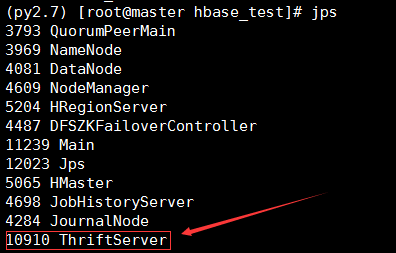
hbase-daemon.sh start thrift
如图:
检查端口是否被监听
命令:netstat -antup | grep 9090
执行python文件,对hbase进行操作
- 创建
create_table.py文件,进行创建表操作
from thrift import Thrift

from thrift.transport import TSocket

from thrift.transport import TTransport

from thrift.protocol import TBinaryProtocol

from hbase import Hbase

from hbase.ttypes import *

transport = TSocket.TSocket('master', 9090)

transport = TTransport.TBufferedTransport(transport)

protocol = TBinaryProtocol.TBinaryProtocol(transport)

client = Hbase.Client(protocol)

transport.open()

#==============================

base_info_contents = ColumnDescriptor(name='meta-data:', maxVersions=1)

other_info_contents = ColumnDescriptor(name='flags:', maxVersions=1)

client.createTable('new_music_table', [base_info_contents, other_info_contents])

print client.getTableNames()
运行python文件,命令:python create_table.py
- 创建
insert_data.py文件,进行插入数据操作
from thrift import Thrift

from thrift.transport import TSocket

from thrift.transport import TTransport

from thrift.protocol import TBinaryProtocol

from hbase import Hbase

from hbase.ttypes import *

transport = TSocket.TSocket('master', 9090)

transport = TTransport.TBufferedTransport(transport)

protocol = TBinaryProtocol.TBinaryProtocol(transport)

client = Hbase.Client(protocol)

transport.open()

tableName = 'new_music_table'

rowKey = '1100'

mutations = [Mutation(column="meta-data:name", value="wangqingshui"), \

        Mutation(column="meta-data:tag", value="pop"), \

        Mutation(column="flags:is_valid", value="TRUE")]

client.mutateRow(tableName, rowKey, mutations, None)
- 创建
get_one_line.py文件,进行获取数据操作
from thrift import Thrift

from thrift.transport import TSocket

from thrift.transport import TTransport

from thrift.protocol import TBinaryProtocol

from hbase import Hbase

from hbase.ttypes import *

transport = TSocket.TSocket('master', 9090)

transport = TTransport.TBufferedTransport(transport)

protocol = TBinaryProtocol.TBinaryProtocol(transport)

client = Hbase.Client(protocol)

transport.open()

tableName = 'new_music_table'

rowKey = '1100'

result = client.getRow(tableName, rowKey, None)

for r in result:

    print 'the row is ' , r.row

    print 'the name is ' , r.columns.get('meta-data:name').value

    print 'the flag is ' , r.columns.get('flags:is_valid').value
- 创建
scan_many_lines.py文件,进行对hbase数据查询操作(扫描)
from thrift import Thrift

from thrift.transport import TSocket

from thrift.transport import TTransport

from thrift.protocol import TBinaryProtocol

from hbase import Hbase

from hbase.ttypes import *

transport = TSocket.TSocket('master', 9090)

transport = TTransport.TBufferedTransport(transport)

protocol = TBinaryProtocol.TBinaryProtocol(transport)

client = Hbase.Client(protocol)

transport.open()

tableName = 'new_music_table'

scan = TScan()

id = client.scannerOpenWithScan(tableName, scan, None)

result = client.scannerGetList(id, 10)

for r in result:

    print '======'

    print 'the row is ' , r.row

    for k, v in r.columns.items():

        print "\t".join([k, v.value])
模块存放位置
hbase >> python以及thrift >> python

Java操作Hbase
向Hbase中写记录
package com.cxqy.baseoperation;

import java.io.IOException;

import java.util.ArrayList;

import java.util.List;

import org.apache.hadoop.conf.Configuration;

import org.apache.hadoop.hbase.Cell;

import org.apache.hadoop.hbase.HBaseConfiguration;

import org.apache.hadoop.hbase.KeyValue;

import org.apache.hadoop.hbase.client.Get;

import org.apache.hadoop.hbase.client.HTable;

import org.apache.hadoop.hbase.client.Put;

import org.apache.hadoop.hbase.client.Result;

import org.apache.hadoop.hbase.client.ResultScanner;

import org.apache.hadoop.hbase.client.Scan;

import org.apache.hadoop.hbase.filter.CompareFilter.CompareOp;

import org.apache.hadoop.hbase.filter.FilterList;

import org.apache.hadoop.hbase.filter.SingleColumnValueFilter;

import org.apache.hadoop.hbase.util.Bytes;

public class HbasePutOneRecord {

	public static final String TableName = "user_action_table";

	public static final String ColumnFamily = "action_log";

	public static Configuration conf = HBaseConfiguration.create();

	private static HTable table;

	public static void addOneRecord(String tableName, String rowKey, String family, String qualifier, String value)

			throws IOException {

		table = new HTable(conf, tableName);

		Put put = new Put(Bytes.toBytes(rowKey));

		put.add(Bytes.toBytes(family), Bytes.toBytes(qualifier), Bytes.toBytes(value));

		table.put(put);

		System.out.println("insert record " + rowKey + " to table " + tableName + " success");

	}

	public static void main(String[] args) throws IOException {

		conf.set("hbase.master", "192.168.87.200:60000");

		conf.set("hbase.zookeeper.quorum", "192.168.87.200,192.168.87.201,192.168.87.202");

		// TODO Auto-generated method stub

		try {

			addOneRecord(TableName, "ip=192.168.87.200-001", ColumnFamily, "ip", "192.168.87.101");

			addOneRecord(TableName, "ip=192.168.87.200-001", ColumnFamily, "userid", "1100");

			addOneRecord(TableName, "ip=192.168.87.200-002", ColumnFamily, "ip", "192.168.1.201");

			addOneRecord(TableName, "ip=192.168.87.200-002", ColumnFamily, "userid", "1200");

			addOneRecord(TableName, "ip=192.168.87.200-003", ColumnFamily, "ip", "192.168.3.201");

			addOneRecord(TableName, "ip=192.168.87.200-003", ColumnFamily, "userid", "1300");

		} catch (Exception e) {

			// TODO Auto-generated catch block

			e.printStackTrace();

		}

	}

}
从Hbase中读记录
package com.cxqy.baseoperation;

import java.io.IOException;

import java.util.ArrayList;

import java.util.List;

import org.apache.hadoop.conf.Configuration;

import org.apache.hadoop.hbase.Cell;

import org.apache.hadoop.hbase.HBaseConfiguration;

import org.apache.hadoop.hbase.KeyValue;

import org.apache.hadoop.hbase.client.Get;

import org.apache.hadoop.hbase.client.HTable;

import org.apache.hadoop.hbase.client.Result;

import org.apache.hadoop.hbase.client.ResultScanner;

import org.apache.hadoop.hbase.client.Scan;

import org.apache.hadoop.hbase.filter.CompareFilter.CompareOp;

import org.apache.hadoop.hbase.filter.FilterList;

import org.apache.hadoop.hbase.filter.SingleColumnValueFilter;

import org.apache.hadoop.hbase.util.Bytes;

public class HbaseGetOneRecord {

	public static final String TableName = "user_action_table";

	public static final String ColumnFamily = "action_log";

	public static Configuration conf = HBaseConfiguration.create();

	private static HTable table;

	public static void selectRowKey(String tablename, String rowKey) throws IOException {

		table = new HTable(conf, tablename);

		Get g = new Get(rowKey.getBytes());

		Result rs = table.get(g);

		System.out.println("==> " + new String(rs.getRow()));

		for (Cell kv : rs.rawCells()) {

			System.out.println("--------------------" + new String(kv.getRow()) + "----------------------------");

			System.out.println("Column Family: " + new String(kv.getFamily()));

			System.out.println("Column       :" + new String(kv.getQualifier()));

			System.out.println("value        : " + new String(kv.getValue()));

		}

	}

	public static void main(String[] args) throws IOException {

		conf.set("hbase.master", "192.168.87.200:60000");

		conf.set("hbase.zookeeper.quorum", "192.168.87.200,192.168.87.201,192.168.87.202");

		// TODO Auto-generated method stub

		try {

			selectRowKey(TableName, "ip=192.168.87.200-003");

		} catch (Exception e) {

			// TODO Auto-generated catch block

			e.printStackTrace();

		}

	}

}
在Hbase中删除某个记录
package com.cxqy.baseoperation;

import java.io.IOException;

import java.util.ArrayList;

import java.util.List;

import org.apache.hadoop.conf.Configuration;

import org.apache.hadoop.hbase.Cell;

import org.apache.hadoop.hbase.HBaseConfiguration;

import org.apache.hadoop.hbase.KeyValue;

import org.apache.hadoop.hbase.client.Delete;

import org.apache.hadoop.hbase.client.Get;

import org.apache.hadoop.hbase.client.HTable;

import org.apache.hadoop.hbase.client.Put;

import org.apache.hadoop.hbase.client.Result;

import org.apache.hadoop.hbase.client.ResultScanner;

import org.apache.hadoop.hbase.client.Scan;

import org.apache.hadoop.hbase.filter.CompareFilter.CompareOp;

import org.apache.hadoop.hbase.filter.FilterList;

import org.apache.hadoop.hbase.filter.SingleColumnValueFilter;

import org.apache.hadoop.hbase.util.Bytes;

public class HbaseDelOneRecord {

	public static final String TableName = "user_action_table";

	public static final String ColumnFamily = "action_log";

	public static Configuration conf = HBaseConfiguration.create();

	private static HTable table;

	public static void delOneRecord(String tableName, String rowKey) throws IOException {

		table = new HTable(conf, tableName);

		List<Delete> list = new ArrayList<Delete>();

		Delete delete = new Delete(rowKey.getBytes());

		list.add(delete);

		table.delete(list);

		System.out.println("delete record " + rowKey + " success!");

	}

	public static void main(String[] args) throws IOException {

		conf.set("hbase.master", "192.168.87.200:60000");

		conf.set("hbase.zookeeper.quorum", "192.168.87.200,192.168.87.201,192.168.87.202");

		// TODO Auto-generated method stub

		try {

			delOneRecord(TableName, "ip=192.168.87.200-002");

		} catch (Exception e) {

			// TODO Auto-generated catch block

			e.printStackTrace();

		}

	}

}
从Hbase中批量读记录
package com.cxqy.baseoperation;

import java.io.IOException;

import java.util.ArrayList;

import java.util.List;

import org.apache.hadoop.conf.Configuration;

import org.apache.hadoop.hbase.Cell;

import org.apache.hadoop.hbase.HBaseConfiguration;

import org.apache.hadoop.hbase.KeyValue;

import org.apache.hadoop.hbase.client.Delete;

import org.apache.hadoop.hbase.client.Get;

import org.apache.hadoop.hbase.client.HTable;

import org.apache.hadoop.hbase.client.Put;

import org.apache.hadoop.hbase.client.Result;

import org.apache.hadoop.hbase.client.ResultScanner;

import org.apache.hadoop.hbase.client.Scan;

import org.apache.hadoop.hbase.filter.BinaryComparator;

import org.apache.hadoop.hbase.filter.CompareFilter.CompareOp;

import org.apache.hadoop.hbase.filter.Filter;

import org.apache.hadoop.hbase.filter.FilterList;

import org.apache.hadoop.hbase.filter.RowFilter;

import org.apache.hadoop.hbase.filter.SingleColumnValueFilter;

import org.apache.hadoop.hbase.util.Bytes;

public class HbaseScanManyRecords {

	public static final String TableName = "user_action_table";

	public static final String ColumnFamily = "action_log";

	public static Configuration conf = HBaseConfiguration.create();

	private static HTable table;

	public static void getManyRecords(String tableName) throws IOException {

		table = new HTable(conf, tableName);

		Scan scan = new Scan();

		ResultScanner scanner = table.getScanner(scan);

		for (Result result : scanner) {

			for (KeyValue kv : result.raw()) {

				System.out.print(new String(kv.getRow()) + " ");

				System.out.print(new String(kv.getFamily()) + ":");

				System.out.print(new String(kv.getQualifier()) + " ");

				System.out.print(kv.getTimestamp() + " ");

				System.out.println(new String(kv.getValue()));

			}

		}

	}

	public static void getManyRecordsWithFilter(String tableName, String rowKey) throws IOException {

		table = new HTable(conf, tableName);

		Scan scan = new Scan();

//		scan.setStartRow(Bytes.toBytes("ip=10.11.1.2-996"));

//		scan.setStopRow(Bytes.toBytes("ip=10.11.1.2-997"));

		Filter filter = new RowFilter(CompareOp.EQUAL, new BinaryComparator(Bytes.toBytes(rowKey)));

		scan.setFilter(filter);

		ResultScanner scanner = table.getScanner(scan);

		for (Result result : scanner) {

			for (KeyValue kv : result.raw()) {

				System.out.print(new String(kv.getRow()) + " ");

				System.out.print(new String(kv.getFamily()) + ":");

				System.out.print(new String(kv.getQualifier()) + " ");

				System.out.print(kv.getTimestamp() + " ");

				System.out.println(new String(kv.getValue()));

			}

		}

	}

	public static void getManyRecordsWithFilter(String tableName, ArrayList<String> rowKeyList) throws IOException {

		table = new HTable(conf, tableName);

		Scan scan = new Scan();

		List<Filter> filters = new ArrayList<Filter>();

		for(int i = 0; i < rowKeyList.size(); i++) {

			filters.add(new RowFilter(CompareOp.EQUAL, new BinaryComparator(Bytes.toBytes(rowKeyList.get(i)))));

		}

		FilterList filerList = new FilterList(FilterList.Operator.MUST_PASS_ONE, filters);

		scan.setFilter(filerList);

		ResultScanner scanner = table.getScanner(scan);

		for (Result result : scanner) {

			System.out.println("===============");

			for (KeyValue kv : result.raw()) {

				System.out.print(new String(kv.getRow()) + " ");

				System.out.print(new String(kv.getFamily()) + ":");

				System.out.print(new String(kv.getQualifier()) + " ");

				System.out.print(kv.getTimestamp() + " ");

				System.out.println(new String(kv.getValue()));

			}

		}

	}

	public static void main(String[] args) throws IOException {

		conf.set("hbase.master", "192.168.159.30:60000");

		conf.set("hbase.zookeeper.quorum", "192.168.159.30,192.168.159.31,192.168.159.32");

		// TODO Auto-generated method stub

		try {

//			getManyRecords(TableName);

//			getManyRecordsWithFilter(TableName, "ip=192.11.1.200-0");

			ArrayList<String> whiteRowKeyList =new ArrayList<>();

			whiteRowKeyList.add("ip=192.168.87.200-001");

			whiteRowKeyList.add("ip=192.168.87.200-003");

			getManyRecordsWithFilter(TableName, whiteRowKeyList);

			//getManyRecords(TableName);

		} catch (Exception e) {

			// TODO Auto-generated catch block

			e.printStackTrace();

		}

	}

}
【Hbase三】Java,python操作Hbase的更多相关文章
- linux 下通过过 hbase 的Java api 操作hbase
hbase版本:0.98.5 hadoop版本:1.2.1 使用自带的zk 本文的内容是在集群中创建java项目调用api来操作hbase,主要涉及对hbase的创建表格,删除表格,插入数据,删除数据 ...
- python 操作 hbase
python 是万能的,当然也可以通过api去操作big database 的hbase了,python是通过thrift去访问操作hbase 以下是在centos7 上安装操作,前提是hbase已经 ...
- Hbase理论&&hbase shell&&python操作hbase&&python通过mapreduce操作hbase
一.Hbase搭建: 二.理论知识介绍: 1Hbase介绍: Hbase是分布式.面向列的开源数据库(其实准确的说是面向列族).HDFS为Hbase提供可靠的底层数据存储服务,MapReduce为Hb ...
- HBase 相关API操练(三):MapReduce操作HBase
MapReduce 操作 HBase 在 HBase 系统上运行批处理运算,最方便和实用的模型依然是 MapReduce,如下图所示. HBase Table 和 Region 的关系类似 HDFS ...
- python 操作Hbase 详解
博文参考:https://www.cnblogs.com/tashanzhishi/p/10917956.html 如果你们学习过Python,可以用Python来对Hbase进行操作. happyb ...
- Java API 操作HBase Shell
HBase Shell API 操作 创建工程 本实验的环境实在ubuntu18.04下完成,首先在改虚拟机中安装开发工具eclipse. 然后创建Java项目名字叫hbase-test 配置运行环境 ...
- HBase 6、用Phoenix Java api操作HBase
开发环境准备:eclipse3.5.jdk1.7.window8.hadoop2.2.0.hbase0.98.0.2.phoenix4.3.0 1.从集群拷贝以下文件:core-site.xml.hb ...
- python操作Hbase
本地操作 启动thrift服务:./bin/hbase-daemon.sh start thrift hbase模块产生: 下载thrfit源码包:thrift-0.8.0.tar.gz 解压安装 . ...
- 大数据入门第十四天——Hbase详解(三)hbase基本原理与MR操作Hbase
一.基本原理 1.hbase的位置 上图描述了Hadoop 2.0生态系统中的各层结构.其中HBase位于结构化存储层,HDFS为HBase提供了高可靠性的底层存储支持, MapReduce为HBas ...
随机推荐
- windows下安装配置RabbitMQ
安装部署 1.当前环境以及参考资料出处 部署环境:windows server 2008 r2 enterprise 官方安装部署文档:http://www.rabbitmq.com/install- ...
- 高逼格UILabel的闪烁动画效果
高逼格UILabel的闪烁动画效果 最终效果图如下: 源码: YXLabel.h 与 YXLabel.m // // YXLabel.h // // Created by YouXianMing o ...
- 导出IIS Log列表,导出站点下虚拟目录列表
Add-Type -AssemblyName System.Web import-module webadministration $ip = (gwmi Win32_NetworkAdapterCo ...
- linux shell每天一阅 -- 安装nginx以及apache
当然这个博客原代码是转载大神的... 自动安装Nginx脚本,采用case方式,选择方式,也可以根据实际需求改成自己想要的脚本mynginx.sh #!/bin/sh ###nginx install ...
- zt C++标准库set类型
C++标准库set类型 分类: C++编程语言 2012-11-06 10:53 909人阅读 评论(0) 收藏 举报 目录(?)[-] 在set中添加元素 从set中获取元素 set容器只是单纯的键 ...
- 028class_part2
1.成员修饰符 2.特殊成员 3.metaclass,类的祖宗 ###成员修饰符###公有和私有 #__author:_nbloser #date:2018/1/19 #私有类.对象成员 ...
- sql语句的group by 与 inner join
一.理解group by和聚合函数 先来看下表1,表名为test: 表1 执行如下SQL语句: 1 2 SELECT name FROM test GROUP BY name 你应该很容易知道运行的结 ...
- Apache Commons-logging使用实例
Apache Commons-logging使用实例 本文将介绍如何在程序中使用Apache Commons-logging author: ZJ 07-3-17 Blog: [url]http:// ...
- Monad新解-FRP对比——ReactiveCocoa、RxSwift、Bacon以及背后的Functional
ReactiveX Rx的Observable的本质就是一个Event Monad,即上下文(就是图文教程中包裹的盒子)为Event的一个Monad,这里的Event定义,可以对应语言的struct或 ...
- #20145238荆玉茗《网络对抗》-逆向及Bof进阶实践
20145238荆玉茗<网络对抗>-逆向及Bof进阶实践 实践目的:注入shellcode 准备一段shellcode代码 Shellcode实际是一段代码(也可以是填充数据),是用来发送 ...