
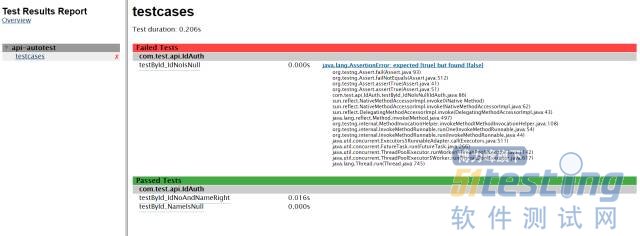
Maven+TestNG+ReportNG/Allure接口自动化测试框架初探(上)
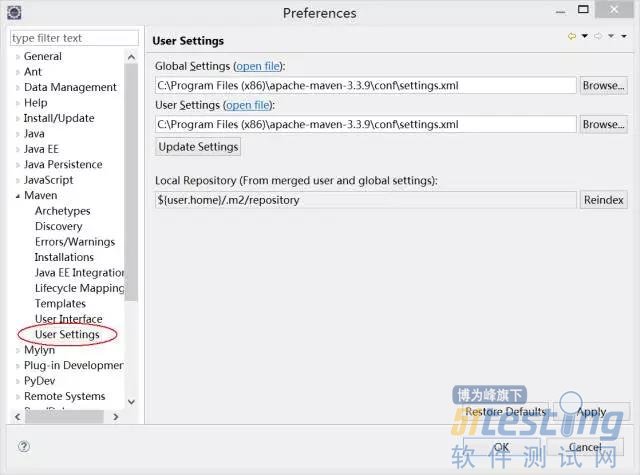
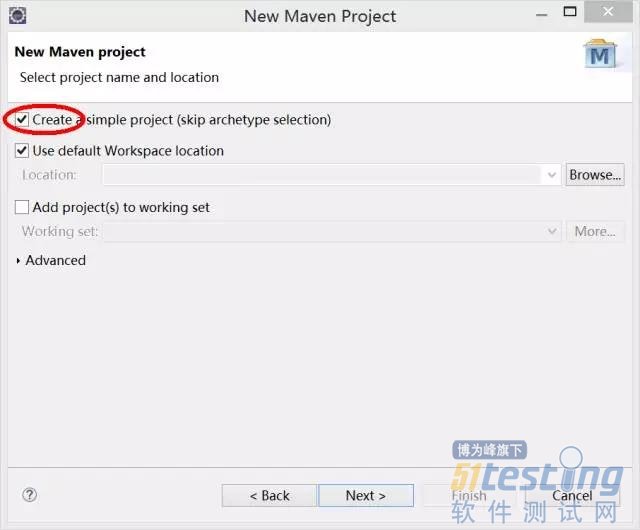
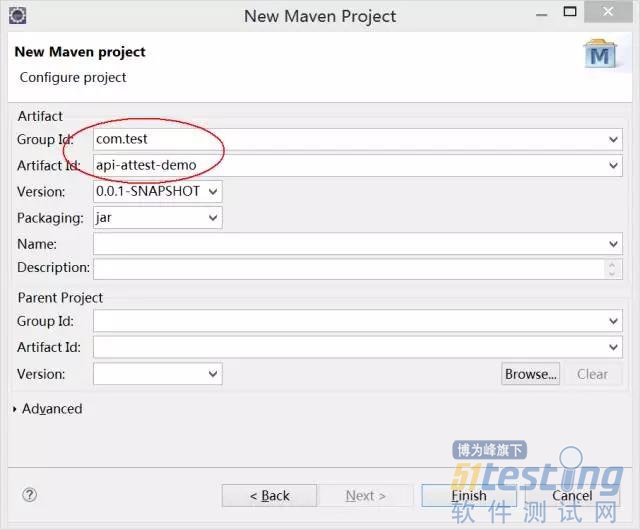
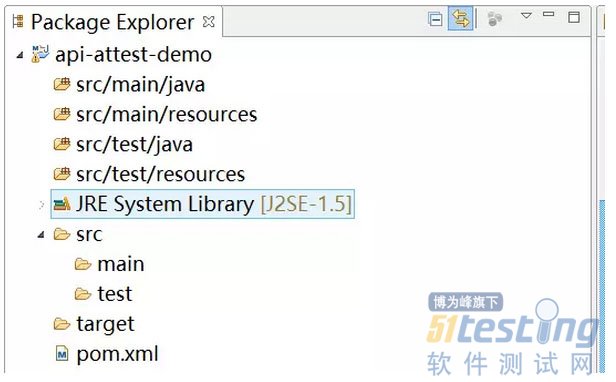
|
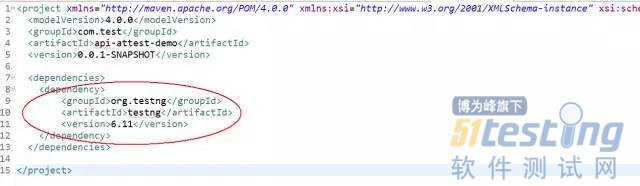
<dependency>
<groupId>org.testng</groupId>
<artifactId>testng</artifactId>
<version>6.11</version>
</dependency>
|


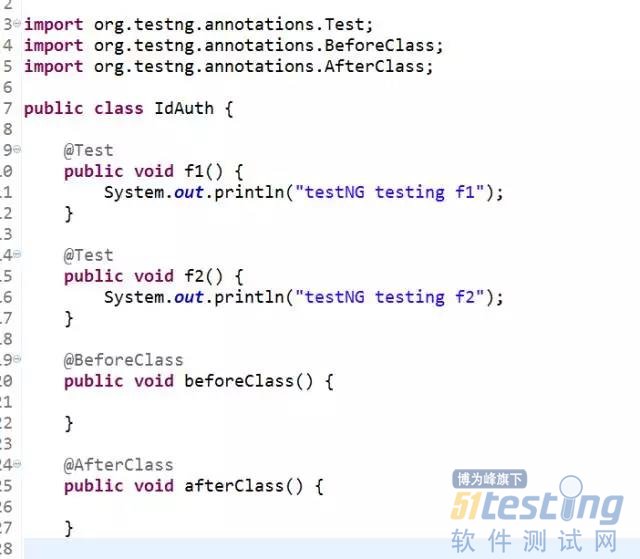
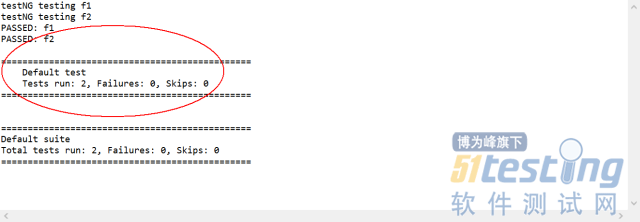
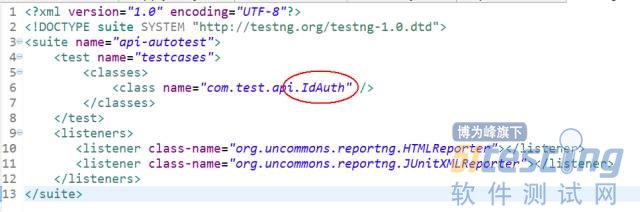
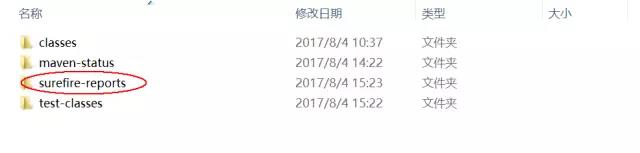

|
<properties>
<project.build.sourceEncoding>UTF-8</project.build.sourceEncoding>
<xmlFileName>testng.xml</xmlFileName>
</properties>
|
|
<!-- testNG依赖管理 -->
<dependency>
<groupId>org.testng</groupId>
<artifactId>testng</artifactId>
<version>6.11</version>
</dependency>
<dependency>
<groupId>org.apache.maven.reporting</groupId>
<artifactId>maven-reporting-api</artifactId>
<version>2.0.9</version>
<scope>test</scope>
<exclusions>
<exclusion>
<groupId>org.testng</groupId>
<artifactId>testng</artifactId>
</exclusion>
</exclusions>
</dependency>
<!-- 依赖Guice -->
<dependency>
<groupId>com.google.inject</groupId>
<artifactId>guice</artifactId>
<version>3.0</version>
<scope>test</scope>
</dependency>
<dependency>
<groupId>org.uncommons</groupId>
<artifactId>reportng</artifactId>
<version>1.1.4</version>
</dependency>
<dependency>
<groupId>org.apache.maven.plugins</groupId>
<artifactId>maven-surefire-plugin</artifactId>
<version>2.18.1</version>
<type>maven-plugin</type>
</dependency>
<dependency>
<groupId>com.beust</groupId>
<artifactId>jcommander</artifactId>
<version>1.64</version>
</dependency>
<dependency>
<groupId>net.sourceforge.jexcelapi</groupId>
<artifactId>jxl</artifactId>
<version>2.6.10</version>
</dependency>
|
|
<build>
<plugins>
<plugin>
<groupId>org.apache.maven.plugins</groupId>
<artifactId>maven-surefire-plugin</artifactId>
<version>2.18.1</version>
<configuration>
<suiteXmlFiles>
<suiteXmlFile>
src/test/resources/${xmlFileName}
</suiteXmlFile>
</suiteXmlFiles>
</configuration>
</plugin>
<plugin>
<groupId>org.apache.maven.plugins</groupId>
<artifactId>maven-surefire-plugin</artifactId>
<version>2.18.1</version>
<configuration>
<properties>
<property>
<name>usedefaultlisteners</name>
<value>false</value>
</property>
<property>
<name>listener</name>
<value>org.uncommons.reportng.HTMLReporter, org.uncommons.reportng.JUnitXMLReporter</value>
</property>
</properties>
<workingDirectory>target/</workingDirectory>
<forkMode>always</forkMode>
<!-- 解决报告中中文乱码 -->
<argLine>-Dfile.encoding=UTF-8</argLine>
</configuration>
</plugin>
</plugins>
</build>
|


|
package com.test.pub;
import java.io.File;
import java.util.HashMap;
import java.util.Map;
import jxl.Workbook;
import jxl.Sheet;
import jxl.Cell;
public class ExcelUtils {
public static Map <String, HashMap> excelToHashMapByFirstSheet(String fPath, String sheetName){
try{
File fExcel = getExcelFileObj(fPath);
Workbook wb = Workbook.getWorkbook(fExcel);
Sheet sht = wb.getSheet(sheetName);
int rowCount = sht.getRows();
int colCount = sht.getColumns();
Cell cel = null;
Map <String, HashMap> excelContents = new HashMap();
if(rowCount<=2){
System.out.println("无测试案例");
return null;
}else{
//检查是否存在空行
String rowContents = "";
for(int i=2;i<rowCount;i++){
if(sht.getCell(0, i).getContents().toString().length()==0){
System.out.println("测试案例文件中存在空行");
return null;
}else{
for(int j=0;j<colCount;j++){
rowContents = rowContents + sht.getCell(j, i).getContents().toString();
}
if (rowContents.length()<20){
System.out.println("测试案例文件中存在空行");
return null;
}
}
}
}
//开始读取内容
for(int rowIndex=2;rowIndex<rowCount;rowIndex++){
HashMap<String, String> rowMap = new HashMap();
String testCaseCode = sht.getCell(0, rowIndex).getContents().toString();
for(int colIndex=1;colIndex<colCount;colIndex++){
rowMap.put(sht.getCell(colIndex, 1).getContents().toString(), sht.getCell(colIndex, rowIndex).getContents().toString());
}
excelContents.put(testCaseCode, rowMap);
}
wb.close();
//HashMap<String, String> tmpMap = new HashMap();
//tmpMap.put("count", "" + (rowCount-2));
//excelContents.put("testsCount", tmpMap);
return excelContents;
}catch (Exception e){
System.out.println("发生异常:" + e);
}
return null;
}
public static File getExcelFileObj(String fPath){
try{
File fExl = new File(fPath);
return fExl;
}catch (Exception e){
System.out.println(e);
}
return null;
}
}
|

Maven+TestNG+ReportNG/Allure接口自动化测试框架初探(上)的更多相关文章
- 基于maven+java+TestNG+httpclient+poi+jsonpath+ExtentReport的接口自动化测试框架
接口自动化框架 项目说明 本框架是一套基于maven+java+TestNG+httpclient+poi+jsonpath+ExtentReport而设计的数据驱动接口自动化测试框架,TestNG ...
- API 接口自动化测试框架
转自: https://testerhome.com/topics/3455 前言 接口自动化逐渐成为各大公司投入产出最高的测试技术.但是如何在版本迅速迭代过程中提高接口自动化的测试效率,仍然是大部分 ...
- 接口自动化测试框架【windows版】:jmeter + ant + jenkins
为了提高回归效率及保证版本质量,很多公司都在做自动化测试,特别是接口自动化.接口自动化测试框架很多,有写代码的,也有不写代码的,我觉得没有谁比谁好,谁比谁高级之说,只要适用就好. 今天给大家分享一个不 ...
- 接口测试入门(4)--接口自动化测试框架 / list和map用法 / 随机选取新闻 (随机数生成) / 接口相关id映射
一.接口自动化测试框架 为了更好的组织测试方法,测试用例并且持续集成,我们选择了 java+testNG(测试用例组织)+gitlab(代码版本管理)+Jenkins(持续集成工具) 作为一整套的自 ...
- 性能测试学习之路 (四)jmeter 脚本开发实战(JDBC &JMS &接口脚本 & 轻量级接口自动化测试框架)
1.业务级脚本开发 登录脚本->思路:在线程组下新建两个HTTP请求,一个是完成访问登录页,一个是完成登录的数据提交. 步骤如下: 1) 访问登录页 2) 提交登录数据的HTTP PS:对于 ...
- ApiTesting全链路接口自动化测试框架 - 新增数据库校验(二)
在这之前我完成了对于接口上的自动化测试:ApiTesting全链路接口自动化测试框架 - 初版(一) 但是对于很多公司而言,数据库的数据校验也尤为重要,另外也有小伙伴给我反馈希望支持. 所以最近几天我 ...
- python版接口自动化测试框架源码完整版(requests + unittest)
python版接口自动化测试框架:https://gitee.com/UncleYong/my_rf [框架目录结构介绍] bin: 可执行文件,程序入口 conf: 配置文件 core: 核心文件 ...
- 接口自动化 [授客]基于python+Testlink+Jenkins实现的接口自动化测试框架V3.0
基于python+Testlink+Jenkins实现的接口自动化测试框架V3.0 by:授客 QQ:1033553122 博客:http://blog.sina.com.cn/ishou ...
- 接口自动化 基于python+Testlink+Jenkins实现的接口自动化测试框架[V2.0改进版]
基于python+Testlink+Jenkins实现的接口自动化测试框架[V2.0改进版] by:授客 QQ:1033553122 由于篇幅问题,,暂且采用网盘分享的形式: 下载地址: [授客] ...
随机推荐
- python数据库编程_sqlite
原文请看:http://blog.csdn.net/jj_liuxin/article/details/3584448 sqlite是一个轻量级的数据库,与很多大型的数据库(例如DB2,Oracle, ...
- POJ 1679 The Unique MST 【最小生成树/次小生成树模板】
The Unique MST Time Limit: 1000MS Memory Limit: 10000K Total Submissions: 22668 Accepted: 8038 D ...
- Windows 下使用 mingw+msys 交叉编译 Android Unity Mono
对于没有升级到 Unity5.4的用户,发布安卓版本都会有对 C# 脚本进行加密的需求,我们项目在裸奔了很长时间后,决定开始做这件事. 网上查看了很多资料,我很希望直接在 windows 下编译而不去 ...
- ElasticSearch Mapping中的字段类型
1)string: 默认会被分词 2)数字类型主要如下几种: long:64位存储 integer:32位存储 short:16位存储 byte:8位存储 double:64位双精度存储 f ...
- android 线程间通信
韩梦飞沙 韩亚飞 313134555@qq.com yue31313 han_meng_fei_sha 1,共享内存 变量 2,文件,数据库 3,处理器 消息机制 4, 线程 的 等待,通知 ...
- CDOJ 1279 班委选举 每周一题 div2 暴力
班委选举 题目连接: http://acm.uestc.edu.cn/#/status/list?problemId=1279 Description 高考的脚步越来越近了--时间如山涧小溪一般悄无声 ...
- Linux通用KVM自动安装Shell脚本(兼容所有Linux发行版/CentOS/Ubuntu)
官网: https://github.com/retspen/webvirtmgr/wiki/Setup-Host-Server 安装: wget -O - https://retspen.githu ...
- Linux中KVM虚拟机是什么
概念: Kernel-based Virtual Machine的简称,是一个开源的系统虚拟化模块,自Linux 2.6.20之后集成在Linux的各个主要发行版本中.它使用Linux自身的调度器进行 ...
- Adaptive Query Optimization in Oracle Database 12c (12.1 and 12.2)
https://oracle-base.com/articles/12c/adaptive-query-optimization-12cr1
- Cargo, Rust’s Package Manager
http://doc.crates.io/ Installing The easiest way to get Cargo is to get the current stable release o ...