
Maven+TestNG+ReportNG/Allure接口自动化测试框架初探(上)
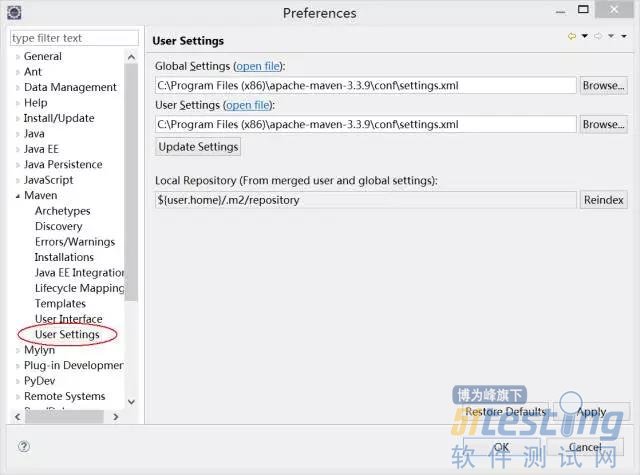
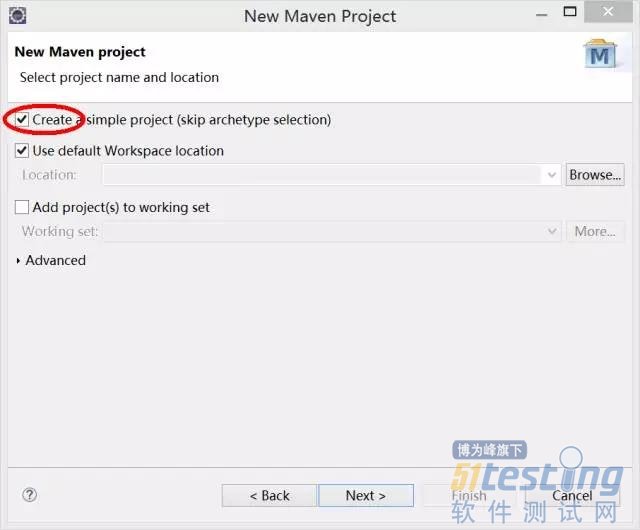
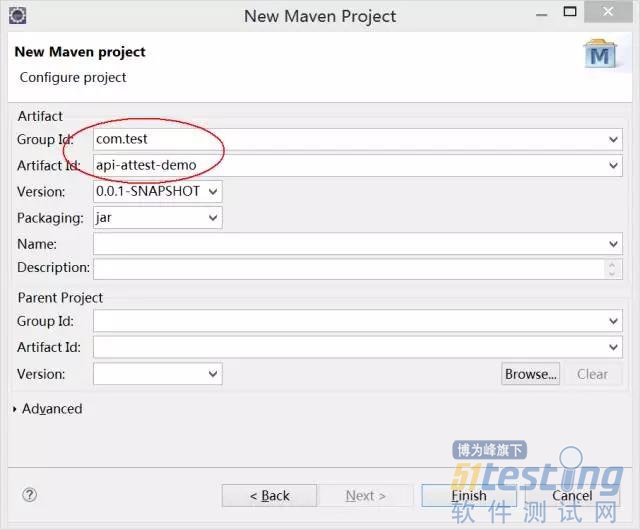
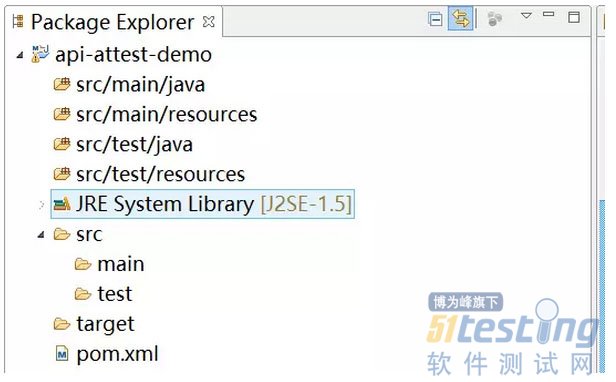
|
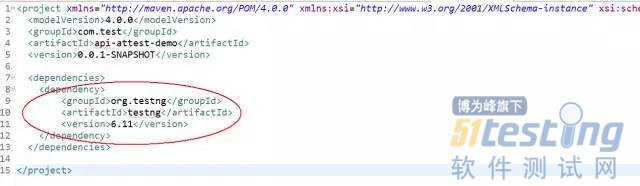
<dependency>
<groupId>org.testng</groupId>
<artifactId>testng</artifactId>
<version>6.11</version>
</dependency>
|


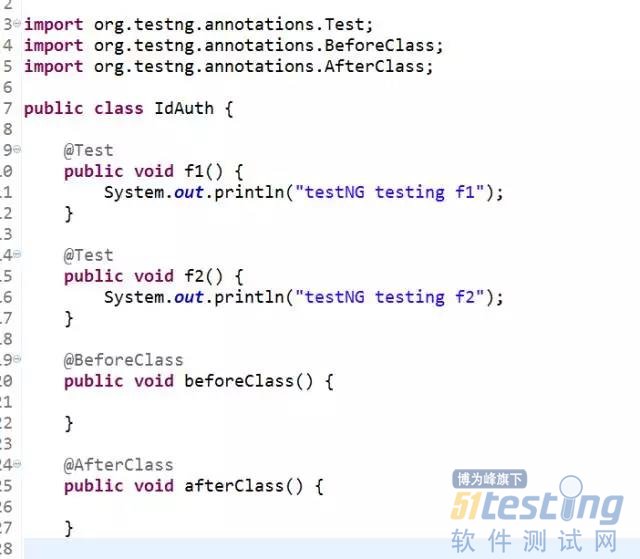
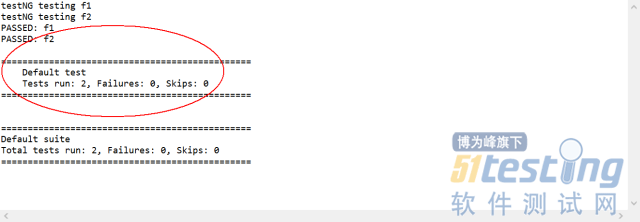
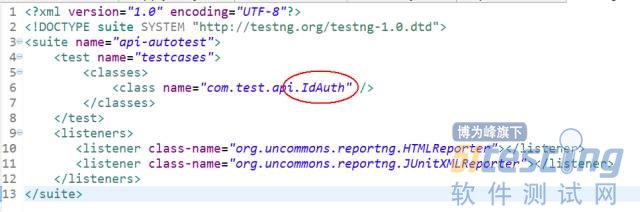
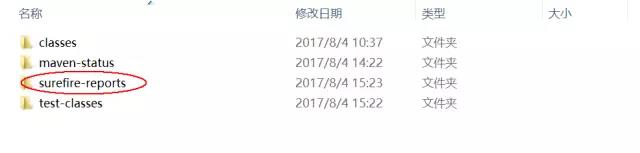
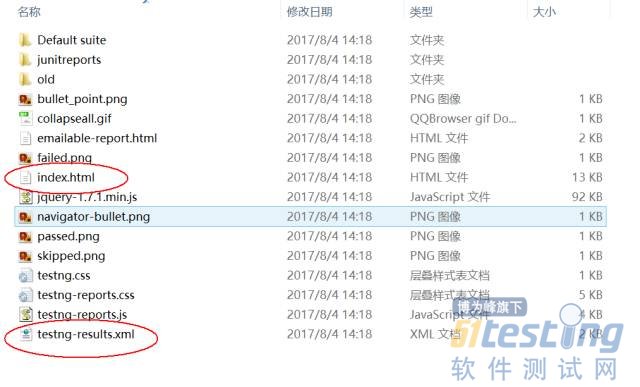

|
<properties>
<project.build.sourceEncoding>UTF-8</project.build.sourceEncoding>
<xmlFileName>testng.xml</xmlFileName>
</properties>
|
|
<!-- testNG依赖管理 -->
<dependency>
<groupId>org.testng</groupId>
<artifactId>testng</artifactId>
<version>6.11</version>
</dependency>
<dependency>
<groupId>org.apache.maven.reporting</groupId>
<artifactId>maven-reporting-api</artifactId>
<version>2.0.9</version>
<scope>test</scope>
<exclusions>
<exclusion>
<groupId>org.testng</groupId>
<artifactId>testng</artifactId>
</exclusion>
</exclusions>
</dependency>
<!-- 依赖Guice -->
<dependency>
<groupId>com.google.inject</groupId>
<artifactId>guice</artifactId>
<version>3.0</version>
<scope>test</scope>
</dependency>
<dependency>
<groupId>org.uncommons</groupId>
<artifactId>reportng</artifactId>
<version>1.1.4</version>
</dependency>
<dependency>
<groupId>org.apache.maven.plugins</groupId>
<artifactId>maven-surefire-plugin</artifactId>
<version>2.18.1</version>
<type>maven-plugin</type>
</dependency>
<dependency>
<groupId>com.beust</groupId>
<artifactId>jcommander</artifactId>
<version>1.64</version>
</dependency>
<dependency>
<groupId>net.sourceforge.jexcelapi</groupId>
<artifactId>jxl</artifactId>
<version>2.6.10</version>
</dependency>
|
|
<build>
<plugins>
<plugin>
<groupId>org.apache.maven.plugins</groupId>
<artifactId>maven-surefire-plugin</artifactId>
<version>2.18.1</version>
<configuration>
<suiteXmlFiles>
<suiteXmlFile>
src/test/resources/${xmlFileName}
</suiteXmlFile>
</suiteXmlFiles>
</configuration>
</plugin>
<plugin>
<groupId>org.apache.maven.plugins</groupId>
<artifactId>maven-surefire-plugin</artifactId>
<version>2.18.1</version>
<configuration>
<properties>
<property>
<name>usedefaultlisteners</name>
<value>false</value>
</property>
<property>
<name>listener</name>
<value>org.uncommons.reportng.HTMLReporter, org.uncommons.reportng.JUnitXMLReporter</value>
</property>
</properties>
<workingDirectory>target/</workingDirectory>
<forkMode>always</forkMode>
<!-- 解决报告中中文乱码 -->
<argLine>-Dfile.encoding=UTF-8</argLine>
</configuration>
</plugin>
</plugins>
</build>
|
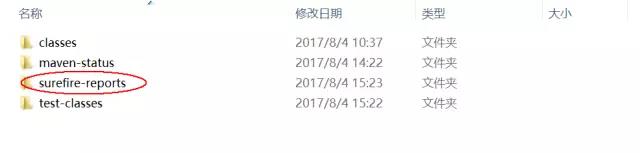
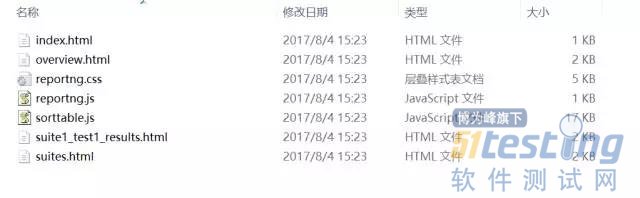


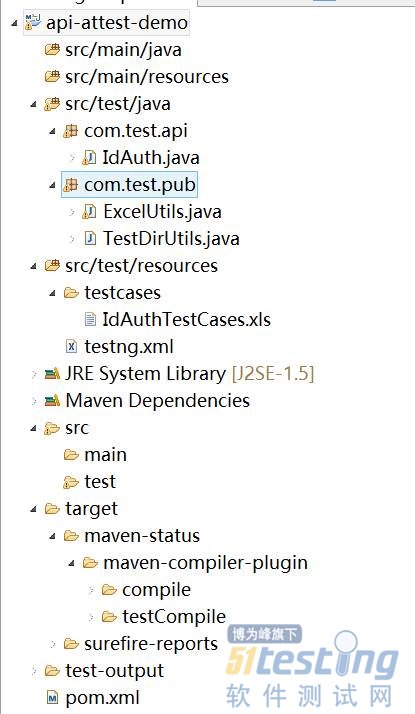
|
package com.test.pub;
import java.io.File;
import java.util.HashMap;
import java.util.Map;
import jxl.Workbook;
import jxl.Sheet;
import jxl.Cell;
public class ExcelUtils {
public static Map <String, HashMap> excelToHashMapByFirstSheet(String fPath, String sheetName){
try{
File fExcel = getExcelFileObj(fPath);
Workbook wb = Workbook.getWorkbook(fExcel);
Sheet sht = wb.getSheet(sheetName);
int rowCount = sht.getRows();
int colCount = sht.getColumns();
Cell cel = null;
Map <String, HashMap> excelContents = new HashMap();
if(rowCount<=2){
System.out.println("无测试案例");
return null;
}else{
//检查是否存在空行
String rowContents = "";
for(int i=2;i<rowCount;i++){
if(sht.getCell(0, i).getContents().toString().length()==0){
System.out.println("测试案例文件中存在空行");
return null;
}else{
for(int j=0;j<colCount;j++){
rowContents = rowContents + sht.getCell(j, i).getContents().toString();
}
if (rowContents.length()<20){
System.out.println("测试案例文件中存在空行");
return null;
}
}
}
}
//开始读取内容
for(int rowIndex=2;rowIndex<rowCount;rowIndex++){
HashMap<String, String> rowMap = new HashMap();
String testCaseCode = sht.getCell(0, rowIndex).getContents().toString();
for(int colIndex=1;colIndex<colCount;colIndex++){
rowMap.put(sht.getCell(colIndex, 1).getContents().toString(), sht.getCell(colIndex, rowIndex).getContents().toString());
}
excelContents.put(testCaseCode, rowMap);
}
wb.close();
//HashMap<String, String> tmpMap = new HashMap();
//tmpMap.put("count", "" + (rowCount-2));
//excelContents.put("testsCount", tmpMap);
return excelContents;
}catch (Exception e){
System.out.println("发生异常:" + e);
}
return null;
}
public static File getExcelFileObj(String fPath){
try{
File fExl = new File(fPath);
return fExl;
}catch (Exception e){
System.out.println(e);
}
return null;
}
}
|

Maven+TestNG+ReportNG/Allure接口自动化测试框架初探(上)的更多相关文章
- 基于maven+java+TestNG+httpclient+poi+jsonpath+ExtentReport的接口自动化测试框架
接口自动化框架 项目说明 本框架是一套基于maven+java+TestNG+httpclient+poi+jsonpath+ExtentReport而设计的数据驱动接口自动化测试框架,TestNG ...
- API 接口自动化测试框架
转自: https://testerhome.com/topics/3455 前言 接口自动化逐渐成为各大公司投入产出最高的测试技术.但是如何在版本迅速迭代过程中提高接口自动化的测试效率,仍然是大部分 ...
- 接口自动化测试框架【windows版】:jmeter + ant + jenkins
为了提高回归效率及保证版本质量,很多公司都在做自动化测试,特别是接口自动化.接口自动化测试框架很多,有写代码的,也有不写代码的,我觉得没有谁比谁好,谁比谁高级之说,只要适用就好. 今天给大家分享一个不 ...
- 接口测试入门(4)--接口自动化测试框架 / list和map用法 / 随机选取新闻 (随机数生成) / 接口相关id映射
一.接口自动化测试框架 为了更好的组织测试方法,测试用例并且持续集成,我们选择了 java+testNG(测试用例组织)+gitlab(代码版本管理)+Jenkins(持续集成工具) 作为一整套的自 ...
- 性能测试学习之路 (四)jmeter 脚本开发实战(JDBC &JMS &接口脚本 & 轻量级接口自动化测试框架)
1.业务级脚本开发 登录脚本->思路:在线程组下新建两个HTTP请求,一个是完成访问登录页,一个是完成登录的数据提交. 步骤如下: 1) 访问登录页 2) 提交登录数据的HTTP PS:对于 ...
- ApiTesting全链路接口自动化测试框架 - 新增数据库校验(二)
在这之前我完成了对于接口上的自动化测试:ApiTesting全链路接口自动化测试框架 - 初版(一) 但是对于很多公司而言,数据库的数据校验也尤为重要,另外也有小伙伴给我反馈希望支持. 所以最近几天我 ...
- python版接口自动化测试框架源码完整版(requests + unittest)
python版接口自动化测试框架:https://gitee.com/UncleYong/my_rf [框架目录结构介绍] bin: 可执行文件,程序入口 conf: 配置文件 core: 核心文件 ...
- 接口自动化 [授客]基于python+Testlink+Jenkins实现的接口自动化测试框架V3.0
基于python+Testlink+Jenkins实现的接口自动化测试框架V3.0 by:授客 QQ:1033553122 博客:http://blog.sina.com.cn/ishou ...
- 接口自动化 基于python+Testlink+Jenkins实现的接口自动化测试框架[V2.0改进版]
基于python+Testlink+Jenkins实现的接口自动化测试框架[V2.0改进版] by:授客 QQ:1033553122 由于篇幅问题,,暂且采用网盘分享的形式: 下载地址: [授客] ...
随机推荐
- vue小荔枝,时间控件,动态按月份增减。
依赖框架有jq,bootstrap3.0,vue2.0; 自封装(搬运)时间控件,bootstrap-datetimepicker.资源下载:看这里 需求: 默认本地时间,相隔一个月 四个选项:1一个 ...
- 四十八 常用内建模块 HTMLParser
如果我们要编写一个搜索引擎,第一步是用爬虫把目标网站的页面抓下来,第二步就是解析该HTML页面,看看里面的内容到底是新闻.图片还是视频. 假设第一步已经完成了,第二步应该如何解析HTML呢? HTML ...
- Exception异常处理机制
为什么要自定义自己的Exception ,Java Exception机制与传统的C语言的异常处理机制有什么不同,这种Exception机制的意义在什么地方?接下来咱就来和你一起探讨Exception ...
- Project interpreter not specified(eclipse+pydev) (转)
[小记] 最近因为想配置Android的开发环境,把原来的MyEclipse5.5删了,下载了最新的Eclipse3.7版本,因为之前在进行Python开 发,就下载了最新的Pydev2.4版本,安装 ...
- HDU 3485【101】 51nod 1668【010】 joj 2171【111】动态规划
有一个只含0和1的长度为n的串,问不含有101的所有串的个数. ——不存在连续的101.010.111的字符串数量 HDU:https://cn.vjudge.net/problem/HDU-3485 ...
- CXF浅析
CXF 框架支撑环境 CXF 框架是一种基于 Servlet 技术的 SOA 应用开发框架,要正常运行基于 CXF 应用框架开发的企业应用,除了 CXF 框架本身之外,还需要 JDK 和 Ser ...
- BZOJ 3669 [Noi2014]魔法森林(贪心+LCT)
[题目链接] http://www.lydsy.com/JudgeOnline/problem.php?id=3669 [题目大意] 给出一张图,每条边上有两个值ai和bi,现在需要求出一条1到N的路 ...
- Problem H: 零起点学算法103——查找最大元素
#include<stdio.h> #include<string.h> int main() { ]; while(gets(a)!=NULL) { ]; ;a[i]!='\ ...
- 新浪微博(t.sina)简单授权代码及API测试
http://www.eoeandroid.com/thread-53701-1-1.html package mobson.weiboku.view; import java.util.ArrayL ...
- Linux限制某些用户或IP登录SSH、允许特定IP登录SSH
说明:一般要实现这种功能时,先安装VPN,然后客户端登录VPN,然后通过内网IP登录SSH. 搭建OpenVPN: 参考:http://www.cnblogs.com/EasonJim/p/83338 ...