
nodejs 文件系统
fs.open(path,flags,[mode],callback)

fs.openSync(path,flags,[mode])
fs.close(fd,callback)

fs.closeSync(fd)
fs.open('myFile','w',function(err,fd){

    if(!error){

        fs.close(fd);

    }

}
注意:回调函数被指定,并接收err和fd参数,fd参数是你可以用来读取或写入该文件的文件描述符。
fs.writeFile(path,data,[options],callback)

fs.writeFileSync(path,data,[options])
var fs=require('fs');

var config={

    maxFiles:20,

    maxConnections:15,

    rootPath:'./routes'

};

var configTxt=JSON.stringify(config);

var options={

    encoding:'utf8',

    flag:'w'

};

fs.writeFile('config.text',configTxt,options,function(err){

   if(err){

       console.log('config write fail');

   } else{

       console.log('config write success');

   }

});


(2)同步和异步文件写入
fs.writeSync(fd,data,offset,length,position)

fs.write(fd,data,offset,length,position,callback)
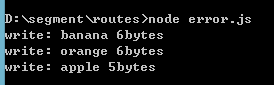
var fs=require('fs');

var fruitBow1=['apple','orange','banana'];

function writeFruit(fd){

    if(fruitBow1.length){

        var fruit=fruitBow1.pop()+'';

        fs.write(fd,fruit,null,null,function(err,bytes){

            if(err){

                console.log('File write failed.');

            }else{

                console.log('write: %s %dbytes',fruit,bytes);

                writeFruit(fd);   //反复调用,直到fruitBow1的length为0

            }

        });

    }else{

        fs.close(fd);

    }

}

fs.open('fruit.txt','w',function(err,fd){

   writeFruit(fd);

});
fs.createWriteStream(path,[options])
var fs=require('fs');

var grains=['wheat','rice','oats'];

var options={encoding:'utf8',flag:'w'};

var fileWriteStream=fs.createWriteStream('grains.txt',options);

fileWriteStream.on('close',function(){

    console.log('file closed.');

});

while(grains.length){

    var data=grains.pop()+' ';

    fileWriteStream.write(data);

    console.log('write: %s',data);

}

fileWriteStream.end();

fs.readFile(path,[options],callback)

fs.readFileSync(path,[options])
var fs=require('fs');

var options={encoding:'utf8',flag:'r'};

fs.readFile('config.txt',options,function(err,data){

    if(err){

        console.log('Failes to open config File.');

    }else{

        console.log('config Loaded.');

        var config=JSON.parse(data);

        console.log('Max Files: '+config.maxFiles);

        console.log('maxConnections: '+config.maxConnections);

        console.log('rootPath: '+config.rootPath);

    }

});


fs.readSync(fd,buffer,offset,length,position)
fs.read(d,buffer,offset,length,position,callback)
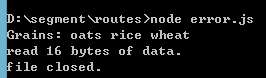
var fs=require('fs');

var options={encoding:'utf8',flag:'r'};

var fileReadStream=fs.createReadStream('grains.txt',options);

fileReadStream.on('data',function(chunk){

    console.log('Grains: %s',chunk);

    console.log('read %d bytes of data.',chunk.length);

});

fileReadStream.on('close',function(){

    console.log('file closed.');

});

nodejs 文件系统的更多相关文章
- 简单的nodejs 文件系统(fs)读写例子。
在nodejs中,可以通过fs(file system)模块进行文件的I/O操作. API链接地址: http://nodeapi.ucdok.com/#/api/fs.html 下面进行fs文件系统 ...
- nodeJs文件系统(fs)与流(stream)
一.简介 本文将介绍node.js文件系统(fs)和流(stream)的一些API已经参数使用情况. 二.目录 文件系统将介绍以下方法: 1.fs.readFile 2.fs.writeFile 3. ...
- nodejs(二) --- 重要知识点回顾
1. 运行一个nodejs文件, 如一个js文件中只含有console.log("hello world");的文件,我们再git里运行node,即 node hello.js 即 ...
- 文件系统(node.js学习笔记)
根据nodejs菜鸟教程整理. 官方API文档:nodeJS文件系统API 其他整理:nodejs File System 文件系统操作函数分类 1.引用: 导入文件系统模块(fs)语句:var fs ...
- node-webkit 使用requirejs 小结
1. node-webkit 启动页使用requrejs 将webapp中的require改为requirejs,因为requirejs本来就应该用requirejs的,require只是requir ...
- EJS 是什么 ,怎么用,以及优点
一.什么是EJS EJS是一个JavaScript模板库,用来从JSON数据中生成HTML字符串. 二.为什么要使用EJS 与最初的JavaScript相比较,一些不太了解你的代码的人可以更容易地通过 ...
- nodeJS之fs文件系统
前面的话 fs文件系统用于对系统文件及目录进行读写操作,本文将详细介绍js文件系统 概述 文件 I/O 是由简单封装的标准 POSIX 函数提供的. 通过 require('fs') 使用该模块. 所 ...
- 在nodeJS中操作文件系统(二)
在nodeJS中操作文件系统(二) 1. 移动文件或目录 在fs模块中,可以使用rename方法移动文件或目录,使用方法如下: fs.rename(oldPath,newPath,call ...
- NodeJS学习笔记 (2)文件系统操作-fs(ok)
原文:https://github.com/chyingp/nodejs-learning-guide/blob/master/%E6%A8%A1%E5%9D%97/fs.md#%E9%80%9A%E ...
随机推荐
- Cocos2d-x 3.1.1 学习日志3--C++ 初始化类的常量数据成员、静态数据成员、常量静态数据成员
版权声明:本文为博主原创文章,未经博主同意不得转载. https://blog.csdn.net/u011292087/article/details/37598919 有关const成员.stati ...
- html5与html的区别
最近看群里聊天聊得最火热的莫过于手机网站和html5这两个词.可能有人会问,这两者有什么关系呢?随着这移动互联网快速发展的时代,尤其是4G时代已经来临的时刻,加上微软对“XP系统”不提供更新补丁.维护 ...
- webservice和wcf和web.api简单介绍
转自:无废话的wcf等等 在.net平台下,有大量的技术让你创建一个HTTP服务,像Web Service,WCF,现在又出了Web API.在.net平台下,你有很多的选择来构建一个HTTP Ser ...
- CentOS7 安装配置备忘录
1. 安装 epel 源 $ sudo yum install epel-release.noarch 如果想强制服务器使用 tuna 的镜像,可以如下修改 /etc/yum.repos.d/epel ...
- [转] 有关java中两个整数的交换问题
转载申明:本文主要是用于自己学习使用,为了完善自己的只是框架,没有任何的商业目的. 原文来源:有关Java中两个整数的交换问题 如果侵权,麻烦告之,立刻删除. 在程序开发的过程,要交换两个变量的内容, ...
- VS2017无法打开Razor视图文件
VS2017一直卡顿就在扩展和更新里把没用的插件关闭了.导致后来一直NETCORE的Razor视图文件打不开 查了资料才知道需要依赖 ASP.NET Core Razor Language Servi ...
- Nginx自定义模块编写:根据post参数路由到不同服务器
Nginx自定义模块编写:根据post参数路由到不同服务器 2014-05-05 15:27 blogread IT技术博客 字号:T | T Nginx可以轻松实现根据不同的url 或者 get参数 ...
- 【微信开发】LINUX-windows下用navicat远程链接虚拟机Linux下MySQL数据库
今天想用navicat远程连接虚拟机中的MySQL数据库,一直连不上,在网上搜索了一下,发现原因是MySQL对远程用户登陆的授权问题. MySQL登陆:mysql -h主机地址 -u用户名-p用户 ...
- Oracle创建聚簇表
创建聚簇表过程: 创建簇(cluster)----创建簇表(基本类似创建一般表但有区别)----创建簇索引(index)----数据管理 创建簇: create cluster stu_ach(sid ...
- .Net core 还原Nuget包失败的解决方法
今天是2018最后一天了,真是神奇的一年啊,写个博客压压惊,来年继续加油吧..... 正文: 当我们打开.net core 项目时候,发现输出提示nuget包还原失败,这个时候首先要考虑.Net Co ...