
jquery+springMVC实现文件上传
此文章是基于 搭建Jquery+SpringMVC+Spring+Hibernate+MySQL平台
一. jar包介绍
1. commons-fileupload-1.3.1.jar
二. 相关程序代码
1. applicationContext.xml
<?xml version="1.0" encoding="UTF-8"?>

<beans xmlns="http://www.springframework.org/schema/beans" xmlns:xsi="http://www.w3.org/2001/XMLSchema-instance"

    xmlns:tx="http://www.springframework.org/schema/tx" xmlns:aop="http://www.springframework.org/schema/aop"

    xmlns:context="http://www.springframework.org/schema/context"

    xsi:schemaLocation="http://www.springframework.org/schema/beans http://www.springframework.org/schema/beans/spring-beans-4.3.xsd

        http://www.springframework.org/schema/tx http://www.springframework.org/schema/tx/spring-tx-4.3.xsd

        http://www.springframework.org/schema/aop http://www.springframework.org/schema/aop/spring-aop-4.3.xsd

        http://www.springframework.org/schema/context http://www.springframework.org/schema/context/spring-context-4.3.xsd">

    <bean id="multipartResolver" class="org.springframework.web.multipart.commons.CommonsMultipartResolver" >

        <property name="maxUploadSize">

            <value>52428800</value>

        </property>

        <property name="maxInMemorySize">

            <value>2048</value>

        </property>

    </bean>

</beans>
2. TestController.java
package com.ims.web.controller;

import java.io.IOException;

import java.util.HashMap;

import java.util.Map;

import org.springframework.stereotype.Controller;

import org.springframework.web.bind.annotation.RequestMapping;

import org.springframework.web.multipart.MultipartFile;

import org.springframework.web.multipart.MultipartHttpServletRequest;

import org.springframework.web.servlet.ModelAndView;

import com.alibaba.fastjson.JSON;

import com.ims.common.FileUtil;

@Controller

@RequestMapping("test")

public class TestController extends BaseController{

    @RequestMapping("view")

    public ModelAndView test(){

        ModelAndView view = new ModelAndView("test.jsp");

        return view;

    }

    @RequestMapping("fileUpload")

    public void fileUpload(MultipartHttpServletRequest multipartRequest){

        Map<String, Object> result = new HashMap<String, Object>();

        try{

            MultipartFile uploadFile = multipartRequest.getFile("uploadFile");

            String fileName = uploadFile.getOriginalFilename();

            String uploadPath = System.getProperty("webapp.root")+"uploadFile\\";

            FileUtil.saveFileFromInputStream(uploadFile.getInputStream(),

                    uploadPath+fileName);

        } catch (IOException e) {

            result.put("status", STATUS_ERROR);

            result.put("message", "文件上传失败");

        }

        ajax(JSON.toJSONString(result),"text/html");

    }

}
3. fileUpload.jsp
<!DOCTYPE html PUBLIC "-//W3C//DTD XHTML 1.0 Transitional//EN">

<%@ page language="java" contentType="text/html; charset=UTF-8" pageEncoding="UTF-8"%>

<html>

 <head>

    <meta http-equiv="Content-Type" content="text/html; charset=UTF-8">

    <title>测试</title>

    <%@ include file="/common/basePath.jsp"%>

 </head>

 <body>

 ~~~~~~~~~~~~~~~~~~~~~~文件上传~~~~~~~~~~~~~~~~~~~~~~~~

 <br><br>

   文件选择:<input type="file" id="uploadFile" style="width: 350px;"/>

 <br><br>

 <button type="button" onclick="upload();">上传</button>

 <br><br><br>

 <script type="text/javascript" src="content/js/jquery/jquery-1.8.1.min.js"></script>

 <script type="text/javascript" src="content/js/jquery-plugin/fileUpload/jquery.ajaxFileUpload.js"></script>

 <script type="text/javascript">

    function upload(){

        $.ajaxFileUpload({

            url:rootPath+"/test/file!upload.do",

            secureuri:false,

            fileElementId: ['uploadFile'],

            dataType: 'json',

            success: function (data){

            },

            error: function(data){

            }

        });

    }

 </script>

 </body>

</html>
三. 测试
访问:http://localhost:8080/ims/test/fileUpload.do
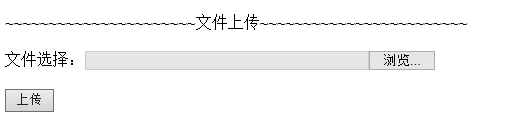
选择一文件,点上传,则在 %工程发布目录%\WebContent\uploadFile 下可看到上传的文件
jquery+springMVC实现文件上传的更多相关文章
- SpringMVC+ajax文件上传实例教程
原文地址:https://blog.csdn.net/weixin_41092717/article/details/81080152 文件上传文件上传是项目开发中最常见的功能.为了能上传文件,必须将 ...
- springmvc图片文件上传接口
springmvc图片文件上传 用MultipartFile文件方式传输 Controller package com.controller; import java.awt.image.Buffer ...
- SpringMVC学习--文件上传
简介 文件上传是web开发中常见的需求之一,springMVC将文件上传进行了集成,可以方便快捷的进行开发. springmvc中对多部件类型解析 在 页面form中提交enctype="m ...
- Spring +SpringMVC 实现文件上传功能。。。
要实现Spring +SpringMVC 实现文件上传功能. 第一步:下载 第二步: 新建一个web项目导入Spring 和SpringMVC的jar包(在MyEclipse里有自动生成spring ...
- 转: 如何实现jQuery的Ajax文件上传
[PHP文件上传] 在开始之前,我觉得是有必要把通WEB上传文件的原理简单说一下的.实际上,在这里不管是PHP,JSP,还是ASP处理上传的文件,其实都是WEB早已把文件上传到服务器了,我们只是运用上 ...
- jQuery插件AjaxFileUpload文件上传实现Javascript多文件上传功能
Ajax file upload plugin是一个功能强大的文件上传jQuery插件,可自定义链接.或其它元素庖代传统的file表单上传结果,可实现Ajax动态提示文件上传 过程,同时支撑多文 ...
- SpringMVC之文件上传异常处理
一般情况下,对上传的文件会进行大小的限制.如果超过指定大小时会抛出异常,一般会对异常进行捕获并友好的显示出来.以下用SpringMVC之文件上传进行完善. 首先配置CommonsMultipartRe ...
- springmvc实现文件上传
springmvc实现文件上传 多数文件上传都是通过表单形式提交给后台服务器的,因此,要实现文件上传功能,就需要提供一个文件上传的表单,而该表单就要满足以下3个条件 (1)form表彰的method属 ...
- 【SpringMVC】文件上传Expected MultipartHttpServletRequest: is a MultipartResolver错误解决
本文转载自:https://blog.csdn.net/lzgs_4/article/details/50465617 使用SpringMVC实现文件上传时,后台使用了 MultipartFile类, ...
随机推荐
- 点击按钮添加一行,和本行的删除功能,序号变动,name属性更改
<!--html结构--> <div> <input type="button" value="添加一行" onclick=&qu ...
- IOS开发之——objectForKey与valueForKey在NSDictionary中的差异
从 NSDictionary 取值的时候有两个方法,objectForKey: 和 valueForKey:,这两个方法具体有什么不同呢? 先从 NSDictionary 文档中来看这两个方法的定义: ...
- 963 AlvinZH打怪刷经验(背包DP大作战R)
963 AlvinZH打怪刷经验 思路 这不是一道普通的01背包题.大家仔细观察数据的范围,可以发现如果按常理来的话,背包容量特别大,你也会TLE. 方法一:考虑01背包的一个常数优化----作用甚微 ...
- Echo团队Alpha冲刺随笔 - 第七天
项目冲刺情况 进展 服务器部署完成.小程序改了几个BUG,WEB端大部分完成,后端主体功能大致完成. 问题 交接的时候出现很多新问题 心得 软工实践真棒!yeah!!! 今日会议内容 黄少勇 今日进展 ...
- [USACO19FEB]Cow Dating
Luogu5242 通过观察数据,我们可以发现,右端点的取值是单调递增的.于是,我们可以极限一波,用一个双指针法,类似于队列. 右端点的取值满足以下公式: (1-p1)(1-p2)..(1-pn) * ...
- 基础篇:3)规范化:3d制图总章
本章目的:明确3d绘图也有相应的准则,遵守者方有相应的进阶之路. 1.建模目标:拥有自己的建模思想 学习完成3d制图,最直接的评价标准就是--拥有自己的建模思想. 其表现为: 1)建模思路明确,能独立 ...
- 高阶篇:4.1.2.2)产品部件级别的QFDII
本章目的:介绍产品部件级别的QFDII编写方法. 1.前言 这章接前面总成级别的QFDII. 产品部件级别的QFDII,其实就是将部件QFDII所得到的设计要求,进一步分配给部件其装配层级的零部件中. ...
- vue源码-检查对象是否全相等
/** * Check if two values are loosely equal - that is, * if they are plain objects, do they have the ...
- 阿里云redisA迁移redisB迁移
./redis-port restore --input=./xxx.rdb --target=r-2zedc7c8e0557dsf4.redis.rds.aliyuncs.com:6379 --au ...
- mysql 查询json字段 json_extract (mysql 5.7及以上)
找第一层: SELECT * FROM tourists WHERE json_data->'$.weixinOpenId' = '299485886686868' 或者 SELECT * FR ...