
python绘制三维图
作者:桂。
时间:2017-04-27 23:24:55
链接:http://www.cnblogs.com/xingshansi/p/6777945.html
本文仅仅梳理最基本的绘图方法。
一、初始化
假设已经安装了matplotlib工具包。
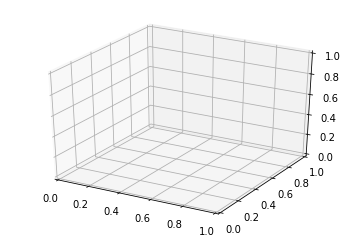
利用matplotlib.figure.Figure创建一个图框:
import matplotlib.pyplot as plt

from mpl_toolkits.mplot3d import Axes3D

fig = plt.figure()

ax = fig.add_subplot(111, projection='3d')
二、直线绘制(Line plots)
基本用法:
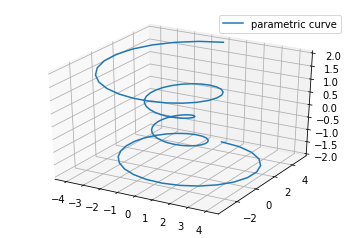
ax.plot(x,y,z,label=' ')
code:
import matplotlib as mpl

from mpl_toolkits.mplot3d import Axes3D

import numpy as np

import matplotlib.pyplot as plt

mpl.rcParams['legend.fontsize'] = 10

fig = plt.figure()

ax = fig.gca(projection='3d')

theta = np.linspace(-4 * np.pi, 4 * np.pi, 100)

z = np.linspace(-2, 2, 100)

r = z**2 + 1

x = r * np.sin(theta)

y = r * np.cos(theta)

ax.plot(x, y, z, label='parametric curve')

ax.legend()

plt.show()
三、散点绘制(Scatter plots)
基本用法:
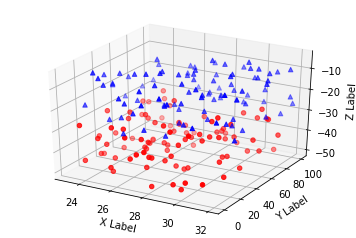
ax.scatter(xs, ys, zs, s=20, c=None, depthshade=True, *args, *kwargs)
- xs,ys,zs:输入数据;
- s:scatter点的尺寸
- c:颜色,如c = 'r'就是红色;
- depthshase:透明化,True为透明,默认为True,False为不透明
- *args等为扩展变量,如maker = 'o',则scatter结果为’o‘的形状
code:
from mpl_toolkits.mplot3d import Axes3D

import matplotlib.pyplot as plt

import numpy as np

def randrange(n, vmin, vmax):

    '''

    Helper function to make an array of random numbers having shape (n, )

    with each number distributed Uniform(vmin, vmax).

    '''

    return (vmax - vmin)*np.random.rand(n) + vmin

fig = plt.figure()

ax = fig.add_subplot(111, projection='3d')

n = 100

# For each set of style and range settings, plot n random points in the box

# defined by x in [23, 32], y in [0, 100], z in [zlow, zhigh].

for c, m, zlow, zhigh in [('r', 'o', -50, -25), ('b', '^', -30, -5)]:

    xs = randrange(n, 23, 32)

    ys = randrange(n, 0, 100)

    zs = randrange(n, zlow, zhigh)

    ax.scatter(xs, ys, zs, c=c, marker=m)

ax.set_xlabel('X Label')

ax.set_ylabel('Y Label')

ax.set_zlabel('Z Label')

plt.show()
四、线框图(Wireframe plots)
基本用法:
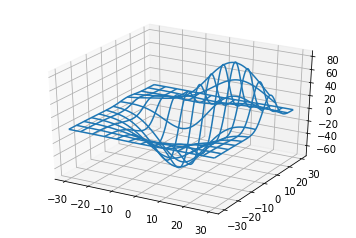
ax.plot_wireframe(X, Y, Z, *args, **kwargs)
- X,Y,Z:输入数据
- rstride:行步长
- cstride:列步长
- rcount:行数上限
- ccount:列数上限
code:
from mpl_toolkits.mplot3d import axes3d

import matplotlib.pyplot as plt

fig = plt.figure()

ax = fig.add_subplot(111, projection='3d')

# Grab some test data.

X, Y, Z = axes3d.get_test_data(0.05)

# Plot a basic wireframe.

ax.plot_wireframe(X, Y, Z, rstride=10, cstride=10)

plt.show()
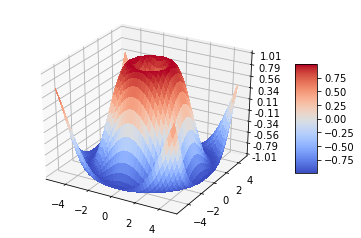
五、表面图(Surface plots)
基本用法:
ax.plot_surface(X, Y, Z, *args, **kwargs)
- X,Y,Z:数据
- rstride、cstride、rcount、ccount:同Wireframe plots定义
- color:表面颜色
- cmap:图层
code:
from mpl_toolkits.mplot3d import Axes3D

import matplotlib.pyplot as plt

from matplotlib import cm

from matplotlib.ticker import LinearLocator, FormatStrFormatter

import numpy as np

fig = plt.figure()

ax = fig.gca(projection='3d')

# Make data.

X = np.arange(-5, 5, 0.25)

Y = np.arange(-5, 5, 0.25)

X, Y = np.meshgrid(X, Y)

R = np.sqrt(X**2 + Y**2)

Z = np.sin(R)

# Plot the surface.

surf = ax.plot_surface(X, Y, Z, cmap=cm.coolwarm,

                       linewidth=0, antialiased=False)

# Customize the z axis.

ax.set_zlim(-1.01, 1.01)

ax.zaxis.set_major_locator(LinearLocator(10))

ax.zaxis.set_major_formatter(FormatStrFormatter('%.02f'))

# Add a color bar which maps values to colors.

fig.colorbar(surf, shrink=0.5, aspect=5)

plt.show()
六、三角表面图(Tri-Surface plots)
基本用法:
ax.plot_trisurf(*args, **kwargs)
- X,Y,Z:数据
- 其他参数类似surface-plot
code:
from mpl_toolkits.mplot3d import Axes3D

import matplotlib.pyplot as plt

import numpy as np

n_radii = 8

n_angles = 36

# Make radii and angles spaces (radius r=0 omitted to eliminate duplication).

radii = np.linspace(0.125, 1.0, n_radii)

angles = np.linspace(0, 2*np.pi, n_angles, endpoint=False)

# Repeat all angles for each radius.

angles = np.repeat(angles[..., np.newaxis], n_radii, axis=1)

# Convert polar (radii, angles) coords to cartesian (x, y) coords.

# (0, 0) is manually added at this stage,  so there will be no duplicate

# points in the (x, y) plane.

x = np.append(0, (radii*np.cos(angles)).flatten())

y = np.append(0, (radii*np.sin(angles)).flatten())

# Compute z to make the pringle surface.

z = np.sin(-x*y)

fig = plt.figure()

ax = fig.gca(projection='3d')

ax.plot_trisurf(x, y, z, linewidth=0.2, antialiased=True)

plt.show()

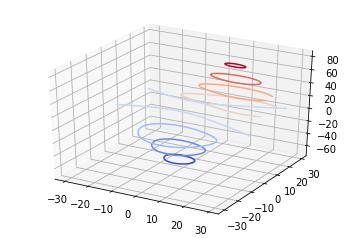
七、等高线(Contour plots)
基本用法:
ax.contour(X, Y, Z, *args, **kwargs)
code:
from mpl_toolkits.mplot3d import axes3d

import matplotlib.pyplot as plt

from matplotlib import cm

fig = plt.figure()

ax = fig.add_subplot(111, projection='3d')

X, Y, Z = axes3d.get_test_data(0.05)

cset = ax.contour(X, Y, Z, cmap=cm.coolwarm)

ax.clabel(cset, fontsize=9, inline=1)

plt.show()
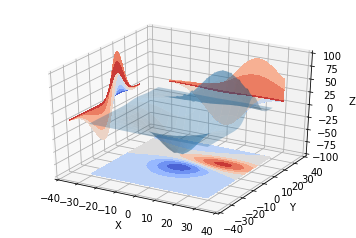
二维的等高线,同样可以配合三维表面图一起绘制:
code:
from mpl_toolkits.mplot3d import axes3d

from mpl_toolkits.mplot3d import axes3d

import matplotlib.pyplot as plt

from matplotlib import cm

fig = plt.figure()

ax = fig.gca(projection='3d')

X, Y, Z = axes3d.get_test_data(0.05)

ax.plot_surface(X, Y, Z, rstride=8, cstride=8, alpha=0.3)

cset = ax.contour(X, Y, Z, zdir='z', offset=-100, cmap=cm.coolwarm)

cset = ax.contour(X, Y, Z, zdir='x', offset=-40, cmap=cm.coolwarm)

cset = ax.contour(X, Y, Z, zdir='y', offset=40, cmap=cm.coolwarm)

ax.set_xlabel('X')

ax.set_xlim(-40, 40)

ax.set_ylabel('Y')

ax.set_ylim(-40, 40)

ax.set_zlabel('Z')

ax.set_zlim(-100, 100)

plt.show()

也可以是三维等高线在二维平面的投影:
code:
from mpl_toolkits.mplot3d import axes3d

import matplotlib.pyplot as plt

from matplotlib import cm

fig = plt.figure()

ax = fig.gca(projection='3d')

X, Y, Z = axes3d.get_test_data(0.05)

ax.plot_surface(X, Y, Z, rstride=8, cstride=8, alpha=0.3)

cset = ax.contourf(X, Y, Z, zdir='z', offset=-100, cmap=cm.coolwarm)

cset = ax.contourf(X, Y, Z, zdir='x', offset=-40, cmap=cm.coolwarm)

cset = ax.contourf(X, Y, Z, zdir='y', offset=40, cmap=cm.coolwarm)

ax.set_xlabel('X')

ax.set_xlim(-40, 40)

ax.set_ylabel('Y')

ax.set_ylim(-40, 40)

ax.set_zlabel('Z')

ax.set_zlim(-100, 100)

plt.show()
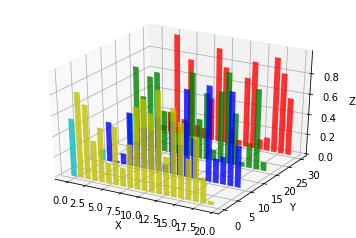
八、Bar plots(条形图)
基本用法:
ax.bar(left, height, zs=0, zdir='z', *args, **kwargs
- x,y,zs = z,数据
- zdir:条形图平面化的方向,具体可以对应代码理解。
code:
from mpl_toolkits.mplot3d import Axes3D

import matplotlib.pyplot as plt

import numpy as np

fig = plt.figure()

ax = fig.add_subplot(111, projection='3d')

for c, z in zip(['r', 'g', 'b', 'y'], [30, 20, 10, 0]):

    xs = np.arange(20)

    ys = np.random.rand(20)

    # You can provide either a single color or an array. To demonstrate this,

    # the first bar of each set will be colored cyan.

    cs = [c] * len(xs)

    cs[0] = 'c'

    ax.bar(xs, ys, zs=z, zdir='y', color=cs, alpha=0.8)

ax.set_xlabel('X')

ax.set_ylabel('Y')

ax.set_zlabel('Z')

plt.show()
九、子图绘制(subplot)
A-不同的2-D图形,分布在3-D空间,其实就是投影空间不空,对应code:
from mpl_toolkits.mplot3d import Axes3D

import numpy as np

import matplotlib.pyplot as plt

fig = plt.figure()

ax = fig.gca(projection='3d')

# Plot a sin curve using the x and y axes.

x = np.linspace(0, 1, 100)

y = np.sin(x * 2 * np.pi) / 2 + 0.5

ax.plot(x, y, zs=0, zdir='z', label='curve in (x,y)')

# Plot scatterplot data (20 2D points per colour) on the x and z axes.

colors = ('r', 'g', 'b', 'k')

x = np.random.sample(20*len(colors))

y = np.random.sample(20*len(colors))

c_list = []

for c in colors:

    c_list.append([c]*20)

# By using zdir='y', the y value of these points is fixed to the zs value 0

# and the (x,y) points are plotted on the x and z axes.

ax.scatter(x, y, zs=0, zdir='y', c=c_list, label='points in (x,z)')

# Make legend, set axes limits and labels

ax.legend()

ax.set_xlim(0, 1)

ax.set_ylim(0, 1)

ax.set_zlim(0, 1)

ax.set_xlabel('X')

ax.set_ylabel('Y')

ax.set_zlabel('Z')
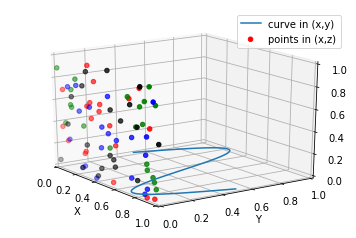
B-子图Subplot用法
与MATLAB不同的是,如果一个四子图效果,如:
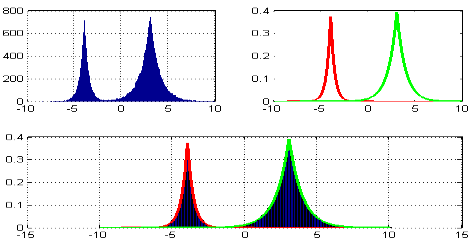
MATLAB:
subplot(2,2,1)

subplot(2,2,2)

subplot(2,2,[3,4])
Python:
subplot(2,2,1)

subplot(2,2,2)

subplot(2,1,2)
code:
import matplotlib.pyplot as plt

from mpl_toolkits.mplot3d.axes3d import Axes3D, get_test_data

from matplotlib import cm

import numpy as np

# set up a figure twice as wide as it is tall

fig = plt.figure(figsize=plt.figaspect(0.5))

#===============

#  First subplot

#===============

# set up the axes for the first plot

ax = fig.add_subplot(2, 2, 1, projection='3d')

# plot a 3D surface like in the example mplot3d/surface3d_demo

X = np.arange(-5, 5, 0.25)

Y = np.arange(-5, 5, 0.25)

X, Y = np.meshgrid(X, Y)

R = np.sqrt(X**2 + Y**2)

Z = np.sin(R)

surf = ax.plot_surface(X, Y, Z, rstride=1, cstride=1, cmap=cm.coolwarm,

                       linewidth=0, antialiased=False)

ax.set_zlim(-1.01, 1.01)

fig.colorbar(surf, shrink=0.5, aspect=10)

#===============

# Second subplot

#===============

# set up the axes for the second plot

ax = fig.add_subplot(2,1,2, projection='3d')

# plot a 3D wireframe like in the example mplot3d/wire3d_demo

X, Y, Z = get_test_data(0.05)

ax.plot_wireframe(X, Y, Z, rstride=10, cstride=10)

plt.show()

补充:
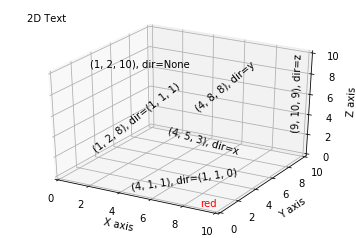
文本注释的基本用法:
code:
from mpl_toolkits.mplot3d import Axes3D

import matplotlib.pyplot as plt

fig = plt.figure()

ax = fig.gca(projection='3d')

# Demo 1: zdir

zdirs = (None, 'x', 'y', 'z', (1, 1, 0), (1, 1, 1))

xs = (1, 4, 4, 9, 4, 1)

ys = (2, 5, 8, 10, 1, 2)

zs = (10, 3, 8, 9, 1, 8)

for zdir, x, y, z in zip(zdirs, xs, ys, zs):

    label = '(%d, %d, %d), dir=%s' % (x, y, z, zdir)

    ax.text(x, y, z, label, zdir)

# Demo 2: color

ax.text(9, 0, 0, "red", color='red')

# Demo 3: text2D

# Placement 0, 0 would be the bottom left, 1, 1 would be the top right.

ax.text2D(0.05, 0.95, "2D Text", transform=ax.transAxes)

# Tweaking display region and labels

ax.set_xlim(0, 10)

ax.set_ylim(0, 10)

ax.set_zlim(0, 10)

ax.set_xlabel('X axis')

ax.set_ylabel('Y axis')

ax.set_zlabel('Z axis')

plt.show()
参考:
python绘制三维图的更多相关文章
- Python绘制面积图
一.Python绘制面积图对应代码如下图所示 import matplotlib.pyplot as plt from pylab import mpl mpl.rcParams['font.sans ...
- Python绘制折线图
一.Python绘制折线图 1.1.Python绘制折线图对应代码如下图所示 import matplotlib.pyplot as pltimport numpy as np from pylab ...
- 使用Matlab绘制三维图的几种方法
以下六个函数都可以实现绘制三维图像: surf(xx,yy,zz); surfc(xx,yy,zz); mesh(xx,yy,zz); meshc(xx,yy,zz); meshz(xx,yy,zz) ...
- python绘制疫情图
python中进行图表绘制的库主要有两个:matplotlib 和 pyecharts, 相比较而言: matplotlib中提供了BaseMap可以用于地图的绘制,但是个人觉得其绘制的地图不太美观, ...
- Python画三维图-----插值平滑数据
一.二维的插值方法: 原始数据(x,y) 先对横坐标x进行扩充数据量,采用linspace.[如下面例子,由7个值扩充到300个] 采用scipy.interpolate中的spline来对纵坐标数据 ...
- 如何用 Python 绘制玫瑰图等常见疫情图
新冠疫情已经持续好几个月了,目前,我国疫情已经基本控制住了,而欧美国家正处于爆发期,我们会看到很多网站都提供了多种疫情统计图,今天我们使用 Python 的 pyecharts 框架来绘制一些比较常见 ...
- Python绘制雷达图(俗称六芒星)
原文链接:https://blog.csdn.net/Just_youHG/article/details/83904618 背景 <Python数据分析与挖掘实战> 案例2–航空公司客户 ...
- 使用Python绘制漫步图
代码如下: import matplotlib.pyplot as plt from random import choice class RandomWalk(): def __init__(sel ...
- matplotlib绘制三维图
本文参考官方文档:http://matplotlib.org/mpl_toolkits/mplot3d/tutorial.html 起步 新建一个matplotlib.figure.Figure对象, ...
随机推荐
- Charles 模拟服务器挂掉Rewrite tools
1.点击相应请求 2.选择Rewrite 工具 3. 4. 5.保存 6.接下来就是重新发送请求了
- windows下搭建Consul分布式系统和集群
随着大数据时代的到来,分布式是解决大数据问题的一个主要手段,随着越来越多的分布式的服务,如何在分布式的系统中对这些服务做协调变成了一个很棘手的问题.我们在一个项目上注册了很多服务,在进行运维时,需要时 ...
- Oracle EBS FA 资产编号跳号
- eclipse在server中tomcat server找不到的问题
想要在eclipse的server新建tomcat服务器然而不知道怎么回事找不到Tomcat 7.0 Server 下面的红圈是tomcat server服务器(更新后才出现) 网上找的很久,只是找到 ...
- JBoss EAP应用服务器部署方法和JBoss 开发JMS消息服务小例子
一.download JBoss-EAP-6.2.0GA: http://jbossas.jboss.org/downloads JBoss Enterprise Application Platfo ...
- RHEL7.3安装mysql5.7
RHEL7.3 install mysql5.7 CentOS7默认安装MariaDB而不是MySQL,而且yum服务器上也移除了MySQL相关的软件包.因为MariaDB和MySQL可能会冲突,需先 ...
- WebStorm 中 dva 项目用 start 命令需要不断重启项目问题
问题: 用dva-cli 构建的项目,用webstorm进行开发,通过 npm start进行启动,经常修改了文件之后,浏览器里面的内容没有刷新,需要重新执行npm start才行. 解决办法: we ...
- selenium - pycharm三种案例运行模式
1.unittest 运行单个用例 (1)将鼠标放到对应的用例,右键运行即可 2.unittest运行整个脚本案例 将鼠标放到if __name__ == "__main__": ...
- Django有关的所有命令
1. Django的安装 pip install django ==1.11.11 pip install -i yuan django==1.11.11 2. 创建项目 django-admin s ...
- Windows Server 2012上安装.NET Framework 3.5
引用:https://jingyan.baidu.com/article/14bd256e26b714bb6d26128a.html 装不成功后网上搜到很多相同的问题,都尝试过没解决到 用PowerS ...