
通过AnimationSet设置动画
在代码中可以通过set来设置多个动画属性,这里分开来设置不同的属性。
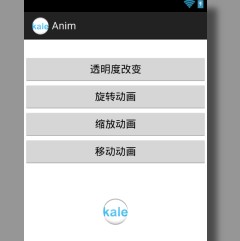
首先先贴上布局文件,里面的imageview是用来做动画的控件
<RelativeLayout xmlns:android="http://schemas.android.com/apk/res/android"

    xmlns:tools="http://schemas.android.com/tools"

    android:layout_width="match_parent"

    android:layout_height="match_parent"

    tools:context="${relativePackage}.${activityClass}" >

    <LinearLayout

        android:id="@+id/linearLayout1"

        android:layout_width="match_parent"

        android:layout_height="wrap_content"

        android:layout_alignParentTop="true"

        android:layout_centerHorizontal="true"

        android:layout_marginTop="28dp"

        android:orientation="vertical" >

        <Button

            android:id="@+id/alpha_button"

            android:layout_width="match_parent"

            android:layout_height="wrap_content"

            android:onClick="buttonListener"

            android:text="透明度改变" />

        <Button

            android:id="@+id/rotate_button"

            android:layout_width="match_parent"

            android:layout_height="wrap_content"

            android:onClick="buttonListener"

            android:text="旋转动画" />

        <Button

            android:id="@+id/scale_button"

            android:layout_width="match_parent"

            android:layout_height="wrap_content"

            android:onClick="buttonListener"

            android:text="缩放动画" />

        <Button

            android:id="@+id/translate_button"

            android:layout_width="match_parent"

            android:layout_height="wrap_content"

            android:onClick="buttonListener"

            android:text="移动动画" />

    </LinearLayout>

    <ImageView

        android:id="@+id/imageView"

        android:layout_width="wrap_content"

        android:layout_height="wrap_content"

        android:layout_below="@+id/linearLayout1"

        android:layout_centerHorizontal="true"

        android:layout_marginTop="56dp"

        android:src="@drawable/ic_launcher" />

</RelativeLayout>
在activity中的listener中写上不同的动画效果
主要是
AnimationSet set = new AnimationSet(true);
set.addAnimation(alpha);
package com.kale.anim;

import android.app.Activity;

import android.os.Bundle;

import android.view.View;

import android.view.animation.AlphaAnimation;

import android.view.animation.Animation;

import android.view.animation.AnimationSet;

import android.view.animation.RotateAnimation;

import android.view.animation.ScaleAnimation;

import android.view.animation.TranslateAnimation;

import android.widget.ImageView;

public class MainActivity extends Activity {

    ImageView iV;

    @Override

    protected void onCreate(Bundle savedInstanceState) {

        super.onCreate(savedInstanceState);

        setContentView(R.layout.activity_main);

        iV = (ImageView)findViewById(R.id.imageView);

    }

    public void buttonListener(View v) {

        AnimationSet set = new AnimationSet(true);

        switch (v.getId()) {

        case R.id.alpha_button:

            //设置渐变从不透明->透明,1表示不透明,0表示透明

            AlphaAnimation alpha = new AlphaAnimation(1f, 0f);

            //设置执行的时间

            alpha.setDuration(1000);

            set.addAnimation(alpha);

            break;

        case R.id.rotate_button:

            //RotateAnimation rotate = new RotateAnimation(0, 180, 0, 0);//从0度旋转到180度,以左上角(0,0)为圆心

            //从相对于自身(圆心在图片的中心)旋转360度,

            //x轴坐标相对于父控件宽的一半,y轴相对于自身高的一半,于是确定一个圆心

            RotateAnimation rotate = new RotateAnimation(0, 360,

                    Animation.RELATIVE_TO_PARENT, 0.5f, //0.5 = 1/2的自己父控件的长度

                    Animation.RELATIVE_TO_SELF, 0.5f);//0.5 = 1/2的自己的长度

            rotate.setDuration(5000);

            set.addAnimation(rotate);

            break;

        case R.id.scale_button:

            //缩放动画,x坐标从1f->2f,y坐标从1f->2f。缩放的轴是相对于自己的一半,等于是自己的中心

            ScaleAnimation scale = new ScaleAnimation(1f, 2f, 1f, 2f,

                    Animation.RELATIVE_TO_SELF, 0.5f,

                    Animation.RELATIVE_TO_SELF, 0.5f);

            scale.setDuration(1000);

            set.addAnimation(scale);

            break;

        case R.id.translate_button:

            //移动动画.x:从相对于自己x轴为0的位置移动到相对于自己x轴为1的位置。等于自己向右边移动一个身位

            //y:从相对于自己y轴为0的位置移动到相对于自己y轴为1的位置。等于自己向下移动了两个身位

            TranslateAnimation translate = new TranslateAnimation(

                    Animation.RELATIVE_TO_SELF, 0f,

                    Animation.RELATIVE_TO_SELF, 1f,

                    Animation.RELATIVE_TO_SELF, 0f,

                    Animation.RELATIVE_TO_SELF, 2f);

            translate.setDuration(1000);

            set.addAnimation(translate);

            break;

        default:

            break;

        }

        //设置开始动画

        iV.startAnimation(set);

    }

}
补充:
        set.setStartOffset(1000);//一秒后再执行动画 = 等待1秒后执行动画

        set.setFillAfter(true);//设置动画执行后保持最后状态

        set.setFillBefore(false);//设置动画执行后不回到原来状态

        set.setRepeatCount(3);//设置动画重复执行的次数
通过AnimationSet设置动画的更多相关文章
- android 后台代码设置动画
1.设置旋转动画 final RotateAnimation animation =new RotateAnimation(0f,360f,Animation.RELATIVE_TO_SELF, 0. ...
- 使用ObjectAnimator设置动画
ObjectAnimator是ValueAnimator的子类,他本身就已经包含了时间引擎和值计算,所以它拥有为对象的某个属性设置动画的功能.这使得为任何对象设置动画更加的容易.你不再需要实现 Val ...
- UI设计篇·入门篇·简单动画的实现,为布局设置动画,用XML布置布局动画
不仅仅控件可以设置动画,一个布局也可以设置动画, 当给一个布局设置了动画的时候,这个布局里所包含的控件都会依赖执行这些动画. 为布局设置动画的实现步骤: 1.新建一个动画,设置需要实现的形式 2.新建 ...
- XamarinAndroid组件教程RecylerView适配器设置动画示例
XamarinAndroid组件教程RecylerView适配器设置动画示例 [示例1-3]下面将在RecylerView的子元素进行滚动时,使用适配器动画.具体的操作步骤如下: (1)创建一个名为R ...
- XamarinAndroid组件教程RecylerView适配器设置动画
XamarinAndroid组件教程RecylerView适配器设置动画 本小节将讲解动画相关设置,如动画的时长.插值器以及复合动画等. 1.设置动画时长 设置动画持续的时间可以使用Animation ...
- XamarinAndroid组件教程设置动画的设置插值器
XamarinAndroid组件教程设置动画的设置插值器 为动画设置插值器,可以使用BaseItemAnimator抽象类中的SetInterpolator()方法,其语法形式如下: public v ...
- XamarinAndroid组件教程设置动画的时长参数
XamarinAndroid组件教程设置动画的时长参数 在添加动画的时候,开发者还可以动画参数进行设置,如动画持续的时长.插值器等.下面依次讲解动画参数的设置方法. 1.设置动画时长 设置动画持续的时 ...
- VUE - 路由跳转时设置动画效果
/* 为对应的路由跳转时设置动画效果 */ <transition name="fade"> <router-view /> & ...
- AndroidUI 视图动画-混合动画效果 (AnimationSet)/动画效果监听
在前面介绍了几种动画效果:透明动画效果(AlphsAnimation).移动动画效果(TranslateAnimation).旋转动画效果(RotateAnimation).缩放动画效果(ScaleA ...
随机推荐
- CentOS7.x使用overlay文件系统
https://www.cnblogs.com/yufeng218/p/8370670.html http://www.cnblogs.com/lehuoxiong/p/9908118.html ht ...
- XML与HTML区别
—————————— ASP.Net+Android+IOS开发..Net培训.期待与您交流!—————————— Xml简介 1. xml是什么? Xml 是eXtended markup lang ...
- 关于gitignore无效的一些记录
git 远程上已经有了 .idea *.iml文件 拉到本地之后,添加.gitignore 此时由于远程有了这些文件,所以.gitignore无法忽略这些文件了 挽救做法: 思路是在本地的git缓存中 ...
- python selenium-webdriver 环境搭建(一)
selenium 虽然过了这么多年,但是到目前为止依然是比较流行的自动化框架了,还有很多的初学者在学习,所以根据自己的时间将把相关的资料汇总一下,下面首先我们需要搭建一下基础环境. 首先自己本身比较笨 ...
- js 判断移动端是否安装应用
var u = navigator.userAgent; var isAndroid = u.indexOf('Android') > -1 || u.indexOf('Linux') > ...
- java 线程池(ExecutorService与Spring配置threadPoolTaskExecutor)
一.java ExecutorService实现 创建ExecutorService变量private ExecutorService executor = null 2.执行对应任务时,首先生成线程 ...
- 使用ApiPost模拟发送get、post、delete、put等http请求
现在的模拟发送请求插件很多比如老外的postman等,但亲测咱们国内的 ApiPost 更好用一些,因为它不仅可以模拟发送get.post.delete.put请求,还可以导出文档,支持团队协作也是它 ...
- shell 父子传值
通过一个中间文件进行: #!/bin/bash ( subvar="hello shell" echo "$subvar" > temp.txt ...
- 22.python中的面向对象和类的基本语法
当我发现要写python的面向对象的时候,我是踌躇满面,坐立不安呀.我一直在想:这个坑应该怎么爬?因为python中关于面向对象的内容很多,如果要讲透,最好是用面向对象的思想重新学一遍前面的内容.这个 ...
- 发布Web端
1.右键发布 2.配置文件,选择自定义 3.填写配置名称 4.选择本地目录 5.最后发布