
Intellij创建简单Springboot项目
Intellij创建简单Springboot项目
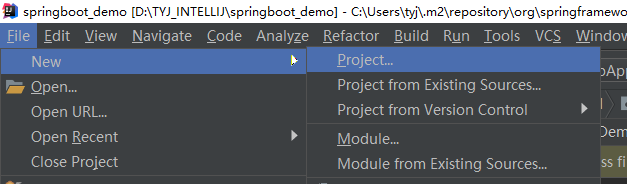
第一步:选择创建新项目——file-new-project
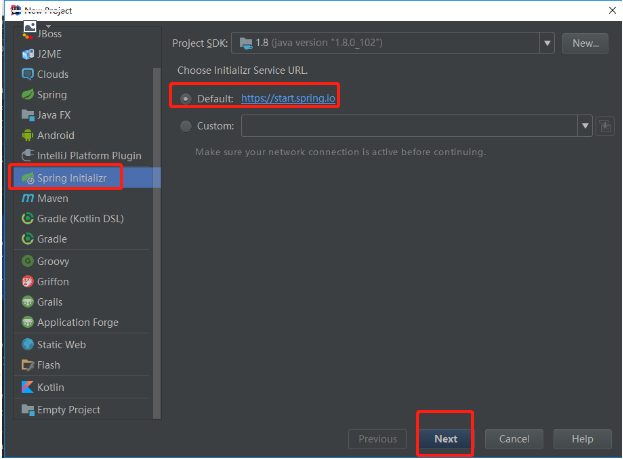
第二步:选择项目类型——Spring Initializr-next
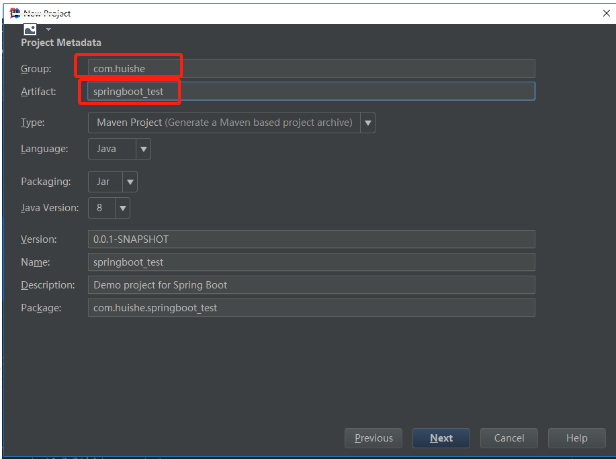
第三步:输入项目信息——Spring Initializr-next
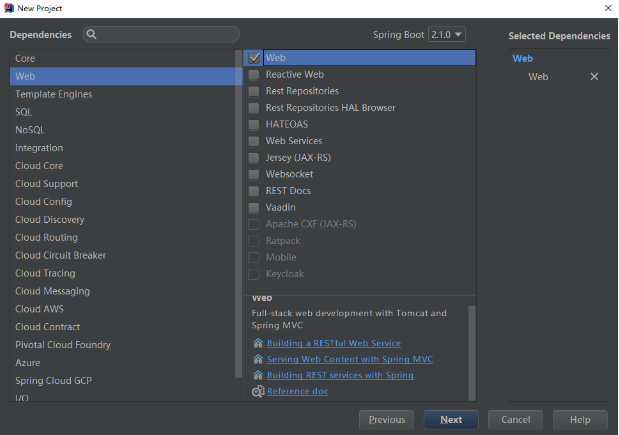
第四步:选择Spring组建——web-web(勾选)
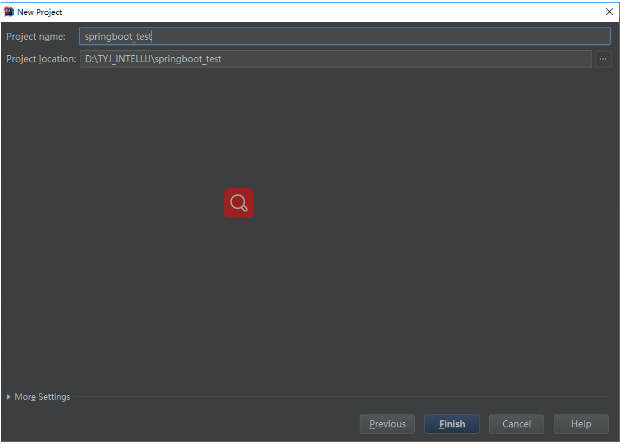
第五步:修改项目名称和项目路径(默认即可)——Finish
第六步:写一个Demo Controller层(controller的代码必须和SpringbootDemoApplication.java位于同级目录或之下)

//Main方法,项目从这里iahsi启动,是项目创建时自动生成的;

package com.example.springboot_demo;

import org.springframework.boot.SpringApplication;

import org.springframework.boot.autoconfigure.SpringBootApplication;

@SpringBootApplication

public class SpringbootDemoApplication {

    public static void main(String[] args) {

        SpringApplication.run(SpringbootDemoApplication.class, args);

    }

}
//自定义Controller方法(注意@RestController的使用)

package com.example.springboot_demo.controller;

import org.springframework.web.bind.annotation.RequestMapping;

import org.springframework.web.bind.annotation.RestController;

@RestController

public class DemoController {

    @RequestMapping("/login")

    public String login(){

        return "login success!";

    }

}
第七步:启动项目,并用浏览器访问项目
//启动日志输出

  .   ____          _            __ _ _

 /\\ / ___'_ __ _ _(_)_ __  __ _ \ \ \ \

( ( )\___ | '_ | '_| | '_ \/ _` | \ \ \ \

 \\/  ___)| |_)| | | | | || (_| |  ) ) ) )

  '  |____| .__|_| |_|_| |_\__, | / / / /

 =========|_|==============|___/=/_/_/_/

 :: Spring Boot ::        (v2.1.0.RELEASE)

2018-11-29 09:47:16.011  INFO 14668 --- [           main] c.e.s.SpringbootDemoApplication          : No active profile set, falling back to default profiles: default

2018-11-29 09:47:17.710  INFO 14668 --- [           main] o.s.b.w.embedded.tomcat.TomcatWebServer  : Tomcat initialized with port(s): 8080 (http)

2018-11-29 09:47:17.734  INFO 14668 --- [           main] o.apache.catalina.core.StandardService   : Starting service [Tomcat]

2018-11-29 09:47:17.735  INFO 14668 --- [           main] org.apache.catalina.core.StandardEngine  : Starting Servlet Engine: Apache Tomcat/9.0.12

2018-11-29 09:47:17.899  INFO 14668 --- [           main] o.a.c.c.C.[Tomcat].[localhost].[/]       : Initializing Spring embedded WebApplicationContext

2018-11-29 09:47:17.899  INFO 14668 --- [           main] o.s.web.context.ContextLoader            : Root WebApplicationContext: initialization completed in 1802 ms

2018-11-29 09:47:17.933  INFO 14668 --- [           main] o.s.b.w.servlet.ServletRegistrationBean  : Servlet dispatcherServlet mapped to [/]

2018-11-29 09:47:17.939  INFO 14668 --- [           main] o.s.b.w.servlet.FilterRegistrationBean   : Mapping filter: 'characterEncodingFilter' to: [/*]

2018-11-29 09:47:17.940  INFO 14668 --- [           main] o.s.b.w.servlet.FilterRegistrationBean   : Mapping filter: 'hiddenHttpMethodFilter' to: [/*]

2018-11-29 09:47:17.940  INFO 14668 --- [           main] o.s.b.w.servlet.FilterRegistrationBean   : Mapping filter: 'formContentFilter' to: [/*]

2018-11-29 09:47:17.940  INFO 14668 --- [           main] o.s.b.w.servlet.FilterRegistrationBean   : Mapping filter: 'requestContextFilter' to: [/*]

2018-11-29 09:47:18.203  INFO 14668 --- [           main] o.s.s.concurrent.ThreadPoolTaskExecutor  : Initializing ExecutorService 'applicationTaskExecutor'

2018-11-29 09:47:18.482  INFO 14668 --- [           main] o.s.b.w.embedded.tomcat.TomcatWebServer  : Tomcat started on port(s): 8080 (http) with context path ''

2018-11-29 09:47:18.487  INFO 14668 --- [           main] c.e.s.SpringbootDemoApplication          : Started SpringbootDemoApplication in 3.183 seconds (JVM running for 4.749)

备注:一开始在DemoController上用@Controller注解,发现不起效果;原来@RestController和@Controller是有区别的。
通过查看@RestController的源码发现:@RestController注解 = @ResponseBody + @Controller
package org.springframework.web.bind.annotation;

import java.lang.annotation.Documented;

import java.lang.annotation.ElementType;

import java.lang.annotation.Retention;

import java.lang.annotation.RetentionPolicy;

import java.lang.annotation.Target;

import org.springframework.core.annotation.AliasFor;

import org.springframework.stereotype.Controller;

@Target({ElementType.TYPE})

@Retention(RetentionPolicy.RUNTIME)

@Documented

@Controller

@ResponseBody

public @interface RestController {

    @AliasFor(

        annotation = Controller.class

    )

    String value() default "";

}
参考资料:
1- https://blog.csdn.net/xyc_csdn/article/details/67672198
2- https://www.cnblogs.com/shuaifing/p/8119664.html
Intellij创建简单Springboot项目的更多相关文章
- IDEA创建简单SpringBoot项目
环境:jdk 1.打开IDEA -->New --> Project -->Spring Initalizer-->next 2.此处,只做创建示例,所以next后Group等 ...
- 使用IDEA创建一个springboot项目
工欲善其事,必先利其器. 不难发现,还是有很多小朋友在使用eclipse开发java项目.当你接触IDEA后,一切都变得美好了. 使用IDEA创建一个springboot项目是一件极其简单的事情.界面 ...
- 创建简单web项目
Intellij Idea直接安装(可根据需要选择自己设置的安装目录),jdk使用1.6/1.7/1.8都可以,主要是配置好系统环境变量,tomcat7上tomcat的官网下载压缩包解压即可. 一.创 ...
- Intellij IDEA实现SpringBoot项目多端口启动的两种方法
有时候使用springboot项目时遇到这样一种情况,用一个项目需要复制很多遍进行测试,除了端口号不同以外,没有任何不同.遇到这种情况怎么办呢?这时候可以使用Intellij IDEA解决 前言 有时 ...
- spting Boot 创建一个springBoot项目
spting Boot 创建一个springBoot项目 1)学习springBoot使用软件:IDEA软件(前面的文章有安装idea的过程). 也可以使用另一种方法在https://start.sp ...
- intellij 创建java web项目(maven管理的SSH)
intellij 创建java web项目(maven管理的SSH) 环境intellij IDEA14.MAVEN.Spring.Struts2.Hibernate.Java Web.工程搭建. 1 ...
- 如何使用IDEA快速创建一个springboot项目
如何使用IDEA快速创建一个springboot项目 https://jingyan.baidu.com/article/0964eca24fdd938284f53640.html
- 使用Intellij Idea创建简单Maven项目(转)
我是学Java Web的,基本靠自学,在网上收集了各种视频资料,逐一的看,代码逐一的敲.学习了这么久之前一直未成想过要把自己的学习路程记录下来,在网上也看到过很多人把自己的学习历程以及遇到的问题写在了 ...
- 使用IntelliJ Idea新建SpringBoot项目
简单给大家介绍一下我来创建SpringBoot项目使用的工具,本人使用IntelliJ Idea来创建项目,利用其中的Spring Initializr工具来快速创建项目. 步骤如下: 菜单栏中选择F ...
随机推荐
- Linux Centos6.5 SVN服务器搭建 以及客户端安装
转载:http://www.cnblogs.com/mymelon/p/5483215.html /******开始*********/ 系统环境:Centos 6.5 第一步:通过yum命令安装sv ...
- Srping cloud Ribbon 自定义负载均衡
IRule 默认提供有7种方式,使用轮询方式 如何自定义 1:主启动类加@RibbonClient @RibbonClient(name="微服务名", configuration ...
- 用waitpid函数回收进程
waitpid函数:作用同wait,但可指定pid进程清理,可以不阻塞. 原型:pid_t waitpid(pid_t pid, int *status, in options); 返回值:成功时返回 ...
- servlet路径获取
本文章主要讨论以下几种request获取路径的方法: request.getServletPath() request.getPathInfo() request.getContextPath() r ...
- oracle vm突然黑屏了
装完mongodb-compass后,我重启了下虚拟机,发现突然进不到ubuntu系统了,一开起来就黑屏.网上查了下有的说是显卡问题的,有说是内核问题的,但我啥都没干突然间就黑屏了.折腾了一下午没搞定 ...
- 遍历DOM树,过滤节点
jQuery还提供以下方法来过滤节点. 方法 说明 first() 获取第一个,示例 $('li').last() last() 获取最后一个,示例$('li').last() eq() ...
- Structs复习 Result第一部分
Jar包 web.xml <?xml version="1.0" encoding="UTF-8"?> <web-app version=&q ...
- ArcGIS案例学习笔记-中国2000坐标转换实例
ArcGIS案例学习笔记-中国2000坐标转换实例 联系方式:谢老师,135-4855-4328,xiexiaokui#qq.com 目的:西安1980.中国2000.WGS84(GPS)等任意坐标系 ...
- 吴裕雄 02-mysql PHP语法
mysqli_connect($connect);mysqli_query($connect,"SQL 语句");mysqli_fetch_array()mysqli_close( ...
- 解决C3P0在Linux下Failed to get local InetAddress for VMID问题
解决C3P0在Linux下Failed to get local InetAddress for VMID问题 FailedtogetlocalInetAddressforVMID.Thisisunl ...