
Distributed traceability with Spring Cloud: Sleuth and Zipkin
I. Sleuth
0. Concept
- Trace
- A set of spans that form a call tree structure, forms the trace of the request.
- Span
- It is the basic unit of work, for example a call to a service. They are identified with a span ID and a trace ID to which span is owned. They have start and end, and with it you get track the response time between requests.
- Tag
- Key/value pair that identifies certain information in the span. It doesn't contain timestamps, it just identifies.
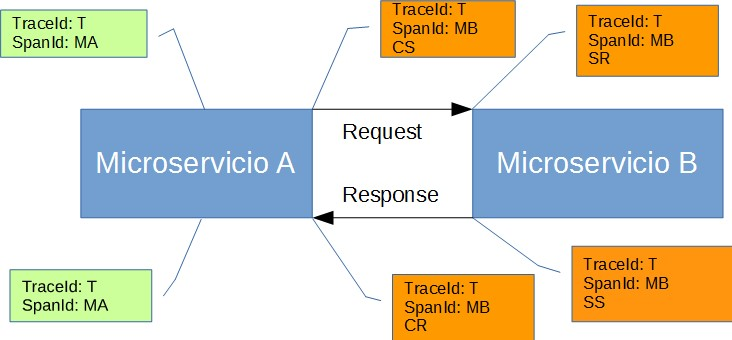
Annotation: Used to record the existence of an event in time. With Brave instrumentation, we no longer need to set special events for Zipkin to understand who the client and server are, where the request started, and where it ended. For learning purposes, however, we mark these events to highlight what kind of an action took place.
- cs: Client Sent. The client has made a request. This annotation indicates the start of the span.
- sr: Server Received: The server side got the request and started processing it. Subtracting the
cstimestamp from this timestamp reveals the network latency. - ss: Server Sent. Annotated upon completion of request processing (when the response got sent back to the client). Subtracting the
srtimestamp from this timestamp reveals the time needed by the server side to process the request. - cr: Client Received. Signifies the end of the span. The client has successfully received the response from the server side. Subtracting the
cstimestamp from this timestamp reveals the whole time needed by the client to receive the response from the server.
1. pom
        <dependency>
            <groupId>org.springframework.cloud</groupId>
            <artifactId>spring-cloud-starter-sleuth</artifactId>
        </dependency>
2. config
1) sampler
---
spring:
  sleuth:
    sampler:
      probability: 1.0
II. zipkin
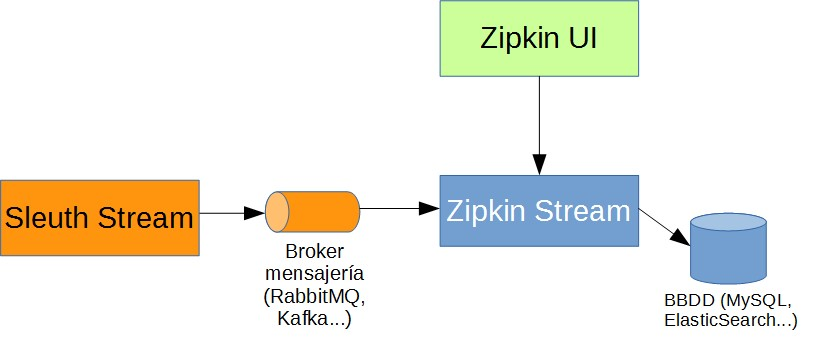
0. way
1) http
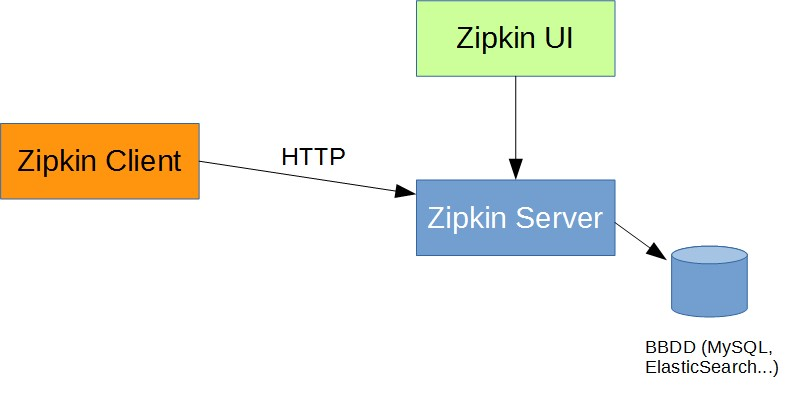
2) Messaging Brokers
0. zipkin client
1) pom
        <dependency>
            <groupId>org.springframework.cloud</groupId>
            <artifactId>spring-cloud-starter-zipkin</artifactId>
        </dependency>
2) config
(1) base url
---
spring:
  zipkin:
    base-url: http://localhost:9411
(2) sender
A. RabbitMQ
---
spring:
  zipkin:
    sender:
      type: RABBIT
B. Kafka
---
spring:
  zipkin:
    sender:
      type: KAFKA
C. Web
default
1. zipkin server
upgrade to Spring Boot 2.0 NoClassDefFoundError UndertowEmbeddedServletContainerFactory
1) down
https://mvnrepository.com/artifact/io.zipkin.java/zipkin-server
2) run
es2.4.x安装在WSL中。详细 see 《Elasticsearch 2.4 安装》
(1) for Rabbit
version: RabbitMQ3.7.13(erlang 21.3)
java -jar zipkin-server--exec.jar --RABBIT_URI=amqp://admin:admin@192.168.42.124:5672/sleuth --STORAGE_TYPE=elasticsearch --ES_HOSTS=http://localhost:9200 --ES_HTTP_LOGGING=BASIC
(2) for kafka
version: Kafka1.0.2(Scale 2.11)
java -jar zipkin-server--exec.jar --KAFKA_BOOTSTRAP_SERVERS=,, --STORAGE_TYPE=elasticsearch --ES_HOSTS=http://localhost:9200 --ES_HTTP_LOGGING=BASIC
III. MQ
1. RabbitMQ
0) pom
        <dependency>
            <groupId>org.springframework.cloud</groupId>
            <artifactId>spring-cloud-stream</artifactId>
        </dependency>
        <dependency>
            <groupId>org.springframework.cloud</groupId>
            <artifactId>spring-cloud-stream-binder-rabbit</artifactId>
        </dependency>
1) config
---
spring:
  rabbitmq:
    addresses: 192.168.42.124
    port: 5672
    username: admin
    password: admin
    virtual-host: sleuth
2) virtual hosts
切换到Admin选项卡,点击右侧的virtual hosts

2. Kafka
0) pom
        <dependency>
            <groupId>org.springframework.cloud</groupId>
            <artifactId>spring-cloud-stream</artifactId>
        </dependency>
        <dependency>
            <groupId>org.springframework.cloud</groupId>
            <artifactId>spring-cloud-stream-binder-kafka</artifactId>
        </dependency>
1) config
spring:
  kafka:
    bootstrap-servers:
      - 192.168.42.186:9092
      - 192.168.42.187:9092
      - 192.168.42.188:9092
IV. Effect Diagram
0. gateway
http://localhost:8311/user/listPage

1. zipkin server
http://localhost:9411

2. RabbitMQ
连接了4个服务:zipkin server
gateway->user-service->userDetails
http://192.168.42.124:15672/#/connections

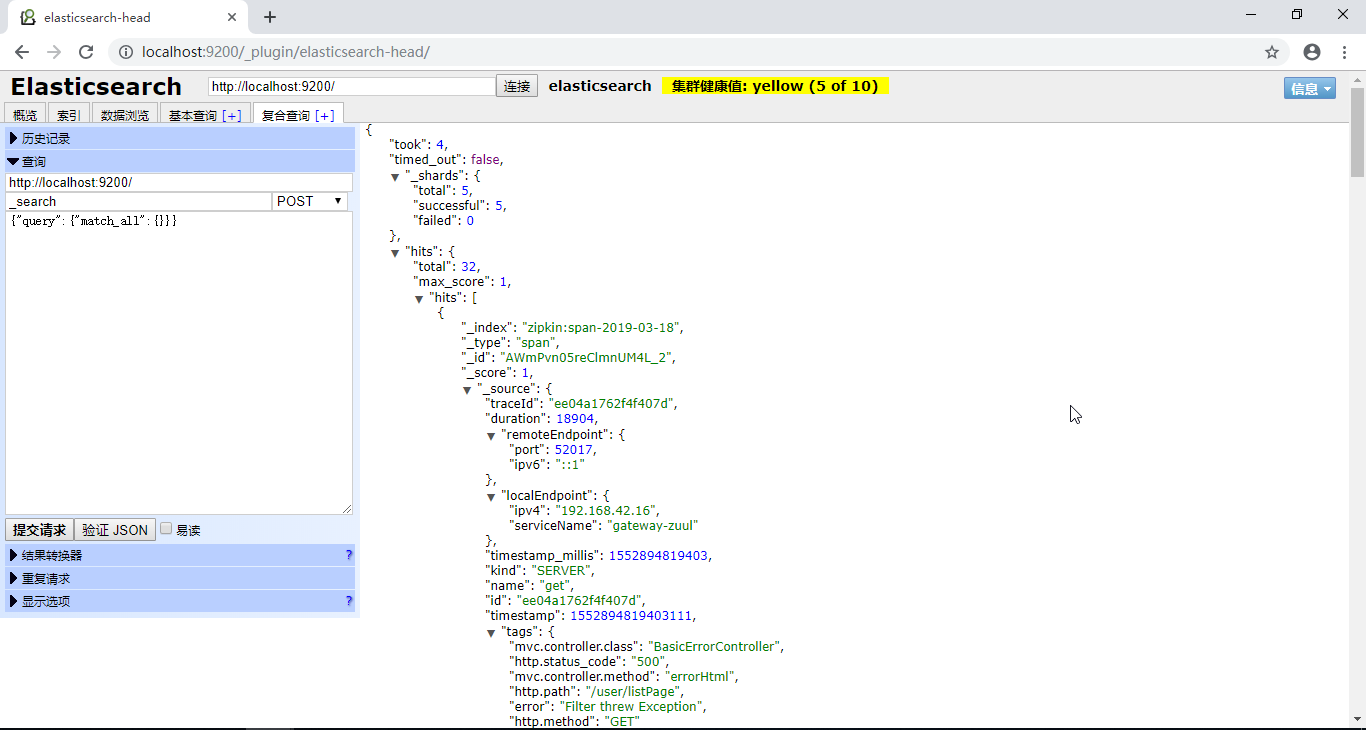
3. ES2.4.x
http://localhost:9200/_plugin/elasticsearch-head
Reference:
1. Trazabilidad Distribuida con Spring Cloud: Sleuth y Zipkin
Distributed traceability with Spring Cloud: Sleuth and Zipkin的更多相关文章
- 跟我学SpringCloud | 第十一篇:使用Spring Cloud Sleuth和Zipkin进行分布式链路跟踪
SpringCloud系列教程 | 第十一篇:使用Spring Cloud Sleuth和Zipkin进行分布式链路跟踪 Springboot: 2.1.6.RELEASE SpringCloud: ...
- Spring Cloud sleuth with zipkin over RabbitMQ教程
文章目录 Spring Cloud sleuth with zipkin over RabbitMQ demo zipkin server的搭建(基于mysql和rabbitMQ) 客户端环境的依赖 ...
- spring cloud 入门系列八:使用spring cloud sleuth整合zipkin进行服务链路追踪
好久没有写博客了,主要是最近有些忙,今天忙里偷闲来一篇. =======我是华丽的分割线========== 微服务架构是一种分布式架构,微服务系统按照业务划分服务单元,一个微服务往往会有很多个服务单 ...
- Spring Cloud Sleuth 和 Zipkin 进行分布式跟踪使用指南
分布式跟踪允许您跟踪分布式系统中的请求.本文通过了解如何使用 Spring Cloud Sleuth 和 Zipkin 来做到这一点. 对于一个做所有事情的大型应用程序(我们通常将其称为单体应用程序) ...
- springcloud(十二):使用Spring Cloud Sleuth和Zipkin进行分布式链路跟踪
随着业务发展,系统拆分导致系统调用链路愈发复杂一个前端请求可能最终需要调用很多次后端服务才能完成,当整个请求变慢或不可用时,我们是无法得知该请求是由某个或某些后端服务引起的,这时就需要解决如何快读定位 ...
- 使用Spring Cloud Sleuth和Zipkin进行分布式链路跟踪
原文:http://www.cnblogs.com/ityouknow/p/8403388.html 随着业务发展,系统拆分导致系统调用链路愈发复杂一个前端请求可能最终需要调用很多次后端服务才能完成, ...
- spring cloud深入学习(十三)-----使用Spring Cloud Sleuth和Zipkin进行分布式链路跟踪
随着业务发展,系统拆分导致系统调用链路愈发复杂一个前端请求可能最终需要调用很多次后端服务才能完成,当整个请求变慢或不可用时,我们是无法得知该请求是由某个或某些后端服务引起的,这时就需要解决如何快读定位 ...
- 【spring cloud】spring cloud Sleuth 和Zipkin 进行分布式链路跟踪
spring cloud 分布式微服务架构下,所有请求都去找网关,对外返回也是统一的结果,或者成功,或者失败. 但是如果失败,那分布式系统之间的服务调用可能非常复杂,那么要定位到发生错误的具体位置,就 ...
- springcloud --- spring cloud sleuth和zipkin日志管理(spring boot 2.18)
前言 在spring cloud分布式架构中,系统被拆分成了许多个服务单元,业务复杂性提高.如果出现了异常情况,很难定位到错误位置,所以需要实现分布式链路追踪,跟进一个请求有哪些服务参与,参与的顺序如 ...
随机推荐
- mysql之 重建GTID下主从关系
主库:mysqldump -uroot -pmysql -S /tmp/mysql.sock1 --single-transaction --add-drop-database --master-da ...
- docker 的前台模式和后台模式
Detached(后台模式) vs foreground(前台模式) 当我们启动一个容器时,首先需要确定这个容器是运行在前台还是运行在后台. -d, --detach Run container in ...
- enum和数据库entity互转
注意,code和desc都是string的,数据库的entity是integer,dto的是enum,所以需要一个转换 entity转dto EnumGender.getEnum(String.val ...
- 通过阅读python subprocess源码尝试实现非阻塞读取stdout以及非阻塞wait
http://blog.chinaunix.net/uid-23504396-id-4661783.html 执行subprocess的时候,执行不是问题最麻烦的是获取进程执行后的回显来确认是否正确执 ...
- JFrame包含的容器(JRootPane)
JFrame对象创建后,此对象包含JRootPane类型的容器.JRootPane 下有GlassPane, 和 LayeredPane,LayeredPane下又有ContentPane , ...
- java面试题002
1.判断下列代码的运行情况 public class TestExtends { public static void main(String[] args) { Father obj = new S ...
- hyperledger fabric各类节点及其故障分析 摘自https://www.cnblogs.com/preminem/p/8729781.html
hyperledger fabric各类节点及其故障分析 1.Client节点 client代表由最终用户操作的实体,它必须连接到某一个peer节点或者orderer节点上与区块链网络通信.客户端 ...
- VS2013编译Qt5.2.1 32位静态库debug-and-release版及结果分享
1. 下载zip源码,我下载的是qt-everywhere-opensource-src-5.2.1.zip这个文件. 2.安装python 3.解压缩qt-everywhere-opensource ...
- 黄聪:wordpress如何携带cookie模拟浏览器访问网站
$args = array( 'user-agent' => 'Mozilla/5.0 (Windows NT 6.1; WOW64) AppleWebKit/537.36 (KHTML, li ...
- STL中erase()的用法
erase()是STL提供的容器中比较常用的方法之一,它的功能是删除容器中的某些元素,其中它的函数原型如下: 1.有两个参数,且参数类型都是size_t型: string& erase ( s ...