
在ASP.NET MVC实现购物车,尝试一种不同于平常的购物车显示方式
通常,我们看到的购物车是这样的:
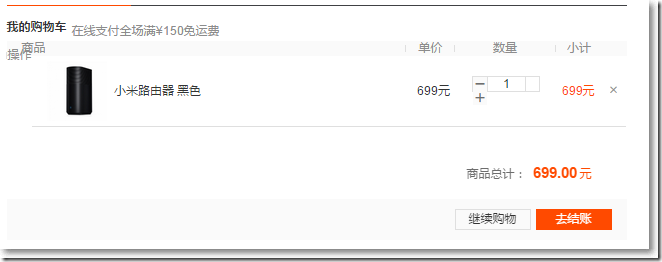
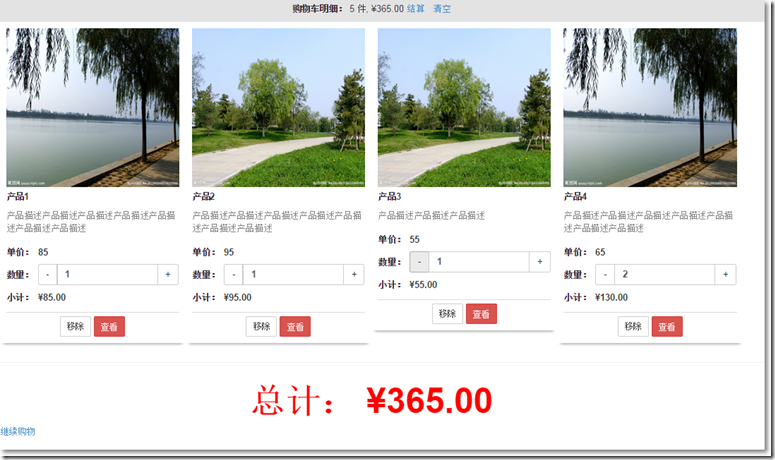
虽然这种购物车显示方式被广泛运用,但我个人觉得不够直观。如果换成这样呢?
本篇的源码放在了:https://github.com/darrenji/ShoppingCartInMVC
以上购物车页能实现的效果包括:
1、购物车明细:显示订购数量、总金额,清空购物车。
2、购物车内产品:数量可调整,对应的小计和总计动态变化。点击移除按钮移除该产品。
3、继续购物按钮:点击左下角的继续购物按钮,回到先前页。
4、使用了Bootstrap, 页面元素自适应,页面宽度调小时,页面布局动态变化。
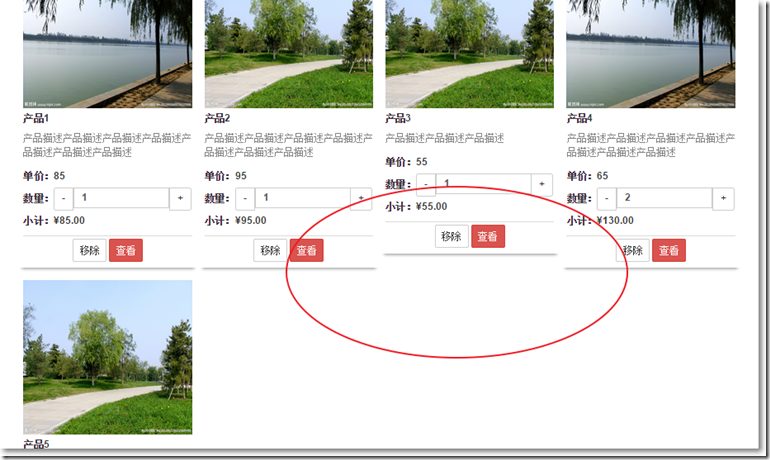
5、每行放置4个产品,且允许高度不一致,第5个产品另起一行,且不会float到上一行的空白区域,如下图。
首先,有关产品的类。
public class Product{public int Id { get; set; }public string Name { get; set; }public string ImageUrl { get; set; }public string Description { get; set; }public decimal Price { get; set; }}
产品选购页如图:
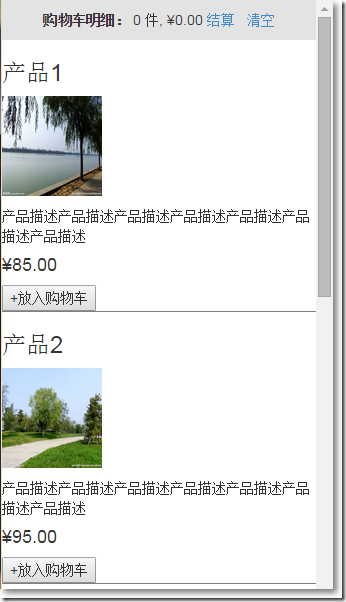
以上,产品选购页是一个有关Product集合的强类型视图页,其对应的Model为:
public class ProductsListVm{public ProductsListVm(){this.Products = new List<Product>();}public IEnumerable<Product> Products { get; set; }}
想像一下,我们在超市购物,在购物车内放着不同的商品对应不同的数量,在这里,可以把商品和数量抽象成一个类:
public class CartLine{public Product Product { get; set; }public int Quantity { get; set; }}
而购物车类实际上就是维护着这个CartLine集合,需要提供添加、移除、计算购物车总价、清空购物车等方法,并提供一个获取到CartLine集合的属性,另外,针对点击购物车页上的增量和减量按钮,也要提供相应的方法。
public class Cart{private List<CartLine> lineCollection = new List<CartLine>();//添加public void AddItem(Product product, int quantity){CartLine line = lineCollection.Where(p => p.Product.Id == product.Id).FirstOrDefault();if (line == null){lineCollection.Add(new CartLine(){Product = product, Quantity = quantity});}else{line.Quantity += quantity;}}//点击数量+号或点击数量-号或自己输入一个值public void IncreaseOrDecreaseOne(Product product, int quantity){CartLine line = lineCollection.Where(p => p.Product.Id == product.Id).FirstOrDefault();if (line != null){line.Quantity = quantity;}}//移除public void RemoveLine(Product product){lineCollection.RemoveAll(p => p.Product.Id == product.Id);}//计算总价public decimal ComputeTotalPrice(){return lineCollection.Sum(p => p.Product.Price*p.Quantity);}//清空public void Clear(){lineCollection.Clear();}//获取public IEnumerable<CartLine> Lines{get { return lineCollection; }}}
购物车页自然就是针对Cart类的一个强类型视图页,嗯,等等,购物车页还需要记录下上一个页面的url,于是,考虑到把Cart类和记录上一个页面url这2个因素,针对购物车页,给出这样的一个Model:
public class CartIndexVm{public Cart Cart { get; set; }public string ReturnUrl { get; set; }}
在HomeController中,需要用到购物车的实例,可以这样写:
private Cart GetCart(){Cart cart = (Cart)Session["Cart"];if (cart == null){cart = new Cart();Session["Cart"] = cart;}return cart;}
Cart实例保存到Session中,并从Session中获取。当然,也可以放到ASP.NET MVC绑定机制中,需要做的就是实现IModelBinder接口。
public class CartModelBinder : IModelBinder{private const string sessionKey = "Cart";public object BindModel(ControllerContext controllerContext, ModelBindingContext bindingContext){Cart cart = (Cart)controllerContext.HttpContext.Session[sessionKey];if (cart == null){cart = new Cart();controllerContext.HttpContext.Session[sessionKey] = cart;}return cart;}}
自定义的ModelBinder需要在全局中注册。
public class MvcApplication : System.Web.HttpApplication{protected void Application_Start(){AreaRegistration.RegisterAllAreas();......ModelBinders.Binders.Add(typeof(Cart), new CartModelBinder());}}
在Home控制器中,首先提供了一个返回Product集合的方法。
private List<Product> GetAllProducts(){return new List<Product>(){new Product(){Id = 1, Description = "产品描述产品描述产品描述产品描述产品描述产品描述产品描述",ImageUrl = "/images/1.jpg",Name = "产品1",Price = 85M},new Product(){Id = 2, Description = "产品描述产品描述产品描述产品描述产品描述产品描述产品描述",ImageUrl = "/images/2.jpg",Name = "产品2",Price = 95M},new Product(){Id = 3, Description = "产品描述产品描述产品描述",ImageUrl = "/images/2.jpg",Name = "产品3",Price = 55M},new Product(){Id = 4, Description = "产品描述产品描述产品描述产品描述产品描述产品描述产品描述",ImageUrl = "/images/1.jpg",Name = "产品4",Price = 65M},new Product(){Id = 5, Description = "产品描述产品描述产品描述产品描述产品描述产品描述产品描述",ImageUrl = "/images/2.jpg",Name = "产品5",Price = 75M}};}
在HomeController中,有关产品选购页的如下:
//产品选购页public ActionResult Index(){ProductsListVm productsListVm = new ProductsListVm();productsListVm.Products = GetAllProducts();return View(productsListVm);}
Homme/Index.cshtml是一个ProductsListVm的强类型视图页。
@model MvcApplication1.Models.ProductsListVm@{ViewBag.Title = "Index";Layout = "~/Views/Shared/_Layout.cshtml";}<style type="text/css">.item {border-bottom: solid 1px gray;}</style><div class="container"><div class="row">@foreach (var item in Model.Products){Html.RenderPartial("ProductSummary", item);}</div></div>
其中,遍历Product集合的时候,又去加载Views/Shared/ProductSummary.cshtml这个强类型部分视图。
@model MvcApplication1.Models.Product<div class="item"><h3>@Model.Name</h3><p><img src="@Model.ImageUrl" style="width: 100px;height: 100px;"/></p><p>@Model.Description</p><h4>@Model.Price.ToString("c")</h4>@using (Html.BeginForm("AddToCart", "Home")){@Html.HiddenFor(p => p.Id)@Html.Hidden("returnUrl", Request.Url.PathAndQuery)<input type="submit" value="+放入购物车"/>}</div>
点击"+放入购物车"按钮,调用HomeController中的AddToCart方法,并且需要把选购产品页的url以query string的形式传递给控制器方法。
//购物车页public ActionResult CartIndex(Cart cart, string returnUrl){return View(new CartIndexVm{Cart = cart,ReturnUrl = returnUrl});}//添加到购物车public ActionResult AddToCart(Cart cart, int id, string returnUrl){Product product = GetAllProducts().Where(p => p.Id == id).FirstOrDefault();if (product != null){cart.AddItem(product, 1);}return RedirectToAction("CartIndex", new {returnUrl});}
购物车页Home/CartIndex.cshtml是一个CartIndexVm的强类型视图页。
@model MvcApplication1.Models.CartIndexVm@{ViewBag.Title = "CartIndex";Layout = "~/Views/Shared/_Layout.cshtml";}@section styles{<link href="~/Content/shopitem.css" rel="stylesheet" /><link href="~/Content/jquery.bootstrap-touchspin.min.css" rel="stylesheet" />}<div class="container"><div class="row">@for (int i = 0; i < Model.Cart.Lines.Count(); i++){var item = (Model.Cart.Lines.ToList())[i];if (i != 0 && i%4 == 0) //每行有4个div{<div style="clear:both;"></div>}<div class="col-md-3 column productbox"><img src="@item.Product.ImageUrl" style="width: 460px; height: 250px;" class="img-responsive"><div class="producttitle"><div class="productname">@item.Product.Name</div><div class="productdes">@item.Product.Description</div><div><table><tr><td style="width:50px;">单价:</td><td>@item.Product.Price</td></tr><tr><td>数量:</td><td><input class="demo2" type="text" value="@item.Quantity" name="demo2" /></td></tr><tr><td>小计:</td><td>@((item.Quantity * item.Product.Price).ToString("c"))</td></tr></table></div></div><div class="productprice"><div class="text-center">@using (Html.BeginForm("RemoveFromCart", "Home")){@Html.Hidden("Id", item.Product.Id)@Html.HiddenFor(x => x.ReturnUrl)<input class="btn btn-default btn-sm" type="submit" value="移除"/><a href="#" class="btn btn-danger btn-sm" role="button">查看</a>}</div></div></div>}</div></div><hr/><div class="container"><div class="row"><div class="text-center" style="font-size: 55px;font-weight: bold;color: red;"><span>总计:</span> @Model.Cart.ComputeTotalPrice().ToString("c")</div><p align="left" class="actionButtons" style="width: 100%; clear: both"><a href="@Model.ReturnUrl">继续购物</a></p></div></div>@section scripts{<script src="~/Scripts/jquery.bootstrap-touchspin.min.js"></script><script type="text/javascript">$(function () {var i = $("input[class='demo2']");i.TouchSpin({min: 1,max: 100,step: 1//增量或减量});i.on("touchspin.on.stopupspin", function () {$.post('@Url.Action("IncreaseOrDecreaseOne", "Home")', { "id": $(this).closest("div.productbox").find('#Id').val(), "quantity": $(this).val() }, function (data) {if (data.msg) {location.reload();}});//var temp = $(this).val();//alert(temp);//var temp = $(this).closest("div.productbox").find('#Id').val();//alert(temp);});i.on("touchspin.on.stopdownspin", function () {$.post('@Url.Action("IncreaseOrDecreaseOne", "Home")', { "id": $(this).closest("div.productbox").find('#Id').val(), "quantity": $(this).val() }, function (data) {if (data.msg) {location.reload();}});});});</script>}
在购物车页,用了Bootstrap TouchSpin这款插件,点击其中的数量的增量和减量按钮,就向Home控制器中的IncreaseOrDecreaseOne方法发送一个异步post请求,得到返回数据刷新购物车页。
//点击数量+号或点击数量-号或自己输入一个值[HttpPost]public ActionResult IncreaseOrDecreaseOne(Cart cart, int id, int quantity){Product product = GetAllProducts().Where(p => p.Id == id).FirstOrDefault();if (product != null){cart.IncreaseOrDecreaseOne(product, quantity);}return Json(new{msg = true});}
在购车页,点击"移除"按钮,就向Home控制器的RemoveFromCart方法提交表单。
//从购物车移除public ActionResult RemoveFromCart(Cart cart, int id, string returnUrl){Product product = GetAllProducts().Where(p => p.Id == id).FirstOrDefault();if (product != null){cart.RemoveLine(product);}return RedirectToAction("CartIndex", new {returnUrl});}
购物车摘要是通过在Views/Shared/_Layout.cshtml中加载部分视图而来。
<head><meta charset="utf-8" /><meta name="viewport" content="width=device-width" /><title>@ViewBag.Title</title>@Styles.Render("~/Content/css")<link href="~/bootstrap/css/bootstrap.min.css" rel="stylesheet" />@RenderSection("styles", required: false)@Scripts.Render("~/bundles/jquery")<script src="~/bootstrap/js/bootstrap.min.js"></script></head><body>@{Html.RenderAction("Summary", "Home");}@RenderBody()@RenderSection("scripts", required: false)</body>
在Home控制器中,对应的Summary方法为:
//清空购物车public ActionResult EmptyCart(Cart cart, string returnUrl){cart.Clear();return View("Index",new ProductsListVm{Products = GetAllProducts()});}//显示购物车摘要public ActionResult Summary(Cart cart){return View(cart);}
Home/Summary.cshtml是一个有关Cart的强类型部分视图:
@model MvcApplication1.Models.Cart@{Layout = null;}<div id="cart" style="background-color: #e3e3e3;padding: 10px; text-align:center;"><span class="caption"><b>购物车明细:</b>@if (Model != null){@Model.Lines.Sum(x => x.Quantity) <span>件,</span>@Model.ComputeTotalPrice().ToString("c")}</span>@Html.ActionLink("结算", "CartIndex", "Home", new {returnUrl = Request.Url.PathAndQuery}, null) @Html.ActionLink("清空", "EmptyCart", "Home", new {returnUrl = Request.Url.PathAndQuery}, null)</div>
注意:需要把Layout设置为null,否则会报错,因为产品选购页和购物车摘要同时加载Views/Shared/_Layout.cshtml就反复调用了。
其它方面,参考这里。
在ASP.NET MVC实现购物车,尝试一种不同于平常的购物车显示方式的更多相关文章
- ASP.NET MVC 表单的几种提交方式
下面是总结一下在ASP.NET MVC中表单的几种提交方式. 1.Ajax提交表单 需要引用 <script type="text/javascript" src=" ...
- ASP.NET MVC 提高运行速度的几种性能优化方法
主要介绍ASP.NETMVC 应用提速的六种方法,因为没有人喜欢等待,所以介绍几种常用的优化方法. 大家可能会遇到排队等待,遇到红灯要等待,开个网页要等待,等等等. 理所当然,没有人喜欢等待网页慢吞吞 ...
- 在ASP.NET MVC中实现一种不同于平常的三级联动、级联方式, 可用于城市、车型选择等多层级联场景
三级或多级联动的场景经常会碰到,比如省.市.区,比如品牌.车系.车型,比如类别的多级联动......我们首先想到的是用三个select来展示,这是最通常的做法.但在另外一些场景中,比如确定搜索条件的时 ...
- 转:ASP.NET MVC + EF 更新的几种方式
1.常用 db.Entry(实体).State = EntityState.Modified;db.SaveChanges(); 2.指定更新 db.Configuration.ValidateOnS ...
- ASP.NET MVC + EF 更新的几种方式(超赞)
1.常用 db.Entry(实体).State = EntityState.Modified;db.SaveChanges(); 2.指定更新 db.Configuration.ValidateOnS ...
- ASP.NET MVC + EF 更新的几种方式
1.常用 db.Entry(实体).State = EntityState.Modified;db.SaveChanges(); 2.指定更新 db.Configuration.ValidateOnS ...
- asp.net MVC html.ActionLink的几种参数格式
一 Html.ActionLink("linkText","actionName") 该重载的第一个参数是该链接要显示的文字,第二个参数是对应的控制器的方法, ...
- C# 6 与 .NET Core 1.0 高级编程 - 41 ASP.NET MVC(中)
译文,个人原创,转载请注明出处(C# 6 与 .NET Core 1.0 高级编程 - 41 ASP.NET MVC(中)),不对的地方欢迎指出与交流. 章节出自<Professional C# ...
- 【ASP.NET MVC系列】浅谈NuGet在VS中的运用
一 概述 在我们讲解NuGet前,我们先来看看一个例子. 1.例子: 假设现在开发一套系统,其中前端框架我们选择Bootstrap,由于选择Bootstrap作为前端框架,因此,在项目中,我们 ...
随机推荐
- AF_INET域与AF_UNIX域socket通信原理对比
原文 1. AF_INET域socket通信过程 典型的TCP/IP四层模型的通信过程. 发送方.接收方依赖IP:Port来标识,即将本地的socket绑定到对应的IP端口上,发送数据时,指定对方的 ...
- 6 个 Linux 运维典型问题,大牛的分析解决思路在这里 【转】
作为一名合格的 Linux 运维工程师,一定要有一套清晰.明确的解决故障思路,当问题出现时,才能迅速定位.解决问题,这里给出一个处理问题的一般思路: 重视报错提示信息:每个错误的出现,都是给出错误提示 ...
- C#使用WSDL服务总结
站在巨人肩上才能看的更远! 1.C# 利用VS自带的WSDL工具生成WebService服务类 2.C#使用WSDL服务
- Ibatis.Net <![CDATA[ ]]>标记学习(九)
当Sql语句中包含特殊字符时,例如: <select id="SelectOnePerson" resultMap="PersonModel"> s ...
- 局域网搭建https局域网
局域网搭建https局域网 1.使用tomcat作为服务器搭建局域网访问https 需要使用java jdk\bin下的keytool.exe来创建证书 使用命令:keytool -genkenpai ...
- Java基础87 MySQL数据约束
1.默认值 -- 创建表student1,设置address字段有默认值 create table student1 ( id int, name ), address ) default '广东省深 ...
- Java 8 lambda表达式示例
例1.用lambda表达式实现Runnable 我开始使用Java 8时,首先做的就是使用lambda表达式替换匿名类,而实现Runnable接口是匿名类的最好示例.看一下Java 8之前的runna ...
- json多态序列化
https://blog.csdn.net/java_huashan/article/details/46428971 https://blog.csdn.net/bruce128/article/d ...
- Codeforces Round #533 (Div. 2) E - Helping Hiasat 最大团
E - Helping Hiasat 裸的最大团,写了一种 2 ^ (m / 2) * (m / 2)的复杂度的壮压, 应该还有更好的方法. #include<bits/stdc++.h> ...
- 西安电子科技大学第16届程序设计竞赛网络同步赛 G-小国的复仇
sb找规律. 分解因数. #include<bits/stdc++.h> #define LL long long #define fi first #define se second # ...