
mac通过命令行获取证书和配置文件过期时间
cd /Users/a58/Library/MobileDevice/Provisioning Profiles

for file in $(ls *)

do

    if [[ $(/usr/libexec/PlistBuddy -c "Print TeamName" /dev/stdin <<< $(/usr/bin/security cms -D -i ${file})) == "${TeamName}" ]]

    then

        #echo "I get you!"

        profile=${file}

        #break

    #else

    #    echo "it's not you "

    fi

done
ExpirationDate=`/usr/libexec/PlistBuddy -c "Print ExpirationDate" /dev/stdin <<< $(/usr/bin/security cms -D -i xxxx.mobileprovision)`
例如:要查找下面内容中com.apple.developer.team-identifier的值

    <key>Entitlements</key>

    <dict>

        <key>keychain-access-groups</key>

        <array>

            <string>xxxx.*</string>

        </array>

        <key>get-task-allow</key>

        <false/>

        <key>application-identifier</key>

        <string>7xxx.push</string>

        <key>com.apple.developer.team-identifier</key>

        <string>xxxx</string>

        <key>aps-environment</key>

        <string>production</string>

    </dict>
/usr/libexec/PlistBuddy -c "Print Entitlements:com.apple.developer.team-identifier" /dev/stdin <<< $(/usr/bin/security cms -D -i ${file})
例如:要获得数组下第二个值

<key>ProvisionedDevices</key>

    <array>

        <string>xxx</string>

        <string>xxx</string>

</array>
/usr/libexec/PlistBuddy -c 'Print ProvisionedDevices:2' /dev/stdin <<< `/usr/bin/security cms -D -i ${file}`
curl https://raw.githubusercontent.com/0xc010d/mobileprovision-read/master/main.m | clang -framework Foundation -framework Security -o /usr/local/bin/mobileprovision-read -x objective-c -
mobileprovision-read -f xxxx.mobileprovision -o ExpirationDate
security find-certificate -a -c "iPhone xxxx" -p > certs.pem
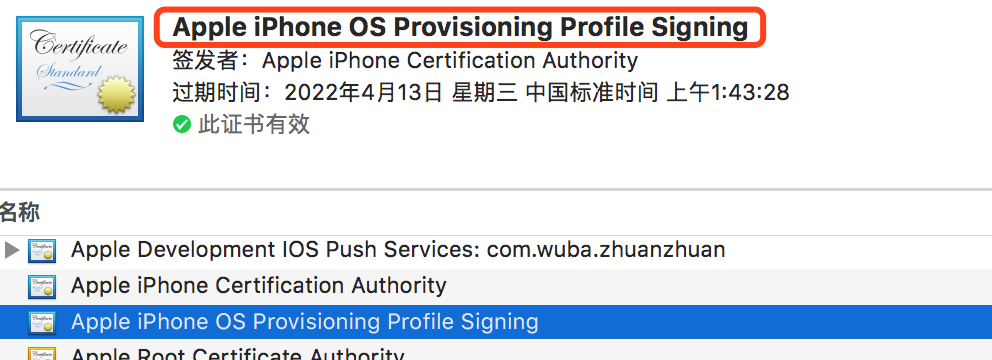
security export -f pkcs12 -k /Users/a58/Library/Keychains/login.keychain -o /opt/temp.p12 -P
security export -f pkcs12 -k /Users/a58/Library/Keychains/login.keychain -o /opt/temp.p12 -P -t identities "iPhone xxx"
openssl pkcs12 -clcerts -nokeys -in temp.p12 -out cert.pem -passin pass:
openssl x509 -in cert.pem -noout -text
mac通过命令行获取证书和配置文件过期时间的更多相关文章
- 用OpenSSL命令行生成证书文件
用OpenSSL命令行生成证书文件 1.首先要生成服务器端的私钥(key文件): openssl genrsa -des3 -out server.key 1024 运行时会提示输入密码,此密码用于加 ...
- Shell 命令行获取本机IP,grep的练习
Shell 命令行获取本机IP,grep的练习 在 mac 下面输入 ifconfig 或者在 linux 下面输入 ip a 就可以得到我们的网卡信息.不过通常情况下,我们需要查看的是我们的IP地址 ...
- Mac 在命令行中获得Root权限
Mac 在命令行中获得Root权限 作者 firedragonpzy 13 九月, 2012 2条评论 本文为firedragonpzy原创,转载务必在明显处注明:转载自[Softeware MyZo ...
- linux/mac下命令行rm回收站--rmtrash
Linux.mac的命令行下没有回收站功能,很多时候手一抖就把重要文件给 rm -fr * 了,虽然linux下有可能通过lost +found/debugfs找回,但难度也比较大,不能保证一定能够找 ...
- 在mac上命令行里面如何打开文本编辑器?
在mac上命令行里面如何打开文本编辑器? 在linux命令行terminal上使用gedit直接就可以打开文本文件 那么在mac上面如何操作呢? 使用:open -a TextEdit setti ...
- 命令行获取docker远程仓库镜像列表
命令行获取docker远程仓库镜像列表 获取思路 通过curl获取镜像tag的json串,解析后得到${image}:${tag}的格式 curl获取示例 # curl [:-s] ${API}/${ ...
- python命令行获取参数
python命令行获取参数 import sys # python获取参数 input_file = sys.argv[1] output_file = sys.argv[2] print(input ...
- Mac下用命令行获取苹果手机的UDID
在终端输入命令行:system_profiler SPUSBDataType | grep "Serial Number:.*" | sed s#".*Serial Nu ...
- Mac终端命令行提示符格式更改方法
内容提要: 主要是通过~/.bash_profile文件更改环境变量PS1,修改命令行提示符的显示格式,并展示不同颜色. 本文介绍了默认设置的缺陷,以及需要用到的基础知识,最后介绍了更改命令行提示符格 ...
随机推荐
- 学习笔记: js插件 —— SuperSlide 2 (轮播图插件,PC用)
SuperSlide 2 轮播图插件,较老.但还好用. 适用于PC,是绑定到jquery上的方法: $.slide(); 如果在实际中找不到.slide方法,请检查jquery等.js文件的引入次序 ...
- hdfs standby namenode checkpoint 的一些参数
dfs.namenode.checkpoint.period --两次检查点创建之间的固定时间间隔,默认3600,即1小时.所以去ann snn 看到的fsimage 相隔1个小时. dfs.name ...
- HTML5 图片宽高自适应,居中裁剪不失真
一,使用 JS,先上效果图,右图为定死宽高的效果,左图为处理之后的 1, 主要思路是,在图片 onload 后,将图片的宽高比和 div 容器的宽高比进行比较, 2, 从而确定拉伸或者压缩之后是宽还是 ...
- 白鹭引擎 - 本地坐标和舞台坐标的转化 ( globalToLocal, localToGlobal )
class Main extends egret.DisplayObjectContainer { /** * Main 类构造器, 初始化的时候自动执行, ( 子类的构造函数必须调用父类的构造函数 ...
- Mac安装Python3报错Permission denied @ dir_s_mkdir - /usr/local/Frameworks
brew安装Python3时出现的问题: Error: Permission denied @ dir_s_mkdir - /usr/local/Frameworks /usr/local/Frame ...
- Map 接口
1.键值对存储一组对象 2.key值不能重复,value可以重复 3.具体的实现类,HashMap,treeMap,HashTable,LinkedHashMap ------------------ ...
- PHP 支持 JQuery 的 JSONP 跨域访问
Jquery Ajax进行跨域时需要使用JSONP,但JSONP格式和JSON格式是有区别的,如果直接返回JSON格式就会报错 首先将原有的Jquery代码中的dataType改成“jsonp”,具体 ...
- BBS-项目流程分析-表的创建
http://www.cnblogs.com/alice-bj/tag/Django%20-%20BBS/ https://www.cnblogs.com/venicid/p/9365019.html ...
- redis 学习笔记2(集群之哨兵模式的使用)
redis3.0之前已经有了哨兵模式,3.0之后有了cluster(分片集群),官方不推荐使用!!主要原因是分片后单节点故障后需要实现手动分槽... 集群较为成熟的解决方案codis,公司使用的是哨兵 ...
- Linux命令:ssh-copy-id
ssh-copy-id帮助 SSH-COPY-ID() BSD General Commands Manual SSH-COPY-ID() NAME ssh-copy-id — use locally ...