
10慕课网《进击Node.js基础(一)》初识promise
首先用最简单的方式实现一个动画效果
<!doctype>

<html>

<head>

<title>Promise animation</title>

<style type="text/css">

    .ball {

        width: 40px;

        height: 40px;

        border-radius: 20px;

    }

    .ball1 {

        background: red;

    }

    .ball2 {

        background: yellow;

    }

    .ball3 {

        background: green;

    }

</style>

</head>

<body>

    <div class="ball ball1" style="margin-left: 0"></div>

    <div class="ball ball2" style="margin-left: 0"></div>

    <div class="ball ball3" style="margin-left: 0"></div>

    <script type="text/javascript">

        //定义三个球

        var ball1 = document.querySelector('.ball1')

        var ball2 = document.querySelector('.ball2')

        var ball3 = document.querySelector('.ball3')

        //球,移动距离,回调函数

        function animate(ball, distance, cd){

            //每13毫秒改变一次圆球的位置,直到到达指定位置

            setTimeout(function(){

                var marginLeft = parseInt(ball.style.marginLeft,10)

                //球达到预期位置

                if(marginLeft === distance){

                    cd && cd()

                }else{

                    //球在左侧

                    if(marginLeft < distance){

                        marginLeft++

                    }else{

                        //球在右侧

                        marginLeft--

                    }

                    //调整球的位置

                    ball.style.marginLeft = marginLeft

                    animate(ball, distance, cd)

                }

            },13)

        }

        //控制动画

        animate(ball1, 100,function(){

            animate(ball2, 200, function(){

                animate(ball3, 150, function(){

                    animate(ball2, 150, function(){

                        animate(ball1, 150, function(){

                        })

                    })

                })

            })

        })

    </script>

</body>

</html>
使用promise实现相同功能
<!doctype>

<html>

<head>

<title>Promise animation</title>

<style type="text/css">

    .ball {

        width: 40px;

        height: 40px;

        border-radius: 20px;

    }

    .ball1 {

        background: red;

    }

    .ball2 {

        background: yellow;

    }

    .ball3 {

        background: green;

    }

</style>

<script src="./node_modules/bluebird/js/browser/bluebird.js" type="text/javascript"></script>

</head>

<body>

    <div class="ball ball1" style="margin-left: 0"></div>

    <div class="ball ball2" style="margin-left: 0"></div>

    <div class="ball ball3" style="margin-left: 0"></div>

    <script type="text/javascript">

        //定义三个球

        var ball1 = document.querySelector('.ball1')

        var ball2 = document.querySelector('.ball2')

        var ball3 = document.querySelector('.ball3')

        var Promise = window.Promise

        function promiseAnimate(ball, distance){

            return new Promise(function(resolve, reject){

                //球,移动距离,回调函数

                function _animate(){

                    //每13毫秒改变一次圆球的位置,直到到达指定位置

                    setTimeout(function(){

                        var marginLeft = parseInt(ball.style.marginLeft,10)

                        //球达到预期位置

                        if(marginLeft === distance){

                            resolve()

                        }else{

                            //球在左侧

                            if(marginLeft < distance){

                                marginLeft++

                            }else{

                                //球在右侧

                                marginLeft--

                            }

                            //调整球的位置

                            ball.style.marginLeft = marginLeft + 'px'

                            _animate()

                        }

                    },13)

                }

                _animate()

            })

        }

        promiseAnimate(ball1, 100)

            .then(function(){

                return promiseAnimate(ball2, 200)

            })

            .then(function(){

                return promiseAnimate(ball3, 150)

            })

            .then(function(){

                return promiseAnimate(ball2, 150)

            })

            .then(function(){

                return promiseAnimate(ball1, 150)

            })

    </script>

</body>

</html>
promise对象三种状态:
- -未完成(pending)
- -已完成(fulfiled)
- -失败(rejected)
promiseA与promiseA+不同点:
- -A+规范通过属于thenable来区分promise对象
- -A+定义onFulfilled/onRejected必须是作为函数来调用,而且调用过程必须是异步的
- -A+严格定义了then方法链式调用时onFulfilled/onRejected的调用顺序
promise then 方法
将异步执行的回调函数放入then方法中,规范链式书写
promiseObj.then(onFunction, onRejected)

onFulfilled = function(value){

  return promiseObj2

}

onRejected = function(err){}
promise库有很多
- bluebird
- Q
- then.js
- es6-promise
- ypromise
- async
- native-promise-only
使用promise重写爬虫
对比:07慕课网《进击Node.js基础(一)》HTTP小爬虫
var http = require('http')

var Promise = require('bluebird')

var cheerio =  require('cheerio') //使用模块

var baseUrl = 'http://www.imooc.com/learn/'

var videoIds = [728,637,348]

function filterChapters(html){

    //可以像jQuery一样使用

    var $ = cheerio.load(html)

    var chapters = $('.chapter')

    var title = $('.clearfix h2').text()

    var number = $('.js-learn-num').text()

    // courseData = {

    //         title : title,

    //         number : 0,

    //         videos : [{

    //             chapterTitle:'',

    //             videos:[{

    //             title:'',

    //             id:''

    //         }]

    //     }

    var courseData = {

        title : title,

        number : number,

        videos : []

    }

    chapters.each(function(item){

        var chapter = $(this)

        var chapterTitle = chapter.find('h3').text()

        var videos = chapter.find('.video').children('li')

        var chapterData = {

            chapterTitle :chapterTitle.trim(),

            videos:[]

        }

        videos.each(function(item){

            var video = $(this).find('a')

            var videoTile = video.text()

            var id = video.attr('href').split('video/')[1]

            chapterData.videos.push({

                title: videoTile.trim(),

                id : id

            })

        })

        courseData.videos.push(chapterData)

    })

    return courseData

}

function printCourseInfo(coursesData){

    coursesData.forEach(function(courseData){

        console.log(courseData.number + ' 人学过 ' + courseData.title + '\n')

    })

    coursesData.forEach(function(courseData){

        console.log('###' + courseData.title + '\n')

        courseData.videos.forEach(function(item){

            var chapterTitle = item.chapterTitle

            item.videos.forEach(function(video){

                console.log(' 【' + video.id + '】' + video.title + '\n')

            })

        })

    })

}

function getPageAsync(url){

    return new Promise(function(resolve,reject){

        console.log('正则爬取'+ url)

        http.get(url,function(res){

            var html = ''

            res.on('data',function(data){

                html += data

            })

            res.on('end',function(){

                resolve(html)

                //var courseData = filterChapters(html)

                //printCourseInfo(courseData)

            })

        }).on('errer',function(e){

            reject(e)

            //console.log('出错')

        })

    })

}

var fetchCourseArray = []

videoIds.forEach(function(id){

    fetchCourseArray.push(getPageAsync(baseUrl + id))

})

Promise

    .all(fetchCourseArray)

    .then(function(pages){

        //对多个数据处理

        var coursesData = []

        pages.forEach(function(html){

            var curses = filterChapters(html)

            coursesData.push(curses)

        })

        coursesData.sort(function(a,b){

            return a.number < b.number

        })

        printCourseInfo(coursesData)

    })
HTTP和HTTPS
HTTPS在http的基础上进行了加密
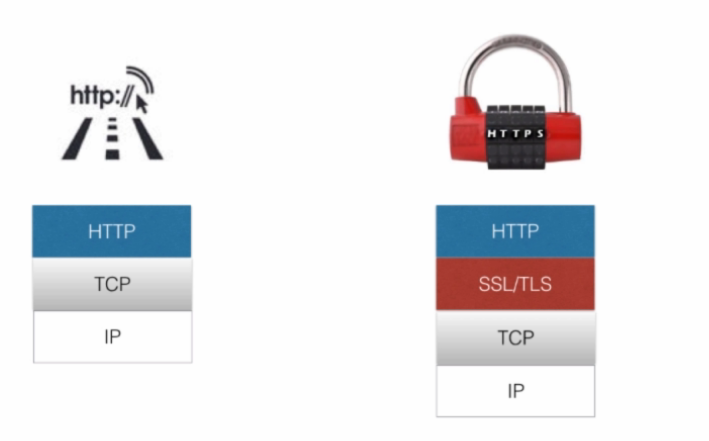
运行HTTPS服务,.pem文件还需要另外的方式创建
var https = require('https')

var fs = require('fs')

var options = {

    key: fs.readFileSync('ssh_key.pem'),//ssl 文件

    key: fs.readFileSync('ssh_cert.pem'),//证书文件

}

//运行HTTPS服务器

https.createServer(options, function(req,res){

    res.writeHead(200)

    res.end('hello world'+ req)

}).listen(8090)
10慕课网《进击Node.js基础(一)》初识promise的更多相关文章
- 01慕课网《进击Node.js基础(一)》Node.js安装,创建例子
版本:偶数位为稳定版本,基数为非稳定版本 - 0.6.x - 0.7.x - 0.8.x -0.9.x -0.10.x -0.11.x 概念:Node.js采用谷歌浏览器的V8引擎,用C ...
- 03慕课网《进击Node.js基础(一)》API-URL网址解析
url url.parse(url,query,host);解析域名 url必须,地址字符串 query可选 host 可选:在不清楚协议时正确解析 querystring 字符串和对象之间互相解析 ...
- 07慕课网《进击Node.js基础(一)》HTTP小爬虫
获取HTML页面 var http = require('http') var url='http://www.imooc.com/learn/348' http.get(url,function(r ...
- 进击Node.js基础(二)
一.一个牛逼闪闪的知识点Promise npm install bluebird 二.Promise实例 ball.html <!doctype> <!DOCTYPE html> ...
- 02慕课网《进击Node.js基础(一)》——CommonJs标准
是一套规范管理模块 每个js 为一个模块,多个模块作为一个包 node.js和Couchdb是对其的实现: 不同于jQuery 模块:定义.标识.引用(地址/模块名称) 模块类型: 核心模块http ...
- 进击Node.js基础(一)
一.前言 1:Node.js本质上是用chrome浏览器 v8引擎 使用c++编写的JS运行环境 2:相比于JS没有浏览器安全级的限制,额外提供了一些系统级的API:文件读写,进程管理,网络通信等. ...
- 11慕课网《进击Node.js基础(一)》Buffer和Stream
Buffer 用来保存原始数据 (logo.png) 以下代码读取logo.png为buffer类型 然后将buffer转化为string,新建png 可以将字符串配置: data:image/png ...
- 09慕课网《进击Node.js基础(一)》HTTP-get/request
get是对request封装 可以在后台发起http请求,获取远程资源,更新或者同步远程资源 http.request(options[,callback]) 以下代码灌水失败: var http = ...
- 08慕课网《进击Node.js基础(一)》事件events
引用events模块中的EventEmitter 事件的监听和发射 相同的事件发射数量有限,可以通过setMaxListeners设置峰值 var EventEmitter = require('ev ...
随机推荐
- SSL/TLS Diffie-Hellman Modulus <= 1024 位 (LogJam) 使用2048位或更高的Diffie-Hellman
1.http://slproweb.com/products/Win32OpenSSL.html 下载 SSL 并安装 2.设置环境变量,例如工具安装在C:\OpenSSL-Win64,则将C:\O ...
- 7、Django的模型层(1)
第1节:ORM简介 ORM简介 MVC或者MVC框架中包括一个重要的部分,就是ORM,它实现了数据模型与数据库的解耦,即数据模型的设计不需要依赖于特定的数据库,通过简单的配置就可以轻松更换数据库,这极 ...
- Spring-IOC RootBeanDefinition源码分析
GenericBeanDefinition是一站式的标准bean definition,除了具有指定类.可选的构造参数值和属性参数这些其它bean definition一样的特性外,它还具有通过par ...
- anaconda查看删除增加镜像源
# 查看显示原来的镜像源(base) [jiangshan@localhost ~]$ conda config --showadd_anaconda_token: Trueadd_pip_as_py ...
- httpclient介绍与使用
什么是httpclient HttpClient 是 Apache Jakarta Common 下的子项目,用来提供高效的.最新的.功能丰富的支持 HTTP 协议的客户端编程工具包,并且它支持 HT ...
- abp 嵌入资源(视图、css、js)的访问
最近在做的基于abp作为框架的一个项目,将一些属于框架功能的页面写在了一个独立程序集中,然后在web项目中引用该程序集达到访问框架页面目的. 这样一来发布web之后,在发布目录中是看不到写在另一个程序 ...
- 50Hz工频干扰消除
50Hz工频干扰消除 今天整理工频干扰消除算法. 我们知道,设计数字滤波器,和模拟滤波器的实质,其实就是求一组系数,逼近要求的频率响应. 模拟滤波器已经很成熟,因此,数字滤波器的设计,将S平面映射到Z ...
- Exp5
实验 实验1 - 直接攻击系统开启的漏洞服务,获取系统控制权 1.选择要使用的模块 在这里我选择的模块是ms08_067 首先我们需要查询一下有关ms08_067所在模块的相关信息 search ms ...
- 在java代码中执行js脚本,实现计算出字符串“(1+2)*(1+3)”的结果
今天在公司项目中,发现一个计算运费的妙招.由于运费规则各种各样,因此写一个公式存到数据库.下次需要计算运费时,直接取出这个公式,把公式的未知变量给替换掉,然后计算出结果就是ok了. 一 ...
- 汇编 cdecl 函数调用约定,stdcall 函数调用约定
知识点: cdecl 函数调用约定 stdcall 函数调用约定 CALL堆栈平衡 配置属性--> c/c++ -->高级-->调用约定 一.cdecl调用约定 VC++ ...