
linux系统分析工具续-SystemTap和火焰图(Flame Graph)
本文为网上各位大神文章的综合简单实践篇,参考文章较多,有些总结性东西,自认暂无法详细写出,建议读文中列出的参考文档,相信会受益颇多。下面开始吧(本文出自 “cclo的博客” 博客,请务必保留此出处http://xuclv.blog.51cto.com/5503169/1184517)
SystemTap简介:
  SystemTap provides free software (GPL) infrastructure to simplify the gathering of information about the running Linux system. This assists diagnosis of a performance or functional problem. SystemTap eliminates the need for the developer to go through the tedious and disruptive instrument, recompile, install, and reboot sequence that may be otherwise required to collect data.

  SystemTap provides a simple command line interface and scripting language for writing instrumentation for a live running system. We are publishing samples, as well as enlarging the internal "tapset" script library to aid reuse and abstraction.
详情参考:
http://sourceware.org/systemtap/wiki
http://www.ibm.com/developerworks/cn/linux/l-systemtap/
http://blog.yufeng.info/archives/855
火焰图简介:
  通过性能分析来确定什么原因导致CPU繁忙是日常工作中长做的事情,这往往会涉及到栈性能分析。通过定期采样的方式来确定哪些代码是导致CPU繁忙的原因是一个比较粗糙的方法。一个更好的方式是创建一个定时中断来收集程序运行时的计数,函数地址,甚至整个堆栈回溯,最后打印为我们可阅读的报告.我们常用的性能分析工具有oprofile,gprof,dtracesystemtap 等

  Flame Graph:火焰图,是一个把采样所得到的堆栈跟踪可视化展示的工具。它是基于上面提到的性能分析工具的结果,Flame graph本身并不具备性能检测的能力。
参考:
https://github.com/brendangregg/FlameGraph
http://dtrace.org/blogs/brendan/2011/12/16/flame-graphs/
http://dtrace.org/blogs/brendan/2012/03/17/linux-kernel-performance-flame-graphs/
systemtap安装及生成nginx的火焰图:
  OS:ubuntu12.10 				#支持uprobes机制

  systemtap:2.1					#尽少的bug
1> 安装systemtap,这里源码编译
  1:安装编译环境:

   $ sudo apt-get install build-essential
  2:安装systemtap

   $ wget http://sourceware.org/systemtap/ftp/releases/systemtap-2.1.tar.gz

   $ tar zxvf systemtap-2.1.tar.gz

   $ sudo ./configure -prefix=/opt/systemtap -disable-docs -disable-publican -disable-refdocs

   如报以下错:

   configure: error: missing elfutils development headers/libraries (install elfutils-devel, libebl-dev, libdw-dev and/or libebl-devel

   $ sudo apt-get install libdw-dev      #其实缺的该是libdw1这个包,按提示安装libdw-dev罢了,另三个包都木有

   $ sudo make

   $ sudo make install
  3:创建个软链接:

   $ sudo ln -s /opt/systemtap/bin/stap /usr/sbin/stap
2> 安装debug packages (Kernel debug info packages on Ubuntu, which will aid in providing information for bugs)
  1:$ uname -r

     3.5.0-17-generic
  2:在http://ddebs.ubuntu.com/pool/main/l/linux/网址找到对应内核的的debug packages,下载并安装之

    $ sudo dpkg -i linux-image-3.5.0-17-generic-dbgsym_3.5.0-17.28_amd64.ddeb
如没有找到自己系统对于的debug packages,建一个,方法如下:(How do I build a debuginfo kernel if one isn't available?)(官网原文,本文不涉及)

    $ cd $HOME

    $ sudo apt-get install dpkg-dev debhelper gawk

    $ mkdir tmp

    $ cd tmp

    $ sudo apt-get build-dep --no-install-recommends linux-image-$(uname -r)

    $ apt-get source linux-image-$(uname -r)

    $ cd linux-2.6.31 (this is currently the kernel version of 9.10)

    $ fakeroot debian/rules clean

    $ AUTOBUILD=1 fakeroot debian/rules binary-generic skipdbg=false

    $ sudo dpkg -i ../linux-image-debug-2.6.31-19-generic_2.6.31-19.56_amd64.ddeb
3> 测试systemtap,出现hello world,安装完成
$ sudo stap -e 'probe kernel.function("sys_open") {log("hello world") exit()}'
4> systemtap安装参考:
http://sourceware.org/systemtap/wiki/SystemtapOnUbuntu
https://wiki.ubuntu.com/Kernel/Systemtap
5> 安装LNMP(非必须,安装nginx即可)
$ sudo apt-get install nginx mysql-server mysql-client php5 php5-fpm php5-mysql
$ sudo vim /etc/nginx/sites-enabled/default #启用下面几行
location ~ \.PHP$ {
fastcgi_split_path_info ^(.+\.php)(/.+)$;
# # NOTE: You should have "cgi.fix_pathinfo = 0;"in php.ini
#
# # With php5-cgi alone:
# fastcgi_pass 127.0.0.1:9000;
# # With php5-fpm:
fastcgi_pass unix:/var/run/php5-fpm.sock;
fastcgi_index index.php;
include fastcgi_params;
}
$ sudo vim /usr/share/nginx/www/index.php #随便建个测试页
<html><body><h1>It is my works!!</h1></body></html>
<?php
$link=mysql_connect('localhost','root','root');
if ($link)
echo "Success";
else
echo "Failure";
mysql_close();
phpinfo();
?>
访问http://192.168.1.94/ #访问确保正常
6> 用systemtap进行nginx的分析,并用flameGraph画出相应的火焰图。
1:编写systemtap脚本: vim ngx.stp
global s;
global quit = 0;
probe timer.profile {
if (pid() == target()) {
if (quit) {
foreach (i in s-) {
print_ustack(i);
printf("\t%d\n", @count(s[i]));
}
exit()
} else {
s[ubacktrace()] <<< 1;
}
}
}
probe timer.s(20) {
quit = 1
}
2:执行如下命令:
   $ sudo stap --ldd -d /usr/sbin/nginx --all-modules -D MAXMAPENTRIES=256 -D MAXACTION=20000 -D MAXTRACE=100 -D MAXSTRINGLEN=4096 -D MAXBACKTRACE=100 -x 2082 ngx.stp --vp 0001 > ngx.out

      可能需修改的地方:

      /usr/sbin/nginx 	             #nginx的安装位置,一般是此

      -D MAXMAPENTRIES=256 	     #本机是个虚拟机,只给了其512M内存,为了保证内存不溢出,设为256

      -x 2082			     #指定其中一个nginx worker进程的pid

   在执行以上命令的同时保证对nginx的压力测试,另开终端执行:

   $ ab -n 900000 -c 50 http://192.168.1.94/index.php
$ perl stackcollapse-stap.pl ngx.out > ngx.out2
   $ perl flamegraph.pl ngx.out2 > ngx.svg

                                   #以上2个perl脚本在https://github.com/brendangregg/FlameGraph
7> 访问192.168.1.94/ngx.svg #火焰图出炉了
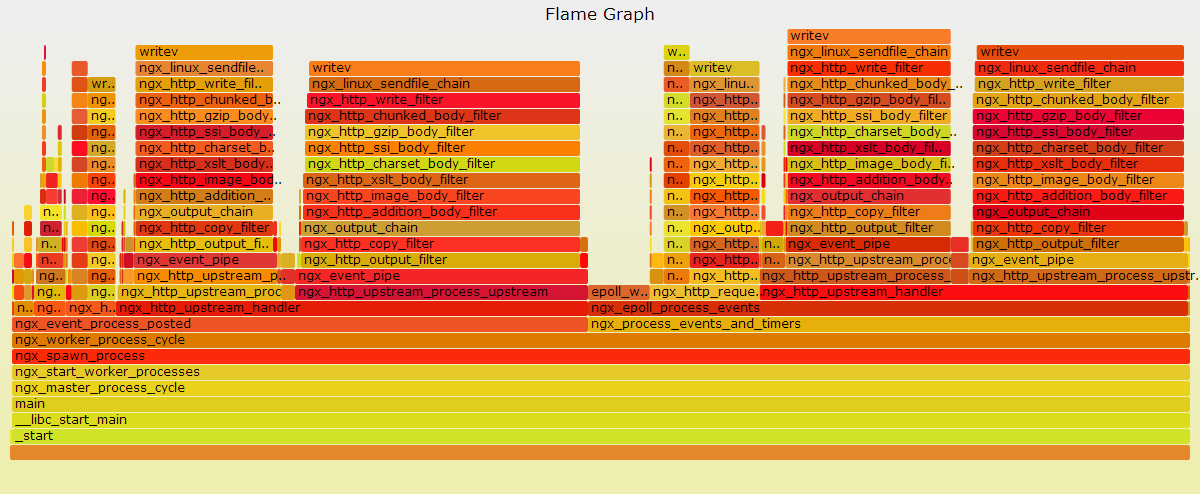
   每个框代表一个栈里的一个函数

   Y轴代表栈深度(栈桢数)。最顶端的框显示正在运行的函数,这之下的框都是调用者。在下面的函数是上面函数的父函数

   X轴代表采样总量。从左到右并不代表时间变化,从左到右也不具备顺序性

   框的宽度代表占用CPU总时间。宽的框代表的函数可能比窄的运行慢,或者被调用了更多次数。框的颜色深浅也没有任何意义

   如果是多线程同时采样,采样总数会超过总时间
8> 可能遇到的问题:
  1:如果有类似如下行,执行 $ sudo rm .systemtap -rf

   Pass 4: using cached /home/ubuntu/.systemtap/cache/24/stap_2479e8647ccf262def735ebf0eeb57c5_5866.ko
  2:如果有类似如下行,那应该有指望

   Pass 4: compiled C into "stap_2711449662ecf03b09d98a743c2122d0_5946.ko" in 24060usr/6960sys/103610rea
  3:如果有类似如下行,可以考虑忽略下

   WARNING: Missing unwind data for module, rerun with 'stap -d stap_2711449662ecf03b09d98a743c2122d0_3437'
  4:如果火焰图只出现大量的init函数,说明完全不正确,暂不知道怎么解决,nginx如果是apt-get安装,尝试执行如下行,可能有用

   $ sudo apt-get install nginx-full-dbg
  5:WARNING: missing unwind/symbol data for module 'kernel' :user-space facilities not available without kernel CONFIG_UTRACE

   这个错误是说你的 kernel 没有提供 utrace/uprobes 用户态支持。两种解法:

   1. 自己给Ubuntu自带的老kernel应用utrace补丁,并重新编译它。chaoslawful老师写过一篇博客分享过ubuntu上的步骤:http://chaoslawful.iteye.com/blog/1463564

   2. 将kernel升级到官方最新的3.5或以上的版本。最新的kernel默认包含了uprobes机制,不再需要utrace补丁了(这是为什么用ubuntu12.10的原因)
9> 火焰图生成参考的文档:
https://groups.google.com/forum/#!msg/openresty/u-puKWWONMk/bxsyQdWMkJIJ
http://idning.github.io/systemtaprst.html
附:
$ stap -h

Systemtap translator/driver (version 2.1/0.153, non-git sources)

Copyright (C) 2005-2013 Red Hat, Inc. and others

This is free software; see the source for copying conditions.

enabled features: TR1_UNORDERED_MAP NLS

Usage: stap [options] FILE         Run script in file.

   or: stap [options] -            Run script on stdin.

   or: stap [options] -e SCRIPT    Run given script.

   or: stap [options] -l PROBE     List matching probes.

   or: stap [options] -L PROBE     List matching probes and local variables.

Options (in /home/ubuntu/.systemtap/rc and on command line):

   --         end of translator options, script options follow

   -h --help  show help

   -V --version  show version

   -p NUM     stop after pass NUM 1-5, instead of 5

              (parse, elaborate, translate, compile, run)

   -v         add verbosity to all passes

   --vp {N}+  add per-pass verbosity [00000]

   -k         keep temporary directory

   -u         unoptimized translation

   -w         suppress warnings

   -W         turn warnings into errors

   -g         guru mode

   -P         prologue-searching for function probes

   -b         bulk (percpu file) mode

   -s NUM     buffer size in megabytes, instead of 0

   -I DIR     look in DIR for additional .stp script files, in addition to

              /opt/systemtap/share/systemtap/tapset

   -D NM=VAL  emit macro definition into generated C code

   -B NM=VAL  pass option to kbuild make

   --modinfo NM=VAL

              include a MODULE_INFO(NM,VAL) in the generated C code

   -G VAR=VAL set global variable to value

   -R DIR     look in DIR for runtime, instead of

              /opt/systemtap/share/systemtap/runtime

   -r DIR     cross-compile to kernel with given build tree; or else

   -r RELEASE cross-compile to kernel /lib/modules/RELEASE/build, instead of

              /lib/modules/3.5.0-17-generic/build

   -a ARCH    cross-compile to given architecture, instead of x86_64

   -m MODULE  set probe module name, instead of

              stap_4736

   -o FILE    send script output to file, instead of stdout. This supports

              strftime(3) formats for FILE

   -c CMD     start the probes, run CMD, and exit when it finishes

   -x PID     sets target() to PID

   -F         run as on-file flight recorder with -o.

              run as on-memory flight recorder without -o.

   -S size[,n] set maximum of the size and the number of files.

   -d OBJECT  add unwind/symbol data for OBJECT file

   --ldd      add unwind/symbol data for all referenced object files.

   --all-modules

              add unwind/symbol data for all loaded kernel objects.

   -t         collect probe timing information

   --runtime=MODE

              set the pass-5 runtime mode, instead of kernel

   --privilege=PRIVILEGE_LEVEL

              check the script for constructs not allowed at the given privilege level

   --unprivileged

              equivalent to --privilege=stapusr

   --compatible=VERSION

              suppress incompatible language/tapset changes beyond VERSION,

              instead of 2.1

   --check-version

              displays warnings where a syntax element may be

              version dependent

   --skip-badvars

              substitute zero for bad context $variables

   --suppress-handler-errors

              catch all runtime errors, quietly skip probe handlers

   --use-server[=SERVER-SPEC]

              specify systemtap compile-servers

   --list-servers[=PROPERTIES]

              report on the status of the specified compile-servers:

              all,specified,online,trusted,signer,compatible

   --remote=HOSTNAME

              run pass 5 on the specified ssh host.

              may be repeated for targeting multiple hosts.

   --remote-prefix

              prefix each line of remote output with a host index.

   --tmpdir=NAME

              specify name of temporary directory to be used.

   --download-debuginfo[=OPTION]

              automatically download debuginfo using ABRT.

              yes,no,ask,<timeout value>

   --dump-probe-types

              show a list of available probe types.

   --sysroot=DIR

              specify sysroot directory where target files (executables,

              libraries, etc.) are located.

   --sysenv=VAR=VALUE

              provide an alternate value for an environment variable

              where the value on a remote system differs.  Path

              variables (e.g. PATH, LD_LIBRARY_PATH) are assumed to be

              relative to the sysroot.

   --suppress-time-limits

              disable -DSTP_NO_OVERLOAD -DMAXACTION and -DMAXTRYACTION limits

本文出自 “cclo的博客” 博客,请务必保留此出处http://xuclv.blog.51cto.com/5503169/1184517
linux系统分析工具续-SystemTap和火焰图(Flame Graph)的更多相关文章
- 使用linux perf工具生成java程序火焰图
pre.cjk { font-family: "Nimbus Mono L", monospace } p { margin-bottom: 0.1in; line-height: ...
- linux 内核分析工具 Dtrace、SystemTap、火焰图、crash等
<< System语言详解 >> 关于 SystemTap 的书. 我们在分析各种系统异常和故障的时候,通常会用到 pstack(jstack) /pldd/ lsof/ tc ...
- 动态追踪技术(中) - Dtrace、SystemTap、火焰图
http://openresty.org/cn/presentations.html http://weibo.com/agentzh?is_all=1 http://openresty.org/po ...
- [失败]SystemTap和火焰图(Flame Graph)
本文参考http://blog.51cto.com/xuclv/1184517 SystemTap简介: SystemTap provides free software (GPL) infrastr ...
- linux系统分析工具之Blktrace
Blktrace简介: blktrace是一个针对Linux内核中块设备I/O层的跟踪工具,用来收集磁盘IO信息中当IO进行到块设备层(block层,所以叫blk trace)时的详细信息(如IO请求 ...
- Linux下用火焰图进行性能分析【转】
转自:https://blog.csdn.net/gatieme/article/details/78885908 版权声明:本文为博主原创文章,遵循 CC 4.0 BY-SA 版权协议,转载请附上原 ...
- perf + 火焰图用法 小结
要对新服务做性能测试,分析代码热点,初识perf,做下总结 perf + 火焰图用法 perf简介 Perf (Performance Event), Linux 系统原生提供的性能分析工具, 会返回 ...
- 火焰图工具 SystemTap
1. 安装 SystemTap 1. 首先安装内核开发包和调试包: # rpm -ivh kernel-debuginfo-common-($version).rpm # rpm -ivh kerne ...
- 如何利用火焰图定位 Java 的 CPU 性能问题
常见 CPU 性能问题 你所负责的服务(下称:服务)是否遇到过以下现象: 休息的时候,手机突然收到大量告警短信,提示服务的 99.9 line 从 20ms 飙升至 10s: 正在敲代码实现业务功能 ...
随机推荐
- 微信小程序传参数的几种方法
1,navigator 跳转时 wxml页面(参数多时可用“&”) <navigator url='../index/index?id=1&name=aaa'></n ...
- [USACO18FEB]Slingshot
题意可化为: 在二维平面中有n个点,坐标为\((x_i,y_i)\),点权为\(t_i\). 现有m个询问,每次给定点\((x,y)\),求\(\min\{|x-x_i|+|y-y_i|+t_i,|y ...
- js-ES6学习笔记-let命令
1.let命令 ES6新增了let命令,用来声明变量.它的用法类似于var,但是所声明的变量,只在let命令所在的代码块内有效. for循环的计数器,就很合适使用let命令. 下面的代码如果使用var ...
- windows环境下IP多访问
1.E:\wamp64\bin\apache\apache2.4.23\conf\extra\httpd-vhosts.conf 添加: <VirtualHost *:80> Server ...
- MVC与单元测试实践之健身网站(一)-项目概述
前不久刚刚通过租房网站的开发学习了MVC,并随后学习了单元测试相关的基础,现在开始健身网站的开发,该项目将结合MVC与单元测试,在开发实践过程中,趁热打铁,巩固并运用之前的内容. 一 健身网站功能描述 ...
- 更改 Windows VM 的可用性集
以下步骤说明如何使用 Azure PowerShell 来更改 VM 的可用性集. 只能在创建 VM 时将 VM 添加到可用性集. 如果要更改可用性集,必须将虚拟机删除,并重新创建虚拟机. 使用 Po ...
- maven+spring+junit测试要注意的事情
使用maven方式创建webapp工程的资料网上一大堆,在这里也不详细说了.在创建完成之后,里面说到要转动态web工程时要切换为3.0版本,但是我本地切换不了,网上的方法好像也没用,暂时也没用到这块. ...
- 高通LCD的pwm背光驱动
发生异常的现象: msm8953 lcd在快速亮灭的情况下背光概率性休眠不灭:测量高通pwm,发现正常的时候pwm的管脚LCM_BL_PWM为低电平,失败的时候为高电平: 根据原理图: mpp是什么? ...
- 天河2号-保持使用yhrun/srun时连接不中断 (screen 命令教程 )
问题重述: 当我们使用天河机进行并行程序实验的时候,都会使用到yhrun/srun命令.在超算环境下,yhrun 命令用来进行提交交互式作业,有屏幕输出.但是容易受到网络波动影响导致断网或者关闭窗口最 ...
- 利用windows的计划任务和eKing.CmdReadFileAndSendEmailOper(控制台小程序)实现远程登录服务器的邮件告警提醒
一.场景摘要: 1.windows计划任务中,有一个用户登录时候触发的事件 2.cmd命令:netstat -ano | find "3389" 可以看到当前远程登录的IP 3 ...