
微信小程序 引入公共页面的几种情况
1、不带参数
首先在pages文件夹中新建一个template文件夹,文件夹中新建一个template.wxml文件,代码如下
<!--template.wxml-->

<template name="msgItem">

  <view>

    <text>This is template.wxml文件,我是一个模板</text>

  </view>

</template>
然后我们书写我们所要调用template的页面index.wxml
<!--index.wxml-->

<!-- 声明需要使用的模板文件 -->

<import src ="../template/template.wxml"/>

  <view>This is index.wxml</view>

<template is="msgItem"/>
注意:
(1)index.wxml中template 标签的is属性与template.wxml中template 标签的name属性值相同
(2)index.wxml文件中要通过import标签声明需要使用的模板文件
运行效果:
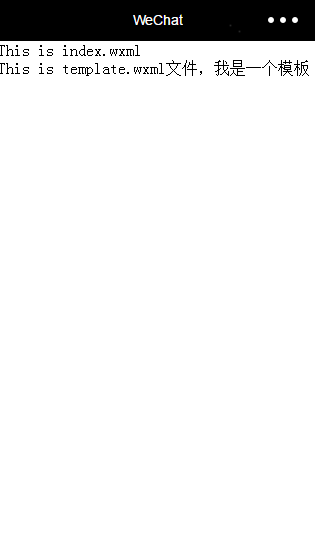
2、带参数
首先,修改template.wxml文件,我们给模板添加三个字段,修改后代码如下
<template name="msgItem">

  <view>

    <text>This is template.wxml文件,我是一个模板</text>

    <view>

      <text> {{index}}: {{msg1}} </text>

      <text> {{msg2}} </text>

    </view>

  </view>

</template>
接下来我们在index.wxml中传递模板中所需要的三个参数,修改后的代码如下:
<!--index.wxml-->

<!-- 声明需要使用的模板文件 -->

<import src ="../template/template.wxml"/>

<view>This is index.wxml</view>

<template is="msgItem" data="{{index:1,msg1:'msg1数据',msg2:'msg2数据'}}"/>
运行效果:
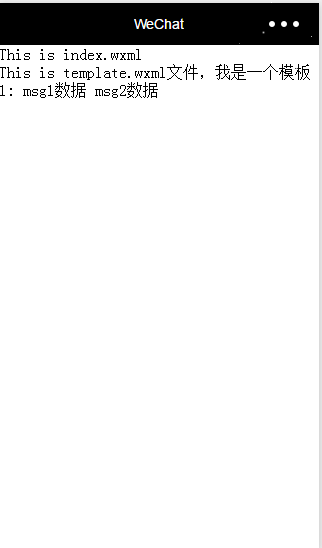
3、列表item模板
接下来我们就通过一种常见的情况列表数据来使用模板,增加对模板的认知,直接上修改过的代码:
//index.js

Page({

  data: {

    list:[

      { name: '张三', age: 15 },

      { name: '李四', age: 25 },

      { name: '王五', age: 18 },

      { name: '赵六', age: 19 },

    ]

  }

})
<!--index.wxml-->

<!-- 声明需要使用的模板文件 -->

<import src ="../template/template.wxml"/>

<view>This is index.wxml</view>

<view wx:for="{{list}}">

    <template is="msgItem" data="{{name:item.name,age:item.age}}"/>

</view>
<!--template.wxml-->

<template name="msgItem">

  <view>

    <text> name: {{name}} </text>

    <text> age: {{age}}</text>

  </view>

</template>
运行效果:
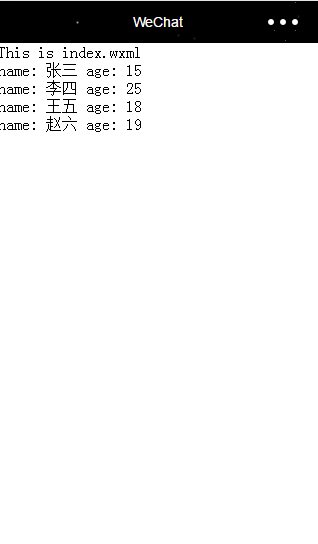
4、使用模板样式
接下来我们就给模板增加样式文件,然后在需要调用模板的地方使用该样式。
首先在pages/template文件夹中新建一个template.wxss文件,然后对模板文件,添加一个简单样式。
<!--template.wxml-->

<template name="msgItem">

  <view class="template_style">

    <text> name: {{name}} </text>

    <text class="template_age_style"> age: {{age}}</text>

  </view>

</template>
/* pages/template/template.wxss */

.template_style{

  border-bottom: solid 2px #999999;

  padding: 5px;

  font-size: 18px;

  color: #000000;

}

.template_age_style{

  color: #666666;

  font-size: 14px;

}
我们的样式文件已经创建好了,接下来在index.wxml中引入该样式文件。
/**index.wxss**/

@import "../template/template.wxss";
运行效果:
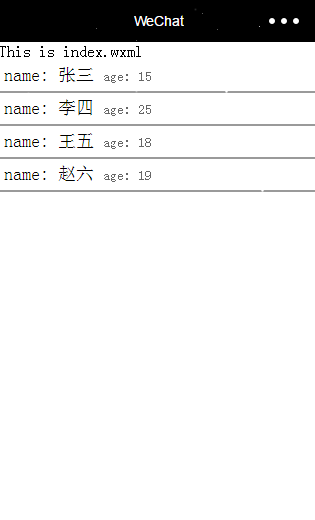
5、调用不同的模板
有时候,我们有这样的需求,那就是同一个列表中,item数据不同,可能他的样式也是有很大的区别,所以我们使用的模板也会对应不相同,接下来我们就来实现这样需求的小Demo:
首先修改了一下template.wxml,原本该文件中只有一个template,现在我们创建了两个,新增的template仅仅多了一行代码,当然了实际开发中,需求会比这个难很多,在这里只是为了实现Demo。
<!--template.wxml-->

<template name="msgItem">

  <view class="template_style">

    <text> name: {{name}} </text>

    <text class="template_age_style"> age: {{age}}</text>

  </view>

</template>

<template name="msgItem2">

  <view class="template_style">

    <text> name: {{name}} </text>

    <text class="template_age_style"> age: {{age}}</text>

    <text>我是一个未成年</text>>

  </view>

</template>
接下来我们在index.wxml中通过age字段调用不同的模板:
<!--index.wxml-->

<!-- 声明需要使用的模板文件 -->

<import src ="../template/template.wxml"/>

<view>This is index.wxml</view>

<view wx:for="{{list}}">

    <template is="{{item.age >= 18 ? 'msgItem' : 'msgItem2'}}" data="{{name:item.name,age:item.age}}"/>

</view>
运行效果:

微信小程序 引入公共页面的几种情况的更多相关文章
- 微信小程序引入md5.js
今天给大家安利一下微信小程序引入md5.js的方法,不多说 md5.js在下面 直接复制到项目的utils/md5.js即可 /* * A JavaScript implementation of t ...
- uni-app开发微信小程序引入UI组件库(Vant-weapp)步骤
uni-app开发微信小程序引入UI组件库(Vant-weapp)步骤 这里以vant-weapp为例 uni-app官方文档介绍引入组件的方法 1. 新建相关目录 根目录下创建 wxcomponen ...
- Java Web项目,Android和微信小程序的初始页面配置
Java Web项目 我们在Eclipse里开了Java Web项目之后,Run As Tomcat或者Apache服务器,本地运行,如果直接用http://localhost:8080访问项目,会发 ...
- (十二)微信小程序实现登陆页面+登陆逻辑
微信小程序实现登陆页面 实现上面两个页面 第一个页面 <view> <!-- 上侧部分 --> <view class="top-view"> ...
- 完整微信小程序授权登录页面教程
完整微信小程序授权登录页面教程 1.前言 微信官方对getUserInfo接口做了修改,授权窗口无法直接弹出,而取而代之是需要创建一个button,将其open-type属性绑定getUseInfo方 ...
- 微信小程序引入ECharts组件
首先打开ECharts网页 https://echarts.apache.org/zh/tutorial.html#%E5%9C%A8%E5%BE%AE%E4%BF%A1%E5%B0%8F%E7%A8 ...
- 微信小程序引入外部组件 iView Weapp
iview Weapp组件的使用方法: 1. 下载小程序组件库 (前提是你已经有了项目目录) 你可以直接去github把iView Weapp的代码下载下来,也可以用过npm来下载. github地址 ...
- 微信小程序之实现页面缩放式侧滑效果
效果图: 实现原理:点击按钮,往需要动画的div中添加或移除拥有动画效果的class. 由于微信小程序中不能操作page这个根节点,所以,只有用一个div(view)来模仿page根节点. 1.结构 ...
- 微信小程序——引入背景图片【六】
前言 之前写了一些小程序的博文只是看文档边看边写,了解下他,这次可是真枪真刀的做了! 框架使用的是美团的mpvue,我也是一边学习,一边写的,如有错误之处,还望大家指出. 在这里我有个问题,为什么微信 ...
随机推荐
- Android在onCreate中获取控件的宽高
在某些需求下,我们需要在onCreate的时候就获取到控件的宽高,但是如果直接用view.getWidth()或view.getHeight()会得到0.这是因为在onCreate执行的时候,控件还没 ...
- C#6.0语言规范(十八) 不安全代码
前面章节中定义的核心C#语言与C和C ++的区别在于它省略了作为数据类型的指针.相反,C#提供了引用和创建由垃圾收集器管理的对象的能力.这种设计与其他功能相结合,使C#成为比C或C ++更安全的语言. ...
- linux服务器ssh免密码登录
假设有三台服务器的ip分别是10.9.1.101.10.9.1.102.10.9.1.103 修改hosts文件 分别修改三台服务器的hosts的文件(vi /etc/hosts), 在hosts文件 ...
- IntelliJ IDEA中Debug的使用技巧
当运行结果跟我们设想的不一致时,我们就可以用debug进行代码调试,下面是我在日常开发中对debug的一些小结 (一)基本介绍 本篇文章是基于IntelliJ IDEA2018.3.2版本,Debug ...
- [LeetCode] 206. Reverse Linked List_Easy tag: Linked List
Reverse a singly linked list. Example: Input: 1->2->3->4->5->NULL Output: 5->4-> ...
- Spark实战1
1. RDD-(Resilient Distributed Dataset)弹性分布式数据集 Spark以RDD为核心概念开发的,它的运行也是以RDD为中心.有两种RDD:第一种是并行Col ...
- CentOS-6.6安装配置Tomcat-7
安装说明 安装环境:CentOS-6.3安装方式:源码安装 软件:apache-tomcat-7.0.29.tar.gz下载地址:http://tomcat.apache.org/download-7 ...
- tensorflow进阶篇-4(损失函数3)
Softmax交叉熵损失函数(Softmax cross-entropy loss)是作用于非归一化的输出结果只针对单个目标分类的计算损失.通过softmax函数将输出结果转化成概率分布,然后计算真值 ...
- 对html中iframe的研究
虽然平时不怎么用iframe,但经常在网上听一些前辈说iframe怎样怎样,今天索性对iframe来个大研究,那样就不必去记那些条条框框了,自己体验一遍比看什么都好. 创建两个文件一个index.ht ...
- 数据序列化导读(3)[JSON v.s. YAML]
前面两节介绍了JSON和YAML,本文则对下面的文章做一个中英文对照翻译. Comparison between JSON and YAML for data serialization用于数据序列化 ...