
[Bootstrap] 6. Navigation
Too Much Navigation?
How many of Bootstrap's Navigation Components can we use on a page?
0
1
More than 1
Navigation Homepage Link
The very top left of our page is a great place for a logo and a link to our site's homepage. What is the Bootstrap class that is used for positioning and styling this element?
Answer: navbar-brand
Nav or Navbar
Take a look at the following screenshot. Is this using Bootstrap's Nav Component, Navbar Component, or both?

Nav Component
Navbar Component
Both
Here's another screenshot of the Meteor website. These links show up at the very top of the page. Is this using Bootstrap's Navbar Component, Nav Component, or both?

Navbar Component
Nav Component
Both
Nav Type
Take a look at the following use of Bootstrap's .nav class. A second Bootstrap Nav class is being applied in this case to add some extra functionality to this list.

What class is being used? Answer: nav-tabs
Here are those same links as before but using a different Bootstrap Nav class. Take a look and let us know what class is being used for styling the links to have these rounded corners.
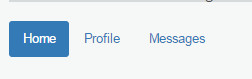
What class is being used? Answer: nav-pills
Adding Our Navigation
Time to focus on navigation! For this one, we'll recreate the Navigation Component from the video. We've gone ahead and added a list of links in the header as a starting point, but it's looking a little ugly. Follow the tasks to create a functional navigation for our site.
<!DOCTYPE html>
<html>
<head>
<title>Blasting Off With Bootstrap</title>
<link href='css/bootstrap.min.css' rel='stylesheet'>
<link href='css/main.css' rel='stylesheet'>
</head>
<body>
<div class='container'>
<div class='row'>
<div class='col-md-12'>
<h1>Blasting Off with Bootstrap</h1>
<ul>
<li><a href='tickets.html'>Tickets</a></li>
<li><a href='stations.html'>Stations</a></li>
<li><a href='about.html'>About</a></li>
</ul>
</div>
</div>
</div> <div class='container'>
<div class='row well well-lg'>
<div class='col-md-6'>
<h2>The Fastest Way to Space</h2>
<p class='lead'>Make your way to space in the comfort of your own rocket, elevator or transporter.</p>
<button type='button' class='btn btn-lg btn-default'>Take the Tour</button>
<button type='button' class='btn btn-lg btn-primary'>Book Tickets Now</button>
</div>
<div class='col-md-6 visible-md visible-lg'>
<img src='images/img-header.jpg' alt='Blast off with Bootstrap' />
</div>
</div> <div class='row text-center features'>
<div class='col-sm-4 col-xs-10 col-xs-offset-1 col-sm-offset-0'>
<i class='glyphicon glyphicon-briefcase'></i>
<h3>Book Today!</h3>
<p>Even if you're traveling tomorrow, you can still get tickets today. We have a number of conveniently located ports around the globe to service everyone.</p>
</div> <div class='col-sm-4 col-xs-6'>
<i class='glyphicon glyphicon-random'></i>
<h3>Go Anywhere</h3>
<p>If you need to get to space today, why not try out a transporter? Despite the claims, there are have been no deaths in the last 6 weeks!</p>
</div> <div class='col-sm-4 col-xs-6'>
<i class='glyphicon glyphicon-send'></i>
<h3>RocketBus®</h3>
<p>For cheapest fares, catch the next RocketBus® to the stars. Cheaper on your wallet, and easiest way to make friends.</p>
</div>
</div>
</div>
<div class='quote'>
<div class='container'>
<blockquote>
<p>Any sufficiently advanced technology is indistinguishable from magic.</p>
<footer>Arthur C. Clarke in <cite title="Source Title">Profiles of the Future</cite></footer>
</blockquote>
</div>
</div>
<div class='container transport-systems'>
<div class='row'>
<div class='col-md-10 col-md-offset-1'>
<h2>Our Transport Systems</h2>
<p>Learn more about our transport systems to find out which one is right for you. Pick out the mode of transport that works for your budget and risk level.</p>
</div>
</div> <div class='row text-center'>
<div class='transporter col-md-3 col-md-offset-1 well well-sm'>
<h3>Transporter</h3>
<ul class='list-unstyled'>
<li>8 second travel time</li>
<li>Chance of death only 1 in 7,593</li>
<li>Low price of only $15.99!</li>
</ul>
<p><button class='btn btn-info'><i class='glyphicon glyphicon-transfer'></i> Beam Me Up!</button></p>
</div>
<div class='space-elevator col-md-3 col-md-offset-1 well well-sm'>
<h3>Space Elevator</h3>
<ul class='list-unstyled'>
<li>8 hour scenic ride</li>
<li>Only 1 horrific death per 12,456</li>
<li>Only $45.99 if you book today!</li>
</ul>
<p><button class='btn btn-info'><i class='glyphicon glyphicon-sort'></i> Board the Elevator!</button></p>
</div>
<div class='rocketbus col-md-3 col-md-offset-1 well well-sm'>
<h3>RocketBus</h3>
<ul class='list-unstyled'>
<li>8 minute scenic ride</li>
<li>Plunging death rate of under 1/100k</li>
<li>$74.99 lets you blast off today!</li>
</ul>
<p><button class='btn btn-info'><i class='glyphicon glyphicon-plane'></i> Blast Off!</button></p>
</div>
</div>
</div>
<div class='footer'>
<div class='container'>
<div class='row'>
<div class='col-md-3 col-sm-4 col-xs-6'>
<h4>Who We Are</h4>
<p><i>Blasting Off With Bootstrap</i> is the fastest way to space. <a href='tickets.html'>Book your ticket today</a>!</p>
<p><a href='about.html'>More About Us <i class='glyphicon glyphicon-arrow-right'></i></a></p>
</div> <div class='col-md-offset-1 col-sm-2 col-xs-6'>
<h4>Links</h4>
<ul class='list-unstyled'>
<li><a href='index.html'>Home</a></li>
<li><a href='tickets.html'>Tickets</a></li>
<li><a href='stations.html'>Stations</a></li>
</ul>
</div> <div class='clearfix visible-xs'></div> <div class='col-sm-2 col-xs-6'>
<h4>Stay in Touch</h4>
<ul class='list-unstyled'>
<li><a href='about.html'>About</a></li>
<li><a href='contact.html'>Contact Us</a></li>
<li><a href='/blog'>Blog</a></li>
<li><a href='http://twitter.com/codeschool'>Twitter</a></li>
<li><a href='http://facebook.com/codeschool'>Facebook</a></li>
</ul>
</div> <div class='col-md-3 col-md-offset-1 col-sm-4 col-xs-6'>
<h4>Contact Us</h4>
<ul class='list-unstyled'>
<li><i class='glyphicon glyphicon-globe'></i> Orlando, FL</li>
<li><i class='glyphicon glyphicon-phone'></i> 1-555-blast-off</li>
<li><i class='glyphicon glyphicon-envelope'></i> <a href='mailto:blastingoff@codeschool.com'>blastingoff@codeschool.com</a></li>
</ul>
<p>Blasting Off With Bootstrap ©2214.</p>
</div>
</div>
</div>
</div> <script src='https://ajax.googleapis.com/ajax/libs/jquery/1.11.1/jquery.min.js'></script>
<script src='js/bootstrap.min.js'></script>
</body>
</html>

Even though our navigation is working, it's not pretty.
Create a new div above our "container" div that uses Bootstrap's Navigation class. We'll use this as a starting point for our Navigation Component.
<div class="navbar">

 ...

</div>
Our navbar is looking a bit plain. Go ahead and add a class to it that'll turn it a default grey color.
<div class="navbar navbar-default">

 ...

</div>
If we open our page now, we'll see that our .navbar element actually has rounded corners around it. Since it's at the top of the page, most people might not notice, but it's still an issue we should take care of.
Add another class to our Navigation Component that will indicate it's positioned at the top of the screen. It should disappear as the page scrolls.
<div class="navbar navbar-default navbar-static-top">

 ...

</div>

Time to get down to content. We want a link to our homepage rather than an h1 tag there. Change this tag to a link to our homepage (which is at index.html) and give it a Bootstrap class used for site titles and logos.
<a href="index.html" class="navbar-brand">Blasting Off with Bootstrap</a>
Our list of links in our header is going to show up with bullets next to them – not exactly what we want. Add (3) classes that will affect it in the following ways:
- Use Bootstrap's Nav Component.
- Indicate that this Nav Component is being used within a Navbar Component.
- Position the Nav Component all the way to the right side of the Navigation.
<ul class="nav navbar-nav navbar-right">
Finally, now that our navigation is wrapped in a Navigation Component, we no longer need to use grids in our navigation. Remove all elements in our nav associated with grids.
   <div class="navbar navbar-default navbar-static-top">

    <div class='container'>

          <a href="index.html" class="navbar-brand">Blasting Off with Bootstrap</a>

          <ul class="nav navbar-nav navbar-right">

            <li><a href='tickets.html'>Tickets</a></li>

            <li><a href='stations.html'>Stations</a></li>

            <li><a href='about.html'>About</a></li>

          </ul>

    </div>

    </div>

Using A Tabbed Nav
We've added another area on the page for travelers to have a bit more help in planning out their trip. To do this, we'll be using Bootstrap's Nav Component with tabs. The JavaScript to make this function was already added to the bottom of the page for us.
<!DOCTYPE html>
<html>
<head>
<title>Blasting Off With Bootstrap</title>
<link href='css/bootstrap.min.css' rel='stylesheet'>
<link href='css/main.css' rel='stylesheet'>
</head>
<body>
<div class='navbar navbar-default navbar-static-top'>
<div class='container'>
<a href='/' class='navbar-brand'>Blasting Off With Bootstrap</a> <ul class='nav navbar-nav navbar-right'>
<li><a href='tickets.html'>Tickets</a></li>
<li><a href='stations.html'>Stations</a></li>
<li><a href='about.html'>About</a></li>
</ul>
</div>
</div>
<div class='container'>
<div class='row well well-lg'>
<div class='col-md-6'>
<h2>The Fastest Way to Space</h2>
<p class='lead'>Make your way to space in the comfort of your own rocket, elevator or transporter.</p>
<button type='button' class='btn btn-lg btn-default'>Take the Tour</button>
<button type='button' class='btn btn-lg btn-primary'>Book Tickets Now</button>
</div>
<div class='col-md-6 visible-md visible-lg'>
<img src='images/img-header.jpg' alt='Blast off with Bootstrap' />
</div>
</div> <div class='row text-center features'>
<div class='col-sm-4 col-xs-10 col-xs-offset-1 col-sm-offset-0'>
<i class='glyphicon glyphicon-briefcase'></i>
<h3>Book Today!</h3>
<p>Even if you're traveling tomorrow, you can still get tickets today. We have a number of conveniently located ports around the globe to service everyone.</p>
</div> <div class='col-sm-4 col-xs-6'>
<i class='glyphicon glyphicon-random'></i>
<h3>Go Anywhere</h3>
<p>If you need to get to space today, why not try out a transporter? Despite the claims, there are have been no deaths in the last 6 weeks!</p>
</div> <div class='col-sm-4 col-xs-6'>
<i class='glyphicon glyphicon-send'></i>
<h3>RocketBus®</h3>
<p>For cheapest fares, catch the next RocketBus® to the stars. Cheaper on your wallet, and easiest way to make friends.</p>
</div>
</div>
</div>
<div class='quote'>
<div class='container'>
<blockquote>
<p>Any sufficiently advanced technology is indistinguishable from magic.</p>
<footer>Arthur C. Clarke in <cite title="Source Title">Profiles of the Future</cite></footer>
</blockquote>
</div>
</div>
<div class='container transport-systems'>
<div class='row'>
<div class='col-md-10 col-md-offset-1'>
<h2>Our Transport Systems</h2>
<p>Learn more about our transport systems to find out which one is right for you. Pick out the mode of transport that works for your budget and risk level.</p>
</div>
</div> <div class='row text-center'>
<div class='transporter col-md-3 col-md-offset-1 well well-sm'>
<h3>Transporter</h3>
<ul class='list-unstyled'>
<li>8 second travel time</li>
<li>Chance of death only 1 in 7,593</li>
<li>Low price of only $15.99!</li>
</ul>
<p><button class='btn btn-info'><i class='glyphicon glyphicon-transfer'></i> Beam Me Up!</button></p>
</div>
<div class='space-elevator col-md-3 col-md-offset-1 well well-sm'>
<h3>Space Elevator</h3>
<ul class='list-unstyled'>
<li>8 hour scenic ride</li>
<li>Only 1 horrific death per 12,456</li>
<li>Only $45.99 if you book today!</li>
</ul>
<p><button class='btn btn-info'><i class='glyphicon glyphicon-sort'></i> Board the Elevator!</button></p>
</div>
<div class='rocketbus col-md-3 col-md-offset-1 well well-sm'>
<h3>RocketBus</h3>
<ul class='list-unstyled'>
<li>8 minute scenic ride</li>
<li>Plunging death rate of under 1/100k</li>
<li>$74.99 lets you blast off today!</li>
</ul>
<p><button class='btn btn-info'><i class='glyphicon glyphicon-plane'></i> Blast Off!</button></p>
</div>
</div>
</div> <div class='container'>
<div class='row'>
<div class='col-md-10 col-md-offset-1'>
<h2>Plan Your Trip Today!</h2>
<ul>
<li><a href='#time'>Today's Times</a></li>
<li><a href='#deals'>Hot Deals</a></li>
<li><a href='#forecast'>Forecast</a></li>
</ul> <div class='tab-content'>
<div class='tab-pane fade' id='time'>
<p>Today's Time here</p>
</div>
<div class='tab-pane fade' id='deals'>
<p>Deals here</p>
</div>
<div class='tab-pane fade' id='forecast'>
<p>Forecast</p>
</div>
</div>
</div>
</div>
</div> <div class='footer'>
<div class='container'>
<div class='row'>
<div class='col-md-3 col-sm-4 col-xs-6'>
<h4>Who We Are</h4>
<p><i>Blasting Off With Bootstrap</i> is the fastest way to space. <a href='tickets.html'>Book your ticket today</a>!</p>
<p><a href='about.html'>More About Us <i class='glyphicon glyphicon-arrow-right'></i></a></p>
</div> <div class='col-md-offset-1 col-sm-2 col-xs-6'>
<h4>Links</h4>
<ul class='list-unstyled'>
<li><a href='/'>Home</a></li>
<li><a href='tickets.html'>Tickets</a></li>
<li><a href='stations.html'>Stations</a></li>
</ul>
</div> <div class='clearfix visible-xs'></div> <div class='col-sm-2 col-xs-6'>
<h4>Stay in Touch</h4>
<ul class='list-unstyled'>
<li><a href='about.html'>About</a></li>
<li><a href='contact.html'>Contact Us</a></li>
<li><a href='/blog'>Blog</a></li>
<li><a href='http://twitter.com/codeschool'>Twitter</a></li>
<li><a href='http://facebook.com/codeschool'>Facebook</a></li>
</ul>
</div> <div class='col-md-3 col-md-offset-1 col-sm-4 col-xs-6'>
<h4>Contact Us</h4>
<ul class='list-unstyled'>
<li><i class='glyphicon glyphicon-globe'></i> Orlando, FL</li>
<li><i class='glyphicon glyphicon-phone'></i> 1-555-blast-off</li>
<li><i class='glyphicon glyphicon-envelope'></i> <a href='mailto:blastingoff@codeschool.com'>blastingoff@codeschool.com</a></li>
</ul>
<p>Blasting Off With Bootstrap ©2214.</p>
</div>
</div>
</div>
</div> <script src='https://ajax.googleapis.com/ajax/libs/jquery/1.11.1/jquery.min.js'></script>
<script src='js/bootstrap.min.js'></script>
<script>
$(function() {
$('.nav-tabs a').click(function (e) {
e.preventDefault();
$(this).tab('show');
});
});
</script>
</body>
</html>
Our "Plan Your Trip Today" section could be improved using a tabbed navigation. Go ahead and add the class that will use the Nav Component and specify the tabs style.
          <ul class="nav nav-tabs">

            <li><a href='#time'>Today's Times</a></li>

            <li><a href='#deals'>Hot Deals</a></li>

            <li><a href='#forecast'>Forecast</a></li>

          </ul>
If we open up our page now, we'll see that none of the tabs are being marked as active. Apparently, we need to indicate which of the tabs should be opened by default. To do that we'll need to add a class to both the tab link that we click on (withinul.nav) and the content that will be shown (within div.tab-content).
In order for our Tabbed Nav to know which tab is currently active, we need to add a class of "active" to the li and tab-pane elements. Go ahead and make the first tab active.
         <ul class="nav nav-tabs">

            <li class="active"><a href='#time' >Today's Times</a></li>

            <li><a href='#deals'>Hot Deals</a></li>

            <li><a href='#forecast'>Forecast</a></li>

          </ul>

          <div class='tab-content'>

            <div class='tab-pane fade active' id='time'>

              <p>Today's Time here</p>

            </div>

            <div class='tab-pane fade' id='deals'>

              <p>Deals here</p>

            </div>

            <div class='tab-pane fade' id='forecast'>

              <p>Forecast</p>

            </div>

          </div>

        </div>
[Bootstrap] 6. Navigation的更多相关文章
- [UI] 04 - Bootstrap: layout & navigation
前言 一.资源 From: http://www.imooc.com/code/2881 Ref: http://www.runoob.com/try/bootstrap/layoutit/[拖拽布局 ...
- [Code::Blocks] Install wxWidgets & openCV
The open source, cross platform, free C++ IDE. Code::Blocks is a free C++ IDE built to meet the most ...
- 本人SW知识体系导航 - Programming menu
将感悟心得记于此,重启程序员模式. js, py, c++, java, php 融汇之全栈系列 [Full-stack] 快速上手开发 - React [Full-stack] 状态管理技巧 - R ...
- [Full-stack] 网页布局艺术 - Less
故事背景 一个过程: template/html ----> css ----> less ----> bootstrap/flex ----> Semantic-ui fle ...
- Bootstrap学习记录-1.Navigation
Bootstrap中的导航栏功能需要添加bootstrap.css.jquery.js.bootstrap.js,其中,jquery.js文件是bootstrap.js文件中必须的,否则就会抛出异常信 ...
- 旺财速啃H5框架之Bootstrap(四)
上一篇<<旺财速啃H5框架之Bootstrap(三)>>已经把导航做了,接下来搭建内容框架.... 对于不规整的网页,要做成自适应就有点玩大了.... 例如下面这种版式的页面. ...
- 旺财速啃H5框架之Bootstrap(三)
好多天没有写了,继续走起 在上一篇<<旺财速啃H5框架之Bootstrap(二)>>中已经把CSS引入到页面中,接下来开始写页面. 首先有些问题要先处理了,问什么你要学boot ...
- Bootstrap框架的学习(二)
一.下载Bootstrap Bootstrap (当前版本 v3.3.0)提供以下几种方式帮你快速上手,每一种方式针对具有不同技能等级的开发者和不同的使用场景. 下载地址:http://v3.boot ...
- bootstrap开发一个简单网页。
CSS代码: body{ padding-top: 50px; padding-bottom: 50px; overflow: auto!important; ...
随机推荐
- 大四实习准备1_java构造器_android ListView
2015-4-23 Java构造器 与类名同名;无返回值(void也不行);被不同的修饰符修饰是有区别的;当构造函数被private修饰时,只有本类可访问.其他类可以通过该类的get函数得到对象.如单 ...
- sencha touch tabsidebar 源码扩展
先上图看效果 没错,这是一个sencha touch 项目,而这里的右边推出效果(下文叫做tabsiderbar),使用插件tabsiderbar来扩展的. 插件js下载地址:http://www.m ...
- POJ 1273 (基础最大流) Drainage Ditches
虽然算法还没有理解透,但以及迫不及待地想要A道题了. 非常裸的最大流,试试lrj的模板练练手. #include <cstdio> #include <cstring> #in ...
- Java [leetcode 31]Next Permutation
题目描述: Implement next permutation, which rearranges numbers into the lexicographically next greater p ...
- shell编程——if语句 if -z -n -f -eq -ne -lt
if 条件then Commandelse Commandfi 别忘了这个结尾 If语句忘了结尾fitest.sh: line 14: sy ...
- 多线程程序设计学习(11)Two-phapse-Termination pattern
Two-phapse-Termination[A终止B线程] 一:Two-phapse-Termination的参与者--->A线程--->B线程 二:Two-phapse-Termina ...
- 【转】android 最新 NDK r8 在window下开发环境搭建 安装配置与使用 详细图文讲解,完整实际配置过程记录(原创)
原文网址:http://www.cnblogs.com/zdz8207/archive/2012/11/27/android-ndk-install.html android 最新 NDK r8 在w ...
- Spring AOP前置通知和后置通知
Spring AOP AspectJ:Java社区里最完整最流行的AOP框架 在Spring2.0以上的版本中,可以使用基于AspectJ注解或基于XML配置的AOP 在Spring中启用Aspect ...
- MS-SQL索引类型
一.索引的概念 索引就是加快检索表中数据的方法.数据库的索引类似于书籍的索引.在书籍中,索引允许用户不必翻阅完整个书就能迅速地找到所需要的信息.在数据库中,索引也允许数据库程序迅速地找到表中的 ...
- POJ 3377 Ferry Lanes
虽然它出现在dp专场里···但是我第一反应是一道最短路题···不过幸好它出现在dp专场里···因为我不怎么会dijstra什么的··· 题意:一条河上有N+1对码头,每个相邻码头之间需要一定时间到达, ...