
[Bootstrap] 6. Navigation
Too Much Navigation?
How many of Bootstrap's Navigation Components can we use on a page?
0
1
More than 1
Navigation Homepage Link
The very top left of our page is a great place for a logo and a link to our site's homepage. What is the Bootstrap class that is used for positioning and styling this element?
Answer: navbar-brand
Nav or Navbar
Take a look at the following screenshot. Is this using Bootstrap's Nav Component, Navbar Component, or both?

Nav Component
Navbar Component
Both
Here's another screenshot of the Meteor website. These links show up at the very top of the page. Is this using Bootstrap's Navbar Component, Nav Component, or both?

Navbar Component
Nav Component
Both
Nav Type
Take a look at the following use of Bootstrap's .nav class. A second Bootstrap Nav class is being applied in this case to add some extra functionality to this list.

What class is being used? Answer: nav-tabs
Here are those same links as before but using a different Bootstrap Nav class. Take a look and let us know what class is being used for styling the links to have these rounded corners.
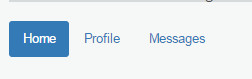
What class is being used? Answer: nav-pills
Adding Our Navigation
Time to focus on navigation! For this one, we'll recreate the Navigation Component from the video. We've gone ahead and added a list of links in the header as a starting point, but it's looking a little ugly. Follow the tasks to create a functional navigation for our site.
<!DOCTYPE html>
<html>
<head>
<title>Blasting Off With Bootstrap</title>
<link href='css/bootstrap.min.css' rel='stylesheet'>
<link href='css/main.css' rel='stylesheet'>
</head>
<body>
<div class='container'>
<div class='row'>
<div class='col-md-12'>
<h1>Blasting Off with Bootstrap</h1>
<ul>
<li><a href='tickets.html'>Tickets</a></li>
<li><a href='stations.html'>Stations</a></li>
<li><a href='about.html'>About</a></li>
</ul>
</div>
</div>
</div> <div class='container'>
<div class='row well well-lg'>
<div class='col-md-6'>
<h2>The Fastest Way to Space</h2>
<p class='lead'>Make your way to space in the comfort of your own rocket, elevator or transporter.</p>
<button type='button' class='btn btn-lg btn-default'>Take the Tour</button>
<button type='button' class='btn btn-lg btn-primary'>Book Tickets Now</button>
</div>
<div class='col-md-6 visible-md visible-lg'>
<img src='images/img-header.jpg' alt='Blast off with Bootstrap' />
</div>
</div> <div class='row text-center features'>
<div class='col-sm-4 col-xs-10 col-xs-offset-1 col-sm-offset-0'>
<i class='glyphicon glyphicon-briefcase'></i>
<h3>Book Today!</h3>
<p>Even if you're traveling tomorrow, you can still get tickets today. We have a number of conveniently located ports around the globe to service everyone.</p>
</div> <div class='col-sm-4 col-xs-6'>
<i class='glyphicon glyphicon-random'></i>
<h3>Go Anywhere</h3>
<p>If you need to get to space today, why not try out a transporter? Despite the claims, there are have been no deaths in the last 6 weeks!</p>
</div> <div class='col-sm-4 col-xs-6'>
<i class='glyphicon glyphicon-send'></i>
<h3>RocketBus®</h3>
<p>For cheapest fares, catch the next RocketBus® to the stars. Cheaper on your wallet, and easiest way to make friends.</p>
</div>
</div>
</div>
<div class='quote'>
<div class='container'>
<blockquote>
<p>Any sufficiently advanced technology is indistinguishable from magic.</p>
<footer>Arthur C. Clarke in <cite title="Source Title">Profiles of the Future</cite></footer>
</blockquote>
</div>
</div>
<div class='container transport-systems'>
<div class='row'>
<div class='col-md-10 col-md-offset-1'>
<h2>Our Transport Systems</h2>
<p>Learn more about our transport systems to find out which one is right for you. Pick out the mode of transport that works for your budget and risk level.</p>
</div>
</div> <div class='row text-center'>
<div class='transporter col-md-3 col-md-offset-1 well well-sm'>
<h3>Transporter</h3>
<ul class='list-unstyled'>
<li>8 second travel time</li>
<li>Chance of death only 1 in 7,593</li>
<li>Low price of only $15.99!</li>
</ul>
<p><button class='btn btn-info'><i class='glyphicon glyphicon-transfer'></i> Beam Me Up!</button></p>
</div>
<div class='space-elevator col-md-3 col-md-offset-1 well well-sm'>
<h3>Space Elevator</h3>
<ul class='list-unstyled'>
<li>8 hour scenic ride</li>
<li>Only 1 horrific death per 12,456</li>
<li>Only $45.99 if you book today!</li>
</ul>
<p><button class='btn btn-info'><i class='glyphicon glyphicon-sort'></i> Board the Elevator!</button></p>
</div>
<div class='rocketbus col-md-3 col-md-offset-1 well well-sm'>
<h3>RocketBus</h3>
<ul class='list-unstyled'>
<li>8 minute scenic ride</li>
<li>Plunging death rate of under 1/100k</li>
<li>$74.99 lets you blast off today!</li>
</ul>
<p><button class='btn btn-info'><i class='glyphicon glyphicon-plane'></i> Blast Off!</button></p>
</div>
</div>
</div>
<div class='footer'>
<div class='container'>
<div class='row'>
<div class='col-md-3 col-sm-4 col-xs-6'>
<h4>Who We Are</h4>
<p><i>Blasting Off With Bootstrap</i> is the fastest way to space. <a href='tickets.html'>Book your ticket today</a>!</p>
<p><a href='about.html'>More About Us <i class='glyphicon glyphicon-arrow-right'></i></a></p>
</div> <div class='col-md-offset-1 col-sm-2 col-xs-6'>
<h4>Links</h4>
<ul class='list-unstyled'>
<li><a href='index.html'>Home</a></li>
<li><a href='tickets.html'>Tickets</a></li>
<li><a href='stations.html'>Stations</a></li>
</ul>
</div> <div class='clearfix visible-xs'></div> <div class='col-sm-2 col-xs-6'>
<h4>Stay in Touch</h4>
<ul class='list-unstyled'>
<li><a href='about.html'>About</a></li>
<li><a href='contact.html'>Contact Us</a></li>
<li><a href='/blog'>Blog</a></li>
<li><a href='http://twitter.com/codeschool'>Twitter</a></li>
<li><a href='http://facebook.com/codeschool'>Facebook</a></li>
</ul>
</div> <div class='col-md-3 col-md-offset-1 col-sm-4 col-xs-6'>
<h4>Contact Us</h4>
<ul class='list-unstyled'>
<li><i class='glyphicon glyphicon-globe'></i> Orlando, FL</li>
<li><i class='glyphicon glyphicon-phone'></i> 1-555-blast-off</li>
<li><i class='glyphicon glyphicon-envelope'></i> <a href='mailto:blastingoff@codeschool.com'>blastingoff@codeschool.com</a></li>
</ul>
<p>Blasting Off With Bootstrap ©2214.</p>
</div>
</div>
</div>
</div> <script src='https://ajax.googleapis.com/ajax/libs/jquery/1.11.1/jquery.min.js'></script>
<script src='js/bootstrap.min.js'></script>
</body>
</html>

Even though our navigation is working, it's not pretty.
Create a new div above our "container" div that uses Bootstrap's Navigation class. We'll use this as a starting point for our Navigation Component.
<div class="navbar">

 ...

</div>
Our navbar is looking a bit plain. Go ahead and add a class to it that'll turn it a default grey color.
<div class="navbar navbar-default">

 ...

</div>
If we open our page now, we'll see that our .navbar element actually has rounded corners around it. Since it's at the top of the page, most people might not notice, but it's still an issue we should take care of.
Add another class to our Navigation Component that will indicate it's positioned at the top of the screen. It should disappear as the page scrolls.
<div class="navbar navbar-default navbar-static-top">

 ...

</div>

Time to get down to content. We want a link to our homepage rather than an h1 tag there. Change this tag to a link to our homepage (which is at index.html) and give it a Bootstrap class used for site titles and logos.
<a href="index.html" class="navbar-brand">Blasting Off with Bootstrap</a>
Our list of links in our header is going to show up with bullets next to them – not exactly what we want. Add (3) classes that will affect it in the following ways:
- Use Bootstrap's Nav Component.
- Indicate that this Nav Component is being used within a Navbar Component.
- Position the Nav Component all the way to the right side of the Navigation.
<ul class="nav navbar-nav navbar-right">
Finally, now that our navigation is wrapped in a Navigation Component, we no longer need to use grids in our navigation. Remove all elements in our nav associated with grids.
   <div class="navbar navbar-default navbar-static-top">

    <div class='container'>

          <a href="index.html" class="navbar-brand">Blasting Off with Bootstrap</a>

          <ul class="nav navbar-nav navbar-right">

            <li><a href='tickets.html'>Tickets</a></li>

            <li><a href='stations.html'>Stations</a></li>

            <li><a href='about.html'>About</a></li>

          </ul>

    </div>

    </div>

Using A Tabbed Nav
We've added another area on the page for travelers to have a bit more help in planning out their trip. To do this, we'll be using Bootstrap's Nav Component with tabs. The JavaScript to make this function was already added to the bottom of the page for us.
<!DOCTYPE html>
<html>
<head>
<title>Blasting Off With Bootstrap</title>
<link href='css/bootstrap.min.css' rel='stylesheet'>
<link href='css/main.css' rel='stylesheet'>
</head>
<body>
<div class='navbar navbar-default navbar-static-top'>
<div class='container'>
<a href='/' class='navbar-brand'>Blasting Off With Bootstrap</a> <ul class='nav navbar-nav navbar-right'>
<li><a href='tickets.html'>Tickets</a></li>
<li><a href='stations.html'>Stations</a></li>
<li><a href='about.html'>About</a></li>
</ul>
</div>
</div>
<div class='container'>
<div class='row well well-lg'>
<div class='col-md-6'>
<h2>The Fastest Way to Space</h2>
<p class='lead'>Make your way to space in the comfort of your own rocket, elevator or transporter.</p>
<button type='button' class='btn btn-lg btn-default'>Take the Tour</button>
<button type='button' class='btn btn-lg btn-primary'>Book Tickets Now</button>
</div>
<div class='col-md-6 visible-md visible-lg'>
<img src='images/img-header.jpg' alt='Blast off with Bootstrap' />
</div>
</div> <div class='row text-center features'>
<div class='col-sm-4 col-xs-10 col-xs-offset-1 col-sm-offset-0'>
<i class='glyphicon glyphicon-briefcase'></i>
<h3>Book Today!</h3>
<p>Even if you're traveling tomorrow, you can still get tickets today. We have a number of conveniently located ports around the globe to service everyone.</p>
</div> <div class='col-sm-4 col-xs-6'>
<i class='glyphicon glyphicon-random'></i>
<h3>Go Anywhere</h3>
<p>If you need to get to space today, why not try out a transporter? Despite the claims, there are have been no deaths in the last 6 weeks!</p>
</div> <div class='col-sm-4 col-xs-6'>
<i class='glyphicon glyphicon-send'></i>
<h3>RocketBus®</h3>
<p>For cheapest fares, catch the next RocketBus® to the stars. Cheaper on your wallet, and easiest way to make friends.</p>
</div>
</div>
</div>
<div class='quote'>
<div class='container'>
<blockquote>
<p>Any sufficiently advanced technology is indistinguishable from magic.</p>
<footer>Arthur C. Clarke in <cite title="Source Title">Profiles of the Future</cite></footer>
</blockquote>
</div>
</div>
<div class='container transport-systems'>
<div class='row'>
<div class='col-md-10 col-md-offset-1'>
<h2>Our Transport Systems</h2>
<p>Learn more about our transport systems to find out which one is right for you. Pick out the mode of transport that works for your budget and risk level.</p>
</div>
</div> <div class='row text-center'>
<div class='transporter col-md-3 col-md-offset-1 well well-sm'>
<h3>Transporter</h3>
<ul class='list-unstyled'>
<li>8 second travel time</li>
<li>Chance of death only 1 in 7,593</li>
<li>Low price of only $15.99!</li>
</ul>
<p><button class='btn btn-info'><i class='glyphicon glyphicon-transfer'></i> Beam Me Up!</button></p>
</div>
<div class='space-elevator col-md-3 col-md-offset-1 well well-sm'>
<h3>Space Elevator</h3>
<ul class='list-unstyled'>
<li>8 hour scenic ride</li>
<li>Only 1 horrific death per 12,456</li>
<li>Only $45.99 if you book today!</li>
</ul>
<p><button class='btn btn-info'><i class='glyphicon glyphicon-sort'></i> Board the Elevator!</button></p>
</div>
<div class='rocketbus col-md-3 col-md-offset-1 well well-sm'>
<h3>RocketBus</h3>
<ul class='list-unstyled'>
<li>8 minute scenic ride</li>
<li>Plunging death rate of under 1/100k</li>
<li>$74.99 lets you blast off today!</li>
</ul>
<p><button class='btn btn-info'><i class='glyphicon glyphicon-plane'></i> Blast Off!</button></p>
</div>
</div>
</div> <div class='container'>
<div class='row'>
<div class='col-md-10 col-md-offset-1'>
<h2>Plan Your Trip Today!</h2>
<ul>
<li><a href='#time'>Today's Times</a></li>
<li><a href='#deals'>Hot Deals</a></li>
<li><a href='#forecast'>Forecast</a></li>
</ul> <div class='tab-content'>
<div class='tab-pane fade' id='time'>
<p>Today's Time here</p>
</div>
<div class='tab-pane fade' id='deals'>
<p>Deals here</p>
</div>
<div class='tab-pane fade' id='forecast'>
<p>Forecast</p>
</div>
</div>
</div>
</div>
</div> <div class='footer'>
<div class='container'>
<div class='row'>
<div class='col-md-3 col-sm-4 col-xs-6'>
<h4>Who We Are</h4>
<p><i>Blasting Off With Bootstrap</i> is the fastest way to space. <a href='tickets.html'>Book your ticket today</a>!</p>
<p><a href='about.html'>More About Us <i class='glyphicon glyphicon-arrow-right'></i></a></p>
</div> <div class='col-md-offset-1 col-sm-2 col-xs-6'>
<h4>Links</h4>
<ul class='list-unstyled'>
<li><a href='/'>Home</a></li>
<li><a href='tickets.html'>Tickets</a></li>
<li><a href='stations.html'>Stations</a></li>
</ul>
</div> <div class='clearfix visible-xs'></div> <div class='col-sm-2 col-xs-6'>
<h4>Stay in Touch</h4>
<ul class='list-unstyled'>
<li><a href='about.html'>About</a></li>
<li><a href='contact.html'>Contact Us</a></li>
<li><a href='/blog'>Blog</a></li>
<li><a href='http://twitter.com/codeschool'>Twitter</a></li>
<li><a href='http://facebook.com/codeschool'>Facebook</a></li>
</ul>
</div> <div class='col-md-3 col-md-offset-1 col-sm-4 col-xs-6'>
<h4>Contact Us</h4>
<ul class='list-unstyled'>
<li><i class='glyphicon glyphicon-globe'></i> Orlando, FL</li>
<li><i class='glyphicon glyphicon-phone'></i> 1-555-blast-off</li>
<li><i class='glyphicon glyphicon-envelope'></i> <a href='mailto:blastingoff@codeschool.com'>blastingoff@codeschool.com</a></li>
</ul>
<p>Blasting Off With Bootstrap ©2214.</p>
</div>
</div>
</div>
</div> <script src='https://ajax.googleapis.com/ajax/libs/jquery/1.11.1/jquery.min.js'></script>
<script src='js/bootstrap.min.js'></script>
<script>
$(function() {
$('.nav-tabs a').click(function (e) {
e.preventDefault();
$(this).tab('show');
});
});
</script>
</body>
</html>
Our "Plan Your Trip Today" section could be improved using a tabbed navigation. Go ahead and add the class that will use the Nav Component and specify the tabs style.
          <ul class="nav nav-tabs">

            <li><a href='#time'>Today's Times</a></li>

            <li><a href='#deals'>Hot Deals</a></li>

            <li><a href='#forecast'>Forecast</a></li>

          </ul>
If we open up our page now, we'll see that none of the tabs are being marked as active. Apparently, we need to indicate which of the tabs should be opened by default. To do that we'll need to add a class to both the tab link that we click on (withinul.nav) and the content that will be shown (within div.tab-content).
In order for our Tabbed Nav to know which tab is currently active, we need to add a class of "active" to the li and tab-pane elements. Go ahead and make the first tab active.
         <ul class="nav nav-tabs">

            <li class="active"><a href='#time' >Today's Times</a></li>

            <li><a href='#deals'>Hot Deals</a></li>

            <li><a href='#forecast'>Forecast</a></li>

          </ul>

          <div class='tab-content'>

            <div class='tab-pane fade active' id='time'>

              <p>Today's Time here</p>

            </div>

            <div class='tab-pane fade' id='deals'>

              <p>Deals here</p>

            </div>

            <div class='tab-pane fade' id='forecast'>

              <p>Forecast</p>

            </div>

          </div>

        </div>
[Bootstrap] 6. Navigation的更多相关文章
- [UI] 04 - Bootstrap: layout & navigation
前言 一.资源 From: http://www.imooc.com/code/2881 Ref: http://www.runoob.com/try/bootstrap/layoutit/[拖拽布局 ...
- [Code::Blocks] Install wxWidgets & openCV
The open source, cross platform, free C++ IDE. Code::Blocks is a free C++ IDE built to meet the most ...
- 本人SW知识体系导航 - Programming menu
将感悟心得记于此,重启程序员模式. js, py, c++, java, php 融汇之全栈系列 [Full-stack] 快速上手开发 - React [Full-stack] 状态管理技巧 - R ...
- [Full-stack] 网页布局艺术 - Less
故事背景 一个过程: template/html ----> css ----> less ----> bootstrap/flex ----> Semantic-ui fle ...
- Bootstrap学习记录-1.Navigation
Bootstrap中的导航栏功能需要添加bootstrap.css.jquery.js.bootstrap.js,其中,jquery.js文件是bootstrap.js文件中必须的,否则就会抛出异常信 ...
- 旺财速啃H5框架之Bootstrap(四)
上一篇<<旺财速啃H5框架之Bootstrap(三)>>已经把导航做了,接下来搭建内容框架.... 对于不规整的网页,要做成自适应就有点玩大了.... 例如下面这种版式的页面. ...
- 旺财速啃H5框架之Bootstrap(三)
好多天没有写了,继续走起 在上一篇<<旺财速啃H5框架之Bootstrap(二)>>中已经把CSS引入到页面中,接下来开始写页面. 首先有些问题要先处理了,问什么你要学boot ...
- Bootstrap框架的学习(二)
一.下载Bootstrap Bootstrap (当前版本 v3.3.0)提供以下几种方式帮你快速上手,每一种方式针对具有不同技能等级的开发者和不同的使用场景. 下载地址:http://v3.boot ...
- bootstrap开发一个简单网页。
CSS代码: body{ padding-top: 50px; padding-bottom: 50px; overflow: auto!important; ...
随机推荐
- php类 静态变量赋值 static $name="abc"
<?php class test { static $name="abc"; } echo test::$name; 1.巴斯科范式 class_statement: var ...
- bzoj4511: [Usaco2016 Jan]Subsequences Summing to Sevens
前缀和. 设f[i]为前缀和%7=i的第一个点.那么答案就是max(i-f[s[i]%7])了. #include<cstdio> #include<algorithm> #i ...
- [原]Unity3D深入浅出 - 新版动画系统(Mecanim)
Mecanim概述: Mecanim是Unity提供第一个丰富而复杂的动画系统,提供了: 针对人形角色的简易的工作流和动画创建能力 Retargeting(运动重定向)功能,即把动画从一个角色模型应用 ...
- IE中Ajax数据缓存的问题
在IE中,Ajax回来的数据会有缓存的现象发生,解决方式: 1,改变URL,每次请求加一个随机数参数Math.random()或者new Date().getTime(),这样IE会认为URL不一样, ...
- Sencha 基础Demo测试,三种showView的方法
直接贴代码吧 Ext.define("build.controller.MainController",{ extend:"Ext.app.Controller" ...
- BZOJ3155: Preprefix sum
题解: 写过树状数组搞区间修改和区间求和的就可以秒出吧... 代码: #include<cstdio> #include<cstdlib> #include<cmath& ...
- android studio 安装总结
Android Studio 的安装和配置篇(Windows篇<转> http://www.jianshu.com/p/fc03942548cc# 中间gradle下载比较慢:解决方法 需 ...
- Azure HDInsight与Hadoop周边系统集成
Sunwei 9 Dec 2014 1:54 AM 传统的Hadoop系统提供给用户2个非常优秀的框架,MR计算框架和HDFS存储框架,尽管MR已经显得有些老迈而缓慢,但是HDFS还是很多应用系统的 ...
- 【转】如何下载并编译Android4.0内核源码goldfish(图文)
原文网址:http://blog.csdn.net/flydream0/article/details/7070392 关于如何下载Android4.0源码,请查看我的博客内另一篇文章(同样是图文教程 ...
- 【转】10分钟搭建NDK的Android开发环境
原文网址:http://blog.csdn.net/u012176591/article/details/23018913 作者:金良(golden1314521@gmail.com) csdn博客: ...