
实现TableLayout布局下循环取出TableRow控件中的文字内容到list集合
布局方式为TableLayout,利于实现表单样式展现。
<!-- 详情内容区域 -->

    <ScrollView

        android:layout_above="@id/id_buttom_layout"

        android:layout_below="@id/home_title"

        android:layout_width="match_parent"

        android:layout_height="wrap_content"

        android:scrollbars="vertical"

        >

        <TableLayout

            android:id="@+id/id_logTableRow"

            style="@style/table"

            android:layout_marginBottom="10dip"

            android:showDividers="middle">

            <TableRow

                style="@style/tablelayout"

                 >

                <TextView

                    android:layout_width="match_parent"

                    android:layout_height="wrap_content"

                    android:paddingLeft="10dip"

                    android:gravity="right"

                    android:text="工单编号:"

                    android:textSize="@dimen/normal_text_size"

                    />

                 <TextView

                    android:id="@+id/id_docNumber"

                    android:layout_width="match_parent"

                    android:layout_height="wrap_content"

                    android:paddingLeft="10dip"

                    android:paddingRight="10dip"

                    android:gravity="left"

                    android:textSize="@dimen/normal_text_size"

                    android:textColor="@color/balck"

                    />

            </TableRow>

            <TableRow

                style="@style/tablelayout" >

                <TextView

                    android:layout_width="match_parent"

                    android:layout_height="wrap_content"

                    android:paddingLeft="10dip"

                    android:gravity="right"

                    android:text="处  理  人:"

                    android:textSize="@dimen/normal_text_size"

                    />

                <TextView

                    android:id="@+id/id_logSolver"

                    android:layout_width="match_parent"

                    android:layout_height="wrap_content"

                    android:paddingLeft="10dip"

                    android:paddingRight="10dip"

                    android:gravity="left"

                    android:textSize="@dimen/normal_text_size"

                    android:textColor="@color/balck"

                    />

            </TableRow>

            <TableRow

                style="@style/tablelayout" >

                <TextView

                    android:layout_width="match_parent"

                    android:layout_height="wrap_content"

                    android:paddingLeft="10dip"

                    android:gravity="right"

                    android:text="项目名称:"

                    android:textSize="@dimen/normal_text_size"

                    />

                <com.hxzk.ydbg.utils.views.SpinnerView

                    android:id="@+id/id_projectName"

                    android:layout_width="match_parent"

                    android:layout_height="42dp"

                    android:background="@drawable/edittext_bg_drawable"

                    android:layout_gravity="center_vertical"

                    android:textSize="@dimen/normal_text_size"

                    android:gravity="center"

                    />

            </TableRow>

            <TableRow

                style="@style/tablelayout" >

                <TextView

                    android:layout_width="match_parent"

                    android:layout_height="wrap_content"

                    android:paddingLeft="10dip"

                    android:gravity="right"

                    android:text="负  责  人:"

                    android:textSize="@dimen/normal_text_size"

                    />

                <TextView

                    android:id="@+id/id_projectLeader"

                    android:layout_width="match_parent"

                    android:layout_height="wrap_content"

                    android:paddingLeft="10dip"

                    android:paddingRight="10dip"

                    android:gravity="left"

                    android:textSize="@dimen/normal_text_size"

                    android:textColor="@color/balck"

                    />

            </TableRow>

            <TableRow

                style="@style/tablelayout"

                 >

                <TextView

                    android:layout_width="match_parent"

                    android:layout_height="wrap_content"

                    android:paddingLeft="10dip"

                    android:gravity="right"

                    android:text="客户地址:"

                    android:textSize="@dimen/normal_text_size"

                    />

                 <TextView

                    android:id="@+id/id_projectAddress"

                    android:layout_width="match_parent"

                    android:layout_height="wrap_content"

                    android:paddingLeft="10dip"

                    android:paddingRight="10dip"

                    android:gravity="left"

                    android:textSize="@dimen/normal_text_size"

                    android:textColor="@color/balck"

                    />

            </TableRow>

            <TableRow

                style="@style/tablelayout" >

                <TextView

                    android:layout_width="match_parent"

                    android:layout_height="wrap_content"

                    android:paddingLeft="10dip"

                    android:gravity="right"

                    android:text="需求类型:"

                    android:textSize="@dimen/normal_text_size"

                    />

                <com.hxzk.ydbg.utils.views.SpinnerView

                    android:id="@+id/id_logType"

                    android:layout_width="match_parent"

                    android:layout_height="42dp"

                    android:background="@drawable/edittext_bg_drawable"

                    android:layout_gravity="center_vertical"

                    android:textSize="@dimen/normal_text_size"

                    android:gravity="center"

                    />

            </TableRow>

            <TableRow

                style="@style/tablelayout">

                <TextView

                    android:layout_width="match_parent"

                    android:layout_height="wrap_content"

                    android:paddingLeft="10dip"

                    android:gravity="right"

                    android:text="需求描述:"

                    android:textSize="@dimen/normal_text_size"

                    />

                <EditText

                    android:id="@+id/id_logDepict"

                    android:layout_width="match_parent"

                    android:layout_height="wrap_content"

                    android:hint="请填写需求的简单描述"

                    android:textSize="18sp"

                    android:inputType="textMultiLine"

                    android:minLines="3"

                    android:maxLines="100"

                    android:gravity="top"

                       android:background="@drawable/edittext_bg_drawable"

                    />

            </TableRow>

            <TableRow

                style="@style/tablelayout" >

                <TextView

                    android:layout_width="match_parent"

                    android:layout_height="wrap_content"

                    android:paddingLeft="10dip"

                    android:gravity="right"

                    android:text="处理结果:"

                    android:textSize="@dimen/normal_text_size"

                    />

                <EditText

                    android:id="@+id/id_logResult"

                    android:layout_width="match_parent"

                    android:layout_height="wrap_content"

                    android:hint="请填写需求的处理结果"

                    android:textSize="18sp"

                    android:inputType="textMultiLine"

                    android:minLines="5"

                    android:maxLines="100"

                    android:gravity="top"

                       android:background="@drawable/edittext_bg_drawable"

                    />

            </TableRow>

            <TableRow

                style="@style/tablelayout" >

                <TextView

                    android:layout_width="match_parent"

                    android:layout_height="wrap_content"

                    android:paddingLeft="10dip"

                    android:gravity="right"

                    android:text="创建时间:"

                    android:textSize="@dimen/normal_text_size"

                    />

                <TextView

                    android:id="@+id/id_logCreateTime"

                    android:layout_width="match_parent"

                    android:layout_height="wrap_content"

                    android:paddingLeft="10dip"

                    android:paddingRight="10dip"

                    android:gravity="left"

                    android:textSize="@dimen/normal_text_size"

                    android:textColor="@color/balck"

                    />

            </TableRow>

            <TableRow

                style="@style/tablelayout" >

                <TextView

                    android:layout_width="match_parent"

                    android:layout_height="wrap_content"

                    android:paddingLeft="10dip"

                    android:gravity="right"

                    android:text="处理时间:"

                    android:textSize="@dimen/normal_text_size"

                    />

                <TextView

                    android:id="@+id/id_logSolveTime"

                    android:layout_width="match_parent"

                    android:layout_height="wrap_content"

                    android:paddingLeft="10dip"

                    android:paddingRight="10dip"

                    android:gravity="left"

                    android:textSize="@dimen/normal_text_size"

                    android:textColor="@color/balck"

                    />

            </TableRow>

            <TableRow

                style="@style/tablelayout" >

                <TextView

                    android:layout_width="match_parent"

                    android:layout_height="wrap_content"

                    android:paddingLeft="10dip"

                    android:gravity="right"

                    android:text="客户签字 \n时         间:"

                    android:textSize="@dimen/normal_text_size"

                    />

                <TextView

                    android:id="@+id/id_signTime"

                    android:layout_width="match_parent"

                    android:layout_height="wrap_content"

                    android:paddingLeft="10dip"

                    android:paddingRight="10dip"

                    android:gravity="left"

                    android:textSize="@dimen/normal_text_size"

                    android:textColor="@color/balck"

                    />

            </TableRow>

        </TableLayout>

    </ScrollView>
tablelayout
在Java代码中通过getChildCount、getChildAt获取tablelayout布局下的tablerow,然后再通过getChildCount、getChildAt获取tablerow下的子控件,最后通过instanceof校验对象类型并调用对应的方法获取文本。
/**表单区域*/

private TableLayout id_logTableRow;

private ArrayList<String> titleList;
初始化:
id_logTableRow = (TableLayout) initview.findViewById(R.id.id_logTableRow);
titleList = new ArrayList<String>();

        TableRow[] childs = new TableRow[id_logTableRow.getChildCount()];

        for(int i=0;i<childs.length;i++){

            childs[i] = (TableRow) id_logTableRow.getChildAt(i);

            View[] childss = new View[childs[i].getChildCount()];

            childss[0] = childs[i].getChildAt(0);

            childss[1] = childs[i].getChildAt(1);

            String labelStr = ((TextView)childss[0]).getText().toString();//每一行的左侧标签

            String infoStr = "";

            /**

             * 校验对象类型,然后再进行强类型转换,以便获取控件中的文本*/

            if(childss[1] instanceof TextView){

                infoStr = ((TextView)childss[1]).getText().toString();//每一行的左侧标签

            }else if(childss[1] instanceof SpinnerView){

                infoStr = ((SpinnerView)childss[1]).getText().toString();//每一行的左侧标签

            }

            else if(childss[1] instanceof EditText){

                infoStr = ((EditText)childss[1]).getText().toString();//每一行的左侧标签

            }else{

                infoStr = " ";

            }

            titleList.add(labelStr + infoStr);

        }
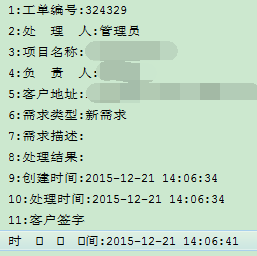
打印结果:
for(int i=0;i<titleList.size();i++){

            Log.v("WriteLogInfoWordFragment", (i+1) + ":" + titleList.get(i));

        }
实现TableLayout布局下循环取出TableRow控件中的文字内容到list集合的更多相关文章
- .net获取select控件中的文本内容
.net获取select控件中的文本内容 2009-11-28 21:19小V古 | 分类:C#/.NET | 浏览1374次 <select id="SecType" st ...
- 在Image控件中绘制文字
//Canvas 在Image控件中绘制文字 procedure TForm1.Button1Click(Sender: TObject);begin image1.Canvas.Font.Size ...
- 在RichTextBox控件中添加超链接文本
实现效果: 知识运用: RichTextBox控件的AppendText方法 public void AppendText{string textData} //向控件中添加文本内容 和Process ...
- 如何写一套下拉刷新的控件?《MJRefresh原理浅析》(附Demo下载地址)
相信大家有很多人在做项目的时候都在使用MJRefresh 控件来实现下拉刷新的功能: MJRefresh经过不断的重构与更新迭代,现在不管是功能上还是代码结构上都是相当不错的,都是很值我们去学习的. ...
- Delphi下使用Oracle Access控件组下TOraSession控件链接
Delphi下使用Oracle Access控件组下TOraSession控件链接数据库,使用 orsn1.Options.Direct:=true; orsn1.Server:=IP:Port: ...
- Silverlight中在MVVM模式下对DatagridRow选择控件封装
在项目中,凡是涉及到表格的地方用的最多的控件,自然少不了DataGrid的身影,它明了的展示各种数据让人十分喜欢.现在要实现一个功能,使DataGrid具有全选和项选中的功能,如果在传统后台代码中完成 ...
- cocos2d-html5 简易 下拉表单 控件
刚才在CH5的群里问了问 有没有大侠写过 下拉表单控件啊! 没人鸟窝 ,DZ老师表示非常伤心啊 ,于是乎 自己写一个把 共享给大家. 效果图上一个 仅仅实现了一个最最主要的控件 非常eas ...
- Asp.Net2.0下C#环境 Login控件实现用户登录
原文:Asp.Net2.0下C#环境 Login控件实现用户登录 一.前台显示效果 二.前台代码 <asp:Login ID="Login1" run ...
- Atitit.ui控件---下拉菜单选择控件的实现select html
Atitit.ui控件---下拉菜单选择控件的实现select html 1. 调用& model的实现 1 2. -----select.jsp------ 1 1. 调用& m ...
随机推荐
- HDU 5816 Hearthstone (状压DP)
Hearthstone 题目链接: http://acm.hdu.edu.cn/showproblem.php?pid=5816 Description Hearthstone is an onlin ...
- 解决Failed to execute goal org.apache.maven.plugins
1.Maven构建失败 Failed to execute goal org.apache.maven.plugins:maven-compiler-plugin: 2.3 . 2 :compile ...
- C#中的ref和out的区别
转载原地址 http://www.cnblogs.com/gjahead/archive/2008/02/28/1084871.html ref和out的区别在C# 中,既可以通过值也可以通过引用传递 ...
- Bootstrap排版
<!DOCTYPE html> <html> <head> <meta charset="utf-8" /> <meta na ...
- PostgreSQL的 initdb 源代码分析之二
继续分析 下面这一段,当 initdb --version 或者 initdb --help 才有意义. ) { ], || strcmp(argv[], ) { usage(progname); ...
- 2015南阳CCPC G - Ancient Go 暴力
G - Ancient Go Time Limit: 1 Sec Memory Limit: 256 MB 题目连接 无 Description Yu Zhou likes to play Go wi ...
- C# 图片保存到数据库和从数据库读取图片并显示
图片保存到数据库的方法: public void imgToDB(string sql) { //参数sql中要求保存的imge变量名称为@images //调 ...
- Android apk程序调用其它的APK程序
Intent mIntent = new Intent(); ComponentName comp = new ComponentName("启动的APK包名","启动的 ...
- js中substr与substring的差别
Js的substring和C#的Substring的作用都是从一个字符串中截取出一个子字符串,但它们的用法却有非常大的不同,下边我们来比較看看: Js的substring 语法: 程序代码 S ...
- X64 Win7(win2008)连接SqlServer2005慢的解决办法
问题描述:数据库版本:SQL SERVER 2005数据库安装环境: Win 2003 X64 客户端环境:Win 2008 x64连接工具:ODBC或ado.net测试连接时间:4-6秒 客户端环境 ...