
【CSS3】---background-origin background-clip background-size
background-origin
设置元素背景图片的原始起始位置。
语法:
background-origin : border-box | padding-box | content-box;
参数分别表示背景图片是从边框,还是内边距(默认值),或者是内容区域开始显示。
效果如下:
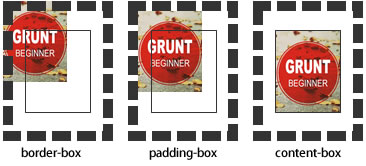
需要注意的是,如果背景不是no-repeat,这个属性无效,它会从边框开始显示。
例子:
<!DOCTYPE html>

<html>

<head>

<meta charset="utf-8">

<title>背景原点</title>

<style type="text/css">

.wrap {

    width:220px;

    border:20px dashed #000;

    padding:20px;

    font-weight:bold;

    color:#000;

    background:#ccc url(http://static.mukewang.com/static/img/logo_index.png) no-repeat;

    background-origin:content-box;//内容区域显示

    position: relative;

}

.wrap span {

    position: absolute;

    left:0;

    top:0;

}

.content {

    height:80px;

    border:1px solid #333;

}

</style>

</head>

<body>

<div class="wrap"><span>padding</span>

    <div class="content">content</div>

</div>

</body>

</html>
效果:
background-clip
用来将背景图片做适当的裁剪以适应实际需要。
语法:
background-clip : border-box | padding-box | content-box | no-clip
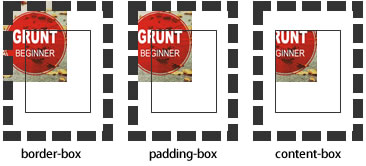
参数分别表示从边框、或内填充,或者内容区域向外裁剪背景。no-clip表示不裁切,和参数border-box显示同样的效果。backgroud-clip默认值为border-box。
效果如下图所示:
例子:
<!DOCTYPE html>

<html>

<head>

<meta charset="utf-8">

<title>背景裁切</title>

<style type="text/css">

.wrap {

    width:220px;

    border:20px dashed #000;

    padding:20px;

    font-weight:bold;

    color:#000;

    background:#ccc url(http://static.mukewang.com/static/img/logo_index.png) no-repeat;

    background-origin: border-box;

    background-clip:padding-box;

    position: relative;

}

.wrap span {

    position: absolute;

    left:0;

    top:0;

}

.content {

    height:80px;

    border:1px solid #333;

}

</style>

</head>

<body>

<div class="wrap"><span>padding</span>

    <div class="content">content</div>

</div>

</body>

</html>
效果: padding-box效果:
background-size
设置背景图片的大小,以长度值或百分比显示,还可以通过cover和contain来对图片进行伸缩。
语法:
background-size: auto | <长度值> | <百分比> | cover | contain
取值说明:
1、auto:默认值,不改变背景图片的原始高度和宽度;
2、<长度值>:成对出现如200px 50px,将背景图片宽高依次设置为前面两个值,当设置一个值时,将其作为图片宽度值来等比缩放;
3、<百分比>:0%~100%之间的任何值,将背景图片宽高依次设置为所在元素宽高乘以前面百分比得出的数值,当设置一个值时同上;
4、cover:顾名思义为覆盖,即将背景图片等比缩放以填满整个容器;
5、contain:容纳,即将背景图片等比缩放至某一边紧贴容器边缘为止。
提示:大家可以在右边的编辑窗口输入自己的代码尝试不同取值的效果。
multiple backgrounds
多重背景,也就是CSS2里background的属性外加origin、clip和size组成的新background的多次叠加,缩写时为用逗号隔开的每组值;用分解写法时,如果有多个背景图片,而其他属性只有一个(例如background-repeat只有一个),表明所有背景图片应用该属性值。
语法缩写如下:
background : [background-color] | [background-image] | [background-position][/background-size] | [background-repeat] | [background-attachment] | [background-clip] | [background-origin],...
可以把上面的缩写拆解成以下形式:
background-image:url1,url2,...,urlN;
background-repeat : repeat1,repeat2,...,repeatN;

backround-position : position1,position2,...,positionN;

background-size : size1,size2,...,sizeN;

background-attachment : attachment1,attachment2,...,attachmentN;

background-clip : clip1,clip2,...,clipN;

background-origin : origin1,origin2,...,originN;

background-color : color;
注意:
- 用逗号隔开每组 background 的缩写值;
- 如果有 size 值,需要紧跟 position 并且用 "/" 隔开;
- 如果有多个背景图片,而其他属性只有一个(例如 background-repeat 只有一个),表明所有背景图片应用该属性值。
- background-color 只能设置一个。
举例:
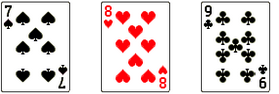
有三张单独的图片:


使用多背景技术实现:
例子:
<!DOCTYPE html>

<html>

<head>

<meta charset="utf-8">

<title>多重背景</title>

<style type="text/css">

.demo{

    width: 300px;

    height: 140px;

    border: 1px solid #999;

    background-image: url(http://img.mukewang.com/54cf2365000140e600740095.jpg),

                      url(http://img.mukewang.com/54cf238a0001728d00740095.jpg),

                      url(http://img.mukewang.com/54cf23b60001fd9700740096.jpg);

    background-position: left top, 100px 0, 200px 0;

    background-repeat: no-repeat, no-repeat, no-repeat;

    margin:0 0 20px 0;

}

.task {

    width: 300px;

    height: 140px;

    border: 1px solid #999;

    background:url(http://static.mukewang.com/static/img/logo_index.png) left top/75% 50% no-repeat,

               url(http://static.mukewang.com/static/img/logo_index.png) right bottom/50% 45% no-repeat;

}

</style>

</head>

<body>

<div class="demo"></div>

<div class="task"></div>

</body>

</html>
效果:
【CSS3】---background-origin background-clip background-size的更多相关文章
- 【CSS3】Advanced8:CSS Backgrounds: Multiples, Size, and Origin
1.Multiples,Size,and Origin eg:background-image:url(bg.png),url(bullet.png) 0 50% no-repeat,url(arro ...
- 【CSS3】 - 初识CSS3
.navdemo{ width:560px; height: 50px; font:bold 0/50px Arial; text-align:center; margin:40px auto 0; ...
- 【微信支付】分享一个失败的案例 跨域405(Method Not Allowed)问题 关于IM的一些思考与实践 基于WebSocketSharp 的IM 简单实现 【css3】旋转倒计时 【Html5】-- 塔台管制 H5情景意识 --飞机 谈谈转行
[微信支付]分享一个失败的案例 2018-06-04 08:24 by stoneniqiu, 2744 阅读, 29 评论, 收藏, 编辑 这个项目是去年做的,开始客户还在推广,几个月后发现服务器已 ...
- 【android】ImageView的src和background的区别以及两者的妙用
一.ImageView中XML属性src和background的区别: background会根据ImageView组件给定的长宽进行拉伸,而src就存放的是原图的大小,不会进行拉伸 .src是图片内 ...
- 【android】ImageView的src和background以及两者之间的神奇的差异
一.ImageView中XML属性src和background的差别: background会依据ImageView组件给定的长宽进行拉伸.而src就存放的是原图的大小,不会进行拉伸.src是图片内容 ...
- -_-#【CSS3】CSS3 gradient transition with background-position
CSS3 gradient transition with background-position <!DOCTYPE html> <html> <head> &l ...
- 【CSS3】---first-of-type选择器+nth-of-type(n)选择器
first-of-type选择器 “:first-of-type”选择器类似于“:first-child”选择器,不同之处就是指定了元素的类型,其主要用来定位一个父元素下的某个类型的第一个子元素. 示 ...
- 【CSS3】选择器
<!DOCTYPE html> <html> <head> <meta charset="utf-8"> <title> ...
- 【css3】画‘百分比圆’
<!DOCTYPE html> <html lang="en"> <head> <meta charset="UTF-8&quo ...
随机推荐
- ......那么Win8.1怎么去掉文件夹?
(从已经死了一次又一次终于挂掉的百度空间人工抢救出来的,发表日期2014-05-11) 细心的朋友会发现,在Win8.1这台电脑(计算机)中,除了我们最熟悉的磁盘外,还新增了视频.图片.文档.下载.音 ...
- input标签写CSS时需要注意的几点(先收藏)
(从已经死了一次又一次终于挂掉的百度空间人工抢救出来的,发表日期2014-05-05) 飞鱼的声纳顶部的搜索框让我头疼了很长时间,原因是总不能获得跨浏览器的统一样式.主要的问题有这么两个:一是inpu ...
- Xcode快捷键整理
下面是Xcode比较常用的快捷键,特别是红色标注的,很常用.用熟了开发编辑代码的的时候就很方便,希望对大家有用~1. 文件CMD + N: 新文件CMD + SHIFT + N: 新项目CMD + O ...
- vc6.0 通过ADO(udl)连接sql 2008
转载声明:本文转自http://blog.sina.com.cn/s/blog_7328b9dd0100pkbw.html茗之的博客 首先声明:本文是针对vc与sql菜鸟的,高人请让路. 本文讲解 ...
- App Submission Issues
查看原文: http://leancodingnow.com/app-submission-issues/ I bet many iOS developers are busy submitting ...
- JSON的解析
一:JSON字符串转换为JSON对象 JSON 最常见的用法之一,是从 web 服务器上读取 JSON 数据(作为文件或作为 HttpRequest),将 JSON 数据转换为 JavaScript ...
- socket 怎么设置心跳判断连接
server的代码public abstract class Server { static readonly ILog logger = LogManager.GetLogger(typeof(Se ...
- FluorineFx对于现有站点的配置
step 1:新建一个FluorineFX网站,作为参考 step 2:在现有网站添加FluorineFX网站的相关dll引用,并拷贝console.aspx和gateway.aspx至网站根目录(最 ...
- hdu 5029 Relief grain(树链剖分+线段树)
题目链接:hdu 5029 Relief grain 题目大意:给定一棵树,然后每次操作在uv路径上为每一个节点加入一个数w,最后输出每一个节点个数最多的那个数. 解题思路:由于是在树的路径上做操作, ...
- alue of type java.lang.String cannot be converted to JSONObject
/** * 4.0以下系统处理掉返回json的BOM头 * * @param jsonStr * @return */ public static String getJson(String json ...