
Eclipse反编译工具Jad及插件JadClipse配置(转)
Jad是一个Java的一个反编译工具,是用命令行执行,和通常JDK自带的java,javac命令是一样的。不过因为是控制台运行,所以用起来不太方便。不过幸好有一个eclipse的插件JadClipse,二者结合可以方便的在eclipse中查看class文件的源代码。下面介绍一下配置:
A.下载JadClipse,http://jadclipse.sourceforge.net/wiki/index.php/Main_Page#Download,注意选择与eclipse版本一致的版本,我用的是Eclipse3.4,所以选择下载版本net.sf.jadclipse_3.3.0.jar
B.下载Jad,http://www.varaneckas.com/jad,下载相应版本
C.将下载下来的Jadclipse,如net.sf.jadclipse_3.3.0.jar拷贝到Eclipse下的plugins目录即可。当然也可以用links安装,不过比较麻烦。
D.将Jad.exe拷贝到JDK安装目录下的bin文件下(方便,与java,javac等常用命令放在一起,可以直接在控制台使用jad命令),我的机器上的目录是D:\Program Files\Java\jdk1.6.0_02\bin\jad.exe
F.然后,重新启动Eclipse,找到Eclipse->Window->Preferences->Java,此时你会发现会比原来多了一个JadClipse的选项,单击,会出现,如下: ,在Path to decompiler中输入你刚才放置jad.exe的位置,也可以制定临时文件的目录,如图所示。。当然在JadClipse下还有一些子选项,如Debug,Directives等,按照默认配置即可。
G.基本配置完毕后,我们可以查看一下class文件的默认打开方式,Eclipse->Window->Preferences->General->Editors->File Associations,我们可以看到下图: ,我们可以看到class文件的打开方式有两个,JadClipse和Eclipse自带的Class File Viewer,而JadClipse是默认的。
H.全部配置完成,下面我们可以查看源码了,选择需要查看的类,按F3即可查看源码,如查看Annotation中的Target,使用jad查看源码如下: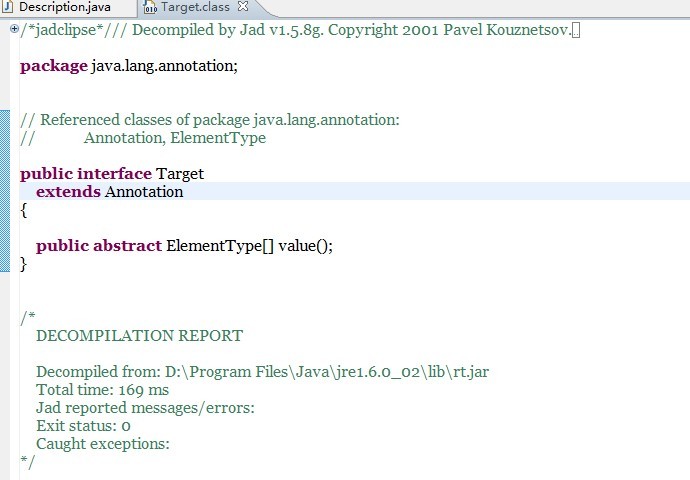 大家可以看到最上面的一行
"/*jadclipse*/// Decompiled by Jad v1.5.8g. Copyright 2001 Pavel Kouznetsov.",说明是由jad反编译的。
PS:网上说对于存在源代码的类,它不会强行反编译,也就是说它还是会用eclipse自带的Class File Viewer查看class文件。这个我还没有进行过验证。 另外附上我用的jad和jadclipse的压缩包,方便大家下载:/Files/landon/DeComiler.rar
Installation
- Put the JadClipse JAR file into the plugins folder of your Eclipse installation.
- Restart Eclipse (eclipse -clean).
- Get Jad.
- Put the Jad executable into a directory that is in the execution path of your operating system. Alternatively, you can configure the path to the Jad executable under Window > Preferences... > Java > JadClipse > Path to Decompiler. (Set the full path, e.g. C:\Program Files\Jad\jad.exe)
- Go to Window > Preferences... > General > Editors > File Associations and make sure that the JadClipse Class File Viewer has the default file association for *.class files.
Troubleshooting
- The JadClipse plug-in is not activated when I start Eclipse.
- You'll need to launch Eclipse with the -clean flag to allow the environment to detect the plug-in. Subsequent launching of Eclipse won't require the -clean flag.
eclipse -clean
- The Eclipse Class File Viewer instead of the JadClipse Class File Viewer is opened.
- Go to Window > Preferences... > General > Editors > File Associations and make sure that the JadClipse Class File Viewer has the default file association for *.class files.
- The JadClipse Class File Viewer does not show the decompiled source.
- If the editor contains the following text segment JadClipse was not able to execute the Jad binary. Make sure that the path to the binary (Path to Decompiler) is set correcly in the preferences.
/*jadclipse*/

/*

	DECOMPILATION REPORT

	Decompiled from: D:\Program Files\Java\jdk1.5.0_06\jre\lib\rt.jar

	Total time: 16 ms

	Jad reported messages/errors:

	Exit status: 0

	Caught exceptions:

java.io.IOException: CreateProcess: (...)
http://jadclipse.sourceforge.net/wiki/index.php/Main_Page#Installation
http://jd.benow.ca/jd-gui/downloads/#jd-gui
jd-gui
http://jd.benow.ca/jd-gui/downloads/jd-gui-0.3.6.windows.zip
http://blog.sina.com.cn/s/blog_437ff56b010166qb.html
Eclipse反编译工具Jad及插件JadClipse配置(转)的更多相关文章
- Eclipse反编译工具Jad及插件JadClipse配置
Jad是一个Java的一个反编译工具,是用命令行执行,和通常JDK自带的java,javac命令是一样的.不过因为是控制台运行,所以用起来不太方便.不过幸好有一个eclipse的插件JadClipse ...
- 2: Eclipse反编译工具Jad及插件JadClipse配置
Jad是一个Java的一个反编译工具,是用命令行执行,和通常JDK自带的java,javac命令是一样的.不过因为是控制台运行,所以用起来不太方便.不过幸好有一个eclipse的插件JadClipse ...
- Java反编译工具Jad及插件JadClipse配置教程
Jad是一个Java的一个反编译工具,和eclipse的插件JadClipse,二者结合可以方便的在eclipse中查看class文件的源代码. 下面介绍一下配置: 下载JadClipse,http: ...
- Eclipse反编译工具Jad及插件
Eclipse反编译工具Jad及插件下载路径 http://download.csdn.net/detail/lijun7788/9689312 http://files.cnblogs.com/fi ...
- Eclipse 反编译工具 jad
** 1 下载 jad工具 ** 2 将.exe文件放在jdk安装路径下,里面有java ,javac 等命令,然后将jad.jar放在eclipse的dropins目录下 ** 3 启动eclips ...
- Java 反编译工具 —— JAD 的下载地址(Windows版/Linux版/Mac OS 版)
Java 反编译工具 —— JAD 的下载地址. 各种版本哦! Windows版,Linux版,Mac OS 版,等等 下载地址: http://varaneckas.com/jad/
- Java反编译工具Jad详解
做项目过程中需要反编译一个jar包,于是作了一些学习,记录下来. Jad(JAva Decompiler)是一个Java的反编译器,可以通过命令行把Java的class文件反编译成源代码. 如果你在使 ...
- 反编译工具 jad
JAD(Java Decompiler)是一个比较流行的Java反编译工具,可以从网站 http://www.varaneckas.com/jad/ 下载,有多个系统下的应用程序,包括Windows. ...
- java反编译工具jad
下好以后解压就可以用了,软件就只有一个exe文件和一个帮助文件.在众多的JAVA反编译工具中,有几种非常著名的工具使用了相同的核心引擎——JAD,其中主要包括:FrontEnd Plus.mDeJav ...
随机推荐
- 阅读《Oracle内核技术揭秘》的读书笔记
阅读<Oracle内核技术揭秘>,对oracle的内存结构.锁.共享池.undo.redo等整理成了如下的思维导图:
- hadoop下跑mapreduce程序报错
mapreduce真的是门学问,遇到的问题逼着我把它从MRv1摸索到MRv2,从年前就牵挂在心里,连过年回家的旅途上都是心情凝重,今天终于在eclipse控制台看到了job completed suc ...
- Android:启动引导页实现
前言 基本上现在所有的应用都会有一个欢迎界面,在欢迎界面对应用做一个整体的介绍,然后在跳入到主界面,这次要说的这个引导页就是带翻页的引导页.效果如下所示
- API删除文件
using System; using System.Runtime.InteropServices; namespace ConsoleApplication1 { class Program { ...
- 【CSDN人物访谈】蒋守壮分享他的技术成长之路以及对Hive技术的解读与思考
结缘大数据技术 CSDN:请简单地介绍一下自己. 蒋守壮:首先非常感谢CSDN能够给我这次被专访的机会,可以让我重新审视自己的职业发展历程,也希望能够帮助一些同行的朋友们.目前就职万达网络科技集团有限 ...
- The architecture of LTE network.
3GPP定义的LTE网络架构结构变得扁平化,无线RNC/BSC 消失,只有eNodeB.控制面使用MME进行处理,用户面使用SGW和PGW进行处理.相比GSM和UMTS,在逻辑接口上定义了S1/X2逻 ...
- CC2640-之功耗
一.测量方式,以DEMO板测量,以消除其它外围不同造成的电流不同. 二.测量结果 以原厂simpleBLEperipheral工程为例 1.如果在低功耗模式下,+5DB发射,最小电流为1.66MA 2 ...
- PHP - PDO 之 mysql 基础操作
<?php /* pdo 学习 */ $dsn = 'mysql:host=localhost;dbname=cswl';//构建连接dsn $db = new pdo($dsn,'root', ...
- RedHat6.4 用UDEV配置ASM所需磁盘
同事在装一套RAC测试环境,结果发现原来用ASMLIB来配置磁盘,在安装GRID的时候,最终报错了,经过检查发现居然两边的磁盘不匹配.A机的sdb,sdc分别对应OCRVOL1,OCRVOL2,但是B ...
- Entity Framework 安装出现问题
Entity Framework 详情请看: http://ulfqbpl.blog.163.com/blog/static/8778355220126272473276/