
《WPF程序设计指南》读书笔记——第5章 Stack与Wrap
1.StackPanel面板
using System;

using System.Windows;

using System.Windows.Input;

using System.Windows.Media;

using System.Windows.Controls;

namespace LY.StactTheButtons

{

    public class StackTheButton:Window

    {

        [STAThread]

        public static void Main()

        {

            new Application().Run(new StackTheButton());

        }

        public StackTheButton()

        {

            Title = "Stack The Button";

            StackPanel stack = new StackPanel();

            stack.Background = Brushes.AliceBlue;

            //设定面板的子元素水平方向排列

            //stack.Orientation = Orientation.Horizontal;

            //设定面板对齐方式为在窗口中央

            //stack.HorizontalAlignment = HorizontalAlignment.Center;

            //将窗体根据内容设定大小

            SizeToContent = SizeToContent.WidthAndHeight;

            ResizeMode = ResizeMode.CanMinimize;

            stack.Margin = new Thickness(5);

            Content = stack;

            Random rand = new Random();

            for (int i = 0; i < 10; i++)

            {

                Button btn = new Button();

                btn.Name = "A" + i;

                //FontSize默认值为System.Windows.SystemFonts.MessageFontSize

                btn.FontSize += rand.Next(10);

                //btn.HorizontalAlignment = HorizontalAlignment.Center;

                btn.Margin = new Thickness(5);

                btn.Content = "Button " + btn.Name + " Says 'Click Me'";

                stack.Children.Add(btn);

                //btn.Click += btn_Click;

            }

            //添加事件,可取代上面的btn.Click+=btn_Click,但两者的区别是sender对象不同

            //AddHandler定义的事件会对面板中的所以button对象起作用

            //这里如果去掉stack也可以,即设定为窗口为sender

            stack.AddHandler(Button.ClickEvent, new RoutedEventHandler(btn_Click));

            stack.Children[0].Focus();

        }

        void btn_Click(object sender, RoutedEventArgs e)

        {

            Button btn = e.Source as Button;

            MessageBox.Show("Button " + btn.Name + " has been clicked", "Button Click");

        }

    }

}
Stack面板嵌套/ScrollViewer控件/Viewbox控件/e.Source的使用注意
using System;

using System.Windows;

using System.Windows.Input;

using System.Windows.Media;

using System.Windows.Controls;

using System.Windows.Controls.Primitives;

namespace LY.StackThirtyButtons

{

    class StackThirtyButtons:Window

    {

        [STAThread]

        public static void Main()

        {

            new Application().Run(new StackThirtyButtons());

        }

        public StackThirtyButtons()

        {

            Title = "嵌套Stack面板";

            AddHandler(Button.ClickEvent, new RoutedEventHandler(Button_Click));

            //使用可滚动区域控件

            ScrollViewer scroll = new ScrollViewer();

            scroll.HorizontalScrollBarVisibility = ScrollBarVisibility.Auto;

            scroll.VerticalScrollBarVisibility = ScrollBarVisibility.Visible;

            Content = scroll;

            //Viewbox控件可以代替ScrollViewer使用,它没有滚动条,

            //但会根据内容缩放其大小,保证所有内容可见

            //Viewbox view = new Viewbox();

            //Content = view;

            StackPanel mainStack = new StackPanel();

            mainStack.Orientation = Orientation.Horizontal;

            mainStack.Margin = new Thickness(5);

            scroll.Content = mainStack;

            //view.Child = mainStack;

            for (int i = 0; i < 3; i++)

            {

                StackPanel stack = new StackPanel();

                stack.Margin = new Thickness(5);

                mainStack.Children.Add(stack);

                for (int j = 0; j < 10; j++)

                {

                    Button btn = new Button();

                    btn.Content = "Button No. " + (10 * i + j + 1);

                    stack.Children.Add(btn);

                }

            }

        }

        private void Button_Click(object sender, RoutedEventArgs e)

        {
       //e.Source指向Button,而此时Sender是this

            Button btn = e.Source as Button;

            /*

             * 因为AddHandler的Sender是窗口,当点击滚动条上的

             * 按钮(RepeatButton类型,继承自ButtonBase,有Click事件),

             * 则无法转换成Button,btn此时为Null,可以在

             * AddHandler前加上mainStack,将其Sender设定为mainStack

             */

            if (btn != null)

                MessageBox.Show(btn.Content + " has been clicked", "Button Click");

        }

    }

}
GroupBox控件/RadioButton控件
using System;

using System.Windows;

using System.Windows.Input;

using System.Windows.Media;

using System.Windows.Controls;

namespace LY.TuneTheRadio

{

    class TuneTheRadio : Window

    {

        [STAThread]

        public static void Main()

        {

            new Application().Run(new TuneTheRadio());

        }

        public TuneTheRadio()

        {

            Title = "单选按钮的使用";

            SizeToContent = SizeToContent.WidthAndHeight;

            GroupBox group = new GroupBox();

            //设定GroupBox控件的标头属性

            group.Header = "Window Style属性";

            group.Margin = new Thickness(96);

            group.Padding = new Thickness(5);

            Content = group;

            StackPanel stack = new StackPanel();

            group.Content = stack;

            stack.Children.Add(CreateRadioButton("无边框样式", WindowStyle.None, "1"));

            stack.Children.Add(CreateRadioButton("单边框样式", WindowStyle.SingleBorderWindow, "1"));

            stack.Children.Add(CreateRadioButton("三维边框样式", WindowStyle.ThreeDBorderWindow, "2"));

            stack.Children.Add(CreateRadioButton("固定工具框样式", WindowStyle.ToolWindow, "2"));

            AddHandler(RadioButton.CheckedEvent, new RoutedEventHandler(RadioOnChecked));

        }

        private void RadioOnChecked(object sender, RoutedEventArgs e)

        {

            RadioButton radio = e.Source as RadioButton;

            WindowStyle = (WindowStyle)radio.Tag;

        }

        private RadioButton CreateRadioButton(string strText, WindowStyle winStyle, string groupNum)

        {

            RadioButton radio = new RadioButton();

            //GroupName属性可以将GroupBox中的单选按钮分成组

            radio.GroupName = groupNum;

            radio.Content = strText;

            //存储有关此元素的自定义信息

            radio.Tag = winStyle;

            radio.Margin = new Thickness(5);

            radio.IsChecked = (WindowStyle == winStyle);

            return radio;

        }

    }

}
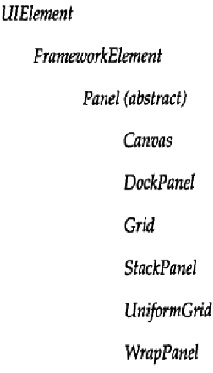
将GroupBox的Content设定为StackPanel,再在StackPanel的Children中加入多个RadioButton。也就是说只有面板Panel中才能放多个控件对象,其他ContentControl只能通过Content放入一个对象。主要的面板控件有:
2.WrapPanel面板
WrapPanel以由左到右,由上到下形式摆放控件;一般用于不确定包含多少个控件时,如资源管理器。平常用StackPanel比较多。
WrapPanel面板一般搭配ScrollViewer控件使用。
using System;

using System.Windows;

using System.Windows.Input;

using System.Windows.Media;

using System.Windows.Controls;

namespace LY.ExploreDirectories

{

    class ExploreDirectories : Window

    {

        [STAThread]

        public static void Main()

        {

            new Application().Run(new ExploreDirectories());

        }

        public ExploreDirectories()

        {

            Title = "Explore Directories";

            ScrollViewer scroll = new ScrollViewer();

            Content = scroll;

            WrapPanel wrap = new WrapPanel();

            scroll.Content = wrap;

            wrap.Children.Add(new FileSystemInfoButton());

        }

    }

}
using System;

using System.Windows;

using System.Windows.Input;

using System.Windows.Media;

using System.Windows.Controls;

using System.IO;

using System.Diagnostics;

namespace LY.ExploreDirectories

{

    public class FileSystemInfoButton : Button

    {

        FileSystemInfo info;

        public FileSystemInfoButton()

            : this(new DirectoryInfo(

                Environment.GetFolderPath(Environment.SpecialFolder.MyDocuments)))

        {

        }

        public FileSystemInfoButton(FileSystemInfo info)

        {

            this.info = info;

            Content = info.Name;

            if (info is DirectoryInfo)

                FontWeight = FontWeights.Bold;

            Margin = new Thickness(10);

        }

        public FileSystemInfoButton(FileSystemInfo info, string str)

            : this(info)

        {

            Content = str;

        }

        protected override void OnClick()

        {

            if (info is FileInfo)

                Process.Start(info.FullName);

            else if (info is DirectoryInfo)

            {

                DirectoryInfo dir = info as DirectoryInfo;

                Application.Current.MainWindow.Title = dir.FullName;

                Panel pnl = Parent as Panel;

                pnl.Children.Clear();

                if (dir.Parent != null)

                    pnl.Children.Add(new FileSystemInfoButton(dir.Parent, ".."));

                foreach (FileSystemInfo inf in dir.GetFileSystemInfos())

                {

                    pnl.Children.Add(new FileSystemInfoButton(inf));

                }

            }

            base.OnClick();

        }

    }

}
《WPF程序设计指南》读书笔记——第5章 Stack与Wrap的更多相关文章
- css权威指南读书笔记-第10章浮动和定位
这一章看了之后真是豁然开朗,之前虽然写了圣杯布局和双飞翼布局,有些地方也是模糊的,现在打算总结之后再写一遍. 以下都是从<css权威指南>中摘抄的我认为很有用的说明. 浮动元素 一个元素浮 ...
- 《Javascript高级程序设计》读书笔记(1-3章)
第一章 JavaScript简介 1.1 JavaScript简史 略 1.2 JavaScript实现 虽然 JavaScript 和 ECMAScript 通常都被人们用来表达相同的含义,但 Ja ...
- JavaScript权威指南读书笔记【第一章】
第一章 JavaScript概述 前端三大技能: HTML: 描述网页内容 CSS: 描述网页样式 JavaScript: 描述网页行为 特点:动态.弱类型.适合面向对象和函数式编程的风格 语法源自J ...
- 《JavaScript高级程序设计》 - 读书笔记 - 第5章 引用类型
5.1 Object 类型 对象是引用类型的实例.引用类型是一种数据结构,用于将数据和功能组织在一起. 新对象是使用new操作符后跟一个构造函数来创建的.构造函数本身就是一个函数,只不过该函数是出于创 ...
- 《JavaScript高级程序设计》 - 读书笔记 - 第4章 变量、作用域和内存问题
4.1 基本类型和引用类型的值 JavaScript变量是松散类型的,它只是保存特定值的一个名字而已. ECMAScript变量包含两种数据类型的值:基本类型值和引用类型值.基本类型值指的是简单的数据 ...
- 《Linux程序设计》--读书笔记---第十三章进程间通信:管道
管道:进程可以通过它交换更有用的数据. 我们通常是把一个进程的输出通过管道连接到另一个进程的输入: 对shell命令来说,命令的连接是通过管道字符来完成的: cmd1 | cmd2 sh ...
- 《Visual C++ 程序设计》读书笔记 ----第8章 指针和引用
1.&取地址:*取内容. 2.指针变量“++”“--”,并不是指针变量的值加1或减1,而是使指针变量指向下一个或者上一个元素. 3.指针运算符*与&的优先级相同,左结合:++,--,* ...
- 《Linux内核设计与实现》第八周读书笔记——第四章 进程调度
<Linux内核设计与实现>第八周读书笔记——第四章 进程调度 第4章 进程调度35 调度程序负责决定将哪个进程投入运行,何时运行以及运行多长时间,进程调度程序可看做在可运行态进程之间分配 ...
- 《Linux内核设计与分析》第六周读书笔记——第三章
<Linux内核设计与实现>第六周读书笔记——第三章 20135301张忻估算学习时间:共2.5小时读书:2.0代码:0作业:0博客:0.5实际学习时间:共3.0小时读书:2.0代码:0作 ...
随机推荐
- Android(java)学习笔记82:我们到底该如何处理异常?
我们到底该如何处理异常? 原则: 如果该功能内部可以将问题处理,用try,自己能解决就自己解决问题. 如果处理不了,交由调用者处理,这是用throws,自己不能解决的问题,我们就抛出去交个调用者解决这 ...
- 《JavaScript学习指南》第2版 学习笔记1
1.<noscript> 标签 noscript 元素用来定义在脚本未被执行时的替代内容(文本). 注释:如果浏览器支持脚本,那么它不会显示出 noscript 元素中的文本.无法识别 & ...
- 两个数据库表同步的可视化WEB同步程序
因业务升级,现有一个数据库中的表需要与先前项目中的表进行数据同步,停用先前的表,这两个表只能按其中相同的一个字段同步,认真研究了一下,用WEB程序进行了处理,可视化显示处理进度,同步操作结果.使用到的 ...
- 【报错】"The constructor Notification(int, CharSequence, long) is deprecated
Notification的构造方法 Notification(int, CharSequence, long) 在API11之后就淘汰了,之后的API需要用Notification.Builder() ...
- [BigData]关于Hadoop学习笔记第三天(PPT总结)(一)
课程安排 MapReduce原理*** MapReduce执行过程** 数据类型与格式*** Writable接口与序列化机制*** ---------------------------加深拓展- ...
- Java 自带性能监控工具:监视和管理控制台jconsole的使用
关于JConsole工具的使用请参见:http://blog.csdn.net/defonds/article/details/45064297
- asp自动补全html标签自动闭合(正则表达式)
Function closeHTML(strContent) Dim arrTags, i, OpenPos, ClosePos, re, strMatchs, j, Match Set re = N ...
- Javascript之简单按钮搜索功能
学习JavaScript我觉得真实的感觉就是可以任意设计,“没有做不到只有想不到!”即使简单,但是任何东西的复杂都是从简单.基础开始的!这是我自己做的一个超简单的"搜索引擎"按钮, ...
- jQuery选项卡插件、Tabs插件
效果图: <!DOCTYPE html> <html> <head> <title></title> <script src=&quo ...
- oracle trunc 函数处理日期格式
select to_char(sysdate,'yyyy-mm-dd hh24:mi:ss') from dual; --显示当前时间 2011-12-29 16:24:34 select trun ...