
ADO.NET学习(一)
一、ADO.NET简介
ADO.NET可以看作是C#语言访问数据库的一种方式。编程语言编写的程序需要数据库的支持,那么怎样才能让他们建立连接呢?当然是ADO.NET
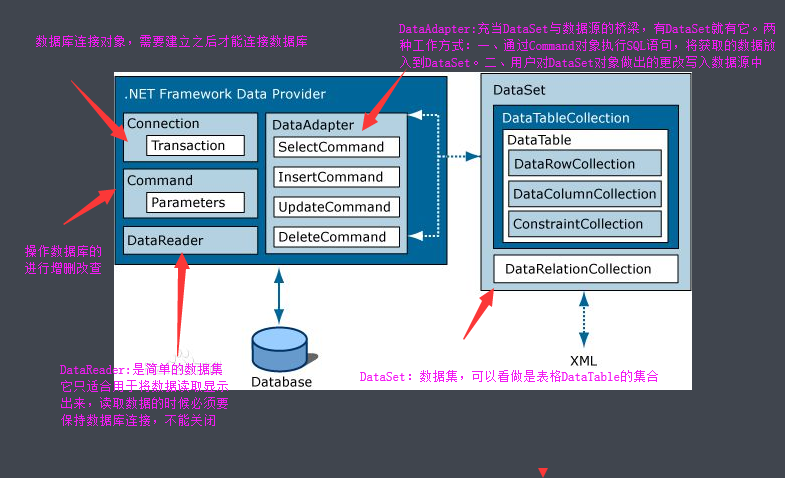
二、ADO.NET 整体流程
1)写连接字符串
2)写连接对象
3)写sql语句
4)写操作SQL语句的对象SqlCommand
5)打开数据库
6)最后写执行操作对象的方法:ExecuteNonQuery(),executescalar(),ExecuteReader()
其中还有写小步骤,具体在案例里面显示。(第四步和第五步可以互换)
三、连接字符串
如果想了解详细的:https://www.cnblogs.com/shuibi/p/6566127.html
SQL SEVER
标准安全连接:
Data Source=.;Initial Catalog=myDataBase;User Id=myUsername;Password=myPassword;或者
Server=myServerAddress;Database=myDataBase;User Id=myUsername;Password=myPassword;Trusted_Connection=False;
可信连接:
Data Source=192.168.0.4;Initial Catalog=MyDataBase;Integrated Security=True;或者
Server=ServerAddress;Database=MyDataBase;Trusted_Connection=True;
Access连接字符串
Provider=Microsoft.Jet.OLEDB.4.0;Data Source=C:\myDatabase.mdb;User Id=admin;Password=;
MySQL连接字符串
Server=myServerAddress;Database=myDatabase;Uid=myUsername;Pwd=myPassword;
DB2连接字符串
Server=myAddress:myPortNumber;Database=myDatabase;UID=myUsername;PWD=myPassword;
Oracle连接字符串
Data Source=TORCL;User Id=myUsername;Password=myPassword;
注意:如果你实在不知道怎么写,也可以通过VS来获取连接字符串
工具 >>>连接到数据库

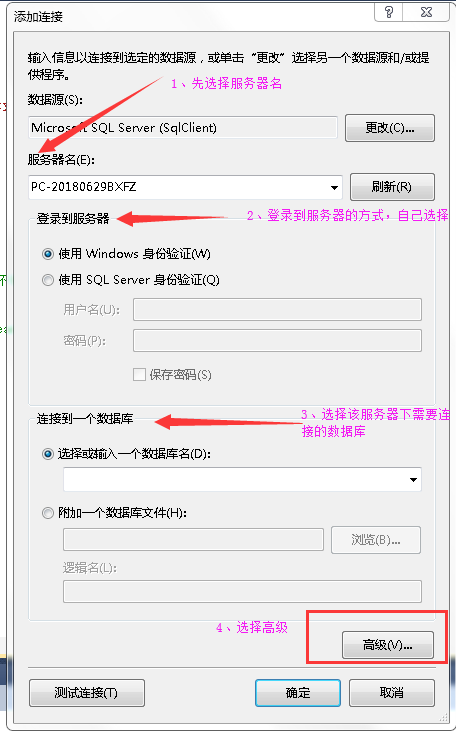
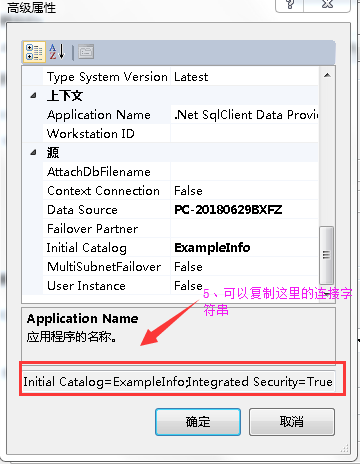
提前准备好数据库,后面使用:

--创建数据库

create database ExampleInfo

--创建学生表

create table StudentTable(

Sid int not null primary key identity,

Sname varchar(),

Sage datetime,

Ssex nvarchar()

)

insert into StudentTable(Sname,Sage,Ssex) values ('王昭君',,'女'),('貂蝉',,'女'),('韩信',,'男'),

('李白',,'男'),('蔡文姬',,'女'),('后裔',,'男'),('伽罗',,'女')

--创建课程表

create table CourseTable(

Cid int not null primary key identity,

Cname varchar(),

Tid int

)

insert into CourseTable(Cname,Tid) values ('语文',),('数学',),('英语',),

('物理',),('化学',),('生物',),('地理',)

--创建教师表

create table TeacherTable(

Tid int not null primary key identity,

Tname varchar()

)

insert into TeacherTable(Tname) values ('诸葛亮'),('黄总'),('老夫子'),('墨子'),('女娲'),('伏羲')

--创建一张学生课程表

create table SCTable(

Sid int,

Cid int,

Score int,

foreign Key (Sid) REFERENCES StudentTable(Sid),

foreign Key (Cid) REFERENCES CourseTable(Cid)

)

insert into SCTable (Sid,Cid,Score) values (,,),(,,),(,,),(,,),(,,),

(,,),(,,),(,,),(,,),(,,),(,,),(,,),(,,),(,,),(,,),(,,),(,,),

(,,),(,,),(,,),(,,),(,,),(,,),(,,),(,,),(,,),(,,),(,,),

(,,),(,,),(,,),(,,),(,,),(,,),

(,,),(,,)
四、连接对象Connection
主要是用于连接到数据库的
由于后面需要
Connection常用属性:
| 属性 | 说明 |
| ConncetionString | 获取或设置用于打开数据库的字符串 |
| ConnectioTimeout | 获取在尝试建立连接时终止尝试并生成错误之前所等待的时间 |
| DataBase | 获取当前数据库,或者连接打开后要使用的数据名称 |
| DataSource | 获取哟啊连接的数据库服务器的名称 |
| State | 数据库连接状态 |
Connection常用方法:
| 方法 | 说明 |
| Open | 打开数据库连接 |
| Close | 关闭数据库连接 |
| Dispose | 释放Connection使用的所有资源 |
这是一个使用模板

//编写连接字符串

String constr = "Data Source = .;Initial Catalog = ExampleInfo;Integrated Security = True"

//创建连接对象

using(SqlConnection conn = new Sqlnnection(Constr)){ // 当在某个代码段中使用了类的实例,而希望无论因为什么原因,只要离开了这个代码段就自动调用这个类实例的Dispose
  //要达到这样的目的,用try...catch来捕捉异常也是可以的,但用using也很方便。

  //写Sql语句

  //创建command对象

  //打开数据

  //执行

}
五、Command
Command有四种:SqlCommand,OleDbCommand,OdbcCommand,OracleComman
具体看使用的是什么数据库。
Command对象常用的属性
| 属性 | 说明 |
| CommandType | 获取要执行命令的类型 |
| CommandText | 获取或者设置要对数据源执行的SQL语句或存储过程或表名 |
| Conncetion | 获取或设置这个Command使用的Connection对象的名称 |
| Parameters | 获取Command对象需要使用的参数集合 |
| Transaction | 获取或设置将在其中执行的SqlTransaction |
这是一个使用模板
//编写连接字符串

String constr = "Data Source = .;Initial Catalog = ExampleInfo;Integrated Security = True"

//创建连接对象

using(SqlConnection conn = new Sqlnnection(Constr)){

  //写Sql语句

     string sql = "select * from StudentTable";

     using(SqlCommand cmd = new Command(sql,conn)){

          //打开数据

            conn.Open();

            //执行
        ....

     }

}
Command对象常用的方法:
(一)ExecuteNonQuery
用于执行非select语句,比如增删改,它会返回影响的行数
1.向数据库中的StudentTable表中插入数据
using System;

using System.Collections.Generic;

using System.Linq;

using System.Text;

using System.Data.SqlClient;

namespace commandExecuteNonQuery

{

    class Program

    {

        static void Main(string[] args)

        {

            //创建连接字符串

            string constr = "Data Source =.;Initial Catalog = ExampleInfo;Integrated Security = True";

            //创建连接对象

            using(SqlConnection conn = new SqlConnection(constr)){

                //床架sql语句

                string sql = "insert into StudentTable (Sname,Sage,Ssex) values ('露娜',16,'女')";

                //创建command对象

                using (SqlCommand cmd = new SqlCommand(sql, conn)) {

                    //打开数据库

                    conn.Open();

                    //执行数据语句的command方法

                   int x = cmd.ExecuteNonQuery();  //返回的是受影响的行数

                   if (x > ) {

                       Console.WriteLine("插入成功");

                   }else{

                       Console.WriteLine("插入失败");

                   }

                }

            }

        }

    }

}
(二)ExecuteScalar
通常用来执行SELECT查询命令,返回第一行第一列值,所以都是用来执行带有Count() 或者是Sum()函数的数据库SQL语句
1.返回数据库表StudentTable的记录条数
using System;

using System.Collections.Generic;

using System.Linq;

using System.Text;

using System.Data.SqlClient;

namespace commandExecuteNonQuery

{

    class Program

    {

        static void Main(string[] args)

        {

            //创建连接字符串

            string constr = "Data Source =.;Initial Catalog = ExampleInfo;Integrated Security = True";

            //创建连接对象

            using (SqlConnection conn = new SqlConnection(constr))

            {

                //床架sql语句

                string sql = "select Count(*) from StudentTable";

                //创建command对象

                using (SqlCommand cmd = new SqlCommand(sql, conn))

                {

                    //打开数据库

                    conn.Open();

                    //执行数据语句的command方法

                    object x = cmd.ExecuteScalar();

                    Console.WriteLine(x);

                }

            }

        }

    }

}
(三)ExecuteReader
由于ExecuteReader通常是和DataReader一起使用的,所以我就放到DataReader一起说
五、DataReader
是一个简单的数据集
DataReader对象的常用属性:
| 属性 | 说明 |
| Connection | 获取与DataReader关联的Conncetion对象 |
| HasRows | 判断数据库中是否有数据 |
| FieldCount | 获取当前行的列数 |
| IsClosed | 是否已关闭DataReader实例,是一个bool值 |
| Item | 获取指定列的以本机的格式表示的值 |
DataReader对象的常用方法:
| 方法 | 说明 |
| ISDBNull | 获取一个值,判断是否是空值 |
| Read | 使DataReader对象指向下一条记录 |
| NextResult | 使数据读取器前进到下一个结果 |
| Close | 关闭DataReader |
| Get | 用来读取数据集的当前行的某一列的数据 |
这是一个使用模板
//连接字符串

 string constr = "data source =.;Initial catalog = StudentInfo;Integrated Security = True";

//创建连接对象

            using (SqlConnection conn = new SqlConnection(str2))

            {

               //sql语句

                string sql = "select * from StudentTable";

               //创建Command对象

                using (SqlCommand comm = new SqlCommand(sql, conn))

                {//打开数据库

                    conn.Open();

                  //创建DataReader对象

                    using (SqlDataReader reader = comm.ExecuteReader())

                    {

                        if (reader.HasRows)  //如果有数据,一条一条去读数据

                        {

                            //reader.Read() 向后移动一条数据(因为默认指向-1,就是开始时候不指向任何数据),有数据就会返回true

                            while (reader.Read())

                            {

                              ..........

                            }

                          }

                      }

                 }

             }
//小案例:查询返回表StudentTable

using System;

using System.Collections.Generic;

using System.Linq;

using System.Text;

using System.Data.SqlClient;

namespace commandExecuteNonQuery

{

    class Program

    {

        static void Main(string[] args)

        {

            //创建连接字符串

            string constr = "Data Source =.;Initial Catalog = ExampleInfo;Integrated Security = True";

            //创建连接对象

            using (SqlConnection conn = new SqlConnection(constr))

            {

                //床架sql语句

                string sql = "select * from StudentTable";

                //创建command对象

                using (SqlCommand cmd = new SqlCommand(sql, conn))

                {

                    //打开数据库

                    conn.Open();

                    //执行数据语句ExecuteReader()的方法

                    SqlDataReader reader = cmd.ExecuteReader();

                    if (reader.HasRows) {

                       while (reader.Read()) {
                            Console.Write(reader.GetInt32(0)  +  "             ");
                            Console.Write(reader.GetString(1) +  "             ");
                            Console.Write(reader.GetInt32(2) +   "             ");
                            Console.Write(reader.GetString(3) +  "             ");
                            Console.WriteLine();
                        }

                    }

                }

            }

        }

    }

}
六、DataAdapter
DataAdapter表示一组 SQL 命令和一个数据库连接,它们用于填充 DataSet和更新数据源
DataAdapter的属性:
| 属性 | 说明 |
| SelectCommand | 引用从数据源中检索行的Command对象 |
| InsertCommand | 引用将插入的行从DataSet写入数据源的Command对象 |
| UpdateCommand | 引用将修改的行从DataSet写入数据源的Command对象 |
| DeleteCommand | 引用从数据源中删除行的Command对象 |
DataAdapter的方法:
| 方法 | 说明 |
| Fill | 使用SqlDataAdapter(或OleDbDataAdapter)的这个方法,从数据源增加或刷新行,并将这些行放到DataSet表中。Fill方法调用SelectCommand属性所指定的SELECT语句 |
| Update | 使用DataAdapter对象的这个方法,将DataSet表的更改传送到相应的数据源中。该方法为DataSet的DataTable中每一指定的行调用相应的INSERT、UPDATE或DELETE命令 |
案例、编写一个小程序,创建一个窗体应用程序,然后在窗体应用程序中创建拖“DataGridView”和‘Button’控件。实现点击‘button’控件就会在“DataGridView”中显示

using System;

using System.Collections.Generic;

using System.ComponentModel;

using System.Data;

using System.Drawing;

using System.Linq;

using System.Text;

using System.Windows.Forms;

using System.Data.SqlClient;

namespace DataAdpter

{

    public partial class Form1 : Form

    {

        public Form1()

        {

            InitializeComponent();

        }

        private void button1_Click(object sender, EventArgs e)

        {

            //创建连接字符串

            string constr = "Data Source =.;Initial Catalog = ExampleInfo;Integrated Security = True";

            //创建连接对象

            using (SqlConnection conn = new SqlConnection(constr))

            {

                //床架sql语句

                string sql = "select * from StudentTable";

                //创建command对象

                using (SqlCommand cmd = new SqlCommand(sql, conn))

                {
            //创建一个DataTable对象

                    DataTable ds = new DataTable();

                    using (SqlDataAdapter adapter = new SqlDataAdapter(sql, constr))

                    {

                        //打开数据库

                        conn.Open();

                        adapter.Fill(ds);

                    }
             //绑定dataGridView控件
                    this.dataGridView1.DataSource = ds;

                }

            }

        }

    }

}
//上述的代码中Datable可以改成DataSet
 private void button1_Click_1(object sender, EventArgs e)

        {

            //创建连接字符串

            string constr = "Data Source =.;Initial Catalog = ExampleInfo;Integrated Security = True";

            //创建连接对象

            using (SqlConnection conn = new SqlConnection(constr))

            {

                //床架sql语句

                string sql = "select * from StudentTable";

                //创建command对象

                using (SqlCommand cmd = new SqlCommand(sql, conn))

                {

                    DataSet ds = new DataSet();

                    using (SqlDataAdapter adapter = new SqlDataAdapter(sql, constr))

                    {

                        //打开数据库

                        conn.Open();

                        adapter.Fill(ds);

                    }

                    this.dataGridView1.DataSource = ds.Tables[];

                }

            }

        }
六、封装SqlHelper
为什么要封装成SqlHelper?
如果不封装的话,我们每写一次查询就要写一次连接字符串,连接对象等等,如果一个程序当中有n个,就要写n此。那么不如将其封装起来,可以直接调用。我们只用提供sql语句和参数就可以了
封装第一步:创建一个项目:窗体应用程序(由于我会直接在这里写案例,所以就直接创建窗体),名称:LoginInfo
封装第二步:如下图
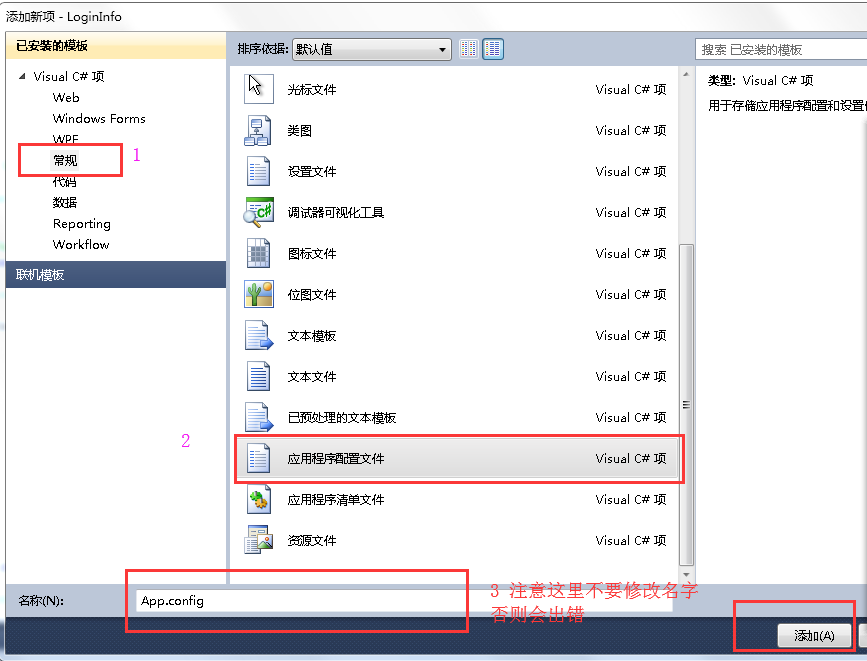
封装第二步骤,在App.config中添加如下代码懒人这里复制(还是要多多手打哦):
<configuration>

  <connectionStrings>

    <add name="mssqlsrever" connectionString="Data Source =.;Initial Catalog =ExampleInfo;Integrated Security = True"  />

  </connectionStrings>
封装第三步:创建SqlHelper类
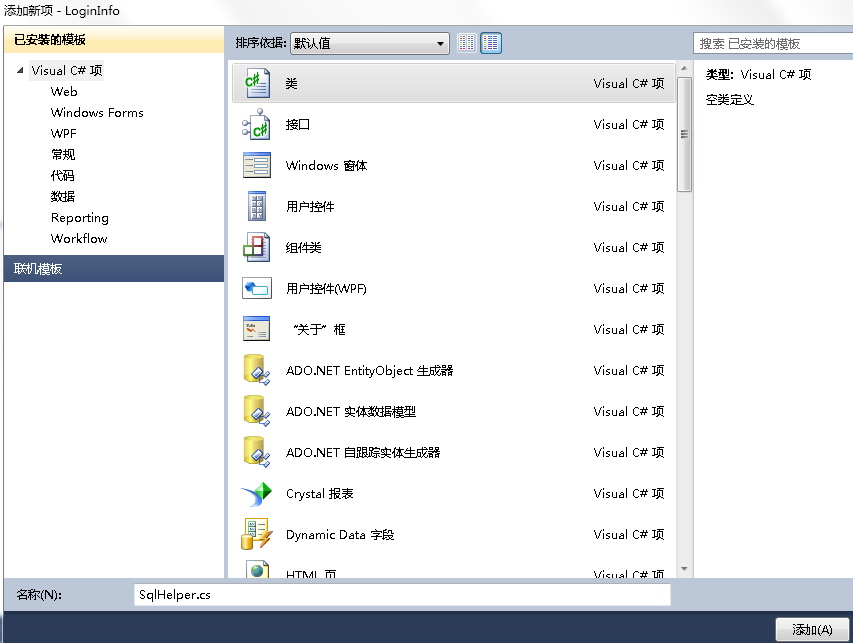
封装第五步:上代码
using System;

using System.Collections.Generic;

using System.Linq;

using System.Text;

using System.Configuration;

using System.Data.SqlClient;

using System.Data;

namespace LoginInfo

{

   public class SqlHelper

    {//定义一个链接字符串

        //readOnly 修饰的变量,只能在初始话的时候赋值,以及在构造函数中赋值

        //读取配置文件中的链接字符串

        private static readonly string constr = ConfigurationManager.ConnectionStrings["mssqlsrever"].ConnectionString;

        //执行增删改的方法   ExecuteNonQuery   params SqlParameter[] paras 可能存在sql语句中带有参数,那么需要把参数给加进去

        public static int ExecuteNonQuery(string sql, params SqlParameter[] paras)

        {

            using (SqlConnection conn = new SqlConnection(constr))

            {

                using (SqlCommand cmd = new SqlCommand(sql, conn))

                {

                    if (paras != null)

                    {

                        cmd.Parameters.AddRange(paras);

                    }

                    conn.Open();

                    return cmd.ExecuteNonQuery();

                }

            }

        }

        //执行查询,返回单个值方法   ExecuteScalar

        public static object ExecuteScalar(string sql, params SqlParameter[] paras)

        {

            using (SqlConnection conn = new SqlConnection(constr))

            {

                using (SqlCommand comm = new SqlCommand(sql, conn))

                {

                    if (paras != null)

                    {

                        comm.Parameters.AddRange(paras);

                    }

                    conn.Open();

                    return comm.ExecuteScalar();

                }

            }

        }

        //执行查询 返回多行多列的方法  ExecuteReader

        public static SqlDataReader ExecuteReader(string sql, params SqlParameter[] paras)

        {

            using (SqlConnection conn = new SqlConnection(constr))

            {

                using (SqlCommand comm = new SqlCommand(sql, conn))

                {

                    if (paras != null)

                    {

                        comm.Parameters.AddRange(paras);

                    }

                    try

                    {

                        conn.Open();

                        return comm.ExecuteReader(System.Data.CommandBehavior.CloseConnection);

                    }

                    catch

                    {

                        conn.Close();

                        conn.Dispose();

                        throw;

                    }

                }

            }

        }

        //执行查询 返回DataTable  ExecuteDataTable

        public static DataTable ExecuteDataTable(string sql, params SqlParameter[] paras)

        {

            DataTable dt = new DataTable();

            using (SqlDataAdapter adapter = new SqlDataAdapter(sql, constr))

            {

                if (paras != null)

                {

                    adapter.SelectCommand.Parameters.AddRange(paras);

                }

                adapter.Fill(dt);

            }

            return dt;

        }

    }

}
到这里这个封装的SqlHelper类就好了。然后我会在这里写一个简单的小案例。
七、综合小案例
将第六步做完之后,我们直接使用这个封装好的SqlHelper
(一)在form1 中拖拉控件,达到以下效果
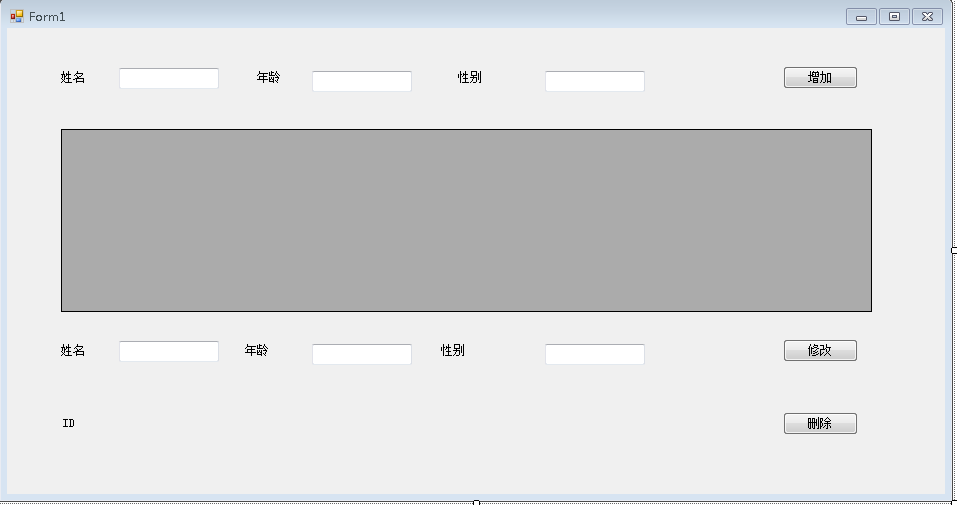
(二)编写程序,就是增删改查,这里我直接放代码
using System;

using System.Collections.Generic;

using System.ComponentModel;

using System.Data;

using System.Drawing;

using System.Linq;

using System.Text;

using System.Windows.Forms;

using System.Data.SqlClient;

namespace LoginInfo

{

    public partial class Form1 : Form

    {

        public Form1()

        {

            InitializeComponent();

        }

        private void Form1_Load(object sender, EventArgs e)

        {

            //进入窗体之后就加载数据

            LoadDate();

        }

        private void LoadDate()

        {

            String sql = "select * from StudentTable";

           this.dataGridView1.DataSource= SqlHelper.ExecuteDataTable(sql);

        }

        private void button1_Click(object sender, EventArgs e)

        {

            string Sname = textBox1.Text.Trim();         //Trim() 移除多余的空格

            string Sage = textBox2.Text.Trim();

            string Ssex = textBox3.Text.Trim();

            string sql = "insert into StudentTable(Sname,Sage,Ssex) values (@Sname,@Sage,@Ssex)";

            //这里是创建参数,更加的安全,防止不法人员注入sql语句,造成错误

            SqlParameter[] paras = new SqlParameter[] {

                    new SqlParameter("@Sname",SqlDbType.NVarChar,){Value = Sname},

                    new SqlParameter("@Sage",SqlDbType.NVarChar,){Value = Sage},

                    new SqlParameter("@Ssex",SqlDbType.NVarChar,){Value = Ssex}

            };

            //因为执行的是插入操作,所以调用ExecuteNonQuery

            int x = SqlHelper.ExecuteNonQuery(sql,paras);

            if (x > )

            {

                MessageBox.Show("新增成功");

                //成功的同时,重新加载表格中的数据

                LoadDate();

            }

            else {

                MessageBox.Show("新增失败");

            }

        }

        private void dataGridView1_CellClick(object sender, DataGridViewCellEventArgs e)

        {

            //行点击事件,点击之后,行会吧数据给修改那一栏

            DataGridViewRow current = dataGridView1.CurrentRow;

            textBox6.Text = current.Cells["Sname"].Value.ToString();

            textBox5.Text = current.Cells["Sage"].Value.ToString();

            textBox4.Text = current.Cells["Ssex"].Value.ToString();

            label8.Text = current.Cells["Sid"].Value.ToString();

        }

        private void button2_Click(object sender, EventArgs e)

        {

              string Sname = textBox6.Text;

              string Sage = textBox5.Text;

              string Ssex = textBox4.Text;

              string Sid = label8.Text;

              string sql = "update StudentTable set Sname =@Sname ,Sage = @Sage,Ssex = @Ssex where Sid = @Sid";

              SqlParameter[] paras = new SqlParameter[]{

                    new SqlParameter("@Sname",SqlDbType.NVarChar,){Value = Sname},

                    new SqlParameter("@Sage",SqlDbType.NVarChar,){Value = Sage},

                    new SqlParameter("@Ssex",SqlDbType.NVarChar,){Value = Ssex},

                    new SqlParameter("@Sid",SqlDbType.Int){Value = Sid}

              };

              int x = SqlHelper.ExecuteNonQuery(sql,paras);

              if (x > )

              {

                  MessageBox.Show("修改成功");

                  LoadDate();

              }

              else

              {

                  MessageBox.Show("修改失败");

              }

        }

        private void button3_Click(object sender, EventArgs e)

        {

            string Sid = label8.Text;

            string sql = "delete from StudentTable where Sid = @Sid";

            SqlParameter[] paras = new SqlParameter[]{

                    new SqlParameter("@Sid",SqlDbType.Int){Value = Sid}

              };

            int x = SqlHelper.ExecuteNonQuery(sql, paras);

            if (x > )

            {

                MessageBox.Show("删除成功");

                LoadDate();

            }

            else

            {

                MessageBox.Show("删除失败");

            }

        }

    }

}
注意:
由于DataGridView还需要设置一些东西: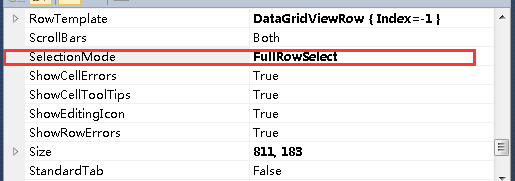
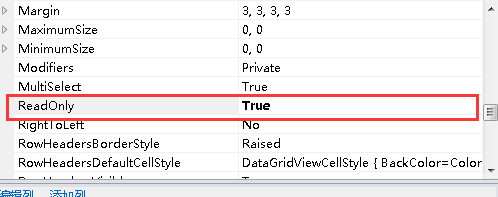
后续可能还会有补充,由于我是初学,所以有很多东西,不够详细,希望谅解
ADO.NET学习(一)的更多相关文章
- ADO.NET 学习笔记 入门教程
本文转载自:http://www.youarebug.com/forum.php?mod=viewthread&tid=57&page=1&extra=#pid63 这是本人在 ...
- ADO.NET学习小结【1】正在更新...
小弟正在学习ADO.net有误的地方还请大大们批评指出,小弟在此谢过了 一.ADO.net简述: 以前我们写程序尤其是写和数据库有关的应用程序时,你我都得要了解Microsoft ADO COM对象才 ...
- ADO.NET学习心得《一》
大家好,我是代号六零一,很高兴又开始重启博客了,为了更好的加深自己的记忆和复习,今天开始坚持写写心得体会,刚开始学习ADO.NET的时候也是一脸懵逼的,代码只有动手敲打才会知道其实并不难,只要多敲几遍 ...
- ADO.NET学习
ADO.NET重要的类 在.NET访问MySql数据库时的几点经验! string connstr=Setting.Instance().GetConnectionString("MySql ...
- ADO.NET学习系列(四)---窗体版的登录小程序
1.需求分析:做一个登录的小程序,基于Winform的窗体小程序.基本要求:登录成功:弹框显示登录成功,登录失败就弹框显示失败. 扩展功能:登录次数超过3次,就”锁定“用户,提示登录错误次数过多,不能 ...
- ADO.NET学习系列(二)
这次我使用ADO.NET来插入一条数据,到数据库中.主用到存储过程.我不想每次都是用SQL文本的形式了,那样始终没有进步--- 下面首先,我把我这次练习要用到的数据库脚本,贴出来: USE maste ...
- ADO.NET学习系列(一)
一.ADO.NET基础 程序和数据库交互,要通过ADO.NET进行:通过ADO.NET就能在数据库中执行SQL了.ADO.NET中提供了对不同数据库的统一操作接口(ODBC).另外还有一种操作数据库的 ...
- ADO.NET学习系列(三)----做一个登录案例
总体思路.根据用户输入的用户名和密码,来判断,和数据库里面存的是不是一样,如果一样就表明登录成功,否则就登录失败. 方案一: 1.select* from 表名 where username=&quo ...
- ado.net 学习小结
连接数据源 Connection对象.Connection对象处于最顶层,是所有数据访问请求的关口.我们通过其暴露的属性进行配置.下面是一段连接字符串的示例. if (string.IsNullOrE ...
- 菜鸟学习Ado.net笔记一:Ado.net学习之SqlHelper类
using System; using System.Collections.Generic; using System.Text; using System.Data.SqlClient; usin ...
随机推荐
- java基础系列之ConcurrentHashMap源码分析(基于jdk1.8)
1.前提 在阅读这篇博客之前,希望你对HashMap已经是有所理解的,否则可以参考这篇博客: jdk1.8源码分析-hashMap:另外你对java的cas操作也是有一定了解的,因为在这个类中大量使用 ...
- Typora + Mathpix Snip,相见恨晚的神器
word 文档虽然很好,但当我需要输入一大堆公式的时候,word 公式让我疯狂. Why markdown?首先,GitHub 上都在用,那我也得会吧,不然 README.md 怎么写:其次,mark ...
- [asp.net mvc 奇淫巧技] 06 - 也许你的项目同一个用户的请求都是同步的
一.感慨 很久前看到一篇博客中有句话大致的意思是:“asp.net 程序性能低下的主要原因是开发人员技术参差不齐”,当时看到这句话不以为然,然而时间过的越久接触的.net 开发人员越多就越认同这句话: ...
- 解决:git push error: failed to push some refs to
出现错误的原因是github中的README.md文件不在本地代码目录中. 也就是说我们需要先将远程代码库中的任何文件先pull到本地代码库中,才能push新的代码到github代码库中. 使用如下命 ...
- Promise, Generator, async/await的渐进理解
作为前端开发者的伙伴们,肯定对Promise,Generator,async/await非常熟悉不过了.Promise绝对是烂记于心,而async/await却让使大伙们感觉到爽(原来异步可以这么简单 ...
- Redis介绍使用及进阶
目录: 一.介绍 二.缓存问题 三.Redis内存滥用 四.键命名规范 五.Redis使用场景 六.持久化操作 七..Net Core 使用redis 简单介绍 一.介绍 1. 高性能-- Redis ...
- 基于Unity的AR开发初探:第一个AR应用程序
记得2014年曾经写过一个Unity3D的游戏开发初探系列,收获了很多好评和鼓励,不过自那之后再也没有用过Unity,因为没有相关的需求让我能用到.目前公司有一个App开发的需求,想要融合一下AR到A ...
- javascript入门篇(六、正则表达式)
JavaScript 正则表达式 正则表达式是由一个字符序列形成的搜索模式.当你在文本中搜索数据时,你可以用搜索模式来描述你要查询的内容. 正则表达式可以是一个简单的字符,或一个更复杂的模式.正则表达 ...
- 邀您参加 | BigData & Alluxio 交流会-成都站
4月27日,在天府之国,与你共享大数据与Alluxio的技术魅力. 活动介绍 本期技术沙龙将会聚焦在大数据.存储.数据库以及Alluxio应用实践等领域,邀请腾讯技术专家和业界技术专家现场分享关于Al ...
- Python json序列化
Python内置的json模块提供了非常完善的对象到JSON格式的转换.废话不多说,我们先看看如何把Python对象变成一个JSON: d = dict(name='Kaven', age=17, s ...