
python+selenium运行时,提示元素不可见
python+selenium运行多次新增项目脚本(出错的元素通过by_id的方式定位),当第三次新增时报Message: element not visible的错误,加入等待时间,等页面加载完成,仍旧报相同的错误,错误如下图:

分析原因:前两次新增都是成功的,说明定位元素的代码没有问题; 加入等待时间还是报错,排除了页面没有加载完成的原因
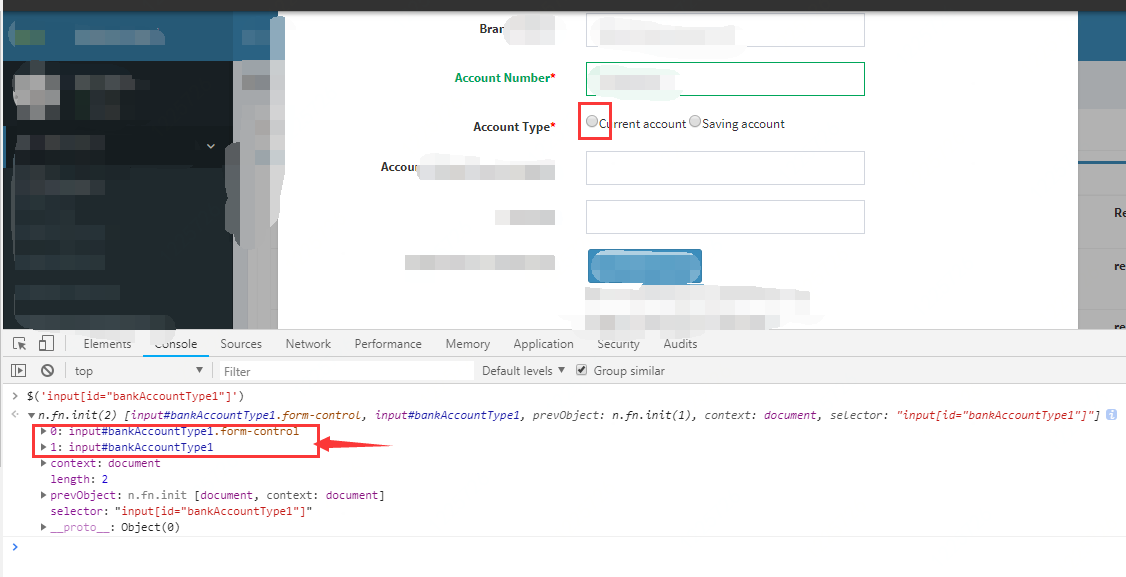
打开开发者模式(F12),在控制台用id进行定位,发现出现了两个元素:
- 0:input#bankAccountType1.form-control
- 1:input#bankAccountType1
其中索引为1的元素是正常的,鼠标放到上面,浏览器也可识别出来,但索引为0的元素有后缀.form-control,鼠标放到上面浏览器也不能识别,具体怎么出来的这个元素,目前还不太清楚需要进一步探究。
进一步试验发现第二次新增时,通过id进行定位发现该元素就出现了两次。也就是说通过id定位出两个相同元素,但是脚本中对元素的操作是单元素操作,所以程序无法识别出元素,就报上述错误。
解决方法:
方法一:
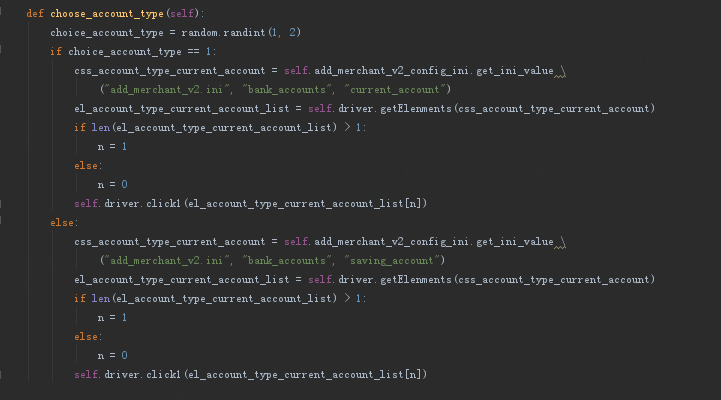
先定位出元素列表,判断元素的大小,更改索引值
def choose_account_type(self):
    choice_account_type = random.randint(1, 2)
    if choice_account_type == 1:
        css_account_type_current_account = self.add_merchant_v2_config_ini.get_ini_value \
            ("add_merchant_v2.ini", "bank_accounts", "current_account")
        el_account_type_current_account_list = self.driver.getElenments(css_account_type_current_account)
        if len(el_account_type_current_account_list) > 1:
            n = 1
        else:
            n = 0
        self.driver.click1(el_account_type_current_account_list[n])
    else:
        css_account_type_current_account = self.add_merchant_v2_config_ini.get_ini_value \
            ("add_merchant_v2.ini", "bank_accounts", "saving_account")
        el_account_type_current_account_list = self.driver.getElenments(css_account_type_current_account)
        if len(el_account_type_current_account_list) > 1:
            n = 1
        else:
            n = 0
        self.driver.click1(el_account_type_current_account_list[n])
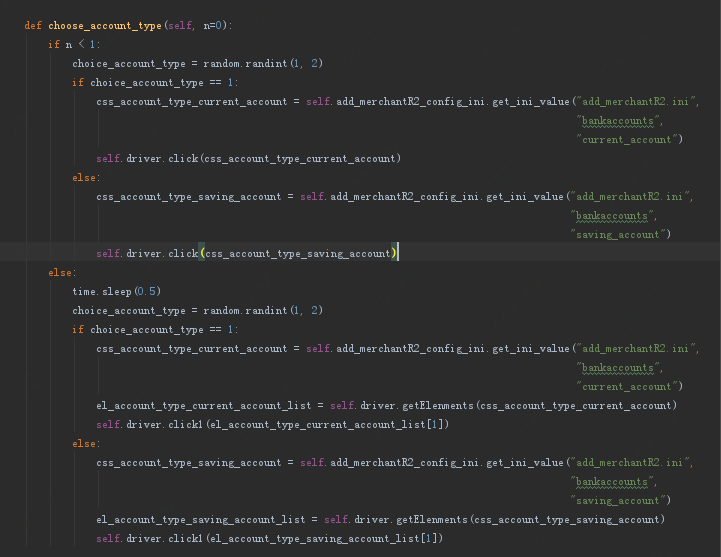
方法二:
在函数中增加一个参数,当n超过1时,先定位出一组元组,然后再对其中的元素进行操作。代码如下:
def choose_account_type(self, n=0):
    if n < 1:
        choice_account_type = random.randint(1, 2)
        if choice_account_type == 1:
            css_account_type_current_account = self.add_merchantR2_config_ini.get_ini_value("add_merchantR2.ini",
                                                                                            "bankaccounts",
                                                                                            "current_account")
            self.driver.click(css_account_type_current_account)
        else:
            css_account_type_saving_account = self.add_merchantR2_config_ini.get_ini_value("add_merchantR2.ini",
                                                                                           "bankaccounts",
                                                                                           "saving_account")
            self.driver.click(css_account_type_saving_account)
    else:
        time.sleep(0.5)
        choice_account_type = random.randint(1, 2)
        if choice_account_type == 1:
            css_account_type_current_account = self.add_merchantR2_config_ini.get_ini_value("add_merchantR2.ini",
                                                                                            "bankaccounts",
                                                                                            "current_account")
            el_account_type_current_account_list = self.driver.getElenments(css_account_type_current_account)
            self.driver.click1(el_account_type_current_account_list[1])
        else:
            css_account_type_saving_account = self.add_merchantR2_config_ini.get_ini_value("add_merchantR2.ini",
                                                                                           "bankaccounts",
                                                                                           "saving_account")
            el_account_type_saving_account_list = self.driver.getElenments(css_account_type_saving_account)
            self.driver.click1(el_account_type_saving_account_list[1])
python+selenium运行时,提示元素不可见的更多相关文章
- Python+Selenium自动化-定位一组元素,单选框、复选框的选中方法
Python+Selenium自动化-定位一组元素,单选框.复选框的选中方法 之前学习了8种定位单个元素的方法,同时webdriver还提供了8种定位一组元素的方法.唯一区别就是在单词elemen ...
- Python+Selenium自动化-定位页面元素的八种方法
Python+Selenium自动化-定位页面元素的八种方法 本篇文字主要学习selenium定位页面元素的集中方法,以百度首页为例子. 0.元素定位方法主要有: id定位:find_elemen ...
- Python+Selenium定位不到元素常见原因及解决办法(报:NoSuchElementException)
在做web应用的自动化测试时,定位元素是必不可少的,这个过程经常会碰到定位不到元素的情况(报selenium.common.exceptions.NoSuchElementException ...
- Python+selenium(定位一组元素)
我们熟知Webdriver有8种定位元素的方法,但是当需要定位一组元素的时候,可以使用Webdriver提供的与之对应的8种用于定位一组元素的方法,分别是: find_elements_by_id() ...
- 【python+selenium】截取某个元素
一. selenium截图1.selenium提供了几个截取全屏的方法- get_screenshot_as_file(self, filename) --这个方法是获取当前window的截图,出现I ...
- python + selenium相关事件和元素定位
女友由于工作上的失误,将公司RDM中的某一字段的2000条数据给删除了.....就算是重新添加字段,但是与其他数据的关联性已经不在了.由于每天的数据修改量大,有关部门不愿意恢复数据库,因此只能一条条的 ...
- python + selenium 练习篇 - 定位元素的方法
1.利用ID定位元素(能直接通过ID来定位的元素比较少) # coding=utf-8from selenium import webdriverdriver = webdriver.Chrome() ...
- python+selenium简单实现拖动元素实例
from selenium import webdriver#引入ActionChains类from selenium.webdriver.common.action_chains impo ...
- Python+selenium(操作隐藏元素)
测试过程中,偶尔会碰到一些页面的隐藏元素,如下,是小编举的一个简单的例子: test.html <html> <head></head> <body> ...
随机推荐
- Java Excel导入导出(实战)
一.批量导入(将excel文件转成list) 1. 前台代码逻辑 1)首先在html页面加入下面的代码(可以忽略界面的样式) <label for="uploadFile" ...
- 时区,GMT时间,UTC时间,UNIX时间戳
秒 秒是一个时间基本单位.一天24小时,一小时60分,一分钟60秒,这来自于秒的定义--1秒的时间间隔为平均太阳日[1]的1⁄86400.到了20世纪中叶,人们发现地球自转的时间并不是恒定的,于是在1 ...
- 部署tomcat环境
1.安装java jdk Java环境变量配置 2.下载64位tomcat https://tomcat.apache.org/download-70.cgi 3.配置service 打开cmd,执行 ...
- Python爬虫入门教程 41-100 Fiddler+夜神模拟器+雷电模拟器配置手机APP爬虫部分
爬前叨叨 从40篇博客开始,我将逐步讲解一下手机APP的爬虫,关于这部分,我们尽量简化博客内容,在这部分中可能涉及到一些逆向,破解的内容,这部分尽量跳过,毕竟它涉及的东西有点复杂,并且偏离了爬虫体系太 ...
- 使用EOLINKER做接口测试最佳路径(上)
本文内容: 测试脚本管理:讲述如何在 EOLINKER 上设计测试项目目录结构. 编写测试脚本:讲述如何在 EOLINKER 上编写接口测试脚本. 测试脚本执行及报告:讲述如何在 EOLINKER 上 ...
- SmartCode.ETL 这不是先有鸡还是蛋的问题!
继国庆节 SmartCode 正式版(SmartCode.Generator)发布之后,SmartCode 迎来了新的能力 SmartCode.ETL ! SmartCode 正式版从开始发布就从未说 ...
- js事件循环机制辨析
对于新接触js语言的人来说,最令人困惑的大概就是事件循环机制了.最开始这也困惑了我好久,花了我几个月时间通过书本,打代码,查阅资料不停地渐进地理解他.接下来我想要和大家分享一下,虽然可能有些许错误的 ...
- WKWebView讲解与使用
随着IOS开发的应用,对于网页嵌入也越来越多了,在IOS 8之前我们使用UIWebView展示详情页,自从IOS 8之后就出现了WKWebView,相比UIWebView,WKWebView优化了较多 ...
- 杭电ACM2019--数列有序!
数列有序! Time Limit: 2000/1000 MS (Java/Others) Memory Limit: 65536/32768 K (Java/Others)Total Submi ...
- Java 插入附件到PDF文档
在文档中插入附件,可以起到与源文档配套使用的目的,以一种更简便的方式对文档起到补充说明的作用.下面将介绍通过Java编程插入附件到PDF文档中的方法.这里插入的文档可以是常见的文档类型,如Word.E ...