
python基础练习题
购物车程序
#!/usr/bin/env python

# -*- coding: utf-8 -*-

# @Time    : 2018/3/6 21:01

# @Author  : hyang

# @Site    :

# @File    : shop_cart.py

# @Software: PyCharm

"""

购物车程序

数据结构:

goods = [

{"name": "电脑", "price": 1999},

{"name": "鼠标", "price": 10},

{"name": "游艇", "price": 20},

{"name": "美女", "price": 998},

......

]

功能要求:

基础要求:

1、启动程序后,输入用户名密码后,让用户输入工资,然后打印商品列表

2、允许用户根据商品编号购买商品

3、用户选择商品后,检测余额是否够,够就直接扣款,不够就提醒

4、可随时退出,退出时,打印已购买商品和余额

5、在用户使用过程中, 关键输出,如余额,商品已加入购物车等消息,需高亮显示

扩展需求:

1、用户下一次登录后,输入用户名密码,直接回到上次的状态,即上次消费的余额什么的还是那些,再次登录可继续购买

2、允许查询之前的消费记录

"""

import os

# 商品列表

goods = [

    {"name": "电脑", "price": 1999},

    {"name": "鼠标", "price": 10},

    {"name": "游艇", "price": 20},

    {"name": "IPAD", "price": 1998},

    {"name": "手机", "price": 998},

    {"name": "玩具", "price": 50},

    {"name": "教科书", "price": 100}

]

last_shop = []  # 上次购买数据

last_bal = []  # 得到每次购买余额

def is_shop(user):

    """

    判断该用户是否已消费数据

    :param user:

    :return:

    """

    flg = False

    if os.path.exists(r"user_shop.txt"):

        # 查询用户有购买记录

        with open(r"user_shop.txt", "r", encoding='utf-8') as f:

            for line in f:

               if line.find(user) != -1:

                   flg = True

                   break

    else:  # 创建空文件

         with open(r"user_shop.txt", "w", encoding='utf-8') as f:

             f.write("")

    return flg

def login():

    """

    用户登录

    :return:

    """

    err_cnt = 0

    suc_user = ''  # 返回成功登录用户

    # 判断锁标志

    while err_cnt < 3:

        user = input('输入用户名: ')

        pwd = input('输入密码: ')

        if user == 'alex' and pwd == '':

            print('登录成功')

            suc_user = user

            break

        else:

            print('登录失败')

        err_cnt += 1

    else:

        print('您登录失败已超过3次')

    return suc_user

def check_salary():

    """

    检查收入

    :return:

    """

    while True:

        salary = input('输入工资: ')

        if salary.isdigit():

            break

        else:

            print('工资输入错误,请重新输入!')

    return int(salary)

def shop(user, salary):

    """

    用户购物

    """

    shop_cart = []  # 购物车

    while True:

        print('-------商品列表--------')

        for index, value in enumerate(goods):

            print('商品编号:%s   商品名称:%s   商品价格:%s' % (index, value['name'], value['price']))

        choice = input('输入商品编号:---输入q退出购买 ')

        if choice.isdigit():

            choice = int(choice)

            if 0 <= choice < len(goods):

                price = goods[choice]['price']

                if (salary - price) > 0:

                    salary = salary - price

                    shop_cart.append(goods[choice])

                    print('\033[1;32;40m购买商品编号:%s   购买商品名称:%s   购买商品价格:%s\033[0m'

                          % (choice, goods[choice]['name'], goods[choice]['price']))

                    print('\033[1;32;40m工资余额=%s\033[0m' % salary)

                else:

                    print('余额不足')

                    continue

            else:

                print('商品编号不存在!')

        elif choice == 'q':

            print('\033[1;31;40m-------本次购物退出--------\033[0m')

            if len(shop_cart) > 0:

                print('-------本次购买商品列表--------')

                with open(r"user_shop.txt", "a+", encoding='utf-8') as f:

                    f.write("user:%s\n" % user)

                    for value in shop_cart:

                        shop_info = '购买商品名称:%s|购买商品价格:%s' % (value['name'], value['price'])

                        print('\033[1;32;40m%s\033[0m' % shop_info)

                        f.write(shop_info + "\n")

                    bal_info = '工资余额:%s' % salary

                    print('\033[1;32;40m%s\033[0m'% bal_info)

                    f.write(bal_info + "\n")

            break

def get_shop(user):

    """

    读取文件得到用户已消费数据

    :param user:

    :return:

    """

    flg = False

    resume_goods = []  # 消费商品

    with open(r"user_shop.txt", "r", encoding='utf-8') as f:

        for line in f:

            if line.find("购买") != -1:

                shop_li = line.split("|")

                resume_goods.append([shop_li[0].split(":")[1].strip(), shop_li[1].split(":")[1].strip()])

            elif line.find("余额") != -1:

                last_bal.append(line.split(":")[1].strip())

        print("\033[1;32;40m历史购物:%s\033[0m" % resume_goods)  # 带绿色输出

        print('\033[1;32;40m还剩下余额:%s\033[0m' % last_bal[-1]) # 带绿色输出

if __name__ == '__main__':

    user = login()

    if user != '':

        print('{}登录成功'.format(user))

        while True:

            action = input('输入c查询消费记录,输入b购买商品,输入q退出:')

            if action == 'q':

                print('\033[1;31;40m---退出程序------\033[0m')  # 带红色输出

                get_shop(user)

                break

            elif action == 'c':

                if is_shop(user):

                    print("---查询之前的消费记录---")

                    get_shop(user)

                else:

                    print("---查询之前无消费记录---")

            elif action == 'b':

                if not is_shop(user):

                    salary = check_salary()

                else:

                    salary = int(last_bal[-1])

                print('您工资现有:', salary)

                shop(user, salary)
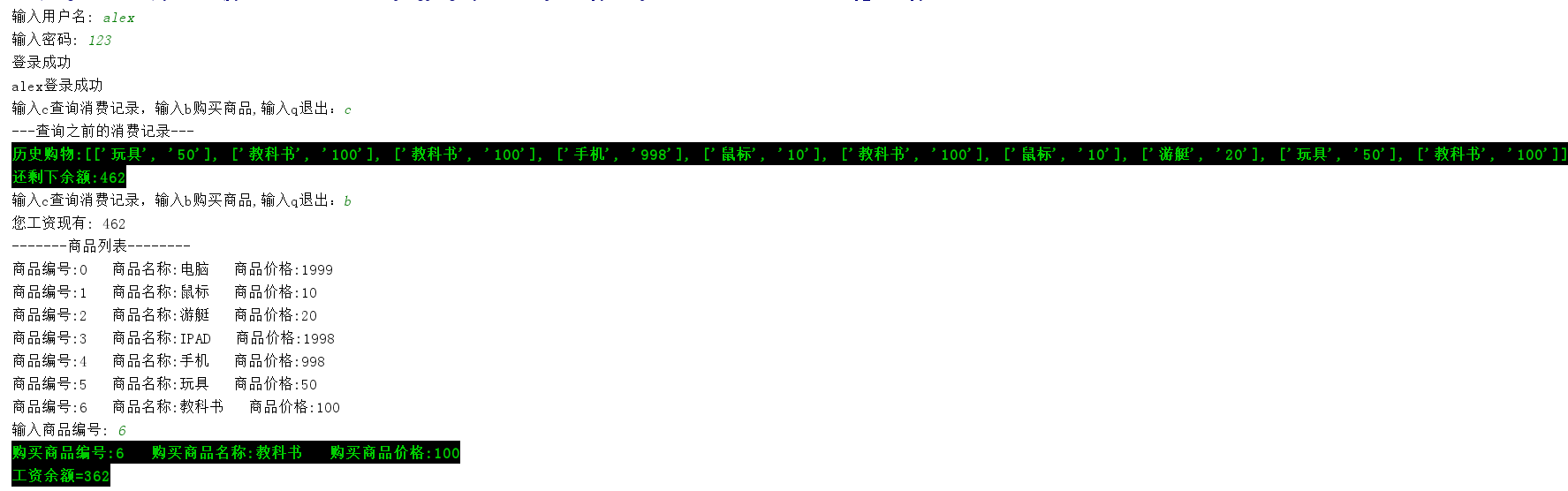
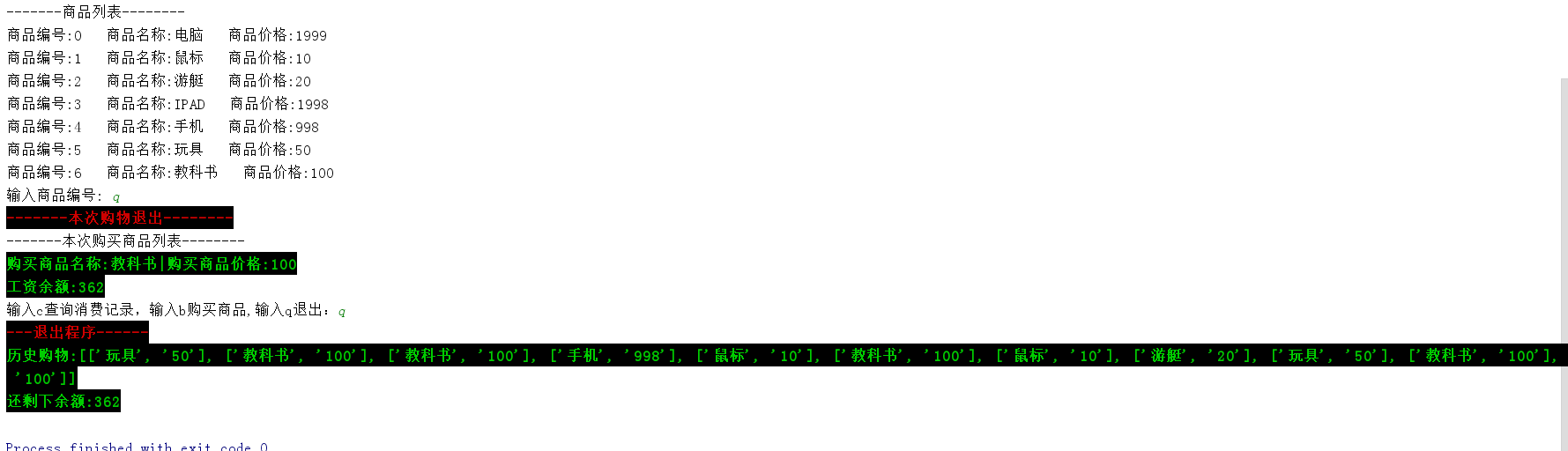
输出结果
三级菜单程序
#!/usr/bin/env python3

# -*- coding: utf-8 -*-

# @Time    : 2018/3/1 9:38

# @Author  : hyang

# @File    : three_menu.py

# @Software: PyCharm

"""

可依次选择进入各子菜单

可从任意一层往回退到上一层

可从任意一层退出程序

"""

menu = {

    '北京':{

        '海淀':{

            '五道口':{

                'soho':{},

                '网易':{},

                'google':{}

            },

            '中关村':{

                '爱奇艺':{},

                '汽车之家':{},

                'youku':{},

            },

            '上地':{

                '百度':{},

            },

        },

        '昌平':{

            '沙河':{

                '老男孩':{},

                '北航':{},

            },

            '天通苑':{},

            '回龙观':{},

        },

        '朝阳':{},

        '东城':{},

    },

    '上海':{

        '闵行':{

            "人民广场":{

                '炸鸡店':{}

            }

        },

        '闸北':{

            '火车站':{

                '携程':{}

            }

        },

        '浦东':{},

    },

    '山东':{},

}

current_menu = menu  # 当前菜单

last_menu = []  # 上层菜单

prompt = "输入菜单名,进入子菜单\n 输入'b',返回上层菜单\n 输入'q',退出程序\n"

while True:

    if len(current_menu) == 0:

        print('已经到最底层,该菜单下无节点')

    else:

        for k in current_menu:

            print('菜单->', k)

    input_str = input(prompt).strip()

    if input_str == 'q':

        print('退出程序')

        break

    elif input_str in current_menu:

        last_menu.append(current_menu)  # 保存上一层菜单

        current_menu = current_menu[input_str]  # 保存当前层

    elif input_str == 'b':

        if len(last_menu) != 0:

            current_menu = last_menu.pop()  # 弹出上一层菜单

        else:

            print('已经是顶层菜单')

    else:

        print('该节点菜单不存在')

        continue
python基础练习题的更多相关文章
- python基础练习题1
深深感知python基础是有多么重要,Ljh说一定要多练题,so,我现在开始要每天打卡练习python.加油! 01:求‘1-100’的偶数和 #第一种解法: sum=0 num=0 while nu ...
- python基础练习题(九九乘法表)
又把python捡起来了,动手能力偏弱,决定每日一练,把基础打好! ------------------------------------------------------------------ ...
- Python基础 练习题
DAY .1 1.使用while循环输出 1 2 3 4 5 6 8 9 10 n = 1 while n < 11: if n == 7: pass else: print(n) n ...
- Python基础练习题100例(Python 3.x)
1:题目:有四个数字:1.2.3.4,能组成多少个互不相同且无重复数字的三位数?各是多少? 程序分析:可填在百位.十位.个位的数字都是1.2.3.4.组成所有的排列后再去 掉不满足条件的排列. 程序源 ...
- python基础练习题30道
1.执行python脚本的两种方式 答:1>可以在python /home/xxxx.py 2>cd /home ./xxxx.py 因为py脚本里面指定了python解释器的位置 ...
- 08: python基础练习题
1.while循环实现输出2 - 3 + 4 - 5 + 6 ... + 100 的和 # 使用while循环实现输出2 - 3 + 4 - 5 + 6 ... + 100 的和 s = 0 i = ...
- 『Python基础练习题』day02
1.判断下列逻辑语句的True, False 1) 1 > 1 or 3 < 4 or 4 > 5 and 2 > 1 and 9 > 8 or 7 < 6 2) ...
- Python学习【day03】- Python基础练习题(列表、元组、字典)
#!/usr/bin/env python # -*- coding:utf8 -*- # 1.有两个列表 # l1 = [11,22,33] # l2 = [22,33,44] # a.获取内容相同 ...
- Python学习【day02】- Python基础练习题
#!/usr/bin/env python # -*- coding:utf8 -*- # 执行Python 脚本的两种方式 # 答:①在windows的cmd窗口下 > D:/Python/p ...
随机推荐
- opencv-python与c++ opencv中的一些区别和基础的知识
使用opencv-python一段时间了,因为之前没有大量接触过c++下的opencv,在网上看c++的一些程序想改成python遇到了不少坑,正好在这里总结一下. 1.opencv 中x,y,hei ...
- 模板方法模式和JDBCTemplate(一)
本篇博客的目录: 一:模板方法模式介绍 二:模板方法模式的简单实现 三:总结 一:模板方法模式的介绍 1.1:模板方法模式的定义 定义:一个操作中的算法的骨架,而将一些步骤延迟到子类中.Templat ...
- centos 6.* 配置端口
vi /etc/sysconfig/iptables 将 -A INPUT -m state --state NEW -m tcp -p tcp --dport 80 -j ACCEPT (允 ...
- chromedriver与chrome版本映射表(最新)
selenium想在chrome进行跑,前提需要下载chromedriver,以下整理了chromedriver与chrome的对应关系表 chromedriver(下载地址):http://chro ...
- [翻译]编写高性能 .NET 代码 第一章:工具介绍 -- Performance Counters(性能计数器)
<<返回目录 Performance Counters(性能计数器) 性能计数器是监视应用程序和系统性能的最简单的方法之一.它有几十个类别数百个计数器在,包括一些.net特有的计数器.要访 ...
- 5. 跟踪标记 (Trace Flag) 834, 845 对内存页行为的影响
跟踪标记:834 功能: 在64位的windows环境下,为SQL Server开启这个跟踪标记,那么SQL Server 会使用大页(Large pages)为内存缓冲区(buffer pool)分 ...
- mysql 学习心得2
1tinyint small~ medium~ int big~ float double dec(M,D)定点数 取值范围由md确定 bit(M)位类型 bit(1) bit(64). 2zerof ...
- gogogo
- 【前端】Vue和Vux开发WebApp日志二、优化gulp任务
转载请注明出处:http://www.cnblogs.com/shamoyuu/p/vue_vux_2.html 项目github地址:https://github.com/shamoyuu/vue- ...
- 如何编译linux第一个模块 hellomod.ko
Linux下的驱动程序也没有听上去的那么难实现,我们可以看一下helloworld这个例子就完全可以了解它的编写的方式! 我们还是先看一个这个例子,helloworld 1. [代码]hellowor ...