
Entity Framework——记录执行的命令信息
有两种方法可以记录执行的SQl语句:
- 使用DbContext.Database.Log属性
- 实现IDbCommandInterceptor接口
一 使用DbContext.Database.Log属性
下面截图显示了Database属性和Log属性,可以看出这个属性是一个委托,类型为Action<string>
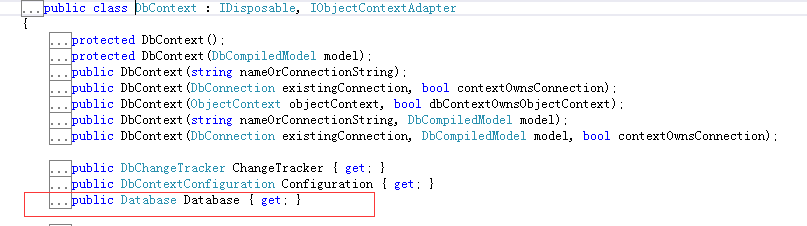

对Log属性的解释为:
Set this property to log the SQL generated by the System.Data.Entity.DbContext to the given delegate. For example, to log to the console, set this property to System.Console.Write(System.String).
使用方法:
1)在自定义上下文中获得执行的SQL相关信息,即在自定上下文的构造函数中使用Database.Log
    /// <summary>

    /// 自定义上下文

    /// </summary>

    [DbConfigurationType(typeof(MySqlEFConfiguration))]

    public class CustomDbContext : DbContext

    {

        public CustomDbContext()

            : base("name=Master")

        {

            //this.Configuration.LazyLoadingEnabled = false;

            //new DropCreateDatabaseIfModelChanges<CustomDbContext>()

            //new DropCreateDatabaseAlways<CustomDbContext>()

            Database.SetInitializer<CustomDbContext>(null);

            this.Database.Log = Log;

        }

        public DbSet<User> Users { get; set; }

        protected override void OnModelCreating(DbModelBuilder modelBuilder)

        {

            base.OnModelCreating(modelBuilder);

            EntityConfiguration.Set(modelBuilder);

        }

        private void Log(string cmd)

        {

            //或输出到控制台

            //Console.Write(cmd);

            //或输出到文件

            //using (StreamWriter sw = new StreamWriter(@"E:\EFCmdLogger.txt"))

            //{

            //    sw.WriteLine(cmd);

            //}

            //或输出到调试信息窗口

            Debug.WriteLine(cmd);

        }

     }
执行结果如下截图

2)在具体的方法中使用
    public class EFOPerations

    {

        public static void ReadUser()

        {

            Stopwatch stw = new Stopwatch();

            stw.Start();

            using (CustomDbContext db = new CustomDbContext())

            {

                db.Database.Log = Console.WriteLine;

                User user = db.Users.Find();

                var userDTO = new { Account = user.Account };

            }

            stw.Stop();

            var time = stw.ElapsedMilliseconds;

        }

    }
注意
db.Database.Log = Console.WriteLine;这条语句的位置;如果将其放到查询语句,即User user = db.Users.Find(1);之后则无法输出信息!
还可以改变日志的格式:
创建继承自DatabaseLogFormatter的类,实现新的格式化器,然后使用
System.Data.Entity.DbConfiguration.SetDatabaseLogFormatter(System.Func<System.Data.Entity.DbContext,System.Action<System.String>,System.Data.Entity.Infrastructure.Interception.DatabaseLogFormatter>)
DatabaseLogFormatter的三个方法
LogCommand:在SQL 语句或存储过程执行前记录它。
LogParameter:记录参数,默认被LogCommand调用(未能验证这一点)
LogResult:记录SQL 语句或存储过程执行后的一些相关信息
这三个方法包含的参数为:
DbCommand command:SQL 语句或存储过程相关的信息。
DbCommandInterceptionContext<TResult> interceptionContext:执行结果相关的信息。
DbParameter parameter:System.Data.Common.DbCommand 的参数。
重写LogCommand或LogResult都可以改变SQL 语句或存储过程相关信息格式,但是注意这两个方法interceptionContext参数的值可能会不一样。
继承DatabaseLogFormatter,实现格式化器
public class CustomDatabaseLogFormatter : DatabaseLogFormatter

    {

        public CustomDatabaseLogFormatter(DbContext context, Action<string> writeAction)

            : base(context, writeAction)

        {

        }

        public override void LogCommand<TResult>(DbCommand command, DbCommandInterceptionContext<TResult> interceptionContext)

        {

        }

        public override void LogResult<TResult>(DbCommand command, DbCommandInterceptionContext<TResult> interceptionContext)

        {

            StringBuilder sb = new StringBuilder();

            for (int i = ; i < command.Parameters.Count; i++)

            {

                sb.AppendLine(string.Format("参数名称:{0},值:{1}", command.Parameters[].ParameterName, command.Parameters[].Value));

            }

            Write(command.CommandText + Environment.NewLine

                + command.CommandTimeout + Environment.NewLine

                + command.CommandType + Environment.NewLine

                + Environment.NewLine

                + sb.ToString());

        }

}
设置新的格式化器
public class CustomDbConfiguration : MySqlEFConfiguration

    {

        public CustomDbConfiguration():base()

        {

            //this.AddInterceptor(new CommandInterceptor(new Logger()));

            SetDatabaseLogFormatter((context, writeAction) => new CustomDatabaseLogFormatter(context, writeAction));

        }

}
使用自定义CustomDbConfiguration
[DbConfigurationType(typeof(CustomDbConfiguration))]

    public class CustomDbContext : DbContext

    {

        public CustomDbContext()

            : base("name=Master")

        {

            //this.Configuration.LazyLoadingEnabled = false;

            //new DropCreateDatabaseIfModelChanges<CustomDbContext>()

            //new DropCreateDatabaseAlways<CustomDbContext>()

            Database.SetInitializer<CustomDbContext>(null);

            this.Database.Log = Log;

        }

        ......

}
二 实现IDbCommandInterceptor接口
实现IDbCommandInterceptor,同时为了灵活的记录执行信息,定义了日志接口
public class CommandInterceptor : IDbCommandInterceptor

    {

        private ICommandLogger logger;

        public CommandInterceptor(ICommandLogger logger)

        {

            this.logger = logger;

        }

        public void NonQueryExecuted(DbCommand command, DbCommandInterceptionContext<int> interceptionContext)

        {

            this.logger.Log<int>(command, interceptionContext);

        }

        public void NonQueryExecuting(DbCommand command, DbCommandInterceptionContext<int> interceptionContext)

        {

            this.logger.Log<int>(command, interceptionContext);

        }

        public void ReaderExecuted(DbCommand command, DbCommandInterceptionContext<System.Data.Common.DbDataReader> interceptionContext)

        {

            this.logger.Log<DbDataReader>(command, interceptionContext);

        }

        public void ReaderExecuting(DbCommand command, DbCommandInterceptionContext<System.Data.Common.DbDataReader> interceptionContext)

        {

            this.logger.Log<DbDataReader>(command, interceptionContext);

        }

        public void ScalarExecuted(DbCommand command, DbCommandInterceptionContext<object> interceptionContext)

        {

            this.logger.Log<object>(command, interceptionContext);

        }

        public void ScalarExecuting(DbCommand command, DbCommandInterceptionContext<object> interceptionContext)

        {

            this.logger.Log<object>(command, interceptionContext);

        }

    }

    public interface ICommandLogger

    {

        void Log<T>(DbCommand command, DbCommandInterceptionContext<T> interceptionContext);

}

public class Logger : ICommandLogger

    {

        public void Log<T>(System.Data.Common.DbCommand command, System.Data.Entity.Infrastructure.Interception.DbCommandInterceptionContext<T> interceptionContext)

        {

            StringBuilder sb = new StringBuilder();

            for(int i =;i<command.Parameters.Count;i++)

            {

                sb.AppendLine(string.Format("参数名称:{0},值:{1}", command.Parameters[].ParameterName, command.Parameters[].Value));

            }

            Debug.WriteLine(command.CommandText+Environment.NewLine

                + command.CommandTimeout + Environment.NewLine

                + command.CommandType + Environment.NewLine

                + Environment.NewLine

                + sb.ToString());

        }

    }
如何使用这两个类呢?
1使用配置文件
<entityFramework>

    <interceptors>

      <interceptor type="ConsoleApp_EntityFramework.Interceptor.CommandInterceptor, ConsoleApp_EntityFramework.Interceptor">

      </interceptor>

    </interceptors>

 </entityFramework>
但是采用这种方式要对上面的CommandInterceptor 进行改造。
public class CommandInterceptor : IDbCommandInterceptor

    {

        private ICommandLogger logger;

        public CommandInterceptor()

        {

            this.logger = new Logger();

        }

    ......

}
但是如果EF操作的是Mysql那么这种方法不行,抛出异常:无法识别的元素“interceptors”
2编码方式
只有上面两个类还不够,还要定义创建一个继承自DbConfiguration的配置类
public class CustomDbConfiguration : DbConfiguration

    {

        public CustomDbConfiguration():base()

        {

            this.AddInterceptor(new CommandInterceptor(new Logger()));

        }

}
在自定义数据库上下文上使用此特性
    /// <summary>

    /// 自定义上下文

    /// </summary>

    [DbConfigurationType(typeof(CustomDbConfiguration))]

    public class CustomDbContext : DbContext

    {

        ......

    }
一切准备好后运行程序,却抛出异常:
The ADO.NET provider with invariant name 'MySql.Data.MySqlClient' is either not registered in the machine or application config file, or could not be loaded. See the inner exception for details.
似乎是MySql.Data.MySqlClient的问题,其实不是!
如果是SQL Server则没问题,但这里EF框架操作的是MySql,要是使用MySql.Data.Entity.MySqlEFConfiguration这个类,而不是System.Data.Entity.DbConfiguration,所以CustomDbConfiguration应该派生自MySql.Data.Entity.MySqlEFConfiguration
    public class CustomDbConfiguration : MySqlEFConfiguration

    {

        public CustomDbConfiguration():base()

        {

            this.AddInterceptor(new CommandInterceptor(new Logger()));

        }

        .....

    }
这样修改后,运行程序得到下面的结果:
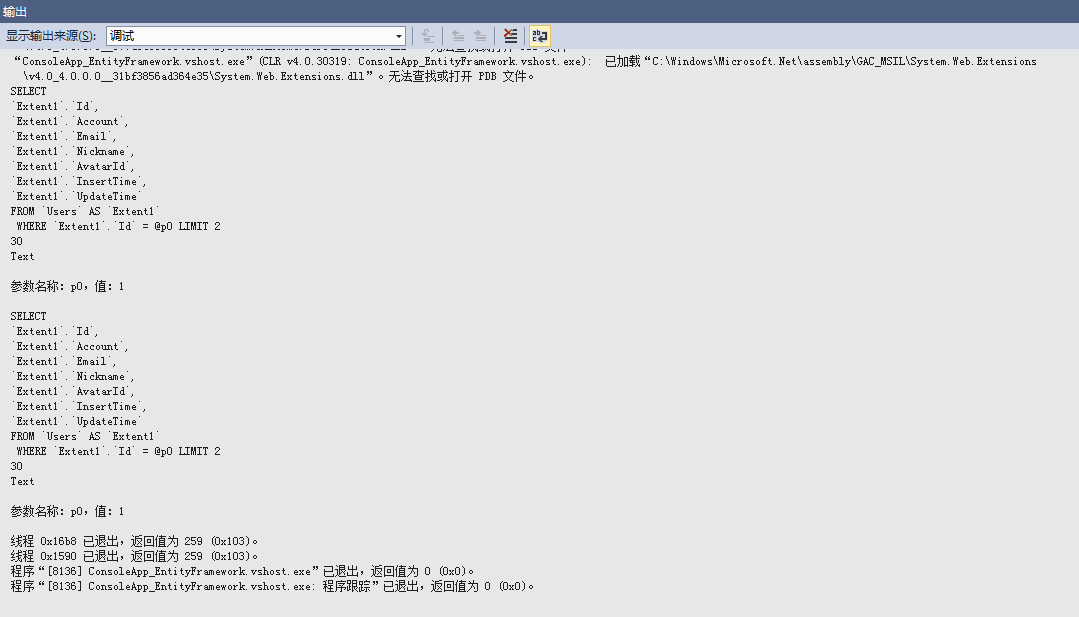
可以看到日志打印了两次,这是因为ReaderExecuting和ReaderExecuted各调用了一次,执行的顺序是先ReaderExecuting然后ReaderExecuted。
-----------------------------------------------------------------------------------------
转载与引用请注明出处。
时间仓促,水平有限,如有不当之处,欢迎指正。
Entity Framework——记录执行的命令信息的更多相关文章
- [翻译] - <Entity Framework> - 直接执行数据库命令
原文:[翻译] - <Entity Framework> - 直接执行数据库命令 纯属学习上的记录, 非专业翻译, 如有错误欢迎指正! 原文地址: http://msdn.microsof ...
- 关于MySql entity framework 6 执行like查询问题解决方案
原文:关于MySql entity framework 6 执行like查询问题解决方案 本人不善于言辞,直接开门见山 环境:EF6.0.0.0+MySQL Server5.6+MySqlConnec ...
- 在Entity Framework 中执行T-sql语句
从Entity Framework 4开始在ObjectContext对象上提供了2个方法可以直接执行SQL语句:ExecuteStoreQuery<T> 和 ExecuteStoreC ...
- Entity Framework Core 执行SQL语句和存储过程
无论ORM有多么强大,总会出现一些特殊的情况,它无法满足我们的要求.在这篇文章中,我们介绍几种执行SQL的方法. 表结构 在具体内容开始之前,我们先简单说明一下要使用的表结构. public clas ...
- java记录linux top命令信息
import java.io.BufferedReader; import java.io.BufferedWriter; import java.io.File; import java.io.Fi ...
- Entity Framework 6 执行Linq to Entities异常"p__linq__1 : String truncation: max=0, len=2, value='测试'"
场景再现 我需要查询公司名称包含给定字符串的公司,于是我写了下面的测试小例子: var condition = "测试"; var query = from b in db.Com ...
- Entity Framework中执行Sql语句
如果想在EF框架中执行Sql语句,其实很简单,EF里面已经提供了相关的方法(此处使用的EF为EF4.1版本). EF中提供了两个方法,一个是执行查询的Sql语句SqlQue ...
- Entity FrameWork Code First 迁移命令详解
1. Enable-Migrations 启动迁移 执行get-help Enable-Migrations –detailed 查看Enable-Migrations的详细用法. -ContextT ...
- .NET Entity Framework(EF)使用SqlQuery直接操作SQL查询语句或者执行过程
Entity Framework是微软出品的高级ORM框架,大多数.NET开发者对这个ORM框架应该不会陌生.本文主要罗列在.NET(ASP.NET/WINFORM)应用程序开发中使用Entity F ...
随机推荐
- Hyperledger Fabric Membership Service Providers (MSP)——成员服务
Membership Service Providers (MSP) 本文将介绍有关MSPs的设置和最佳实践的详细方案. Membership Service Providers (MSP)是一个旨在 ...
- 黑窗口输入确定数字弹MessageBox(VirtualProtect())
今天有人说到这个就想的弹一下,刚开始弄了一下,发现内存访问有问题想到可能与读写保护有关,所以用了VirtualProtect函数,得到了正确结果 网上这个小东西我自己没发现,就贴一下.. void m ...
- IOS 使用 ZbarSDK 二维码扫描
1. 下载SDK https://github.com/bmorton/ZBarSDK 2. 引用到项目中 3. 添加引用 4. AppDelegate中添加下面代码 5. 在需要使用扫描的con ...
- java8-新特性--(接口的默认方法与静态方法)
Java 8用默认方法与静态方法这两个新概念来扩展接口的声明. public interface Inte{ void method(); default void defaultMethod(){ ...
- 了解JDK 6和JDK 7中substring的原理及区别
substring(int beginIndex, int endIndex)方法在jdk 6和jdk 7中的实现是不同的.了解他们的区别可以帮助你更好的使用他.为简单起见,后文中用substring ...
- linux_inode 和 block
linux里一切皆文件 什么是文件属性? 文件本身带有的信息, 包括:索引节点编号. 文件类型以及权限.硬链接个数(备份作用).所有者.所属组.文件大小.修改月.修改日.时分 什么是索引节点? ino ...
- linux各种顔色代表
@linux中的各文件的颜色表示什么 白色:表示普通文件 蓝色:表示目录 绿色:表示可执行文件 红色:表示压缩文件 浅蓝色:链接文件 红色闪烁:表示链接的文件有问题 黄色:表示设备文件 灰色:表示其它 ...
- 无废话XML--XML约束(DTD)
基本术语 一.序言Prolog:包括XML声明(XML Declaration)和文档类型声明(Document Type Declaration). 二.良构(well-formed ...
- Windows下为PHP安装redis扩展
1.使用phpinfo()函数查看PHP的版本信息,这会决定扩展文件版本. 2.下载 php_redis-2.2.7-5.5-ts-vc11-x86.zip 和 php_igbinary-2.0.5- ...
- YourSQLDba介绍
YourSQLDba介绍 YourSQLDba是一个法国人写的程序,它是由一系列T-SQL存储过程构成的脚本文件.可以理解成一个组件或安装包,从而简化了在Mircorsoft SQL Server 2 ...