
RHEL6误安装RHEL7的包导致glibc被升级后系统崩溃处理方法
[root@rhel65 ~]# yum install ftp

Loaded plugins: product-id, refresh-packagekit, security, subscription-manager

This system is not registered to Red Hat Subscription Management. You can use subscription-manager to register.

Setting up Install Process

Resolving Dependencies

--> Running transaction check

---> Package ftp.x86_64 :0.17-.el7 will be installed

--> Processing Dependency: libc.so.(GLIBC_2.)(64bit) for package: ftp-0.17-.el7.x86_64

--> Running transaction check

---> Package glibc.x86_64 :2.12-1.132.el6 will be updated

--> Processing Dependency: glibc = 2.12-1.132.el6 for package: glibc-headers-2.12-1.132.el6.x86_64

--> Processing Dependency: glibc = 2.12-1.132.el6 for package: glibc-common-2.12-1.132.el6.x86_64

--> Processing Dependency: glibc = 2.12-1.132.el6 for package: glibc-devel-2.12-1.132.el6.x86_64

---> Package glibc.x86_64 :2.17-.el7 will be an update

--> Running transaction check

---> Package glibc-common.x86_64 :2.12-1.132.el6 will be updated

---> Package glibc-common.x86_64 :2.17-.el7 will be an update

--> Processing Dependency: /usr/bin/bash for package: glibc-common-2.17-.el7.x86_64

---> Package glibc-devel.x86_64 :2.12-1.132.el6 will be updated

---> Package glibc-devel.x86_64 :2.17-.el7 will be an update

---> Package glibc-headers.x86_64 :2.12-1.132.el6 will be updated

---> Package glibc-headers.x86_64 :2.17-.el7 will be an update

--> Running transaction check

---> Package bash.x86_64 :4.1.-.el6_4 will be updated

---> Package bash.x86_64 :4.2.-.el7_2 will be an update

--> Processing Conflict: bash-4.2.-.el7_2.x86_64 conflicts filesystem <

--> Restarting Dependency Resolution with new changes.

--> Running transaction check

---> Package filesystem.x86_64 :2.4.-.el6 will be updated

---> Package filesystem.x86_64 :3.2-.el7 will be an update

--> Finished Dependency Resolution

Dependencies Resolved

===========================================================================================================

Package                    Arch                Version                      Repository               Size

===========================================================================================================

Installing:

ftp                        x86_64              0.17-.el7                  rhel73-iso                k

Updating:

filesystem                 x86_64              3.2-.el7                   rhel73-iso              1.0 M

Updating for dependencies:

bash                       x86_64              4.2.-.el7_2              rhel73-iso              1.0 M

glibc                      x86_64              2.17-.el7                 rhel73-iso              3.6 M

glibc-common               x86_64              2.17-.el7                 rhel73-iso                M

glibc-devel                x86_64              2.17-.el7                 rhel73-iso              1.1 M

glibc-headers              x86_64              2.17-.el7                 rhel73-iso               k

Transaction Summary

===========================================================================================================

Install        Package(s)

Upgrade        Package(s)

Total download size:  M

Is this ok [y/N]: y

Downloading Packages:

-----------------------------------------------------------------------------------------------------------

Total                                                                       MB/s |   MB     :

Running rpm_check_debug

Running Transaction Test

Transaction Test Succeeded

Running Transaction

  Updating   : glibc-2.17-.el7.x86_64                                                              /

  Updating   : bash-4.2.-.el7_2.x86_64                                                            /

  Updating   : glibc-common-2.17-.el7.x86_64                                                       /

  Updating   : glibc-headers-2.17-.el7.x86_64                                                      /

  Updating   : glibc-devel-2.17-.el7.x86_64                                                        /

  Updating   : filesystem-3.2-.el7.x86_64                                                           /

Error unpacking rpm package filesystem-3.2-.el7.x86_64

error: unpacking of archive failed on file /bin: cpio: rename

  Installing : ftp-0.17-.el7.x86_64                                                                 /

  Cleanup    : glibc-devel-2.12-1.132.el6.x86_64                                                      /

  Cleanup    : glibc-headers-2.12-1.132.el6.x86_64                                                    /

  Cleanup    : bash-4.1.-.el6_4.x86_64                                                            /

Non-fatal POSTUN scriptlet failure in rpm package bash

  Cleanup    : glibc-common-2.12-1.132.el6.x86_64                                                    /

warning: %postun(bash-4.1.-.el6_4.x86_64) scriptlet failed, exit status

  Cleanup    : glibc-2.12-1.132.el6.x86_64                                                           /

warning: /etc/localtime saved as /etc/localtime.rpmsave

Non-fatal <unknown> scriptlet failure in rpm package glibc

rhel65-iso/productid                                                                | 1.7 kB     : ...

rhel73-iso/productid                                                                | 1.6 kB     : ...

  Verifying  : glibc-devel-2.17-.el7.x86_64                                                        /

  Verifying  : bash-4.2.-.el7_2.x86_64                                                            /

  Verifying  : glibc-2.17-.el7.x86_64                                                              /

  Verifying  : glibc-common-2.17-.el7.x86_64                                                       /

  Verifying  : ftp-0.17-.el7.x86_64                                                                 /

  Verifying  : glibc-headers-2.17-.el7.x86_64                                                      /

  Verifying  : glibc-2.12-1.132.el6.x86_64                                                            /

  Verifying  : glibc-devel-2.12-1.132.el6.x86_64                                                      /

  Verifying  : bash-4.1.-.el6_4.x86_64                                                             /

filesystem-2.4.-.el6.x86_64 was supposed to be removed but is not!

  Verifying  : filesystem-2.4.-.el6.x86_64                                                        /

  Verifying  : glibc-common-2.12-1.132.el6.x86_64                                                    /

  Verifying  : glibc-headers-2.12-1.132.el6.x86_64                                                   /

  Verifying  : filesystem-3.2-.el7.x86_64                                                          /

Installed:

  ftp.x86_64 :0.17-.el7

Dependency Updated:

  bash.x86_64 :4.2.-.el7_2     glibc.x86_64 :2.17-.el7         glibc-common.x86_64 :2.17-.el7

  glibc-devel.x86_64 :2.17-.el7 glibc-headers.x86_64 :2.17-.el7

Failed:

  filesystem.x86_64 :2.4.-.el6                      filesystem.x86_64 :3.2-.el7

Complete!
查看yum install升级记录日志
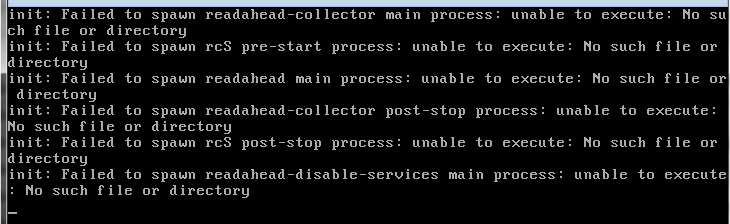
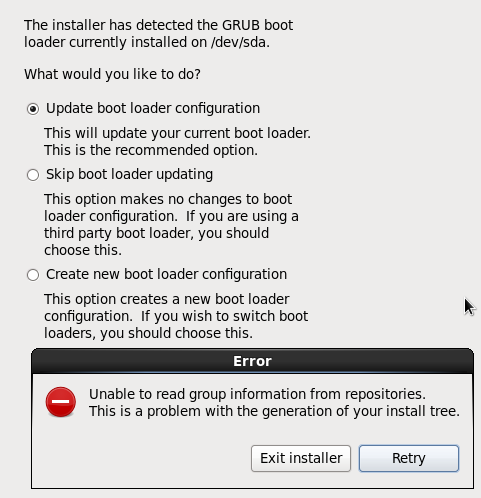

# rpm --force --nodeps -Uvh  [RPM包名]

分别把bash/glibc/glibc-common/glibc-devel/glibc-headers这几个包装回去。
RHEL6误安装RHEL7的包导致glibc被升级后系统崩溃处理方法的更多相关文章
- glibc CVE-2015-7547漏洞的分析和修复方法【转】
本文转载自:http://blog.csdn.net/tengxy_cloud/article/details/50764370 漏洞概述 glibc中处理DNS查询的代码中存在栈溢出漏洞,远端攻击者 ...
- 第七天 Linux用户管理、RHEL6.5及RHEL7.2 root密码破解、RHEL6.5安装vmware tools
1.Linux用户管理 Linux系统中,存在三种用户 A.超级用户:root 最高权限,至高无上 在windows中 administrator是可以登录的最高权限,但是,system权限最高,不能 ...
- RHEL6.1 安装 Oracle10gr2 (图文、解析)
目录 目录 软件环境 前言 初始化RHEL61 硬件检测 预安装软件包 安装oratoolkit 创建Oracle用户 修改配置文件 系统版本伪装 解压并运行Oracle10gr2安装包 安装rlwr ...
- rhel6.4 安装nodejs和Mysql DB服务
rhel6.4 安装nodejs和Mysql DB服务 安装好redhat6.4虚拟机后, 安装软件: # yum install gcc-c++ openssl-devel Loaded plugi ...
- linux和windows下安装python拓展包及requirement.txt安装类库
python拓展包安装 直接安装拓展包默认路径: Unix(Linux)默认路径:/usr/local/lib/pythonX.Y/site-packagesWindows默认路径:C:\Python ...
- Android导包导致java.lang.NoClassDefFoundError
摘要: SDK方法总数是不能超过65k的.是否也引入其他的三方库,导致总数超过限制.超出限制会导致部分class找不到,引发java.lang.NoClassDefFoundError.解决方法:近日 ...
- Red Hat Enterprise Server 6.0 安装Sendmail相关包
由于需要在Linux服务器(Red Hat Enterprise Linux Server release 6.0)上配置邮件服务,需要安装Sendmail包,一般Sendmail的安装有两种方式:R ...
- (转载)Linux如何编译安装源码包软件
一.什么是源码包软件: 顾名思义,源码包就是源代码的可见的软件包,基于Linux和BSD系统的软件最常见:在国内源可见的软件几乎绝迹:大多开源软件都是国外出品:在国内较为出名的开源软件有fcitx;l ...
- 安装 RPM 包或者安装源码包
安装 RPM 包或者安装源码包 在windows下安装一个软件很轻松,只要双击.exe的文件,安装提示连续“下一步”即可,然而linux系统下安装一个软件似乎并不那么轻松了,因为我们不是在图形界面下. ...
随机推荐
- JVM之对象的创建简要流程
- 解决 vmware workstations 14 开启虚拟机黑屏
某些朋友在使用vmware workstations 14创建或者开启虚拟机时发现黑屏,但其实系统的正常启动的,只是无画面显示. 1.以管理员方式启动命令行 2.修复LSP 在CMD中输入 netsh ...
- [原创]自动获取当前URL所属主域的JS方法(适合多级域名)
工作中要用到,就随手写了个,不是什么难题,分享给有需要的朋友(主要是很久没更新博客了). 如果有特殊域名,比如“.tj.cn",请将".tj"加到hostExts数组中( ...
- 多IP服务器应用可以有效的降低成本
多IP的常规应用很多,SEO,EDM,VPN代理等.可以有效的解决成本,很多时候的租用一台高配置服务器通过XEN,hyper-V等虚拟化技术分割成VPS ,共用一台服务器就会大大的降低成本,这样就需要 ...
- vue初学者
先分享一波福利 vue学习视频 链接:https://pan.baidu.com/s/1ggSfE75 密码:7h2a 1.先安装 webpack vue-cli ...
- .net Core学习笔记3 编辑列表并绑定下拉列
本次主要实现列表的编辑及下拉列表的绑定 先看效果图: 主要用DropDownList绑定下拉列后端代码: 1:定义一个存下拉数据类 public class SelectItem { public s ...
- 日历插件——laydate.js
laydate是一款很好用的日历控件,兼容了包括IE6在内的所有主流浏览器,默认有三种皮肤,如需其它皮肤可去官网下载http://www.layui.com/laydate/ 一.核心方法:layd ...
- Unity DoTween 动画使用案例
这边我就直接放一个标准的Dotween动画的使用demo吧. 这个案例满足应该可以完成你所想实现的几乎所有复杂动画. void PlayTween() { //set tween data float ...
- ftp服务配置
文件传输协议(File Transfer Protocol,FTP),基于该协议FTP客户端与服务端可以实现共享文件.上传文件.下载文件. FTP 基于TCP协议生成一个虚拟的连接,主要用于控制F ...
- jsp中实现点击文件名称完成下载
1.文件名称添加点击事件 <a href="javascript:void(0);" id="wjm" onclick="wjxz();&quo ...