
通过配置web.config使WCF向外提供HTTPS的Restful Service
如何通过WCF向外提供Restful的Service请看如下链接
http://www.cnblogs.com/mingmingruyuedlut/p/4223116.html
那么如何通过对web.config的配置,使原有的Service即符合HTTP又符合HTTPS呢?
请看如下具体步骤:
1):将上篇文章 http://www.cnblogs.com/mingmingruyuedlut/p/4223116.html 中的IIS对应的Site绑定80端口,并且添加HTTPS的443端口
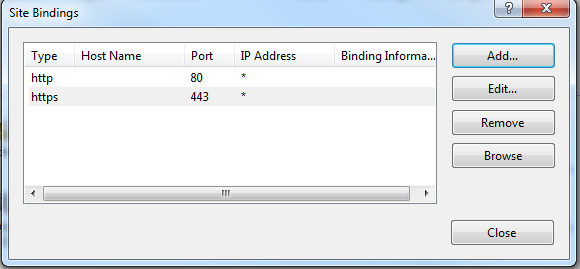
2):保持其他不变,然后我们访问 http://localhost/UserService.svc 依旧可以看到我们所提供的Service是好用的,现在我们向web.config文件添加binding来实现HTTPS的配置
2.1):在system.ServiceModel节点中添加如下节点
    <bindings>

      <webHttpBinding >

        <binding name="SecureWebBinding" >

            <security mode="Transport">

              <transport clientCredentialType="None"></transport>

            </security>

        </binding>

      </webHttpBinding>

     </bindings>
2.2):然后在services节点中添加如下节点
          <endpoint address=""

                  binding="webHttpBinding"

                  bindingConfiguration="SecureWebBinding"

                  contract="EricSunWcfService.IUserService"

                  behaviorConfiguration="ESEndPointBehavior"/>

          <endpoint address="mex" binding="mexHttpsBinding" contract="IMetadataExchange"/>
2.3):最终的配置文件为
<?xml version="1.0"?>

<configuration>

  <appSettings>

    <add key="aspnet:UseTaskFriendlySynchronizationContext" value="true" />

  </appSettings>

  <system.web>

    <compilation debug="true" targetFramework="4.5" />

    <httpRuntime targetFramework="4.5"/>

  </system.web>

  <system.serviceModel>

    <services>

        <service name="EricSunWcfService.UserService" behaviorConfiguration="RESTBehaviour">

          <endpoint address=""

                    binding="webHttpBinding"

                    contract="EricSunWcfService.IUserService"

                    behaviorConfiguration="ESEndPointBehavior"/>

          <endpoint address=""

                  binding="webHttpBinding"

                  bindingConfiguration="SecureWebBinding"

                  contract="EricSunWcfService.IUserService"

                  behaviorConfiguration="ESEndPointBehavior"/>

          <endpoint address="mex" binding="mexHttpsBinding" contract="IMetadataExchange"/>

        </service>

      </services>

    <behaviors>

      <serviceBehaviors>

        <behavior name="RESTBehaviour">

          <serviceMetadata httpGetEnabled="true"/>

          <serviceDebug includeExceptionDetailInFaults="true"/>

        </behavior>

        <behavior>

          <!-- To avoid disclosing metadata information, set the values below to false before deployment -->

          <serviceMetadata httpGetEnabled="true" httpsGetEnabled="true"/>

          <!-- To receive exception details in faults for debugging purposes, set the value below to true.  Set to false before deployment to avoid disclosing exception information -->

          <serviceDebug includeExceptionDetailInFaults="false"/>

        </behavior>

      </serviceBehaviors>

      <endpointBehaviors>

        <behavior name="ESEndPointBehavior">

          <webHttp/>

        </behavior>

      </endpointBehaviors>

    </behaviors>

    <protocolMapping>

        <add binding="basicHttpsBinding" scheme="https" />

    </protocolMapping>

    <serviceHostingEnvironment aspNetCompatibilityEnabled="true" multipleSiteBindingsEnabled="true" />

    <bindings>

      <webHttpBinding >

        <binding name="SecureWebBinding" >

            <security mode="Transport">

              <transport clientCredentialType="None"></transport>

            </security>

        </binding>

      </webHttpBinding>

     </bindings>

  </system.serviceModel>

  <system.webServer>

    <!--

      To browse web app root directory during debugging, set the value below to true.

      Set to false before deployment to avoid disclosing web app folder information.

    -->

    <directoryBrowse enabled="true"/>

    <!--<modules runAllManagedModulesForAllRequests="true"/>-->

    <modules runAllManagedModulesForAllRequests="true">

      <remove name="WebDAVModule" />

    </modules>

    <handlers>

      <remove name="WebDAV" />

    </handlers>

  </system.webServer>

</configuration>
3):这样我们通过URL--> https://localhost/UserService.svc ,以及 http://www.cnblogs.com/mingmingruyuedlut/p/4223116.html 这篇文章中的方法去测试我们提供的Service是好用的
至此如何添加https的访问节点就搞定了~~
更多信息请看如下链接:
https://nirajrules.wordpress.com/2011/04/29/wcf-rest-over-https/
通过配置web.config使WCF向外提供HTTPS的Restful Service的更多相关文章
- 配置子目录Web.config使其消除继承,用虚拟目录创建多个网站的方法
来源:http://www.wtnzone.com/post/2011/02/20/Set-Web-Config-to-Turn-Inheritance-Off.aspx ASP.NET提供了强大的W ...
- 配置子目录Web.config使其消除继承,iis7.0设置路由
iis7.0设置路由 ,url转向,伪静态 <system.webServer> <modules runAllManagedModulesForAllRequests=& ...
- asp.net配置web.config支持jQuery.Uploadify插件上传大文件
配置web.config有两处地方需要配置,分别是集成模式和经典模式. 集成模式: <!--文件上传大小设置--> <httpRuntime requestValidationMod ...
- asp.net权限控制配置web.config
项目下 有三个文件夹 A,B,C 验正方式是 Forms 验正 我要设置他们的访问权限为, A,匿名可访问 B,普通用户授权后才能访问 C,只允许管理员访问 <configuration> ...
- WCF学习笔记一之通过配置web.config可以通过http访问接口
一.准备 这里涉及到三个文件,现在只是简单的把代码贴出来,后面再详细的讲一下. 三个文件分别是(都是wcf服务应用程序项目下的): 1.IService1.cs 2.Service1.svc 3.We ...
- asp.net mvc 应用Bundle(捆绑和微小)压缩技术 启用 BundleConfig 配置web.config
从MVC4开始,我们就发现,项目中对Global.asax进行了优化,将原来在MVC3中使用的代码移到了 [App_Start]文件夹下,而Global.asax只负责初始化.其中的BundleCon ...
- asp.net项目配置Web.config,支持JSON
VS2013新建的web项目不支持直接下载json文件,可以在项目的web.config下插入如下的配置信息. <configuration> <system.web> < ...
- 配置Web.config 元素CustomErrors
一.customErrors 元素 属性 说明 defaultRedirect 指定出错时将浏览器定向到的默认 URL.如果未指定该属性,则显示一般性错误. 可选的属性. URL 可以是绝对的(如 w ...
- asp.net 配置 web.config 禁用VS2013自带的Browser Link功能
我的字符被截断了 然后,我修改了下 web.config 的配置,在appSettings节点里加了这个,如下: <appSettings><add key="vs:Ena ...
随机推荐
- js设置鼠标悬停改变背景色
看了网上那么多的js鼠标悬停时事件,大多数的,说了那么多话,也没解决什么问题,现在直接贴上代码,以供参考 html: <div id="sign">this is te ...
- asp.net三层架构 及其中使用泛型获取实体数据介绍
asp.net中使用泛型获取实体数据可以发挥更高的效率,代码简洁方便,本例采用三层架构.首先在model层中定义StuInfo实体,然后在 DAL层的SQLHelper数据操作类中定义list< ...
- python标准模块(os及sys模块)
一.os模块 用于提供系统级别的操作 os.getcwd() 获取当前工作目录 os.stat('path/filename') 获取文件/目录信息,其中包括文件大小等 os.sep 获得操作系统特定 ...
- VS2010+Qt5.4.0 环境搭建(离线安装)
原创作者:http://blog.csdn.net/solomon1558/article/details/44084969 前言 因项目需要Qt开发GUI,我根据网上资料及自己的经验整理了搭建vs2 ...
- SQL分页获取数据
SQL Server分页 select * from (') t Oracle分页 SELECT * FROM (' ORDER BY MaterialNM) t
- 基于Unity3D 的Vuforia SDK开发基础教程
最新博客地址已转到: http://blog.csdn.net/zzlyw?viewmode=contents ------------------------------------------ ...
- RBAC中 permission , role, rule 的理解
Role Based Access Control (RBAC)——基于角色的权限控制 permission e.g. creating posts, updating posts role A ro ...
- Microsoft QAS架接项目
1,p位置玩文件后.运行程序命令是: QCSQueryLabelWithLES.exe -c %CD%\FinalQASModelDir --variant AMyMovie --outputFull ...
- Linux下安装MongoDB
MongoDB是一个C++编写的基于分布式文件存储的数据库,是一个介于关系和非关系之间的数据库,当然也属于NoSQL的行列,存储方式和Redis类似,是json格式的kav-value存储方式,只是R ...
- html JS 打开本地程序及文件
在网页打开本地应用程序示例: 一.在本地注册表自定义协议:以自定义调用Viso为例 1.在HKEY_CLASSES_ROOT下添加项ZVISIO. 2.修改ZVISIO项下的"(默认)&qu ...