
Linux安装MySQL遇到的问题
安装:
https://www.cnblogs.com/fnlingnzb-learner/p/5830622.html
https://www.cnblogs.com/xinjing-jingxin/p/8025805.html
https://www.cnblogs.com/xxoome/p/5864912.html
https://www.cnblogs.com/bookwed/p/5896619.html
1、解压到当前目录
tar -xvzf mysql-5.6.42-linux-glibc2.12-x86_64.tar.gz
2、复制到mysql目录
cp mysql-5.6.42-linux-glibc2.12-x86_64 /usr/local/mysql -r
3、添加系统mysql组和mysql用户
groupadd mysql和useradd -r -g mysql mysql
4、安装数据库
进入安装mysql软件目录:执行命令 cd /usr/local/mysql
修改当前目录拥有者为mysql用户:执行命令 chown -R mysql:mysql ./
安装数据库:执行命令 ./scripts/mysql_install_db --user=mysql
修改当前目录拥有者为root用户:执行命令 chown -R root:root ./
修改当前data目录拥有者为mysql用户:执行命令 chown -R mysql:mysql data
5、安装完成
开启远程连接:
https://www.cnblogs.com/pqy521/p/7111268.html
一、MySQL5.6 Using a password on the command line interface can be insecure解决方法;
原因:
官方网址:http://dev.mysql.com/doc/refman/5.1/en/password-security-user.html
MySQL users shoulduse the following guidelines to keep passwords secure.
When you run a client program to connect to the MySQL server, it is inadvisableto specify your password in a way that exposes it to discovery by other users.The methods you can use to specify your password when you run client programsare
listed here, along with an assessment of the risks of each method. Inshort, the safest methods are to have the client program prompt for thepassword or to specify the password in a properly protected option file.
翻译过来大意是在命令行下如果要使用密码可以在执行命令后的提示输入里输入密码,或者在指定的安全文件内指定密码;那安全文件时哪个呢?文档对此给出了答案:
Store your passwordin an option file. For example, on Unix, you can list your password in the[client] section of the .my.cnf file in your home directory:
1.针对mysql:
mysql -u root -pPASSWORD改成mysql -u root -p 在输入密码即可.
2.mysqldump就比较麻烦了,通常都写在scripts脚本中;
解决方法:
对于mysqldump 要如何避免出现(Warning:Using a password on the command line interface can be insecure.) 警告信息呢?
vim /etc/mysql/my.cnf
[mysqldump]
user=your_backup_user_name
password=your_backup_password
修改完配置文件后, 只需要执行mysqldump 脚本就可以了;备份脚本中不需要涉及用户名密码相关信息;
我用的是第一种,第二种没试过。
二、Centos下Mysql因为pid文件启动失败问题解析
> service mysql start

Starting MySQL.. ERROR! The server quit without updating PID file (/var/run/mariadb/mariadb.pid).
cat /var/log/mariadb/mariadb.log
...

171112 11:18:38 [ERROR] /usr/sbin/mysqld: Can't create/write to file '/var/run/mariadb/mariadb.pid' (Errcode: 2)

171112 11:18:38 [ERROR] Can't start server: can't create PID file: No such file or directory
我看了下,的确文件、文件都不存在,我的解决办法是:
> mkdir /var/run/mariadb

> chown mysql.mysql /var/run/mariadb/
最后,重启MySQL,成功。
> service mysql start

Starting MySQL.. SUCCESS!
三、mysql.sock问题(解决方法很多,这只是其中一个)
Can't connect to local MySQL server through socket '/tmp/mysql.sock' (2)
这是可以由于系统默认的文件位置和文件位置不一致,解决办法找到文件创建软链接
find / -name mysql.sock

ln -s /var/lib/mysql/mysql.sock /tmp/mysql.sock
四、 FATAL ERROR: please install the following Perl modules before executing scripts/mysql_install_db:
Data::Dumper
#解决方法:

yum install -y perl-Data-Dumper
五、mysqld_safe Directory '/var/lib/mysql' for UNIX socket file don't exists.
https://blog.csdn.net/qq_32331073/article/details/76229420
六、MySQL: Starting MySQL….. ERROR! The server quit without updating PID file解决办法
https://blog.csdn.net/orichisonic/article/details/47021379
七、如果是阿里云服务器 需要注意
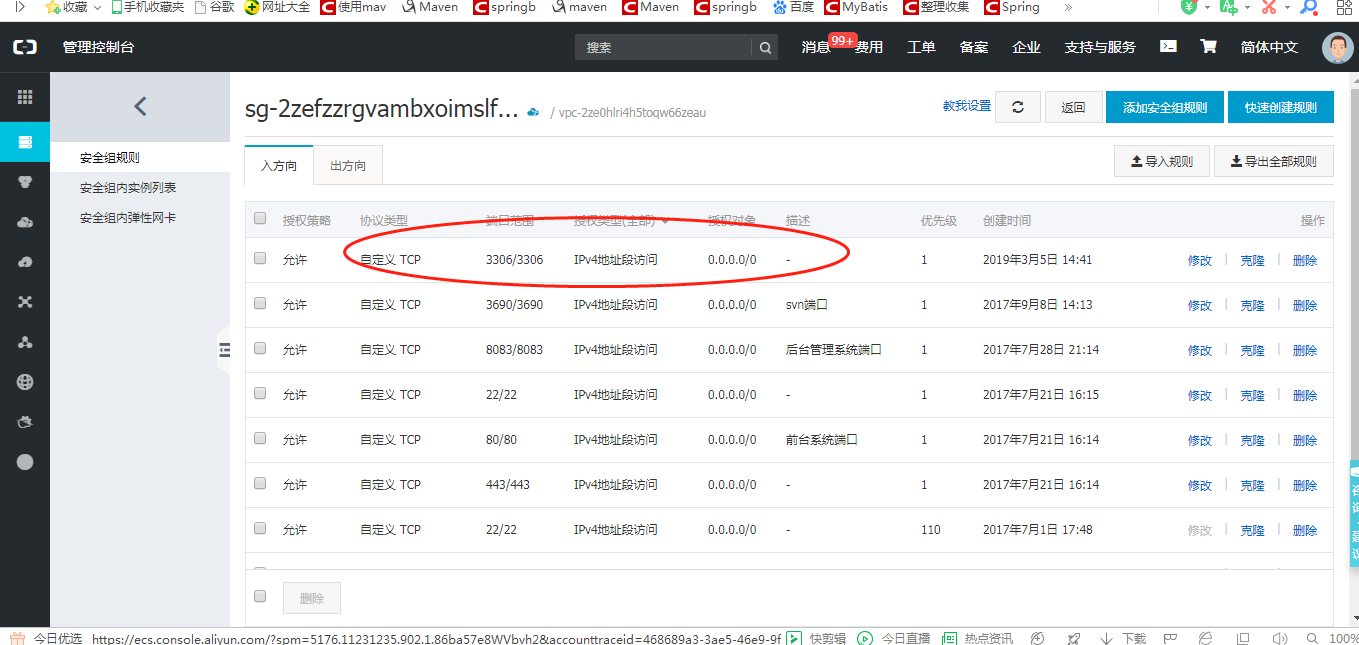
这地方也需要开启相关的端口,不然仅仅是linux开启防火墙不行
Linux安装MySQL遇到的问题的更多相关文章
- linux安装mysql后root无法登录 sql 无法登录
linux安装mysql后root无法登录 问题:[root@localhost mysql]# mysql -u root -pEnter password: ERROR 1045 (28000): ...
- linux安装mysql~~~mysql5.6.12
Linux安装mysql服务器 准备: MySQL-client-5.6.12-1.rhel5.i386.rpm MySQL-server-5.6.12-1.rhel5.i386.rpm 首先检查环境 ...
- linux安装mysql全纪录[包括yum和rpm安装,编码,远程连接以及大小写问题]
linux安装mysql全纪录[包括yum和rpm安装,编码,远程连接以及大小写问题] 一.查看mysql是否已经安装 使用“whereis mysql”命令来查看mysql安装路径: [root@h ...
- linux安装mysql服务分两种安装方法:
linux安装mysql服务分两种安装方法: ①源码安装,优点是安装包比较小,只有十多M,缺点是安装依赖的库多,安装编译时间长,安装步骤复杂容易出错: ②使用官方编译好的二进制文件安装,优点是安装速度 ...
- linux安装MySQL后输入mysql显示 ERROR 2002 (HY000): Can't connect to local MySQL server through socket
我是小白,大佬勿喷 *** linux安装MySQL后输入mysql显示 ERROR 2002 (HY000): Can't connect to local MySQL server through ...
- Linux 安装Mysql(图文教程)
原文:Linux 安装Mysql(图文教程) 版权声明:本文为博主原创文章,遵循CC 4.0 BY-SA版权协议,转载请附上原文出处链接和本声明. 本文链接:https://blog.csdn.net ...
- Linux 安装 MySQL 8 数据库(图文详细教程)
本教程手把手教你如何在 Linux 安装 MySQL 数据库,以 CentOS 7为例. 1. 下载并安装 MySQL 官方的 Yum Repository wget -i -c https://re ...
- linux 安装mysql数据库——yum安装法
mysql数据库有多种安装方式,本文只介绍在Linux服务器上最实用.最快捷的mysql server安装方法.一.Linux服务器yum安装(CentOS6.3 64位) 所有在服务器上执行的命令, ...
- 虚拟机下linux安装mysql,apache和php
由于腿伤了,卧床在家折腾下linux,尝试用虚拟机装mysql,apche和php.中间各种波折,装了好几天,觉得有些经验还是要记录下来,让自己别忘了:) 按照下面这篇文章的方法,基本可以顺利安装成功 ...
- 在linux安装mysql,并设置远程访问
1.查看系统有没有安装mysql. vpm -qa mysql 发现有删除:rpm -e mysql(rpm -e --nodeps mysql) 2.下载数据库 mysql-standard-5.0 ...
随机推荐
- 如何在python3.5环境下安装BeautifulSoup?
首先是安装: 1.到http://www.crummy.com/software/BeautifulSoup/网站上上下载 2.下载完成之后需要解压缩,假设放到D:/python下. 3.运行cmd, ...
- matplotlib-折线图、散点图
(一)折线图小结 1.设置图片大小(想要一个高清无码大图) # 图大小 plt.figure(figsize=(20, 8), dpi=80) 2.保存到本地 # 设置图片大小 plt.figure( ...
- ViewPager添加小圆点
ViewPager添加小圆点很简单,但是如果是网络图片可能就不太好做了,所以我这里给出一种方法,当然你也可以用其他的 1.主界面xml <?xml version="1.0" ...
- Django model中数据批量导入bulk_create()
在Django中需要向数据库中插入多条数据(list).使用如下方法,每次save()的时候都会访问一次数据库.导致性能问题: for i in resultlist: p = Account(nam ...
- php \r \n 和 <br/> \t
利用\r \n 和 <br/> \t做了个实验,话不多说,看代码就很清楚的知道
- 【运维技术】node项目使用strongloop进行部署相关教程
node项目使用strongloop进行部署相关教程 安装strongloop 下载安装node 解压到路径完成安装 使用软链方式配置环境变量 添加cnpm的淘宝镜像源 安装node-gyp的模块依赖 ...
- 20145312《网络对抗》Exp4 恶意代码分析
20145312<网络对抗>Exp4 恶意代码分析 问题回答 1.总结一下监控一个系统通常需要监控什么.用什么来监控. 监控一个系统通常需要监控这个系统的注册表,进程,开放端口,程序服务还 ...
- 20145204《Java程序设计》第10周学习总结
网络编程 网络编程:在两个或两个以上的设备(例如计算机)之间传输数据.程序员所作的事情就是把数据发送到指定的位置,或者接收到指定的数据,这个就是狭义的网络编程范畴.在发送和接收数据时,大部分的程序设计 ...
- SqlBulkCopy 批量导入数据 转换表字段类型
在使用SqlBulkCopy导入数据时,要有一个跟数据库里面同样的DataTable 要赋值表名 要求每个列跟数据库中列同名,并且列的类型要赋值跟数据库中列的类型对应的NET类型 要求数据库中为Nul ...
- bzoj 1799: [Ahoi2009]self 同类分布 数位dp
1799: [Ahoi2009]self 同类分布 Time Limit: 50 Sec Memory Limit: 64 MB[Submit][Status][Discuss] Descripti ...