
DEP脚本
新方式添加表格监听,解决扩展脚本添加的监听无法移除的问题,目的是跳过methodName参数

最近和部门大神在调试的时候,发现一个神奇的现象。使用脚本给一个表格增加了监听,脚本如下:

pluginCtx.getKDTable("kdtEntrys").addKDTEditListener(function(event,methodName){

        if(methodName == "editStopped")

        {

            com.kingdee.eas.util.client.MsgBox.showInfo("$$$$$EditStopped");

        }

    });

 然后业务代码中在提交后有移除表格监听的动作。居然报错了,

var obj = {

          editStarting : function (e)

         {

              com.kingdee.eas.util.client.MsgBox.showInfo("editStarting");

         } ,

          editStarted : function (e)

         {

              com.kingdee.eas.util.client.MsgBox.showInfo("editStarted");

         } ,

          editValueChanged : function (e)

         {

              com.kingdee.eas.util.client.MsgBox.showInfo("editValueChanged");

         } ,

          editStopping : function (e)

         {

              com.kingdee.eas.util.client.MsgBox.showInfo("editStopping");

         } ,

          editStopped : function (e)

         {

              com.kingdee.eas.util.client.MsgBox.showInfo("editStopped");

         } ,

          editCanceled : function (e)

         {

              com.kingdee.eas.util.client.MsgBox.showInfo("editCanceled");

         }

       } ;

       kdtable.addKDTEditListener( new com.kingdee.bos.ctrl.kdf.table.event.KDTEditListener(obj));
使用DEP给采购入库单的分录物料编码F7增加值改变监听时,使用Dep提供的表格表格编辑监听事件方式进行业务逻辑处理,通过F7物料编码值改变,查询并携带给物料新增F7的值填充到采购入库单分录的字符串字段中。
注意:因为使用表格值改变事件(table.addKDTPropertyChangeListener(function(event,methodName)),保存单据时,出现了点击保存按钮无任何反应,但客户端日志中会提示 去掉表格监听事件出错。此问题未解决,因此,采用上面的事件方式进行监听。
var easImporter = JavaImporter();

easImporter.importPackage(Packages.com.kingdee.bos.dao.query);

easImporter.importPackage(Packages.com.kingdee.eas.util.client);

easImporter.importPackage(Packages.com.kingdee.eas.basedata.master.material);

with(easImporter){

    var table = pluginCtx.getKDTable("detailTable");

    var obj = {

          editStopped : function (e)

         {

              com.kingdee.eas.util.client.MsgBox.showInfo("editStopped");

              var row = e.getRowIndex();

               var col = e.getColIndex();

               if(col==2){

                // 获取物料编码F7的MaterialInfo

                var material =  table.getRow(row).getCell("materialNum").getValue();

                var sql = "select material.fname_l2 as mName,cp.fname_l2 as cpName, bizType.fname_l2 as btName, levy.fname_l2 as leName from T_BD_Material material left join CT_CUS_Levy levy on levy.fid = material.cflevyid left join CT_CUS_CarPrice cp on cp.fid = material.cfcarpriceid left join CT_CUS_BizType bizType  on bizType.fid = material.cfbiztypeid where material.fid = '"+ material.getId()+"'";

                var se = new SQLExecutor(sql);

                var rs = se.executeSQL();

                var leName = "",cpName = "",btName = "";

                while(rs.next()){

                    // 税款

                    if(rs.getString("leName") != null){

                        leName = rs.getString("leName").toString();

                    }

                    // 车款

                    if(rs.getString("cpName") != null){

                        cpName = rs.getString("cpName").toString();

                    }

                    // 业务类型

                    if(rs.getString("btName") != null){

                        btName = rs.getString("btName").toString();

                    }

                }

               //给kdtable 测试单元格赋值

               table.getRow(row).getCell("levy").setValue(leName);

               table.getRow(row).getCell("carPrice").setValue(cpName);

               table.getRow(row).getCell("bizType").setValue(btName);

            }

         }

       };

       table.addKDTEditListener( new com.kingdee.bos.ctrl.kdf.table.event.KDTEditListener(obj));

}
批量更新序时簿中选中行数据的字段值
var easImporter = JavaImporter();

easImporter.importPackage(Packages.com.kingdee.bos.dao.query);

easImporter.importPackage(Packages.com.kingdee.eas.util.client);

easImporter.importPackage(Packages.com.kingdee.eas.fm.common);

with(easImporter){

    //批量修改物料的监管状态-监管中

    var tblMain = pluginCtx.getKDTable("tblMain");

    var size = tblMain.getSelectManager().size();

    for(var i = 0; i < size; i++){

        var block = tblMain.getSelectManager().get(i);

            for (var j = block.getTop(); j <= block.getBottom(); j++) {

                    var cellstr = tblMain.getRow(j).getCell("id");

                    // 选中行的id

                    var materialId =  cellstr.getValue();

                    //获取监管基础资料中 监管中  fid

                    //此处不再进行查询FID,直接写死FID

                    var sid = 'dUEz3FjuG0OZ/0CDJXh0zGPRCMw=';

                    //修改该物料的监管状态

                    var sql = "UPDATE T_BD_Material SET cfcontrolstatusid  = '" + sid + "'   WHERE  FID = '" + materialId + "'";

                   FMIsqlFacadeFactory.getRemoteInstance().executeSql(sql);

                }

        }

}
F7字段添加过滤
var easImporter = JavaImporter();

easImporter.importPackage(Packages.com.kingdee.bos.ctrl.extendcontrols);

easImporter.importPackage(Packages.com.kingdee.bos.metadata.entity);

easImporter.importPackage(Packages.com.kingdee.bos.metadata.query.util);

easImporter.importPackage(Packages.com.kingdee.bos.util);

with(easImporter){

    var prmtSQBM = pluginCtx.getKDBizPromptBox("prmtSQBM");

    var filterInfo = new FilterInfo();

    var entityViewInfo = new EntityViewInfo();

    var company = pluginCtx.getUIContext().get("sysContext").getCurrentFIUnit();

    filterInfo.getFilterItems().add(new FilterItemInfo("CU.id",company.get("Id"),CompareType.EQUALS));

    entityViewInfo.setFilter(filterInfo);

    prmtSQBM.setEntityViewInfo(entityViewInfo);

}
弹出界面并传输选中行信息给界面类处理逻辑
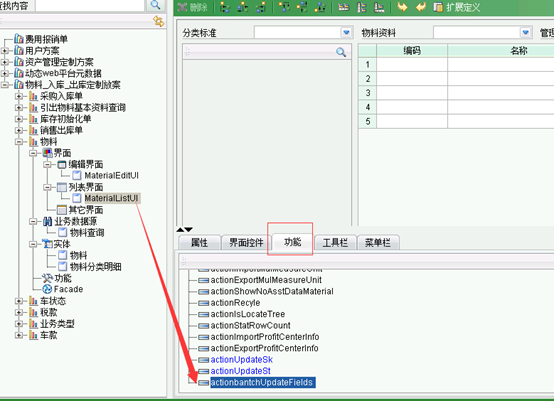
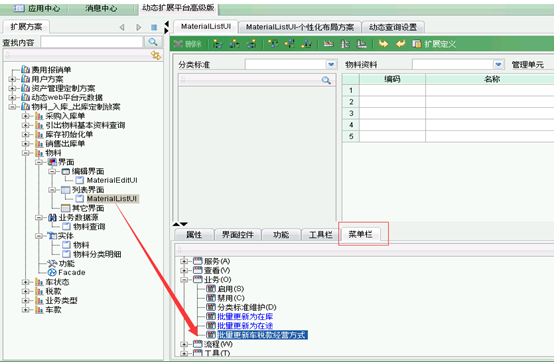
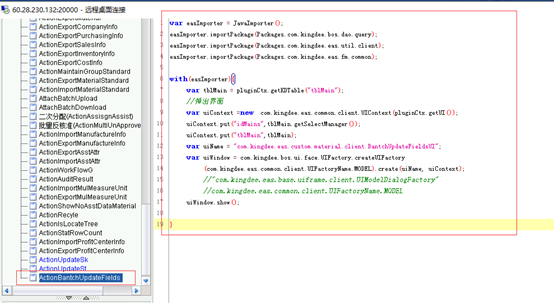
dep:
var easImporter = JavaImporter();

easImporter.importPackage(Packages.com.kingdee.bos.dao.query);

easImporter.importPackage(Packages.com.kingdee.eas.util.client);

easImporter.importPackage(Packages.com.kingdee.eas.fm.common);

with(easImporter){

    var tblMain = pluginCtx.getKDTable("tblMain");

    //弹出界面

    var uiContext =new  com.kingdee.eas.common.client.UIContext(pluginCtx.getUI());
  //选中行信息

    uiContext.put("idMains",tblMain.getSelectManager());

    uiContext.put("tblMain",tblMain);

    var uiName = "com.kingdee.eas.custom.material.client.BantchUpdateFieldsUI";

    var uiWindow = com.kingdee.bos.ui.face.UIFactory.createUIFactory

        (com.kingdee.eas.common.client.UIFactoryName.MODEL).create(uiName, uiContext);

        //"com.kingdee.eas.base.uiframe.client.UIModelDialogFactory"

        //com.kingdee.eas.common.client.UIFactoryName.MODEL

    uiWindow.show();

}
界面:BantchUpdateFieldsUICTEx.java
 package com.kingdee.eas.custom.material.client;

 import java.awt.event.ActionEvent;

 import java.sql.SQLException;

 import java.util.ArrayList;

 import org.apache.commons.lang.StringUtils;

 import org.apache.log4j.Logger;

 import org.mozilla.javascript.edu.emory.mathcs.backport.java.util.Arrays;

 import com.kingdee.bos.BOSException;

 import com.kingdee.bos.ctrl.kdf.table.KDTSelectBlock;

 import com.kingdee.bos.ctrl.kdf.table.KDTSelectManager;

 import com.kingdee.bos.ctrl.kdf.table.KDTable;

 import com.kingdee.bos.dao.query.SQLExecutor;

 import com.kingdee.bos.ui.face.CoreUIObject;

 import com.kingdee.eas.common.EASBizException;

 import com.kingdee.eas.fm.common.FMIsqlFacadeFactory;

 import com.kingdee.eas.util.SysUtil;

 import com.kingdee.eas.util.client.MsgBox;

 import com.kingdee.jdbc.rowset.IRowSet;

 import com.kingdee.portal.biz.common.exception.BizException;

 /**

  * 批量更新字段(车款 税款 经营方式)

  * @desc 批量更新界面

  * @author yacong_liu

  *

  */

 public class BantchUpdateFieldsUICTEx extends BantchUpdateFieldsUI {

     private static final Logger logger = CoreUIObject

             .getLogger(BantchUpdateFieldsUICTEx.class);

     private static final ArrayList<String> materialIds = new ArrayList<String>(

             8);

     // 需要更新的字段F7类型

     private static final String[] types = { "车款", "税款", "经营方式" };

     private String carPriceId = "";

     private String levyId = "";

     private String bizTypeId = "";

     public BantchUpdateFieldsUICTEx() throws Exception {

         super();

     }

     /**

      * 取消按钮-关闭当前窗口

      */

     @Override

     public void actionBtnCancel_actionPerformed(ActionEvent e) throws Exception {

         super.actionBtnCancel_actionPerformed(e);

         // 关闭当前窗口

         getUIWindow().close();

     }

     /**

      * 确定按钮-更新数据

      */

     @Override

     public void actionBtnSubmit_actionPerformed(ActionEvent e) throws Exception {

         super.actionBtnSubmit_actionPerformed(e);

         getValues();

         if(updateFields()){

             MsgBox.showInfo("更新数据已完成!");

             Thread.sleep(2000);

             getUIWindow().close();

         }

     }

     /**

      * 获取值

      */

     private void getValues() {

         // 车款

         String carPrice;

         // 税款

         String levy;

         // 经营方式

         String bizType;

         if (null != this.carPrice.getSelectedItem()

                 && !"无".equals(this.carPrice.getSelectedItem().toString())) {

             carPrice = this.carPrice.getSelectedItem().toString();

             carPriceId = getUpdateFieldsIdByItemName(carPrice, "车款");

         }

         if (null != this.levy.getSelectedItem()

                 && !"无".equals(this.levy.getSelectedItem().toString())) {

             levy = this.levy.getSelectedItem().toString();

             levyId = getUpdateFieldsIdByItemName(levy, "税款");

         }

         if (null != this.bizTypes.getSelectedItem()

                 && !"无".equals(this.bizTypes.getSelectedItem().toString())) {

             bizType = this.bizTypes.getSelectedItem().toString();

             bizTypeId = getUpdateFieldsIdByItemName(bizType, "经营方式");

         }

     }

     @Override

     public void onLoad() throws Exception {

         materialIds.clear();

         this.btn_cancel.setEnabled(true);

         KDTSelectManager sManager = (KDTSelectManager) getUIContext().get(

                 "idMains"); //dep传来的选中行信息

         KDTable tblMain = (KDTable) getUIContext().get("tblMain");

         for (int i = 0; i < sManager.size(); i++) {

             KDTSelectBlock block = sManager.get(i);

             for (int j = block.getTop(); j <= block.getBottom(); j++) {

                 // 选中行的id

                 if (null != tblMain.getRow(j).getCell("id")) {

                     String id = (String) tblMain.getRow(j).getCell("id")

                             .getValue();

                     materialIds.add(id);

                 }

             }

         }

         logger.info("本次批量更新的物料内码:"+materialIds.toString());

         super.onLoad();

     }

     /**

      * 更新 车款 税款 经营方式

      *

      * @throws BizException

      *

      * @throws EASBizException

      * @throws BOSException

      */

     private boolean updateFields() {

         if (materialIds.size() <= 0) {

             return false;

         }

         if(StringUtils.isEmpty(carPriceId)&&StringUtils.isEmpty(levyId)&&StringUtils.isEmpty(bizTypeId)){

             // 没有选择任何字段

             MsgBox.showWarning("您尚未选择更新的字段内容!");

             return false;

         }

         try {

             String setSql = setFieldsSql();

             for (String materialId : materialIds) {

                 String updateSql = "update t_bd_material set " + setSql

                         + " where fid = '" + materialId + "'";

                 logger.info("***************更新SQL: " + updateSql);

                 FMIsqlFacadeFactory.getRemoteInstance().executeSql(updateSql);

             }

             return true;

         } catch (EASBizException e) {

             logger.error(" 更新选中字段数据出错,请联系管理员!" + e);

             MsgBox.showError("更新选中字段数据出错,请联系管理员");

             SysUtil.abort(e);

         } catch (BOSException e) {

             logger.error(" 更新选中字段数据出错,请联系管理员!" + e);

             MsgBox.showError("更新选中字段数据出错,请联系管理员");

             SysUtil.abort(e);

         }

         return false;

     }

     /**

      * 需要更新的字段

      *

      * @return

      */

     private String setFieldsSql() {

         ArrayList<String> ids = new ArrayList<String>(3);

         ids.clear();

         if (StringUtils.isNotEmpty(bizTypeId)) {

             ids.add(bizTypeId);

         }

         if (StringUtils.isNotEmpty(carPriceId)) {

             ids.add(carPriceId);

         }

         if (StringUtils.isNotEmpty(levyId)) {

             ids.add(levyId);

         }

         StringBuilder sb = new StringBuilder();

         sb.setLength(0);

         if(StringUtils.isNotEmpty(carPriceId) && ids.size() == 1){

             //只选择了车款

             sb.append(" cfcarpriceid = '" + carPriceId + "'");

         }else if(StringUtils.isNotEmpty(carPriceId) && ids.size() > 1){

             // 除了车款 还有别的字段

             sb.append(" cfcarpriceid = '" + carPriceId + "',");

         }

         if(StringUtils.isNotEmpty(levyId) && ids.size() == 1){

             //只选了税款

             sb.append(" cflevyid = '" + levyId + "'");

         }else if(StringUtils.isNotEmpty(levyId) && StringUtils.isNotEmpty(bizTypeId)){

             //选了税款 和 经营方式

             sb.append(" cflevyid = '" + levyId + "',");

         }else if(StringUtils.isNotEmpty(levyId) && StringUtils.isEmpty(bizTypeId)){

             //选了税款 没有 经营方式

             sb.append(" cflevyid = '" + levyId + "'");

         }

         if(StringUtils.isNotEmpty(bizTypeId)){

             //选了 经营方式

             sb.append(" cfbiztypeid = '" + bizTypeId + "'");

         }

         return sb.toString();

     }

     /**

      * 根据下拉框选中的项目名称获取其对应的fid

      *

      * @param name

      *            下拉框选中项名称

      * @return FID

      */

     private String getUpdateFieldsIdByItemName(String name, String type) {

         if (StringUtils.isEmpty(name) || StringUtils.isEmpty(type)) {

             return null;

         }

         String sql = "select c.fid from " + getTableName(type)

                 + " c where c.fname_l2 = '" + name + "'";

         try {

             SQLExecutor sqe = new SQLExecutor(sql);

             IRowSet rowSet = sqe.executeSQL();

             while (rowSet.next()) {

                 return rowSet.getString("fid");

             }

         } catch (BOSException e) {

             logger.error("获取" + type + " Fid 失败!SQL执行器获取失败!" + e);

             MsgBox.showError("获取" + type + " 内码FID失败!SQL执行器获取失败!请联系管理员" + e);

         } catch (SQLException e) {

             logger.error("获取" + type + " Fid 失败!执行SQL失败!" + e);

             MsgBox.showError("获取" + type + " 内码FID失败!执行SQL失败!请联系管理员" + e);

         }

         return null;

     }

     /**

      * 获取表名

      *

      * @param F7Type

      * @return

      */

     private String getTableName(String F7Type) {

         if (!Arrays.asList(types).contains(F7Type)) {

             logger.warn("不存在该F7类型!" + F7Type);

             return null;

         }

         if (types[0].equals(F7Type)) {

             // 车款

             return "ct_su_carprice";

         }

         if (types[1].equals(F7Type)) {

             // 税款

             return "ct_su_levy";

         }

         if (types[2].equals(F7Type)) {

             // 经营方式

             return "ct_su_biztype";

         }

         return null;

     }

     /**

      * 根据车款枚举名称获取车款id (重构 不在使用 请使用 getUpdateFieldsIdByItemName(String name,

      * String type))

      *

      * @param name

      * @return

      */

     @Deprecated

     private String getCarPriceIdByName(String name) {

         if (StringUtils.isEmpty(name)) {

             return null;

         }

         String sql = "select c.fid from ct_su_carprice c where c.fname_l2 = '"

                 + name + "'";

         try {

             SQLExecutor sqe = new SQLExecutor(sql);

             IRowSet rowSet = sqe.executeSQL();

             while (rowSet.next()) {

                 return rowSet.getString("fid");

             }

         } catch (BOSException e) {

             logger.error("获取车款id 失败!SQL执行器获取失败!" + e);

             MsgBox.showError("获取车款内码FID失败!SQL执行器获取失败!请联系管理员" + e);

         } catch (SQLException e) {

             logger.error("获取车款id 失败!执行SQL失败!" + e);

             MsgBox.showError("获取车款内码FID失败!执行SQL失败!请联系管理员" + e);

         }

         return null;

     }

     /**

      * 根据税款枚举名称获取税款id (重构 不再使用 请使用 getUpdateFieldsIdByItemName(String name,

      * String type))

      *

      * @param name

      * @return

      */

     @Deprecated

     private String getLevyIdByName(String name) {

         if (StringUtils.isEmpty(name)) {

             return null;

         }

         String sql = "select c.fid from ct_su_levy c where c.fname_l2 = '"

                 + name + "'";

         try {

             SQLExecutor sqe = new SQLExecutor(sql);

             IRowSet rowSet = sqe.executeSQL();

             while (rowSet.next()) {

                 return rowSet.getString("fid");

             }

         } catch (BOSException e) {

             e.printStackTrace();

             logger.error("获取税款id 失败!" + e);

         } catch (SQLException e) {

             e.printStackTrace();

             logger.error("获取税款id 失败!" + e);

         }

         return null;

     }

     /**

      * 根据经营方式枚举名称获取经营方式id (重构 不再使用 请使用 getUpdateFieldsIdByItemName(String name,

      * String type))

      *

      * @param name

      * @return

      */

     @Deprecated

     private String getBizTypeIdByName(String name) {

         if (StringUtils.isEmpty(name)) {

             return null;

         }

         String sql = "select c.fid from ct_su_biztype c where c.fname_l2 = '"

                 + name + "'";

         try {

             SQLExecutor sqe = new SQLExecutor(sql);

             IRowSet rowSet = sqe.executeSQL();

             while (rowSet.next()) {

                 return rowSet.getString("fid");

             }

         } catch (BOSException e) {

             e.printStackTrace();

             logger.error("获取经营方式id 失败!" + e);

         } catch (SQLException e) {

             e.printStackTrace();

             logger.error("获取经营方式id 失败!" + e);

         }

         return null;

     }

 }
DEP脚本的更多相关文章
- eas之dep的前置脚本和后置脚本
dep的前置脚本和后置脚本,什么时候写,是这样解释的: 前置脚本是在方法前执行,后置脚本是在方法后执行 1.比如保存扩展,如果你要在保存前校验某个字段的值,你要在前置脚本中写,如果要保存后 ...
- busybox rootfs 启动脚本分析(二)
上次分析了busybox的启动脚本,这次分析一下init.d中一些脚本的内容. 参考链接 http://www.cnblogs.com/helloworldtoyou/p/6169678.html h ...
- loadRunner录制脚本常见问题及解决方法
1.是用IE9录制IE浏览器异常关闭 系统:win7 LR:11 浏览器:IE9 lr使用IE9录制脚本时,浏览器异常关闭且lr报the recording of the application wa ...
- 【原创】loadrunner12.53 录制脚本时 打不开网页或者打开网页慢?
问题描述: 之前刚装12.5版本时候,用 WebTours测试过,应用程序选择自己本地IE浏览器.exe程序,输入url地址就可以成功录制了 . 但是由于公司网络配置环境改变了(猜测),现 ...
- LR11录制脚本时打不开浏览器,如何解决?
请教一下各位大神,我安装的LR11,在录制脚本的时候打不开浏览器,已经试过了网上的方法还是不行,以下是搜到的方法: 无法打开IE的主要原因是,LR的注册信息被修改了,所以无法找到IE的路径. 解决这个 ...
- 金山毒霸和Chrome浏览器植入脚本导致网页报错
1 (function(win, undefined) { var SELECTORS = transformSelector; function insertTemplate(callback) { ...
- Windows Server 2016 桌面环境的自动配置脚本
除非学习要求,还是建议使用Windows 10 LTSB 2016或其他桌面系统. github:https://github.com/m2nlight/WindowsServerToWindowsD ...
- safeseh+dep保护绕过
[文章作者] :h_one [漏洞程序名称]:mplayer.exe [漏洞类型] :缓冲区溢出 [保护方式] :safeseh+dep [操作平台] ...
- [转]Metasploit的meterpreter黑客脚本列表
原文地址: 摘要: Metasploit的框架是一个令人难以置信的黑客攻击和渗透测试工具,每一个黑客称职的应该是熟悉和有能力的. 在上一篇文章中,我提供了你的 meterpreter 命令列表.这些命 ...
随机推荐
- JavaScript学习记录总结(八)——全选、反选
<!DOCTYPE html><html><head><title>checkboxs.html</title> <meta name ...
- bzoj 4712: 洪水
[权限题][https://www.lydsy.com/JudgeOnline/status.php?problem_id=4712&jresult=4] 这道动态\(dp\)终于不是独立集/ ...
- [转]PowerDesigner使用常见问题锦集
1. 附加:PowerDesigner 的调色板(Palette)快捷工具栏不见了,怎么重新打开,找回来呢 上网搜索了一下”powerdesigner 图形工具栏”,找到了找回PowerDesigne ...
- 如何异步的处理restful服务(基础)
1.使用Runnable 2.使用DeferredResult 3.异步处理的一些配置 正常请求方式 package com.nxz.controller; import lombok.extern. ...
- wepy build 错误 [Error] 未发现相关 less 编译器配置,请检查wepy.config.js文件。
[Error] 未发现相关 less 编译器配置,请检查wepy.config.js文件. 缺少less包,npm install less -d
- 网络测量中基于Sketch方法的调查
目录 LD Sketch SeqHash What's New reversible sketch Count-Sketch和Count-min sketch Diamond Sketch: Accu ...
- 查看apache当前并发访问数和进程数
1.查看apache当前并发访问数: netstat -an | grep ESTABLISHED | wc -l 对比httpd.conf中MaxClients的数字差距多少. 2.查看有多少个进程 ...
- EJB到底是什么?---通俗易懂,简单明了
EJB到底是什么? 1. 我们不禁要问,什么是"服务集群"?什么是"企业级开发"? 既然说了EJB 是为了"服务集群"和"企业 ...
- java通过IO流复制文件
package kimoji; import java.io.*; public class FileTest { public static void main(String[] args) thr ...
- 再论C++引用(reference)类型
很多C++初学者搞不清楚C++引用类型,不知有什么用,所以也不知怎么用.一个问题令人迷惑,不是读者有问题,而是教科书有问题. 和多数初学者一样,笔者在初学C++时,关于引用类型,教科书上也是如下表所述 ...