
springboot中的任务(异步任务--定时任务--邮件任务)
1.pom文件
<?xml version="1.0" encoding="UTF-8"?>

<project xmlns="http://maven.apache.org/POM/4.0.0" xmlns:xsi="http://www.w3.org/2001/XMLSchema-instance"

         xsi:schemaLocation="http://maven.apache.org/POM/4.0.0 http://maven.apache.org/xsd/maven-4.0.0.xsd">

    <modelVersion>4.0.0</modelVersion>

    <groupId>com.zy</groupId>

    <artifactId>spring-boot-task-demo</artifactId>

    <version>0.0.1-SNAPSHOT</version>

    <packaging>jar</packaging>

    <name>spring-boot-task-demo</name>

    <description>Demo project for Spring Boot</description>

    <parent>

        <groupId>org.springframework.boot</groupId>

        <artifactId>spring-boot-starter-parent</artifactId>

        <version>2.0.4.RELEASE</version>

        <relativePath/> <!-- lookup parent from repository -->

    </parent>

    <properties>

        <project.build.sourceEncoding>UTF-8</project.build.sourceEncoding>

        <project.reporting.outputEncoding>UTF-8</project.reporting.outputEncoding>

        <java.version>1.8</java.version>

    </properties>

    <dependencies>

        <dependency>

            <groupId>org.springframework.boot</groupId>

            <artifactId>spring-boot-starter-web</artifactId>

        </dependency>

        <dependency>

            <groupId>org.springframework.boot</groupId>

            <artifactId>spring-boot-starter-test</artifactId>

            <scope>test</scope>

        </dependency>

    </dependencies>

    <build>

        <plugins>

            <plugin>

                <groupId>org.springframework.boot</groupId>

                <artifactId>spring-boot-maven-plugin</artifactId>

            </plugin>

        </plugins>

    </build>

</project>
2.启动类
package com.zy;

import org.springframework.boot.SpringApplication;

import org.springframework.boot.autoconfigure.SpringBootApplication;

import org.springframework.scheduling.annotation.EnableAsync;

@SpringBootApplication

// 支持异步线程,需要异步调用的service层方法上面加上@Async注解,二者联合,可起作用

@EnableAsync
//开启基于注解的定时任务
@EnableScheduling
public class SpringBootTaskDemoApplication { public static void main(String[] args) { SpringApplication.run(SpringBootTaskDemoApplication.class, args); } }
3.controller测试类
package com.zy.controller;

import com.zy.service.AsyncServiceImpl;

import org.springframework.beans.factory.annotation.Autowired;

import org.springframework.web.bind.annotation.RequestMapping;

import org.springframework.web.bind.annotation.RestController;

@RequestMapping("/task/")

@RestController

public class AsyncController {

    @Autowired

    private AsyncServiceImpl asyncService;

    @RequestMapping("/async")

    public Object async(String name){

        return name;

    }

}
4.service层
4.1异步任务实现类
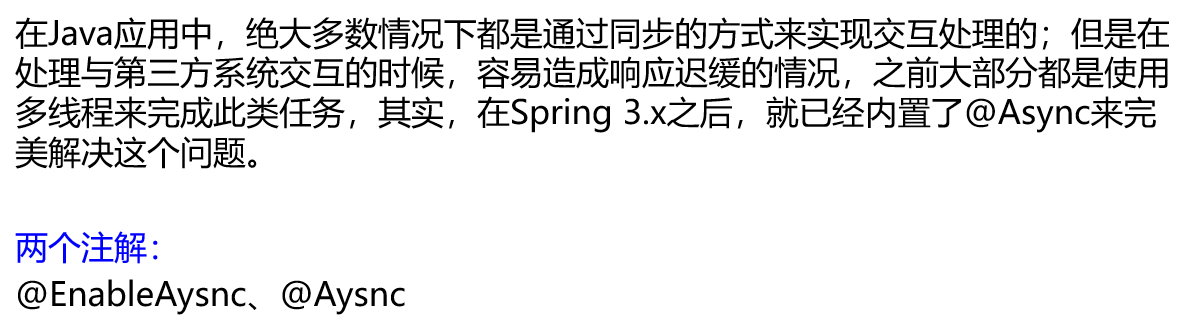
package com.zy.service;

import org.springframework.scheduling.annotation.Async;

import org.springframework.stereotype.Service;

@Service("asyncService")

public class AsyncServiceImpl {

    @Async

    public String async(String name){

        try {

            Thread.sleep(5000);

        } catch (InterruptedException e) {

            e.printStackTrace();

        }

        return "good morning:" + name;

    }

}
4.2定时任务实现类
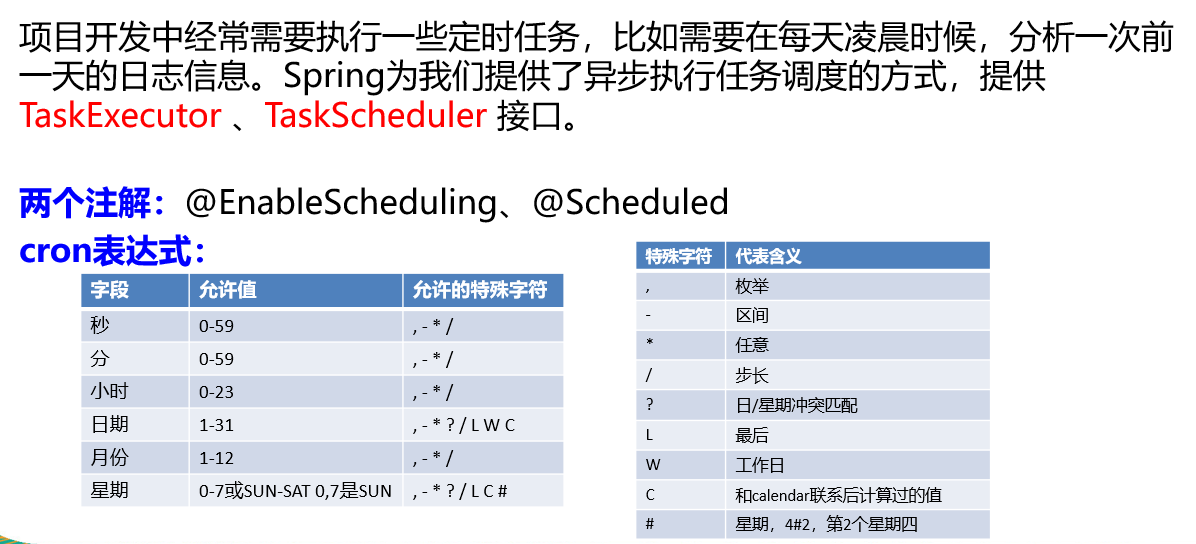
package com.zy.service;

import org.springframework.scheduling.annotation.Scheduled;

import org.springframework.stereotype.Service;

@Service

public class ScheduledServiceImpl {

    /**

     * second(秒), minute(分), hour(时), day of month(日), month(月), day of week(周几).

     * 0 * * * * MON-FRI

     *  【0 0/5 14,18 * * ?】 每天14点整,和18点整,每隔5分钟执行一次

     *  【0 15 10 ? * 1-6】 每个月的周一至周六10:15分执行一次

     *  【0 0 2 ? * 6L】每个月的最后一个周六凌晨2点执行一次

     *  【0 0 2 LW * ?】每个月的最后一个工作日凌晨2点执行一次

     *  【0 0 2-4 ? * 1#1】每个月的第一个周一凌晨2点到4点期间,每个整点都执行一次;

     */

    // @Scheduled(cron = "0 * * * * MON-SAT")

    //@Scheduled(cron = "0,1,2,3,4 * * * * MON-SAT")

    // @Scheduled(cron = "0-4 * * * * MON-SAT")

    @Scheduled(cron = "0/50 * * * * MON-SAT")  //每50秒执行一次

    public void saySchedule(){

        System.out.println("saySchedule");

    }

}
5.邮件任务配置
5.1在上述pom中引入javamail的依赖
<!-- javamail的starter -->

        <dependency>

            <groupId>org.springframework.boot</groupId>

            <artifactId>spring-boot-starter-mail</artifactId>

        </dependency>
5.2application.yaml配置
spring:

  mail:

    username: aaa@qq.com

#    授权码,而非真实密码

    password: bbb

    host: smtp.qq.com

#    配置安全连接

    properties: mail.smtp.ssl.enable=true
5.3测试类
package com.zy;

import org.junit.Test;

import org.junit.runner.RunWith;

import org.springframework.beans.factory.annotation.Autowired;

import org.springframework.boot.test.context.SpringBootTest;

import org.springframework.mail.SimpleMailMessage;

import org.springframework.mail.javamail.JavaMailSenderImpl;

import org.springframework.mail.javamail.MimeMessageHelper;

import org.springframework.test.context.junit4.SpringRunner;

import javax.mail.internet.MimeMessage;

import java.io.File;

@RunWith(SpringRunner.class)

@SpringBootTest

public class SpringBootTaskDemoApplicationTests {

    @Autowired

    JavaMailSenderImpl mailSender;

    // 简单邮件发送

    @Test

    public void contextLoads() {

        SimpleMailMessage message = new SimpleMailMessage();

        //邮件设置

        message.setSubject("通知-今晚开会");

        message.setText("今晚开会");

        message.setTo("ccc@163.com");

        message.setFrom("aaa@qq.com");

        mailSender.send(message);

    }

    @Test

    public void test02() throws  Exception{

        //1、创建一个复杂的消息邮件

        MimeMessage mimeMessage = mailSender.createMimeMessage();

        MimeMessageHelper helper = new MimeMessageHelper(mimeMessage, true);

        //邮件设置

        helper.setSubject("通知-今晚开会");

        helper.setText("<b style='color:red'>今天 7:30 开会</b>",true);

        helper.setTo("ccc@163.com");

        helper.setFrom("aaa@qq.com");

        //上传文件

        helper.addAttachment("1.jpg",new File("C:\\Users\\lfy\\Pictures\\Saved Pictures\\1.jpg"));

        helper.addAttachment("2.jpg",new File("C:\\Users\\lfy\\Pictures\\Saved Pictures\\2.jpg"));

        mailSender.send(mimeMessage);

    }

}
springboot中的任务(异步任务--定时任务--邮件任务)的更多相关文章
- springBoot中使用定时任务
简单示例 导入依赖 springBoot已经默认集成了定时任务的依赖,只需要引入基本的依赖就可以使用定时任务. <parent> <groupId>org.springfram ...
- 在SpringBoot中配置定时任务
前言 之前在spring中使用过定时任务,使用注解的方式配置很方便,在SpringBoot中的配置基本相同,只是原来在spring中的xml文件的一些配置需要改变,在SpringBoot中也非常简单. ...
- SpringBoot中并发定时任务的实现、动态定时任务的实现(看这一篇就够了)
原创不易,如需转载,请注明出处https://www.cnblogs.com/baixianlong/p/10659045.html,否则将追究法律责任!!! 一.在JAVA开发领域,目前可以通过以下 ...
- ActiveMQ入门系列之应用:Springboot+ActiveMQ+JavaMail实现异步邮件发送
现在邮件发送功能已经是几乎每个系统或网址必备的功能了,从用户注册的确认到找回密码再到消息提醒,这些功能普遍的会用到邮件发送功能.我们都买过火车票,买完后会有邮件提醒,有时候邮件并不是买完票立马就能收到 ...
- SpringBoot中异步请求和异步调用(看这一篇就够了)
原创不易,如需转载,请注明出处https://www.cnblogs.com/baixianlong/p/10661591.html,否则将追究法律责任!!! 一.SpringBoot中异步请求的使用 ...
- springBoot中实现自定义属性配置、实现异步调用、多环境配置
springBoot中其他相关: 1:springBoot中自定义参数: 1-1.自定义属性配置: 在application.properties中除了可以修改默认配置,我们还可以在这配置自定义的属性 ...
- springBoot中的定时任务
springBoot中的定时任务 1:在Spring Boot的主类中加入@EnableScheduling注解,启用定时任务的配置 2:新建ScheduledTasks任务类 : package c ...
- 定时任务-----Springboot中使用Scheduled做定时任务----http://www.cnblogs.com/lirenqing/p/6596557.html
Springboot中使用Scheduled做定时任务---http://www.cnblogs.com/lirenqing/p/6596557.html 已经验证的方案: pom文件加入依赖 < ...
- SpringBoot中执行定时任务
一:在SpringBoot中使用定时任务相当的简单.首先,我们在启动类中加入@EnableScheduling来开启定时任务. @SpringBootApplication @EnableSchedu ...
随机推荐
- 经典排序方法 python
数据的排序是在解决实际问题时经常用到的步骤,也是数据结构的考点之一,下面介绍10种经典的排序方法. 首先,排序方法可以大体分为插入排序.选择排序.交换排序.归并排序和桶排序四大类,其中,插入排序又分为 ...
- 第30课 C语言中的字符串
任意的软件开发过程都会涉及到字符串,字符串的概念: ca是字符数组,其他几个都是字符串,因为最后都有'\0'. 示例程序如下: #include <stdio.h> int main() ...
- 《DSP using MATLAB》Problem 2.7
1.代码: function [xe,xo,m] = evenodd_cv(x,n) % % Complex signal decomposition into even and odd parts ...
- noi.ac上的一套(假)NOI题
noi.ac上的一套(假)NOI题 本来想着可以刷点通过量的,结果发现好像并不是这样的. 整数 description 给你\(n,p\),要你求\(\sum_{k=1}^n\sum_{i=1}^k\ ...
- string,char*及CString类型的相互转换
首先先介绍一下什么是CString CString是MFC的字符串类,它不是基本类型,而是对字符串的封装,它是自适应的,在UNICODE环境下就是CStringW,在非UNICODE环境下就是CStr ...
- CCFlow工作流程起航
详细可参考SDK请假流程.但请假流程中定义的四个表单只是四个节点表单,首先要依靠访问指向这个请假流程,两种方法进入: 一.是在流程设计中点击运行: 二.先访问 WF\App\Simple\login. ...
- 试玩mpvue,用vue的开发模式开发微信小程序
mpvue,美团开源的vue文件转换成小程序的文件格式,今天玩了一下练练手 mpvue文档地址: http://mpvue.com/mpvue/#_1 暂时有几个点需要注意的: 1.新增页面需要重新启 ...
- Python 中单例模式 4种方法
假设我们在一个与数据库交互的系统中,需要进行数据库操作,那么我们就有必要了解单例模式,单例模式使得我们不用每次进行数据库的操作时都去链接数据库. 我将循环渐进,由浅入深的写一下单例模式示例. 实例1: ...
- WindowsServer2012显示计算机的方法
WindowsServer2012显示计算机的方法 (转) 消失的"计算机"?[这周九叔工作比较忙,还有其他琐事缠身,因此SystemCenter2012SP1系列的发布稍慢,抱歉 ...
- 使用anaconda安装tensorflow (windows10环境)
版权声明:勤学 修德 明辨 笃实 - CSDN周雄伟 https://blog.csdn.net/ebzxw/article/details/80701613 已有环境:python3.7.1 ana ...