
Kubernetes的UI界面Kubernetes Dashboard的搭建
1、搭建准备
2、搭建过程
2.1、在master节点上创建kubernetes-dashboard.yaml
cd /etc/kubernetes

vim kubernetes-dashboard.yaml

# Copyright 2015 Google Inc. All Rights Reserved.

#

# Licensed under the Apache License, Version 2.0 (the "License");

# you may not use this file except in compliance with the License.

# You may obtain a copy of the License at

#

#     http://www.apache.org/licenses/LICENSE-2.0

#

# Unless required by applicable law or agreed to in writing, software

# distributed under the License is distributed on an "AS IS" BASIS,

# WITHOUT WARRANTIES OR CONDITIONS OF ANY KIND, either express or implied.

# See the License for the specific language governing permissions and

# limitations under the License.

# Configuration to deploy release version of the Dashboard UI.

#

# Example usage: kubectl create -f <this_file>

kind: Deployment

apiVersion: extensions/v1beta1

metadata:

  labels:

    app: kubernetes-dashboard

    version: v1.1.1

  name: kubernetes-dashboard

  namespace: kube-system

spec:

  replicas: 1

  selector:

    matchLabels:

      app: kubernetes-dashboard

  template:

    metadata:

      labels:

        app: kubernetes-dashboard

    spec:

      containers:

      - name: kubernetes-dashboard

        image: daocloud.io/minunix/kubernetes-dashboard-amd64:v1.1.1

        imagePullPolicy: Always

        ports:

        - containerPort: 9090

          protocol: TCP

        args:

          # Uncomment the following line to manually specify Kubernetes API server Host

          # If not specified, Dashboard will attempt to auto discover the API server and connect

          # to it. Uncomment only if the default does not work.

        - --apiserver-host=http://192.168.44.60:8080

        livenessProbe:

          httpGet:

            path: /

            port: 9090

          initialDelaySeconds: 30

          timeoutSeconds: 30

---

kind: Service

apiVersion: v1

metadata:

  labels:

    app: kubernetes-dashboard

  name: kubernetes-dashboard

  namespace: kube-system

spec:

  type: NodePort

  ports:

  - port: 80

    targetPort: 9090

  selector:

    app: kubernetes-dashboard
2.2、下载pod-infrastructure镜像(每个节点上都需要)
上篇文章中/etc/kubernetes/kubelet文件配置中,有一项配置需要docker的registry.access.redhat.com/rhel7/pod-infrastructure:latest镜像,所以我们先pull下来
先yum安装rhsm
yum install *rhsm* -y
然后下载镜像
docker pull registry.access.redhat.com/rhel7/pod-infrastructure:latest
如果执行上一步报错,就执行以下两步,生成/etc/rhsm/ca/redhat-uep.pem这个文件,然后再执行上一步
wget http://mirror.centos.org/centos/7/os/x86_64/Packages/python-rhsm-certificates-1.19.10-1.el7_4.x86_64.rpm

rpm2cpio python-rhsm-certificates-1.19.10-1.el7_4.x86_64.rpm | cpio -iv --to-stdout ./etc/rhsm/ca/redhat-uep.pem | tee /etc/rhsm/ca/redhat-uep.pem
2.3、创建Kubernetes Dashboard
在master节点上执行
[root@k8s-master kubernetes]# kubectl create -f kubernetes-dashboard.yaml
执行以下命令,查看是否成功
[root@k8s-master kubernetes]# kubectl get pods --all-namespaces

NAMESPACE     NAME                                   READY     STATUS    RESTARTS   AGE

kube-system   kubernetes-dashboard-878342739-f8nhb   1/1       Running   0          1h
如果上面的status为running,则成功,如果不是的话就需要查看详细信息,看是哪里出错
[root@k8s-master kubernetes]# kubectl describe pods kubernetes-dashboard-878342739-f8nhb --namespace="kube-system"
2.4、访问UI界面
http://k8s-master:8080/ui
可能会出现以下错误,页面上报错
Error: 'dial tcp 172.17.78.2:9090: getsockopt: connection timed out'

Trying to reach: 'http://172.17.78.2:9090/'
如果出现以上错误,执行以下命令(每台机器都执行一遍)
iptables -P INPUT ACCEPT

iptables -P FORWARD ACCEPT

iptables -F

iptables -L -n
然后再访问UI界面
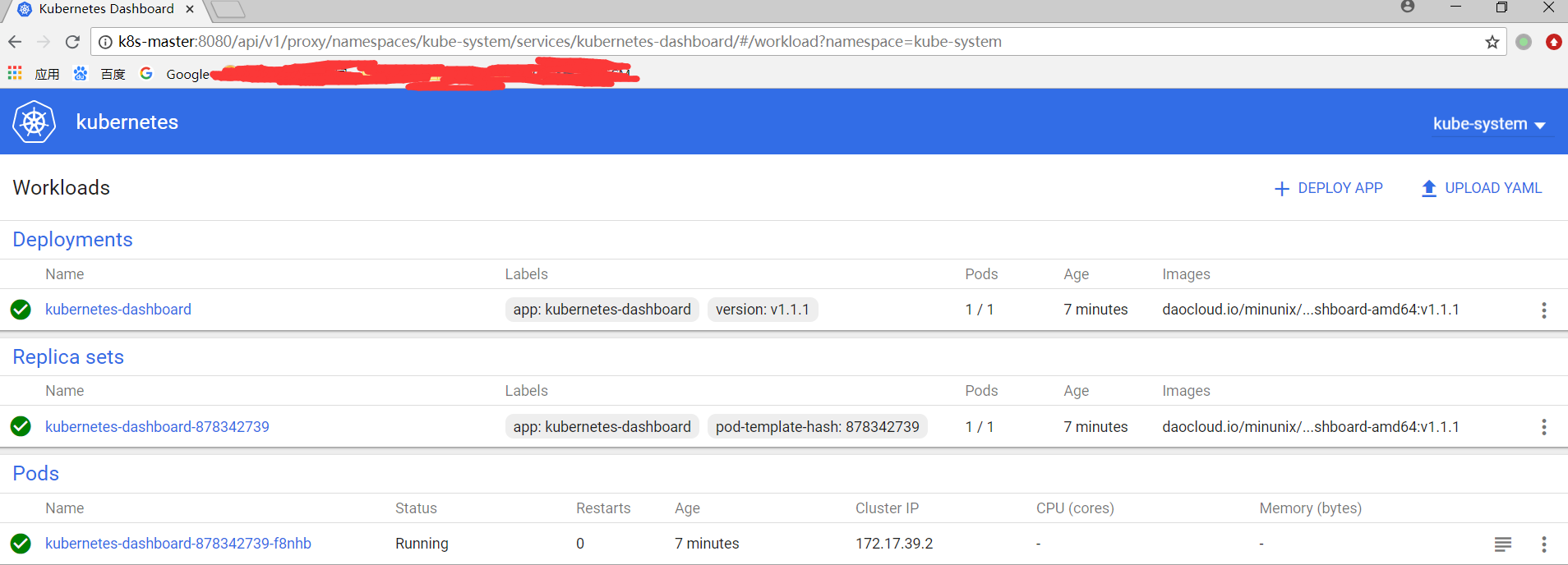
ojbk。
Kubernetes的UI界面Kubernetes Dashboard的搭建的更多相关文章
- kubernetes 1.14安装部署dashboard
简单介绍: Dashboard是一个基于web的Kubernetes用户界面.您可以使用Dashboard将容器化应用程序部署到Kubernetes集群,对容器化应用程序进行故障诊断,并管理集群资源. ...
- Kubernetes V1.16.2部署Dashboard V2.0(beta5)
Kubernetes V1.16.2部署Dashboard V2.0(beta5) 在Master上部署Dashboard 集群安装部署请看安装Kubernetes V1.16.2 kubectl g ...
- 微服务架构 - 搭建docker本地镜像仓库并提供权限校验及UI界面
搭建docker本地镜像仓库并提供权限校验及UI界面 docker本地镜像仓库的作用跟maven私服差不多,特别是公司级或者是小组级开发好的docker仓库可以上传到本地镜像仓库中,需要用时,直接从本 ...
- 基于Kubernetes v1.24.0的集群搭建(二)
上一篇文章主要是介绍了,每台虚拟机的环境配置.接下来我们开始有关K8S的相关部署. 另外补充一下上一篇文章中的K8S的changelog链接: https://github.com/kubernet ...
- kubernetes实践之一:kubernetes二进制包安装
kubernetes二进制部署 1.环境规划 软件 版本 Linux操作系统 CentOS Linux release 7.6.1810 (Core) Kubernetes 1.9 Docker 18 ...
- Reveal逆向工程:分析任意iOS应用的UI界面
在iOS逆向工程中,Reveal扮演着重要角色,一般情况下,Reveal在iOS开发过程中可以分析UI界面的状态,同样也可以应用于分析其他任意的App.特别是对于初学者来说,去了解其他优秀App的界面 ...
- PyQt5系列教程(二)利用QtDesigner设计UI界面
软硬件环境 OS X EI Capitan Python 3.5.1 PyQt 5.5.1 PyCharm 5.0.1 前言 在PyQt5系列教程的第一篇http://blog.csdn.net/dj ...
- Fire Balls 10——UI界面的制作
版权申明: 本文原创首发于以下网站: 博客园『优梦创客』的空间:https://www.cnblogs.com/raymondking123 优梦创客的官方博客:https://91make.top ...
- iPhone/iPad/Android UI尺寸规范 UI尺寸规范,UI图标尺寸,UI界面尺寸,iPhone6尺寸,iPhone6 Plus尺寸,安卓尺寸,iOS尺寸
iPhone/iPad/Android UI尺寸规范 UI尺寸规范,UI图标尺寸,UI界面尺寸,iPhone6尺寸,iPhone6 Plus尺寸,安卓尺寸,iOS尺寸 iPhone界面尺寸 设备 分辨 ...
随机推荐
- centos6 Nginx+Tomcat负载均衡配置
一.Nginx简介 Nginx是一个web服务器也可以用来做负载均衡及反向代理使用,目前使用最多的就是负载均衡,具体简介我就不介绍了百度一下有很多,下面直接进入安装步骤 二.Nginx安装 1.下载N ...
- Linux:LNMP架构的搭建
LNMP架构的搭建 centos6.8-i686 MySQL PHP Nginx 搭建前先安装一些必要的rpm和php组件(全新系统) yum install -y wget gcc vim* lib ...
- Winform开发之窗体显示、关闭与资源释放
Winform的窗体涉及到一般窗体(单文档窗体).MDI窗体.窗体之间的关系等,那么如果调用打开新窗体.如何关闭窗体.窗体资源的释放等都关系到软件运行的效率,本文一一介绍 1.窗体的显示 从一个窗体打 ...
- cousera 深度学习 吴恩达 第一课 第二周 学习率对优化结果的影响
本文代码实验地址: https://github.com/guojun007/logistic_regression_learning_rate cousera 上的作业是 编写一个 logistic ...
- 《Java技术》预备作业总结
Java预备作业总结 第一次的博客作业完成了,对于一种崭新的形式,大家可能还不太适应,学习和借鉴好的理念和学习方式,是我们缩小差距.提升自己的第一步. 关于你期望的师生关系 从幼儿园到大学,大家接触到 ...
- 1029:Ignatius and the Princess IV
题目大意是找出数组中出现次数超过一半的数. 基本思想:每遇到两个不同的数就消掉,设一个计数器就行了. 存出现次数最大的那个数的出现次数. 当下一个数与当前的数不同时,计数器减一,相同,则加一. 实 ...
- ballerina 学习二十五 项目docker 部署&& 运行
ballerina 官方提供了docker 的runtime,还是比较方便的 基本项目创建 使用cli创建项目 按照提示操作就行 ballerina init -i 项目结构 添加了dockerfil ...
- TCP和UDP Client 代码
最近学习要求做网络编程,使用从网上找了一些资料,主要是网络协议的分层等通讯,你可以查看英文版的资料:CScharp网络编程英文版 下面直接给出代码吧,我想一看应该就懂. TCP Client 代码: ...
- MySql登陆密码忘记了 怎么办?
MySql登陆密码忘记了 怎么办?root密码:连root密码忘记没用root进修改mysql数据库user表咯 root密码: 方法一:MySQL提供跳访问控制命令行参数通命令行命令启MySQL服务 ...
- Hive之 数据存储
首先,Hive 没有专门的数据存储格式,也没有为数据建立索引,用户可以非常自由的组织 Hive 中的表,只需要在创建表的时候告诉 Hive 数据中的列分隔符和行分隔符,Hive 就可以解析数据. 其次 ...