
CodeIgniter(3.1.4)框架中整合ThinkPHP验证码
下载源码包:
https://github.com/top-think/think-captcha
字体库:
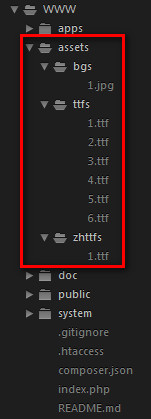
源文件路径:

//代码中字体路径,背景路径已经修改。
<?php

class Vcode

{

    protected $config = [

        'codeSet'  => '2345678abcdefhijkmnpqrstuvwxyzABCDEFGHJKLMNPQRTUVWXY',

        // 验证码字符集合

        'expire'   => 1800,

        // 验证码过期时间(s)

        'useZh'    => false,

        // 使用中文验证码

        'zhSet'    => '们以我到他会作时要动国产的一是工就年阶义发成部民可出能方进在了不和有大这主中人上为来分生对于学下级地个用同行面说种过命度革而多子后自

        // 中文验证码字符串

        'useImgBg' => false,

        // 使用背景图片

        'fontSize' => 20,

        // 验证码字体大小(px)

        'useCurve' => true,

        // 是否画混淆曲线

        'useNoise' => true,

        // 是否添加杂点

        'imageH'   => 40,

        // 验证码图片高度

        'imageW'   => 180,

        // 验证码图片宽度

        'length'   => 5,

        // 验证码位数

        'fontttf'  => '',

        // 验证码字体,不设置随机获取

        'bg'       => [243, 251, 254],

        // 背景颜色

        'reset'    => true,

        // 验证成功后是否重置

    ];

    private $code = 'default'; // 生成的验证码字符串

    private $im    = null; // 验证码图片实例

    private $color = null; // 验证码字体颜色

    /**

     * 架构方法 设置参数

     * @access public

     * @param  array $config 配置参数

     */

    public function __construct($config = [])

    {

        $this->config = array_merge($this->config, $config);

    }

    /**

     * 使用 $this->name 获取配置

     * @access public

     * @param  string $name 配置名称

     * @return mixed    配置值

     */

    public function __get($name)

    {

        return $this->config[$name];

    }

    /**

     * 设置验证码配置

     * @access public

     * @param  string $name  配置名称

     * @param  string $value 配置值

     * @return void

     */

    public function __set($name, $value)

    {

        if (isset($this->config[$name])) {

            $this->config[$name] = $value;

        }

    }

    /**

     * 检查配置

     * @access public

     * @param  string $name 配置名称

     * @return bool

     */

    public function __isset($name)

    {

        return isset($this->config[$name]);

    }

    /**

     * 输出验证码并把验证码的值保存的session中

     * 验证码保存到session的格式为: array('verify_code' => '验证码值', 'verify_time' => '验证码创建时间');

     * @access public

     * @param string $id 要生成验证码的标识

     * @return \think\Response

     */

    public function entry($id = '')

    {

        // 图片宽(px)

        $this->imageW || $this->imageW = $this->length * $this->fontSize * 1.5 + $this->length * $this->fontSize / 2;

        // 图片高(px)

        $this->imageH || $this->imageH = $this->fontSize * 2.5;

        // 建立一幅 $this->imageW x $this->imageH 的图像

        $this->im = imagecreate($this->imageW, $this->imageH);

        // 设置背景

        imagecolorallocate($this->im, $this->bg[0], $this->bg[1], $this->bg[2]);

        // 验证码字体随机颜色

        $this->color = imagecolorallocate($this->im, mt_rand(1, 150), mt_rand(1, 150), mt_rand(1, 150));

        // 验证码使用随机字体

        $ttfPath = 'assets/' . ($this->useZh ? 'zhttfs' : 'ttfs') . '/';

        if (empty($this->fontttf)) {

            $dir  = dir($ttfPath);

            $ttfs = [];

            while (false !== ($file = $dir->read())) {

                if ('.' != $file[0] && substr($file, -4) == '.ttf') {

                    $ttfs[] = $file;

                }

            }

            $dir->close();

            $this->fontttf = $ttfs[array_rand($ttfs)];

        }

        $this->fontttf = $ttfPath . $this->fontttf;

        if ($this->useImgBg) {

            $this->background();

        }

        if ($this->useNoise) {

            // 绘杂点

            $this->writeNoise();

        }

        if ($this->useCurve) {

            // 绘干扰线

            $this->writeCurve();

        }

        // 绘验证码

        $code   = []; // 验证码

        $codeNX = 0; // 验证码第N个字符的左边距

        if ($this->useZh) {

            // 中文验证码

            for ($i = 0; $i < $this->length; $i++) {

                $code[$i] = iconv_substr($this->zhSet, floor(mt_rand(0, mb_strlen($this->zhSet, 'utf-8') - 1)), 1, 'utf-8');

                imagettftext($this->im, $this->fontSize, mt_rand(-40, 40), $this->fontSize * ($i + 1) * 1.5, $this->fontSize + mt_rand(10, 20), $this->color, $this->fontttf, $code[$i]);

            }

        } else {

            for ($i = 0; $i < $this->length; $i++) {

                $code[$i] = $this->codeSet[mt_rand(0, strlen($this->codeSet) - 1)];

                $codeNX += mt_rand($this->fontSize * 1.2, $this->fontSize * 1.6);

                imagettftext($this->im, $this->fontSize, mt_rand(-40, 40), $codeNX, $this->fontSize * 1.6, $this->color, $this->fontttf, $code[$i]);

            }

        }

        $this->code = $code;

        ob_start();

        // 输出图像

        imagepng($this->im);

        $content = ob_get_clean();

        imagedestroy($this->im);

        ob_clean();

        header('Content-Type:image/png');

        header('Content-Length:' . strlen($content));

        echo $content;

    }

    /**

     * 获取生成的验证码文本

     * @return [type] [description]

     */

    public function getCode()

    {

        return empty($this->code) ? ' ' : $this->code;

    }

    /**

     * 画一条由两条连在一起构成的随机正弦函数曲线作干扰线(你可以改成更帅的曲线函数)

     *

     *      高中的数学公式咋都忘了涅,写出来

     *        正弦型函数解析式:y=Asin(ωx+φ)+b

     *      各常数值对函数图像的影响:

     *        A:决定峰值(即纵向拉伸压缩的倍数)

     *        b:表示波形在Y轴的位置关系或纵向移动距离(上加下减)

     *        φ:决定波形与X轴位置关系或横向移动距离(左加右减)

     *        ω:决定周期(最小正周期T=2π/∣ω∣)

     *

     */

    private function writeCurve()

    {

        $px = $py = 0;

        // 曲线前部分

        $A = mt_rand(1, $this->imageH / 2); // 振幅

        $b = mt_rand(-$this->imageH / 4, $this->imageH / 4); // Y轴方向偏移量

        $f = mt_rand(-$this->imageH / 4, $this->imageH / 4); // X轴方向偏移量

        $T = mt_rand($this->imageH, $this->imageW * 2); // 周期

        $w = (2 * M_PI) / $T;

        $px1 = 0; // 曲线横坐标起始位置

        $px2 = mt_rand($this->imageW / 2, $this->imageW * 0.8); // 曲线横坐标结束位置

        for ($px = $px1; $px <= $px2; $px = $px + 1) {

            if (0 != $w) {

                $py = $A * sin($w * $px + $f) + $b + $this->imageH / 2; // y = Asin(ωx+φ) + b

                $i  = (int) ($this->fontSize / 5);

                while ($i > 0) {

                    imagesetpixel($this->im, $px + $i, $py + $i, $this->color); // 这里(while)循环画像素点比imagettftext和imagestring用字体大小一次画出(不用这while循环)性能要好很多

                    $i--;

                }

            }

        }

        // 曲线后部分

        $A   = mt_rand(1, $this->imageH / 2); // 振幅

        $f   = mt_rand(-$this->imageH / 4, $this->imageH / 4); // X轴方向偏移量

        $T   = mt_rand($this->imageH, $this->imageW * 2); // 周期

        $w   = (2 * M_PI) / $T;

        $b   = $py - $A * sin($w * $px + $f) - $this->imageH / 2;

        $px1 = $px2;

        $px2 = $this->imageW;

        for ($px = $px1; $px <= $px2; $px = $px + 1) {

            if (0 != $w) {

                $py = $A * sin($w * $px + $f) + $b + $this->imageH / 2; // y = Asin(ωx+φ) + b

                $i  = (int) ($this->fontSize / 5);

                while ($i > 0) {

                    imagesetpixel($this->im, $px + $i, $py + $i, $this->color);

                    $i--;

                }

            }

        }

    }

    /**

     * 画杂点

     * 往图片上写不同颜色的字母或数字

     */

    private function writeNoise()

    {

        $codeSet = '2345678abcdefhijkmnpqrstuvwxyz';

        for ($i = 0; $i < 10; $i++) {

            //杂点颜色

            $noiseColor = imagecolorallocate($this->im, mt_rand(150, 225), mt_rand(150, 225), mt_rand(150, 225));

            for ($j = 0; $j < 5; $j++) {

                // 绘杂点

                imagestring($this->im, 5, mt_rand(-10, $this->imageW), mt_rand(-10, $this->imageH), $codeSet[mt_rand(0, 29)], $noiseColor);

            }

        }

    }

    /**

     * 绘制背景图片

     * 注:如果验证码输出图片比较大,将占用比较多的系统资源

     */

    private function background()

    {

        $path = 'assets/bgs/';

        $dir  = dir($path);

        $bgs = [];

        while (false !== ($file = $dir->read())) {

            if ('.' != $file[0] && substr($file, -4) == '.jpg') {

                $bgs[] = $path . $file;

            }

        }

        $dir->close();

        $gb = $bgs[array_rand($bgs)];

        list($width, $height) = @getimagesize($gb);

        // Resample

        $bgImage = @imagecreatefromjpeg($gb);

        @imagecopyresampled($this->im, $bgImage, 0, 0, 0, 0, $this->imageW, $this->imageH, $width, $height);

        @imagedestroy($bgImage);

    }

}
CodeIgniter(3.1.4)框架中整合ThinkPHP验证码的更多相关文章
- 在DWZ框架中整合kindeditor复文本框控件
今天上午在DWZ框架中整合kindeditor复文本框控件,发现上传图片是老是提示 “上传中,请稍候...”,上网查看别人说可能是文件路径问题,在想以前在其他项目中用这个控件一直没问题,到这里怎么会出 ...
- C#开发微信门户及应用(48) - 在微信框架中整合CacheManager 缓存框架
在我们的很多框架或者项目应用中,缓存在一定程度上可以提高程序的响应速度,以及减轻服务器的承载压力,因此在一些地方我们都考虑引入缓存模块,这篇随笔介绍使用开源缓存框架CacheManager来实现数据的 ...
- CodeIgniter(3.1.4)框架中添加执行时间统计代码
CodeIgniter(3.1.4)框架中添加,执行时间统计代码: system/core/CodeIgniter.php最后行处. /* * ---------------------------- ...
- 在Winform混合式框架中整合外部API接口的调用
在我们常规的业务处理中,一般内部处理的接口多数都是以数据库相关的,基于混合式开发的Winform开发框架,虽然在客户端调用的时候,一般选择也是基于Web API的调用,不过后端我们可能不仅仅是针对我们 ...
- Spring框架中整合JUnit单元测试的方法
一. 步骤: 1. 拷贝jar包: 1. JUnit-4.9.jar和spring-test-4.2.4.RELEASE.jar ; 2. 替换原来的main函数: 1. 在测试类上使用注解方式替换: ...
- CodeIgniter(3.1.4)框架中设置默认控制器
创建的目录结构: 如果是以上这种目录分布结构,则在controller文件夹下没有相应的控制器文件.如果在浏览器中直接使用 [http://localhost]则找不到相应的控制器. 必须进行以下设置 ...
- CodeIgniter(3.1.4)框架中成功/错误跳转
if ( ! function_exists('error')) { /** * 错误跳转 */ function error($mes, $url) { echo '<script type= ...
- CodeIgniter(3.1.4)框架中-使用多个公共控制器
项目目录结构: 在core/MY_Controller.php文件下: <?php /** * Class MY_Controller * 自定义控制器 */ class MY_Controll ...
- CI框架中,扩展验证码类。
使用CI框架的朋友,应该都知道CI框架的的验证码辅助函数,不太好用.它需要写入到数据库中,然后再进行比对. 大家在实际项目中,好像不会这样去使用,因为会对数据库造成一定的压力. 所以,我们还是利用se ...
随机推荐
- Android 弹出有确认按键的对话
//弹出对话框-------------------------------------------------- private void openDialog(String strMsg, Str ...
- activity的onCreate参数 saveInstanceState
写过Android程序的都知道Activity中有一个名称叫onCreate的方法.该方法是在Activity创建时被系统调用,是一个Activity生命周期的开始.可是有一点容易被忽视,就是 ...
- linux page buffer cache深入理解
Linux上free命令的输出. 下面是free的运行结果,一共有4行.为了方便说明,我加上了列号.这样可以把free的输出看成一个二维数组FO(Free Output).例如: FO[2][1] = ...
- #pragma pack
原文链接: http://www.cnblogs.com/s7vens/archive/2012/03/06/2382236.html pack 为 struct, union 和 class 等的成 ...
- mysql格式化日期
mysql查询记录如果有时间戳字段时,查看结果不方便,不能即时看到时间戳代表的含义,现提供mysql格式换时间函数,可以方便的看到格式化后的时间. 1. DATE_FORMAT() 函数用于以不同的格 ...
- Android开发8——利用pull解析器读写XML文件
一.基本介绍 对XML解析有SAX和DOM等多种方式,Android中极力推荐xmlpull方式解析xml.xmlpull不仅可用在Android上同样也适用于javase,但在javase环境中需自 ...
- Mac中提升权限修改系统目录
原来OSX EI Capitan中增加了一个SIP功能,不管你是不是su,都会阻止你在系统目录下进行操作.如果,想要修改系统目录的文件,如升级bash,需要修改/bin/bash,那么就要先关闭SIP ...
- IE下JS读取xml文件示例代码
JS读取xml文件具体步骤为:创建DOM对象.加载xml文件(仅适用于IE)附示例代码,感兴趣的朋友可以参考下,希望对大家有所帮助使用javascript脚本读取xml文件,这里暂只考虑IE浏览器st ...
- [na][tools]快速ping网段工具-QuickPing
一款神器 quickping 能够很快的探测出该网断分出去哪些地址. 在线的会显示绿色 在线的+有主机名的显示为亮绿色
- Tomcat Jboss Glassfish 三种常见web容器比较
一.缘由: 新公司平台是纯Java架构,有用到Java Web(JSP).Java 业务(EJB).Nginx..Websphere MQ.Mysql这样.大家知道java是跑在容器里的, 这里的业务 ...