
JavaScrip——练习(做悬浮框再进一步:悬浮窗后缀悬浮窗——用this.className)
对悬浮窗进一步改进:
用this.className
可以省略script
<!DOCTYPE html PUBLIC "-//W3C//DTD XHTML 1.0 Transitional//EN" "http://www.w3.org/TR/xhtml1/DTD/xhtml1-transitional.dtd">

<html xmlns="http://www.w3.org/1999/xhtml">

<head>

<meta http-equiv="Content-Type" content="text/html; charset=utf-8" />

<title>无标题文档</title>

<style type="text/css">

*{

    margin:0px;

    padding:0px;

    }

.aa

{

    background-color:#FF0;

    height: 40px;

    width: 100px;

    top: 60px;

    left: 100px;

    position: absolute;

    overflow: hidden;

    text-align: center;

    line-height:40px;

    }

    .aaa

{

    background-color:red;

    height: 40px;

    width: 100px;

    top: 60px;

    left: 100px;

    position: absolute;

    overflow:visible;

    text-align: center;

    line-height:40px;

    }

#bb{

    height:120px;

    width:100px;

    top:40px;

    left:0px;

    position:absolute;

    }

table{

    height:120px;

    width:100px;

    text-align:center;

    vertical-align:middle;

}

.tiyu

{

    height:40px;

    width:100px;

    position:absolute;

    overflow:hidden;

    left:0px;

    top:0px;

    }

.zuqiu

{

    height:40px;

    width:100px;

    position:absolute;

    overflow:visible;

    left:0px;

    top:0px;

    }

#zuqiu

{

    height:40px;

    width:100px;

    position:absolute;

    left:100px;

    top:0px;

    background-color:#C63;

    }

.yule

{

    height:40px;

    width:100px;

    position:absolute;

    overflow:hidden;

    left:0px;

    top:40px;

    }

    .bagua

{

    height:40px;

    width:100px;

    position:absolute;

    overflow:visible;

    left:0px;

    top:40px;

    }

#bagua

{

    height:40px;

    width:100px;

    position:absolute;

    left:100px;

    top:0px;

    background-color:#C63;

    }

.guoji

{

    height:40px;

    width:100px;

    position:absolute;

    overflow:hidden;

    left:0px;

    top:80px;

    }

.junshi

{

    height:40px;

    width:100px;

    position:absolute;

    overflow:visible;

    left:0px;

    top:80px;

    }

#junshi

{

    height:40px;

    width:100px;

    position:absolute;

    left:100px;

    top:0px;

    background-color:#C63;

    }

</style>

</head>

<body>

<div class="aa" onmousemove="this.className='aaa'" onmouseout="this.className='aa'">新闻动态

<div id="bb">

<table cellpadding="0" cellspacing="0">

<tr bgcolor="#0000FF">

<td height="40" width="100">

<div class="tiyu" onmouseover="this.className='zuqiu'" onmouseout="this.className='tiyu'">体育

<div id="zuqiu">足球</div></div></td>

</tr>

<tr bgcolor="#FFFF00">

<td height="40" width="100">

<div class="yule" onmousemove="this.className='bagua'" onmouseout="this.className='yule'">娱乐

<div id="bagua">八卦</div></div></td>

</tr>

<tr bgcolor="#00FFFF">

<td height="40" width="100">

<div class="guoji" onmouseover="this.className='junshi'" onmouseout="this.className='guoji'">国际新闻

<div id="junshi">军事</div></div></td>

</tr>

</table>

</div></div>

</body>

</html>
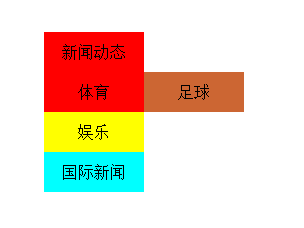
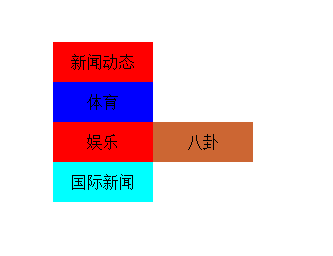
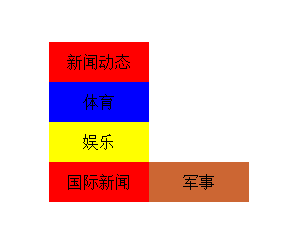
结果是一样的:
默认时

鼠标在新闻动态上面时
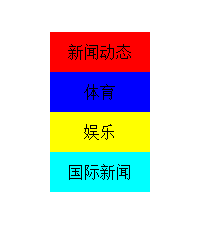
鼠标在体育上面时:
鼠标在娱乐上面时:
鼠标在国际新闻上面时:
JavaScrip——练习(做悬浮框再进一步:悬浮窗后缀悬浮窗——用this.className)的更多相关文章
- JavaScrip——练习(做悬浮框进一步:悬浮窗后缀悬浮窗【感觉这种方法比较麻烦】)
<!DOCTYPE html PUBLIC "-//W3C//DTD XHTML 1.0 Transitional//EN" "http://www.w3.org/ ...
- JavaScrip——练习(做悬浮框)
通过HTML.CSS.JSP来实现 1.首先确定通过div嵌套来实现: 大的div里放默认显示的一层,限制其总层次高,设置超出部分隐藏 小的div里放鼠标移过去时显示的一层:3行1列的表格 1.1.什 ...
- Android悬浮框,在Service中打开悬浮窗;在Service中打开Dialog;
文章介绍了如何在Service中显示悬浮框,在Service中弹出Dialog,在Service中做耗时的轮询操作: 背景需求: 公司的项目现在的逻辑是这样的:发送一个指令,然后3秒一次轮询去查询这个 ...
- Android音视频通话过程中最小化成悬浮框的实现(类似Android8.0画中画效果)
关于音视频通话过程中最小化成悬浮框这个功能的实现,网络上类似的文章很多,但是好像还没看到解释的较为清晰的,这里因为项目需要实现了这样的一个功能,今天我把它记录下来,一方面为了以后用到便于自己查阅,一方 ...
- 小米Adnroid默认禁止悬浮框的使用,导致开发的悬浮框无法接收事件
比如你建了一个悬浮框: WindowManager windowManager = getWindowManager(context); int screenWidth = windowManager ...
- Echarts ecomfe 触摸屏 touch 在IE10下无法显示悬浮框
问题描述: Windows 8 IE10浏览http://echarts.baidu.com/doc/example/line2.html 时,鼠标放置在数据点上时无法显示悬浮框. 正常情况为: 而现 ...
- C# 鼠标悬停在datagridview的某单元格,显示悬浮框效果
今天在做项目时,看到一软件做的悬浮框效果不错,从网上搜罗了一些资料,未见到有十分好的解决办法,只能自已动手,利用datagridview 的ToolTipText 来达到此效果. 以下是我简单实现的代 ...
- Android -- 使用WindowManager实现悬浮框效果
1,原文在这里http://blog.csdn.net/qq_17250009/article/details/52908791,我只是把里面的关键步骤给注释了一下,首先来看一下我们的效果,如图(电脑 ...
- 菜鸟学JS(三)——自动隐藏的悬浮框
今天写一个小实例,用js和css写一个可以自动隐藏的悬浮框.css肯定是用来控制样式的,js用来控制器显示与隐藏的.显示与隐藏通常有两种方法实现:1,用js控制其显示属性:2,用js控制其大小. 今天 ...
随机推荐
- Ajax Control Toolkit 34个服务器端控件的使用
摘自:http://blog.csdn.net/yaoshuyun/article/details/2218633 1. Accordion[功能概述] Accordion可以让你设计多个panel ...
- Java使用Selenium几个例子
零.姿势 Selenium分为两个版本:Selenium RC和Selenium Webdriver.现在用Selenium Webdriver比较多. Selenium是一套工具,而不仅仅是一个操纵 ...
- C#委托、事件剖析(下)
本节对事件进行总结. 二.事件: 1.概念:Event:A member that enables an object or class to provide notifications;官方的解释是 ...
- python学习笔记——multiprocessing 多进程模块Process
系统自带的fork模块创建的多进程是基于Linux或Unix平台的,而window平台并不支持: python中的multiprocess为跨平台版本的多进程模块,支持子进程.通信和共享数据.执行不同 ...
- Appium測试安卓Launcher以滑动窗口获得目标应用
所谓Launcher,指的是安卓的桌面管理程序,全部的应用图标都放在launcher上面.事实上这是一个非常easy的样例,仅仅是为了验证几点想法而已. 1.实验目的 做这个试验的目的有二 尝试下窗口 ...
- Jvisualvm监控远程linux下Tomcat
Jvisualvm监控远程linux下Tomcat 1.编辑tomcat/bin/catalina.sh 加入下面这段代码,中间无换行: CATALINA_OPTS="$CATALINA_O ...
- ORM是什么?
对象关系映射(Object Relational Mapping,简称ORM)是一种为了解决面向对象与关系数据库存在的互不匹配的现象的技术. 简单的说,ORM是通过使用描述对象和数据库之间映射的元数据 ...
- 高度自适应的CSS
/*高度自适应*/ .com_fill_height{ height:100%; overflow:hidden; } 高度自适应的样式代码,真的就这么简单吗...
- JAX-RS(REST Web Services)2.0 can not be installed: One or more constraints have not been satisfied
eclipse出错: JAX-RS(REST Web Services)2.0 can not be installed: One or more constraints have not been ...
- AI、机器学习、深度学习、神经网络
1.AI:人工智能(Artificial Intelligence) 2.机器学习:(Machine Learning, ML) 3.深度学习:Deep Learning 人工功能的实现是让机器自己学 ...