
使用FontAwesome
使用FontAwesome

https://github.com/PrideChung/FontAwesomeKit
为什么要使用FontAwesome呢,其实,它的字体就是矢量图,无论是放大还是缩小都不失真的矢量图哦.
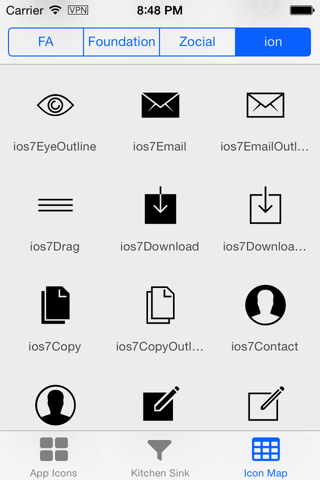
1. 下载源码,导入文件夹FontAwesomeKit,然后引入头文件FontAwesomeKit.h

2. 使用
    // 取得固定的icon以及设定尺寸

    FAKZocial *twitterIcon = [FAKZocial stackoverflowIconWithSize:];

    // 设定相关的属性

    [twitterIcon addAttribute:NSForegroundColorAttributeName

                     value:[UIColor redColor]];

    // 在UILabel上显示

    UILabel *label = [[UILabel alloc] initWithFrame:CGRectMake(, , , )];

    label.attributedText = [twitterIcon attributedString];

    [self.view addSubview:label];

    label.center = self.view.center;
使用是非常简单的哦,效果如下:

3. 高级应用
你以为就显示出来就没了么?非也,你想过把字体转换为路径么,转换为路径后就可以执行各种CoreAnimation的动画了呢:)
先来试一下CAshapeLayer的动画路径:
    // 取得固定的icon以及设定尺寸

    FAKZocial *twitterIcon = [FAKZocial chromeIconWithSize:];

    // 设定相关的属性

    [twitterIcon addAttribute:NSForegroundColorAttributeName

                     value:[UIColor blackColor]];

    // 将icon转换为贝塞尔曲线

    UIBezierPath *path = [UIBezierPath pathFromAttributedString:[twitterIcon attributedString]];

    // 创建shapeLayer

    CAShapeLayer *shapeLayer = [CAShapeLayer layer];

    // 获取path

    shapeLayer.path = path.CGPath;

    // 根据这个path来设定尺寸

    shapeLayer.bounds = CGPathGetBoundingBox(shapeLayer.path);

    // 几何反转

    shapeLayer.geometryFlipped = YES;

    // 一些颜色的填充

    shapeLayer.fillColor = [UIColor clearColor].CGColor;

    shapeLayer.strokeColor = [UIColor cyanColor].CGColor;

    // 设定layer位置

    shapeLayer.position = self.view.center;

    [self.view.layer addSublayer:shapeLayer];

    // 定时器动画

    _timer = [[GCDTimer alloc] initInQueue:[GCDQueue mainQueue]];

    [_timer event:^{

        shapeLayer.strokeEnd = arc4random()%/.f;

    } timeInterval:NSEC_PER_SEC];

    [_timer start];

    // 取得固定的icon以及设定尺寸

    FAKZocial *twitterIcon = [FAKZocial chromeIconWithSize:];

    // 设定相关的属性

    [twitterIcon addAttribute:NSForegroundColorAttributeName

                     value:[UIColor blackColor]];

    // 将icon转换为贝塞尔曲线

    UIBezierPath *path = [UIBezierPath pathFromAttributedString:[twitterIcon attributedString]];

    // 创建shapeLayer

    CAShapeLayer *shapeLayer = [CAShapeLayer layer];

    // 获取path

    shapeLayer.path = path.CGPath;

    // 根据这个path来设定尺寸

    shapeLayer.bounds = CGPathGetBoundingBox(shapeLayer.path);

    // 几何反转

    shapeLayer.geometryFlipped = YES;

    // 一些颜色的填充

    shapeLayer.fillColor = [UIColor blackColor].CGColor;

    shapeLayer.strokeColor = [UIColor clearColor].CGColor;

    shapeLayer.position = CGPointMake(, );

    // 渐变颜色图层

    CAGradientLayer *colorLayer = [CAGradientLayer layer];

    colorLayer.bounds = CGRectMake(, , , );

    colorLayer.mask = shapeLayer;

    colorLayer.colors = @[(id)[UIColor redColor].CGColor,

                          (id)[UIColor greenColor].CGColor,

                          (id)[UIColor yellowColor].CGColor];

    colorLayer.position = self.view.center;

    // 设定layer位置

    [self.view.layer addSublayer:colorLayer];

    // 定时器动画

    _timer = [[GCDTimer alloc] initInQueue:[GCDQueue mainQueue]];

    [_timer event:^{

        colorLayer.speed = 0.5;

        colorLayer.colors = @[(id)[UIColor colorWithRed:arc4random()%/.f

                                                  green:arc4random()%/.f

                                                   blue:arc4random()%/.f

                                                  alpha:].CGColor,

                              (id)[UIColor colorWithRed:arc4random()%/.f

                                                  green:arc4random()%/.f

                                                   blue:arc4random()%/.f

                                                  alpha:].CGColor,

                              (id)[UIColor colorWithRed:arc4random()%/.f

                                                  green:arc4random()%/.f

                                                   blue:arc4random()%/.f

                                                  alpha:].CGColor,

                              (id)[UIColor colorWithRed:arc4random()%/.f

                                                  green:arc4random()%/.f

                                                   blue:arc4random()%/.f

                                                  alpha:].CGColor,

                              (id)[UIColor colorWithRed:arc4random()%/.f

                                                  green:arc4random()%/.f

                                                   blue:arc4random()%/.f

                                                  alpha:].CGColor];

    } timeInterval:NSEC_PER_SEC];

    [_timer start];

    // 取得固定的icon以及设定尺寸

    FAKZocial *twitterIcon = [FAKZocial chromeIconWithSize:];

    // 设定相关的属性

    [twitterIcon addAttribute:NSForegroundColorAttributeName

                     value:[UIColor blackColor]];

    // 将icon转换为贝塞尔曲线

    UIBezierPath *path = [UIBezierPath pathFromAttributedString:[twitterIcon attributedString]];

    // 创建shapeLayer

    CAShapeLayer *shapeLayer = [CAShapeLayer layer];

    // 获取path

    shapeLayer.path = path.CGPath;

    // 根据这个path来设定尺寸

    shapeLayer.bounds = CGPathGetBoundingBox(shapeLayer.path);

    // 几何反转

    shapeLayer.geometryFlipped = YES;

    // 一些颜色的填充

    shapeLayer.fillColor = [UIColor redColor].CGColor;

    shapeLayer.strokeColor = [UIColor clearColor].CGColor;

    shapeLayer.position = CGPointMake(, );

    // 渐变颜色图层

    CAGradientLayer *colorLayer = [CAGradientLayer layer];

    colorLayer.bounds = CGRectMake(, , , );

    colorLayer.mask = shapeLayer;

    colorLayer.colors = @[(id)[UIColor redColor].CGColor,

                          (id)[UIColor greenColor].CGColor,

                          (id)[UIColor yellowColor].CGColor];

    colorLayer.position = self.view.center;

    // 设定layer位置

    [self.view.layer addSublayer:colorLayer];

    // 旋转

    CABasicAnimation *basicAni = \

        [CABasicAnimationList animationWithRotationZFromValue:-*M_PI_2 toValue:*M_PI_2];

    basicAni.duration = 1.0f;

    basicAni.repeatCount = HUGE_VALF;

    [shapeLayer addAnimation:basicAni forKey:nil];

    // 定时器动画

    _timer = [[GCDTimer alloc] initInQueue:[GCDQueue mainQueue]];

    [_timer event:^{

        colorLayer.colors = @[(id)[UIColor colorWithRed:arc4random()%/.f

                                                  green:arc4random()%/.f

                                                   blue:arc4random()%/.f

                                                  alpha:].CGColor,

                              (id)[UIColor colorWithRed:arc4random()%/.f

                                                  green:arc4random()%/.f

                                                   blue:arc4random()%/.f

                                                  alpha:].CGColor,

                              (id)[UIColor colorWithRed:arc4random()%/.f

                                                  green:arc4random()%/.f

                                                   blue:arc4random()%/.f

                                                  alpha:].CGColor,

                              (id)[UIColor colorWithRed:arc4random()%/.f

                                                  green:arc4random()%/.f

                                                   blue:arc4random()%/.f

                                                  alpha:].CGColor,

                              (id)[UIColor colorWithRed:arc4random()%/.f

                                                  green:arc4random()%/.f

                                                   blue:arc4random()%/.f

                                                  alpha:].CGColor];

    } timeInterval:NSEC_PER_SEC];

    [_timer start];

附录:
FAKFontAwesome *starIcon = [FAKFontAwesome asteriskIconWithSize:50];
FAKFoundationIcons *bookmarkIcon = [FAKFoundationIcons bookmarkIconWithSize:15];
FAKZocial *twitterIcon = [FAKZocial twitterIconWithSize:15];
FAKIonIcons *mailIcon = [FAKIonIcons ios7EmailIconWithSize:48];
使用FontAwesome的更多相关文章
- 【三石jQuery视频教程】02.创建 FontAwesome 复选框和单选框
视频地址:http://v.qq.com/page/m/8/c/m0150izlt8c.html 大家好,欢迎来到[三石jQuery视频教程],我是您的老朋友 - 三生石上. 今天,我们要通过基本的H ...
- 直接在 CSS 中引用 FONTAWESOME 图标(附码表)
直接在 CSS 中引用 FONTAWESOME 图标(附码表) 因此我们如果不想用 Fontawesome 提供的类,只想在 css 里面引用图标的话,可以这样子,请自行脑补: .icon:befor ...
- 学习WPF——使用Font-Awesome图标字体
图标字体介绍 在介绍图标字体之前,不得不介绍图标格式ICON ICON是一种图标格式,我们操作系统中各种应用程序都包含一个图标 比如QQ程序的图标是一个可爱的企鹅,我的电脑是一个显示器图标 ----- ...
- 利用PhotoShop将Font-Awesome转为图片格式
介绍如何将Font-Awesome等字体图标转换为图片格式,使用PHOTPSHOP很简单. 网上找了很多,都比较麻烦.别问为什么要这么做,因为你还没遇到需要的时候. 下载Font-Awesome字体库 ...
- 用fontAwesome代替网页icon小图标
1. 引言 网页小图标到处可见,如果一个网页都是干巴巴的文字和图片,而没有小图标,会显得非常简陋.下面的小图标,你是不是会经常用到? 你可能说——“我们用的都是彩色的,不是黑白的”——别着急,下面会讲 ...
- IconFont和FontAwesome的区别?
一.[Iconfont] Iconfont支持所有低版本浏览器: Iconfont的图标库更大: Iconfont可以用自己上传的svg,但是要花费大量时间和耐心去设计AI图标: Iconfont的使 ...
- 分享我用Qt开发的应用程序【二】在Qt应用程序中使用字体图标fontawesome
为了使用简单,需要先写一个单件类,头文件的代码如下: 其中静态方法Instance保证IconHelper的实例全局唯一 (注意构造函数已经私有化了) #ifndefICONHELPER_H #def ...
- Adobe Illustrator里使用fontawesome矢量图标
简单教程:1.安装FontAwesome.otf字体2.打开http://fontawesome.io/cheatsheet/3.选中图标图片,ctrl+c4.粘贴到AI中5.选中粘贴的内容,修改字 ...
- 请用fontAwesome代替网页icon小图标
1. 引言 网页小图标到处可见,如果一个网页都是干巴巴的文字和图片,而没有小图标,会显得非常简陋.下面的小图标,你是不是会经常用到? 你可能说——“我们用的都是彩色的,不是黑白的”——别着急,下面会讲 ...
- fontAwesome代替网页icon小图标
引言 奥森图标(Font Awesome)提供丰富的矢量字体图标—通过CSS可以任意控制所有图标的大小 ,颜色,阴影. 网页小图标到处可见,如果一个网页都是干巴巴的文字和图片,而没有小图标,会显得非常 ...
随机推荐
- CentO7 安装 redis, 主从配置,Sentinel集群故障转移切换
一.Redis的安装(前提是已经安装了EPEL) 安装redis: yum -y install redis 启动/停止/重启 Redis 启动服务: systemctl start re ...
- 用通俗的语言解释 Spring 中的 DI 、IOC 和AOP概念
DI 所谓依赖,从程序的角度看,就是比如A要调用B的方法,那么A就依赖于B,反正A要用到B,则A依赖于B.所谓倒置,你必须理解如果不倒置,会怎么着,因为A必须要有B,才可以调用B,如果不倒置,意思就是 ...
- PHP OOP面向对象部分方法归总(代码实例子)
<?php//对象名存在栈内存中,数据存在堆内存中class leyangjun{ var $name; //定义变量 var $age; var $sex; ...
- Ruby(2): 基本语法上
表达式和变量: 这两点和其他主流的编程语言基本没有差别,这里直接跳过. 需要注意的是 ruby中 x=x+1 可以写成 x+=1 但是不支持 x++ , x-- 等一元运算符 比较运算符和表达式: ...
- ios碎片小记
一.UIImageView 1.图片形状设为圆形时可能会由于图片的宽高比例导致显示出来的效果不是圆形 解决:设置UIImageView的contentMode为UIViewContentModeSca ...
- Idea软件Vim插件问题
人家说用webstorm是纯前端,用Idea是java+前端,好,那就用Idea,装上试试,全选所有插件安装,奇迹出现了,选中一行代码,backspace,删不了,我的天,好吧,复制粘贴的快捷键也不行 ...
- 版本管控---Visual Source Safe(VSS)和Team Foundation Server(TFS)
Visual Source Safe 是用于软件专业开发人员的源代码管理工具 Team Foundation Server是为开发团队提供集成源代码管理.问题跟踪和进程管理的更改管理系统 相同点 1. ...
- Linux安装之后需要进行的一些步骤
查看IP 首先安装后需要查看ip用SSH或者XSHELL来连接Linux,查看ip代码 ifconfig 需要执行 sudo yum install net-tools 命令安装之后 就可以看到ip了 ...
- JSONObject与null
前言 今天在写代码的时候发现在 JSON 中 由于put了key对应的value为null,结果这个JSON键值对没有输出 org.json.JSONObject 在orgJSON 中,如果直接put ...
- Redis-SDS
Redis 的简单动态字符串 (simple dynamic string,SDS) SDS的结构: struct sdshdr { int len; //保存的字符串长度. int free; ...