
Html.DropDownList传值
Html.DropDownList传值:
可以传入明确的IEnumerable<SelectListItem>,也可以通过ViewBag或者ViewData隐式地传入,前提是需要相同的名称,比如:ViewBag.GenreId或者ViewData["GenreId"]。
示例:
public ActionResult Index()

{

    var SelectItems = new List<dynamic>(){

        new { id = , name="刘新"},

        new { id = , name="小明"},

        new { id = , name="蛋蛋"}

    };

    //SelectList : 使用SelectList辅助类构建

    ViewBag.SelectItem = new SelectList(SelectItems, "id", "name", );

    //使用SelectListItem对象集合

    var SexItems = new List<SelectListItem>{

        new SelectListItem{ Text="男", Value="", Selected=true},

        new SelectListItem{ Text="女", Value=""}

    };

    return View(SexItems);

}
视图:
@model IEnumerable<System.Web.Mvc.SelectListItem>

//使用ViewBag或者ViewDate隐式传入,通过@Html.DropDownList指定的name匹配ViewBag或者ViewDate的属性值(不指定第二个参数默认是根据指定的name去ViewBag或者ViewData查找同名的属性)

@Html.Label("person_id", "人员"): @Html.DropDownList("SelectItem", null, new { id = "person_id" })<br/>

//也可以将ViewBag.SelectItem转换成IEnumerable<SelectListItem>

@Html.Label("person_id", "人员"): @Html.DropDownList("SelectItem", ViewBag.SelectItem as IEnumerable<SelectListItem>, new { id = "person_id" })<br/>

//使用强类型视图对象填充select, 需要声明Model的类型

@Html.Label("sex", "性别"): @Html.DropDownList("sex", Model, new { id = "sex" })
注意:
1. @Html.Label的第一个参数表示for特性的值, 第二个参数表示lable文本
2. SelectList是IEnumerable<SelectListItem>的进一步封装而已。可以根据不同的场景选择使用哪一种
3. 将SelectList转换成IEnumerable<SelectListItem>会丢失默认选择的项
执行结果: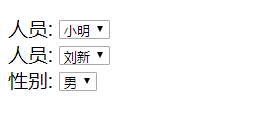
生成的代码:
<label for="person_id">人员</label>:

    <select id="person_id" name="SelectItem">

        <option value="1">刘新</option>

        <option selected="selected" value="2">小明</option>

        <option value="3">蛋蛋</option>

    </select>

<br/>

<label for="person_id">人员</label>:

    <select id="person_id" name="SelectItem">

        <option value="1">刘新</option>

        <option value="2">小明</option>

        <option value="3">蛋蛋</option>

    </select>

<br />

<label for="sex">性别</label>:

    <select id="sex" name="sex">

        <option selected="selected" value="1">男</option>

        <option value="0">女</option>

</select>
Html.DropDownList传值的更多相关文章
- ASP.NET MVC中,前台DropDownList传值给后台。
List<SelectListItem> ZH = new List<SelectListItem>(); ZH.Add(new SelectListItem { Text = ...
- DropDownList单选与多选下拉框
一.单选DropDownList传值 1.添加界面的DropDownList显示值问题 (1)在方法内添加ViewData的方法: var ad = new UnitsRepository(); Vi ...
- Asp.net mvc页面传值-- dropdownlist
后台传值 List<ConfigParamInfo> paramList = configParamBLL.GetModelList(" and parentID=1" ...
- Dropdownlist中用viewmodel传值处理方法
背景:MVC框架,页面使用razor语法,下拉框的话使用了@Html.DropDownList(),以前传值使用viewdata,但是我们老大说这个方式比较low,希望我可以使用viewmodel的方 ...
- dropdownlist无刷新传值
既然局部刷新,其实没有必要用服务器控件,即便用了服务器控件,也不应该将AutoPostBack="true" ,这将导致页面回发并刷新,因此去掉下拉框的该属性 至于局部改变div的 ...
- Ado.net[登录,增删改查,Get传值,全选,不选,批量删除,批量更新]
[虽然说,开发的时候,我们可以使用各种框架,ado.net作为底层的东西,作为一个合格的程序员,在出问题的时候我们还是要知道如何调试] 一.增删改查 cmd.ExecuteReader();执行查询, ...
- Ado.net[增删改查,GET传值]
1. <%@ Page Language="C#" AutoEventWireup="true" CodeBehind="Home.aspx.c ...
- ASP.NET MVC 下拉框的传值的两种方式
以前使用WebForm变成时,下拉框传值只需直接在后台绑定代码就可以了.现在我们来看看在MVC中DropDownList是如果和接受从Controller传过来的值的. 第一种:使用DropDownL ...
- [moka同学笔记]yii2.0 dropdownlist的简单使用(一)
1.controller控制中 $modelCountrytelCode = CountryTelCode::find()->orderBy('id DESC')->all(); $tel ...
随机推荐
- mysql--对行(表中数据)的增删改查
一.插入数据(增加)insert 1.插入数据(顺序插入) 语法一: INSERT INTO 表名(字段1,字段2,字段3…字段n) VALUES(值1,值2,值3…值n); #指定字段来插入数据,插 ...
- GO学习笔记 - 基本数据类型
官方教程:https://tour.go-zh.org/basics/11 Go 的基本类型有Basic types bool string int int8 int16 int32 int64 ui ...
- leetcode 72 编辑距离 JAVA
题目: 给定两个单词 word1 和 word2,计算出将 word1 转换成 word2 所使用的最少操作数 . 你可以对一个单词进行如下三种操作: 插入一个字符 删除一个字符 替换一个字符 示例 ...
- 【OCP-12c】2019年CUUG OCP 071考试题库(76题)
76.View the exhibit and examine the description of the DEPARTMENTSand EMPLOYEEStables. The retrieve ...
- 【ocp-12c】最新Oracle OCP-071考试题库(41题)
41.(8-14) choose two View the Exhibit and examine the structure of the ORDERS table. The columns ORD ...
- IT男装逼利器:如何像黑客一样聊天 Mojo-Webqq
电影里的黑客们聊天不想我们生活中的一样,用QQ.微信的客户端,都是通过命令行来进行聊天交流的,大概是为了提升逼格吧.(文末有福利~) 本文作者:KevinSVIP 今天发现一个有趣的项目:使用mojo ...
- 如何自己写aspx过狗D盾一句话木马
hi,我是凉风,(以下内容纯属个人见解,如有不同的意见欢迎回复指出) ,本菜比发现aspx过狗的姿势不常见,不像php一样一抓一大把,于是我决定研究一下aspx 本文作者:i春秋签约作家——凉风 引用 ...
- [CSS3] 各种角度的三角形绘制
#triangle-up { width:; height:; border-left: 50px solid transparent; border-right: 50px solid transp ...
- mxonline实战3,编写首页及用户登录页面1
对应github地址:首页和用户登陆1 一. 显示首页 1. 修改mxonline/setttings.py 在TEMPLATES代码块修改DIRS为 'DIRS': [os. ...
- jmeter我们必须搞清楚的问题
我们从以下几个点来看jmeter: 1.jmeter是什么? 2.jmeter为什么我们要使用jmeter?他可以帮我们解决那些事情? 3.怎样使用jmeter做这些事情? 4.我们在什么时候会使用j ...