
tf.contrib.slim arg_scope
缘由
最近一直在看深度学习的代码,又一次看到了slim.arg_scope()的嵌套使用,具体代码如下:
with slim.arg_scope(
      [slim.conv2d, slim.separable_conv2d],
      weights_initializer=tf.truncated_normal_initializer(
          stddev=weights_initializer_stddev),
      activation_fn=activation_fn,
      normalizer_fn=slim.batch_norm if use_batch_norm else None):
    with slim.arg_scope([slim.batch_norm], **batch_norm_params):
      with slim.arg_scope(
          [slim.conv2d],
          weights_regularizer=slim.l2_regularizer(weight_decay)):
        with slim.arg_scope(
            [slim.separable_conv2d],
            weights_regularizer=depthwise_regularizer) as arg_sc:
          return arg_sc
由上述代码可以看到,第一层argscope有slim.conv2d参数,第三层也有这个参数,那么不同层的参数是如何相互补充,作用到之后的代码块中,就是这篇博文的出发点。
准备工作
我们先看一下arg_scope的函数声明:
@tf_contextlib.contextmanager
def arg_scope(list_ops_or_scope, **kwargs):
有函数修饰符@tf_contextlib.contextmanager修饰arg_scope函数,我们先研究下这个函数修饰符。
@的作用
@之后一般接一个可调用对象(tf_contextlib.contextmanager),一起构成函数修饰符(装饰器),这个可调用对象将被修饰函数(arg_scope)作为参数,为其执行一系列辅助操作,我们来看一个demo:
import time

def my_time(func):
    print(time.ctime())
    return func()

@my_time  # 从这里可以看出@time 等价于 time(xxx()),但是这种写法你得考虑python代码的执行顺序
def xxx():
    print('Hello world!')

运行结果:
Wed Jul 26 23:01:21 2017
Hello world!
在这个例子中,xxx函数实现我们的主要功能,打印Hello world!,但我们想给xxx函数添加一些辅助操作,让它同时打印出时间,于是我们用函数修饰符@my_time完成这个目标。整个例子的执行流程为调用my_time可调用对象,它接受xxx函数作为参数,先打印时间,再执行xxx函数。
上下文管理器
既然arg_scope函数存在装饰器,那么我们应该了解一下@tf_contextlib.contextmanager装饰器提供了什么辅助功能,代码为:
import contextlib as _contextlib

from tensorflow.python.util import tf_decorator

def contextmanager(target):
  """A tf_decorator-aware wrapper for `contextlib.contextmanager`.
  Usage is identical to `contextlib.contextmanager`.
  Args:
    target: A callable to be wrapped in a contextmanager.
  Returns:
    A callable that can be used inside of a `with` statement.
  """
  context_manager = _contextlib.contextmanager(target)
  return tf_decorator.make_decorator(target, context_manager, 'contextmanager') #会在下一篇介绍这个return语句的功能
上下文管理器——contextlib库
可以看到导入了contextlib库,这个库提供了contextmanager函数,这也是一个装饰器,它使被修饰的函数具有上下文管理器的功能。上下文管理器使我们能在执行一段代码块之前做一些准备工作,执行完代码块之后做一些收尾工作,同样先来看一个上下文管理器的例子:
import time

class MyTimer(object):
    def __init__(self, verbose = False):
        self.verbose = verbose

    def __enter__(self):
        self.start = time.time()
        return self

    def __exit__(self, *unused):
        self.end = time.time()
        self.secs = self.end - self.start
        self.msecs = self.secs * 1000
        if self.verbose:
            print "elapsed time: %f ms" %self.msecs

with MyTimer(True):  print('Hello world!')
类MyTimer中的__enter__和__exit__方法分别是准备工作和收尾工作。整个代码的执行过程为:先执行__enter__方法,__enter__方法中的返回值(这个例子中是self)可以用到代码块中,再执行语句块,这个例子中是print函数,最后执行__exit__方法,更多关于上下文管理器的内容可以看这,我的例子也是从那copy的。contextlib中实现上下文管理器稍有不同,一样来看个例子:
from contextlib import contextmanager

@contextmanager
def tag(name):
    print "<%s>" % name
    yield
    print "</%s>" % name

>>> with tag("h1"):
...    print "foo"
运行结果:
<h1>
foo
</h1>
tag函数中yield之前的代码相当于__enter__方法,yield产生的生成器相当于__enter__方法的返回值,yield之后的代码相当于__exit__方法。
arg_scope方法
这里我把arg_scope方法中代码稍微做了一些精简,代码如下:
arg_scope = [{}]

@tf_contextlib.contextmanager
def arg_scope(list_ops_or_scope, **kwargs):   try:
      current_scope = current_arg_scope().copy()
      for op in list_ops_or_scope:
        key = arg_scope_func_key(op)
        if not has_arg_scope(op): # op是否用@slim.add_arg_scope修饰,这会在下一篇中介绍
          raise ValueError('%s is not decorated with @add_arg_scope',
                           _name_op(op))
        if key in current_scope:
          current_kwargs = current_scope[key].copy()
          current_kwargs.update(kwargs)
          current_scope[key] = current_kwargs
        else:
          current_scope[key] = kwargs.copy()
      _get_arg_stack().append(current_scope)
      yield current_scope
    finally:
      _get_arg_stack().pop()

# demo
with slim.arg_scope(
      [slim.conv2d, slim.separable_conv2d],
      weights_initializer=tf.truncated_normal_initializer(
          stddev=weights_initializer_stddev),
      activation_fn=activation_fn,
      normalizer_fn=slim.batch_norm if use_batch_norm else None):
    with slim.arg_scope([slim.batch_norm], **batch_norm_params):
      with slim.arg_scope(
          [slim.conv2d],
          weights_regularizer=slim.l2_regularizer(weight_decay)):
        with slim.arg_scope(
            [slim.separable_conv2d],
            weights_regularizer=depthwise_regularizer) as arg_sc:
          return arg_sc
第一层
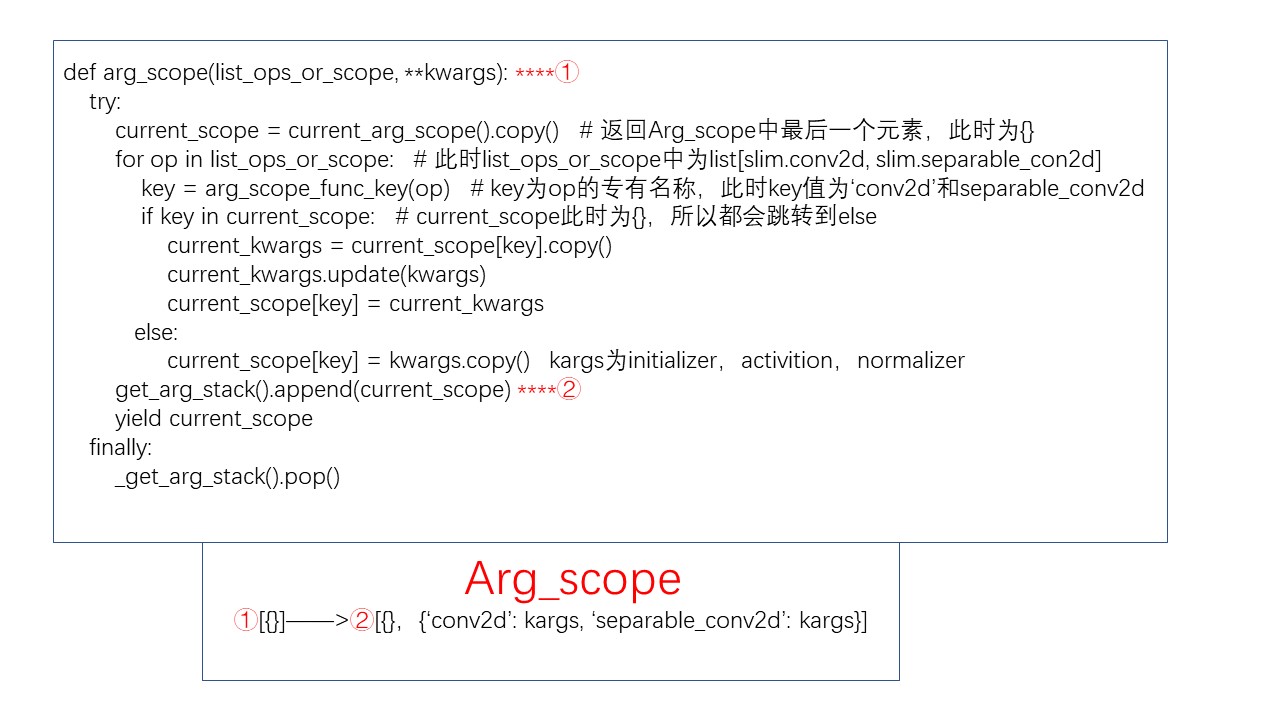
之后的层的处理就很类似,留给大家思考。
结语
回到我们开头提到的问题,不同层的参数是如何互相补充的?现在我们可以看到,参数存储在栈中,每叠加一层,就在原有参数基础上把新参数添加上去。
最后编辑于15:46:26 2018-07-24
tf.contrib.slim arg_scope的更多相关文章
- tf.contrib.slim模块简介
原文连接:https://blog.csdn.net/MOU_IT/article/details/82717745 1.简介 对于tensorflow.contrib这个库,tensorflow官方 ...
- tf.contrib.slim add_arg_scope
上一篇文章中我们介绍了arg_scope函数,它在每一层嵌套中update当前字典中参数形成新的字典,并入栈.那么这些参数是怎么作用到代码块中的函数的呢?比如说如下情况: with slim.arg_ ...
- tf.contrib.slim.data数据加载(1) reader
reader: 适用于原始数据数据形式的Tensorflow Reader 在库中parallel_reader.py是与reader相关的,它使用多个reader并行处理来提高速度,但文件中定义的类 ...
- tf.contrib.slim.data数据加载 综述
TF-Slim为了方便加载各种数据类型(如TFRocords或者文本文件)的数据,创建了这个库. Dataset 这里的数据库与通常意义下数据库是不同的,这里数据库是python一个类,它负责将原始数 ...
- tf.contrib.slim
https://blog.csdn.net/mao_xiao_feng/article/details/73409975
- 图融合之加载子图:Tensorflow.contrib.slim与tf.train.Saver之坑
import tensorflow as tf import tensorflow.contrib.slim as slim import rawpy import numpy as np impor ...
- slim.arg_scope()的使用
[https://blog.csdn.net/u013921430 转载] slim是一种轻量级的tensorflow库,可以使模型的构建,训练,测试都变得更加简单.在slim库中对很多常用的函数进行 ...
- 使用多块GPU进行训练 1.slim.arg_scope(对于同等类型使用相同操作) 2.tf.name_scope(定义名字的范围) 3.tf.get_variable_scope().reuse_variable(参数的复用) 4.tf.py_func(构造函数)
1. slim.arg_scope(函数, 传参) # 对于同类的函数操作,都传入相同的参数 from tensorflow.contrib import slim as slim import te ...
- 学习笔记TF044:TF.Contrib组件、统计分布、Layer、性能分析器tfprof
TF.Contrib,开源社区贡献,新功能,内外部测试,根据反馈意见改进性能,改善API友好度,API稳定后,移到TensorFlow核心模块.生产代码,以最新官方教程和API指南参考. 统计分布.T ...
随机推荐
- linux --xampp 配置多个网站
我们想要在本地安装两个测试域名,www.abc.tld, www.xyz.tld, 分别指向到 htdoc 目录下的 abc.tld 和 xyz.tld 文件夹下.tld 是顶级域名 the top ...
- 提高MYSQL大数据量查询的速度
1.对查询进行优化,应尽量避免全表扫描,首先应考虑在 where 及 order by 涉及的列上建立索引. 2.应尽量避免在 where 子句中对字段进行 null 值判断,否则将导致引擎放弃使用索 ...
- spring boot集成swagger,自定义注解,拦截器,xss过滤,异步调用,guava限流,定时任务案例, 发邮件
本文介绍spring boot集成swagger,自定义注解,拦截器,xss过滤,异步调用,定时任务案例 集成swagger--对于做前后端分离的项目,后端只需要提供接口访问,swagger提供了接口 ...
- Python爬虫从入门到进阶(3)之requests的使用
快速上手(官网地址:http://www.python-requests.org/en/master/user/quickstart/) 发送请求 首先导入Requests模块 import requ ...
- Web前端-网站首页和注册界面的实现
首页用到的知识如下: 1.bootstrap框架 2.jQuerry实现页面定时弹出广告 注册界面用到的知识: 1.bootstrap框架 2.jQuerry实现省市联动操作 3.jQuerry实现表 ...
- UiAutomator2.0 - 获取同行控件
目录 问题:UI测试时,在同一个界面出现相同的属性的控件(如图),对于这种控件的获取很是无奈.如果直接通过控件id去查找的话总是会返回界面该类型的第一个控件. 解决: 1.UiObject2 中已经给 ...
- Ajax 统一处理token失效
complete:function ajax 请求完成激活本事件.这个方法很方便完成ajax 异常的处理. $.ajaxSetup({ contentType:"application/x- ...
- 洛谷 P2678 & [NOIP2015提高组] 跳石头
题目链接 https://www.luogu.org/problemnew/show/P2678 题目背景 一年一度的“跳石头”比赛又要开始了! 题目描述 这项比赛将在一条笔直的河道中进行,河道中分布 ...
- CAS5.3.0安装部署
部署环境:JDK1.8.x maven-3.5.2 tomcat-8.x.x 1.下载地址 https://github.com/apereo/cas-overlay-template/tree/5. ...
- JsonIgnore注解不起作用的解决办法
一开始在属性上注解了JsonIgnore以为就不会序列化了,结果还是有这个属性,看来是没有起作用啊 [JsonIgnore] public List<int> SubjectAndSubS ...