
Eclipse安装springsource-tool-suite插件及spring helloworld入门实例
转载至:
https://www.cnblogs.com/aaron-shu/p/5156007.html
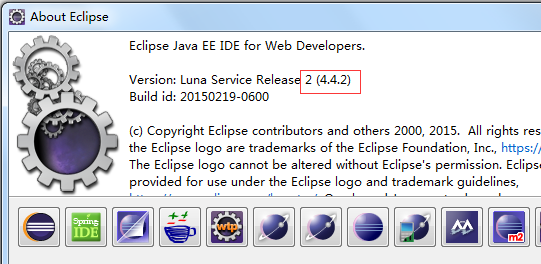
一、查看eclipse版本
Help-->About Eclipse,我的版本是4.4.2。
二、根据eclipse 版本,选择插件版本
访问网址:http://spring.io/tools/sts/all 查看eclipse对应的插件版本
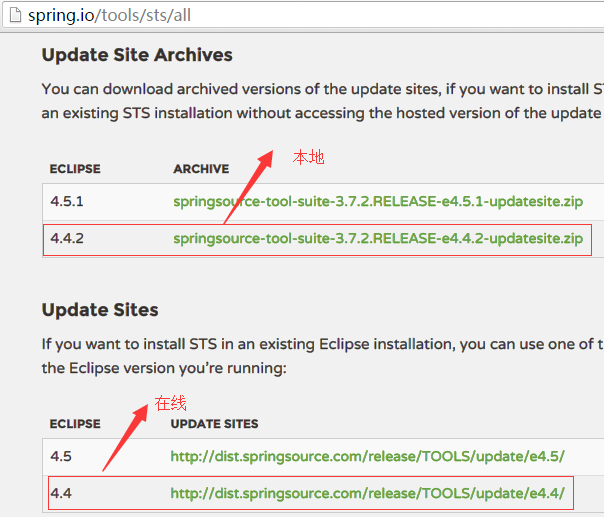
eclipsep安装spring插件有两种方式:在线安装和本地安装;
1、在线安装
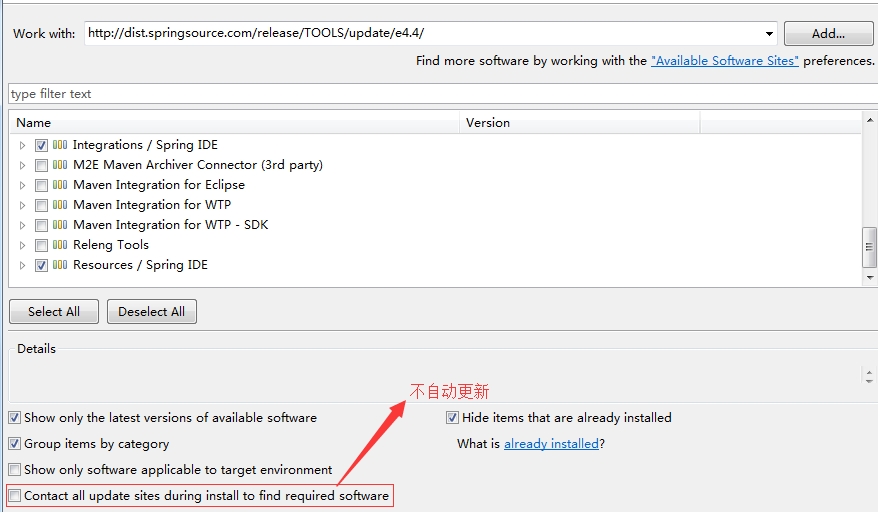
Help-->Install New Software-->work with 中输入http://dist.springsource.com/release/TOOLS/update/e4.4/ ,回车等待片刻,选中带spring IDE的四项,一直next直到完成,重启eclipse。
2、本地安装
Help-->Install New Software-->Add-->Local-->选择解压文件夹,剩下的和在线安装类似。
三、下载spring jar包
访问http://projects.spring.io/spring-framework/,可以看到最新的稳定版本为4.2.4
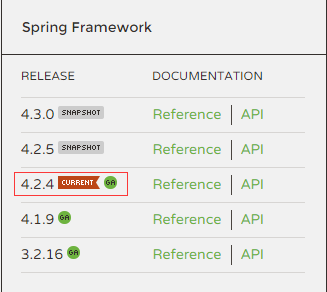
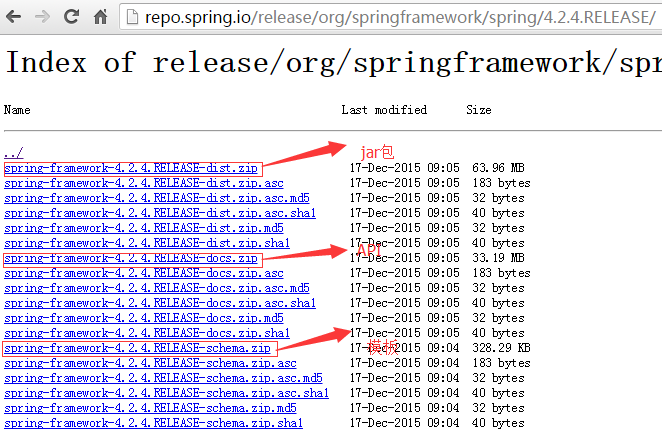
点击Reference-->点击Distribution Zip Files-->点击http://repo.spring.io/release/org/springframework/spring


选择最新的稳定版本4.2.4.RELEASE

打开页面,根据提示下载需要的文件
四、HelloWorld入门实例
1、新建java工程,命名HelloSpring;新建Folder 命名为lib,存放Spring基本的jar包和commons-logging包(可在Struts的lib中找到),并将这些包Add Build Path。项目结构图所下图所示:

2、HelloWorld.java代码

package com.ke361;

public class HelloWorld {

    private String message;

       public void setMessage(String message){

          this.message=message;

       }

       public void getMessage(){

          System.out.println("Your Message : " + message);

       }

}
3、新建spring配置文件
在src下新建spring配置文件,命名为applicationContext.xml。
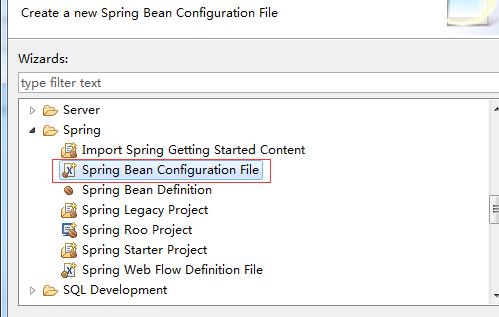
applicationContext.xml
<?xml version="1.0" encoding="UTF-8"?>

<beans xmlns="http://www.springframework.org/schema/beans"

    xmlns:xsi="http://www.w3.org/2001/XMLSchema-instance"

    xsi:schemaLocation="http://www.springframework.org/schema/beans http://www.springframework.org/schema/beans/spring-beans.xsd">

<bean id="helloWorld" class="com.ke361.HelloWorld">

       <property name="message" value="Hello World!"/>

</bean>

</beans>
4、MainApp.java代码
package com.ke361;

import org.springframework.context.ApplicationContext;

import org.springframework.context.support.ClassPathXmlApplicationContext;

public class MainApp {

    public static void main(String[] args) {

        // TODO Auto-generated method stub

        ApplicationContext context=new ClassPathXmlApplicationContext("applicationContext.xml");

          HelloWorld obj=(HelloWorld)context.getBean("helloWorld");

          obj.getMessage();

    }

}
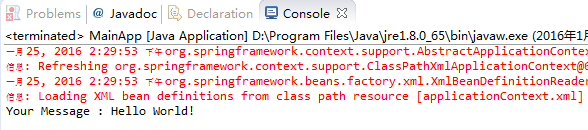
5、运行结果
Eclipse安装springsource-tool-suite插件及spring helloworld入门实例的更多相关文章
- eclipse4.6.1安装SpringSource Tool Suite(sts-eclipse)插件
1. Spring Tool Suite(sts)简介 Spring Tool Suite(sts)就是一个基于Eclipse的开发环境, 用于开发Spring应用程序.它提供了一个现成的使用环境来实 ...
- 用spring tool suite插件创建spring boot项目时报An internal error occurred during: "Building UI model". com/google/common/
本文为博主原创,未经允许不得转载 在用spring tool suite创建spring boot项目时,报一下异常: 查阅很多资料之后发现是因为装的spring tool suite的版本与ecli ...
- 图解Eclipse或者SpringSource Tool Suite 创建模块化Maven项目
第一步:Package Explorer里选择右键,新建Maven项目,如果没有在Other里找,还没有确认一下是否安装了Maven插件 第二步:在Wizards向导里可以通过搜索,找到Maven P ...
- eclipse 中安装spring tool suite 插件100%成功率
自己曾在学习spring时,在eclipse EE中安装springsourceTool Suite插件浪费了很多时间,不管是离线,在线还是在eclipse marketplace中安装,尝试了许多方 ...
- Eclipse Spring Tool Suite插件安装
目录 Eclipse Spring Tool Suite插件安装 Eclipse Spring Tool Suite插件安装 1.登录网址:http://spring.io/tools/sts/all ...
- 【Eclipse】Spring Tool Suite插件
Spring Tool Suite插件 最新下载地址:https://spring.io/tools3/sts/all 以前下载地址:https://spring.io/tools3/sts/lega ...
- myeclipse和eclipse安装Java反编译插件
为myeclipse和eclipse安装Java反编译插件 插件所需包 1.解压jad1.5.8g.zip.将jad.exe放到jre的bin目录下,下载地址: http://ishare.ia ...
- [原]Eclipse 安装SVN、Maven插件(补充)
参考雨之殇的文章:Eclipse 安装SVN.Maven插件 1.SVN可以按文章介绍的正常安装 2.Maven的Eclipse插件地址有变化 文章中的安装链接已经失效:m2e - http://m2 ...
- Eclipse 安装mybatis的编辑插件
1.MyEditor安装的方式 Eclipse 安装mybatis的编辑插件有以下4种方式,您可以使用下列方法之一来安装MyBatis的编辑器: Eclipse 3.7的(市场客户机安装):此图像拖放 ...
随机推荐
- python 离群点检测
import numpy as np import pandas as pd from sklearn.cluster import KMeans import matplotlib.pyplot a ...
- React事件绑定与解绑
React中事件分类 React中事件绑定分为两种: 1.直接添加在React元素上的事件,这是React在基于Virtual DOM的基础上实现的符合w3c规范的合成事件(SyntheticEven ...
- 网络知识--OSI七层网络与TCP/IP五层网络架构及二层/三层网络
作为一个合格的运维人员,一定要熟悉掌握OSI七层网络和TCP/IP五层网络结构知识. 废话不多说!下面就逐一展开对这两个网络架构知识的说明:一.OSI七层网络协议OSI是Open System Int ...
- iris:get json
package main import( "github.com/kataras/iris" "github.com/kataras/iris/middleware/lo ...
- 41.找出所有和为S的连续正数序列
小明很喜欢数学,有一天他在做数学作业时,要求计算出9~16的和, 他马上就写出了正确答案是100.但是他并不满足于此,他在想究竟有多少种连续的正数序列的和为100(至少包括两个数). 没多久,他就得到 ...
- Unity3D UGUI实现Toast
项目中有些信息需要以Toast的形式体现出来,不需要交互,弹出后一段时间后消失,多个Toast会向上重叠,下面是一个UGUI Toast的实现,动画部份用到了Dotween来实现 首先需要制作Toas ...
- libnids校验和引起回放包不能正常捕捉
如题 取消校验和校验即可: struct nids_chksum_ctl temp;temp.netaddr = 0;temp.mask = 0;temp.action = 1;nids_regist ...
- 前端浏览器自动刷新神器:Browsersync
[安装] 1 npm install -g browser-sync [静态项目使用browsersync] 自己可以去browsersync官网查看,其实使用很简单,总结下就是: 1 browser ...
- JVM垃圾收集器-Serial收集器
今天我给大家分享的是Serial收集器,垃圾收集器就是内存回收的具体实现.Java虚拟机规范中对垃圾收集器应该如何实现并没有任何规定,因此不同的厂商,不同的版本的虚拟机所提供的垃圾收集器都可能会有很大 ...
- ITextSharp构造PDF文件
1.1 生成Document Document是我们要生成的PDF文件所有元素的容器,因此要生成一个PDF文档,必须首先定义一个Document对象. Document有三种构造函数: publ ...