
LAB1 partV
partV


bash ./test-ii.sh 直接测试程序结果。
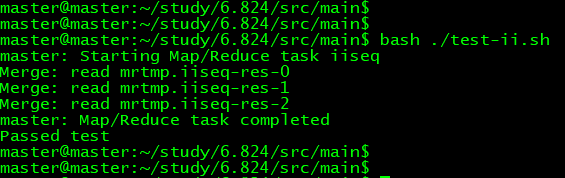
ii.go
package main

import (

    "os"

    "strings"

    "unicode"

    "strconv"

)

import "fmt"

import "mapreduce"

// The mapping function is called once for each piece of the input.

// In this framework, the key is the name of the file that is being processed,

// and the value is the file's contents. The return value should be a slice of

// key/value pairs, each represented by a mapreduce.KeyValue.

func mapF(document string, value string) (res []mapreduce.KeyValue) {

    // Your code here (Part V).

    f := func(c rune) bool {

        return !unicode.IsLetter(c)

    }

    rst := make([]mapreduce.KeyValue, )

    keys := strings.FieldsFunc(value, f)

    for _, key := range keys {

        kv := mapreduce.KeyValue{ Key: key, Value:document}

        rst = append(rst, kv)

    }

    return rst

}

// The reduce function is called once for each key generated by Map, with a

// list of that key's string value (merged across all inputs). The return value

// should be a single output value for that key.

func reduceF(key string, values []string) string {

    // Your code here (Part V).

    vm := make(map[string]string)

    var rst []string

    for _, value := range values {

        if _, ok := vm[value]; !ok {

            rst = append(rst, value)

            vm[value] = value

        }

    }

    vl := strings.Join(rst, ",")

    return strconv.Itoa(len(rst)) + " " + vl

}

// Can be run in 3 ways:

// 1) Sequential (e.g., go run wc.go master sequential x1.txt .. xN.txt)

// 2) Master (e.g., go run wc.go master localhost:7777 x1.txt .. xN.txt)

// 3) Worker (e.g., go run wc.go worker localhost:7777 localhost:7778 &)

func main() {

    if len(os.Args) <  {

        fmt.Printf("%s: see usage comments in file\n", os.Args[])

    } else if os.Args[] == "master" {

        var mr *mapreduce.Master

        if os.Args[] == "sequential" {

            mr = mapreduce.Sequential("iiseq", os.Args[:], , mapF, reduceF)

        } else {

            mr = mapreduce.Distributed("iiseq", os.Args[:], , os.Args[])

        }

        mr.Wait()

    } else {

        mapreduce.RunWorker(os.Args[], os.Args[], mapF, reduceF, , nil)

    }

}
上面LAB1 五部分一起测试。
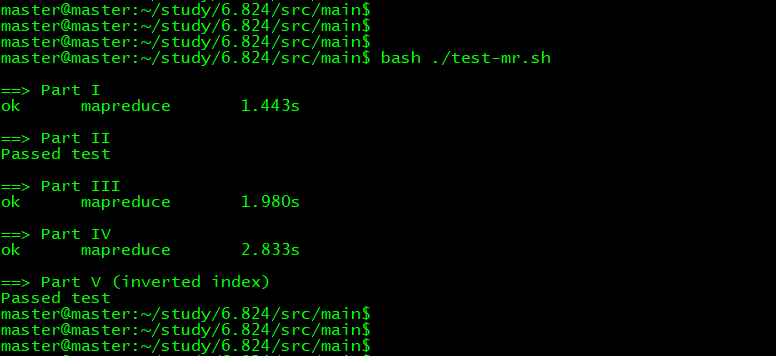
LABI 完成。
LAB1 partV的更多相关文章
- 6.828 lab1 bootload
MIT6.828 lab1地址:http://pdos.csail.mit.edu/6.828/2014/labs/lab1/ 第一个练习,主要是让我们熟悉汇编,嗯,没什么好说的. Part 1: P ...
- Machine Learning #Lab1# Linear Regression
Machine Learning Lab1 打算把Andrew Ng教授的#Machine Learning#相关的6个实验一一实现了贴出来- 预计时间长度战线会拉的比較长(毕竟JOS的7级浮屠还没搞 ...
- ucore lab1 bootloader学习笔记
---恢复内容开始--- 开机流程回忆 以Intel 80386为例,计算机加电后,CPU从物理地址0xFFFFFFF0(由初始化的CS:EIP确定,此时CS和IP的值分别是0xF000和0xFFF0 ...
- 6.824 LAB1 环境搭建
MIT 6.824 LAB1 环境搭建 vmware 虚拟机 linux ubuntu server 安装 go 官方安装步骤: 下载此压缩包并提取到 /usr/local 目录,在 /usr/l ...
- 软件测试:lab1.Junit and Eclemma
软件测试:lab1.Junit and Eclemma Task: Install Junit(4.12), Hamcrest(1.3) with Eclipse Install Eclemma wi ...
- MIT 6.824 lab1:mapreduce
这是 MIT 6.824 课程 lab1 的学习总结,记录我在学习过程中的收获和踩的坑. 我的实验环境是 windows 10,所以对lab的code 做了一些环境上的修改,如果你仅仅对code 感兴 ...
- 清华大学OS操作系统实验lab1练习知识点汇总
lab1知识点汇总 还是有很多问题,但是我觉得我需要在查看更多资料后回来再理解,学这个也学了一周了,看了大量的资料...还是它们自己的80386手册和lab的指导手册觉得最准确,现在我就把这部分知识做 ...
- JOS lab1 part2 分析
lab1的Exercise 2就是让我们熟悉gdb的si操作,并知道BIOS的几条指令在做什么就够了,所以我们也会尽可能的去分析每一行代码. 首先进入到6.8282/lab这个目录下,输入指令make ...
- MIT 操作系统实验 MIT JOS lab1
JOS lab1 首先向MIT还有K&R致敬! 没有非常好的开源环境我不可能拿到这么好的东西. 向每个与我一起交流讨论的programmer致谢!没有道友一起死磕.我也可能会中途放弃. 跟丫死 ...
随机推荐
- arch xfce快捷键
<Alt>F1:xfce4-popup-applicationsmenu 打开右键菜单 <Alt>F2:xfrun4 打开应用程序运行窗口,同<Alt>F3差不多 ...
- 【linux基础】linux不能进入系统
博主遇到的这个问题其实主要原因是系统内核和NVIDIA的GPU版本不匹配. 主要是系统内核自动更新,而GPU驱动没有对应的更新造成的. 又要涉及NVIDIA驱动的安装,这个安装真的很鸡肋... 需要注 ...
- Dart 创建Map
Map的常用操作 1. [] , length 获取值和长度 2. isEmpty (),isNoEmpty () 是否为空 3.Keys ,values 获取所有的键 和值 4. contai ...
- app内嵌vue h5,安卓和ios拦截H5点击事件
安卓和ios拦截h5点击事件,这个函数事件必须是暴漏在window下的 安卓和ios拦截普通h5函数: <div onclick = "show(),window.android.sh ...
- (转)用JS获取地址栏参数的方法(超级简单)
转自http://www.cnblogs.com/fishtreeyu/archive/2011/02/27/1966178.html 用JS获取地址栏参数的方法(超级简单) 方法一:采用正则表达式获 ...
- C#服务端Web Api
本教程已经录制视频,欢迎大家观看我在CSDN学院录制的课程:http://edu.csdn.net/lecturer/944
- JQ方法实用案例///鼠标移动到div和修改ipt中弹窗、CSS鼠标变小手、JQ获取元素属性、JQ选择器
今天学习了jQ,jQ对js的帮助很大,菜鸟教程上也有属性.可以查看 js 和 jquery主要的区别 在 dom 想用jquery 必须先引入(顺序问题) 先css 再js: ...
- 自己用的vim插件
一.Plugin 'VundleVim/Vundle.vim'. 二.Plugin 'Valloric/YouCompleteMe' let g:ycm_server_python_interpret ...
- 枪弹辩驳(弹丸论破)即将登陆PC
Spike Chunsoft在PSP上的经典推理游戏: 枪弹辩驳1(Danganronpa: Trigger Happy Havoc)即将登陆PC, PC党有福了. 不过我在PSVita上已经玩完了两 ...
- Oracle创建用户角色
正在维护一个CS结构的应用,每次创建应用的用户时都需要创建对应的数据库schema,并且需要赋予其相应的对象权限和角色.操作很不方便,所以专门创建了一个角色,过程如下: 1.创建角色 SQL> ...